Blink: typing “- - blah <space>” erases last “h”
 lyosha
All 26 comments
In mosh, that is.
lyosha
on 21 Feb 2019
Hi @lyosha,
I can't reproduce. What shell do you have on the server? Bash, zsh or fish?
 yury
on 22 Feb 2019
yury
on 22 Feb 2019
This is:
GNU bash, version 4.4.19(1)-release (x86_64-pc-linux-gnu)
on Ubuntu 18.04.2 LTS. TERM is set to xterm-256color.
If I run vim and enter in insert mode - - blah
--blah ^?
Turns out it’s not specific to mosh, I see the same issue in ssh.
I am using PT Mono font I installed locally, though I think it reproduces with other fonts as well.
lyosha
on 22 Feb 2019
Uh, that was <minus> <minus> blah <ctrl-v> <space>
lyosha
on 23 Feb 2019
It works fine with on-screen keyboard; reproduces with the external keyboard.
I wonder if it’s related to smart dashes or something like that.
lyosha
on 26 Feb 2019
Oh, it could be, however we do remove all "smart" things in the code. Let me check
yury
on 26 Feb 2019
Nope, didn't worked for me. What KB do you have?
yury
on 26 Feb 2019
Sorry for the delay. Still experiencing this. Using Apple’s “smart keyboard folio”.
lyosha
on 5 Jun 2019
Hi
I have noticed this happen too.
- Login to a remote linux computer via mosh from blink.
- run a command such as:
nim —version
- run a command such as:
- when return is press the ‘n’ of ‘version’ get deleted before the command is run
Recalling the command with up arrow, then adding the missing ‘n’ back to the previous command and pressing return—then runs it correctly. So - bit odd!
Appears to happen a lot with —version option to commands... I am using an iPad Pro 12.9” with iOS 12.4 (3rd gen iPad Pro version) with the Apple folio keyboard. Shell is bash v 5.0.3(1).
Simon
 wiremoons
on 25 Jul 2019
wiremoons
on 25 Jul 2019
Hi @wiremoons and @lyosha.
I still can't reproduce this issue. Can you post screenshots of
- Settings.app -> General -> Keyboard
- Settings.app -> General -> Keyboard -> Hardware Keyboard
- Blink.app -> config -> Keyboard.
So I will try with your settings.
Thank you
yury
on 25 Jul 2019
Hi Yury
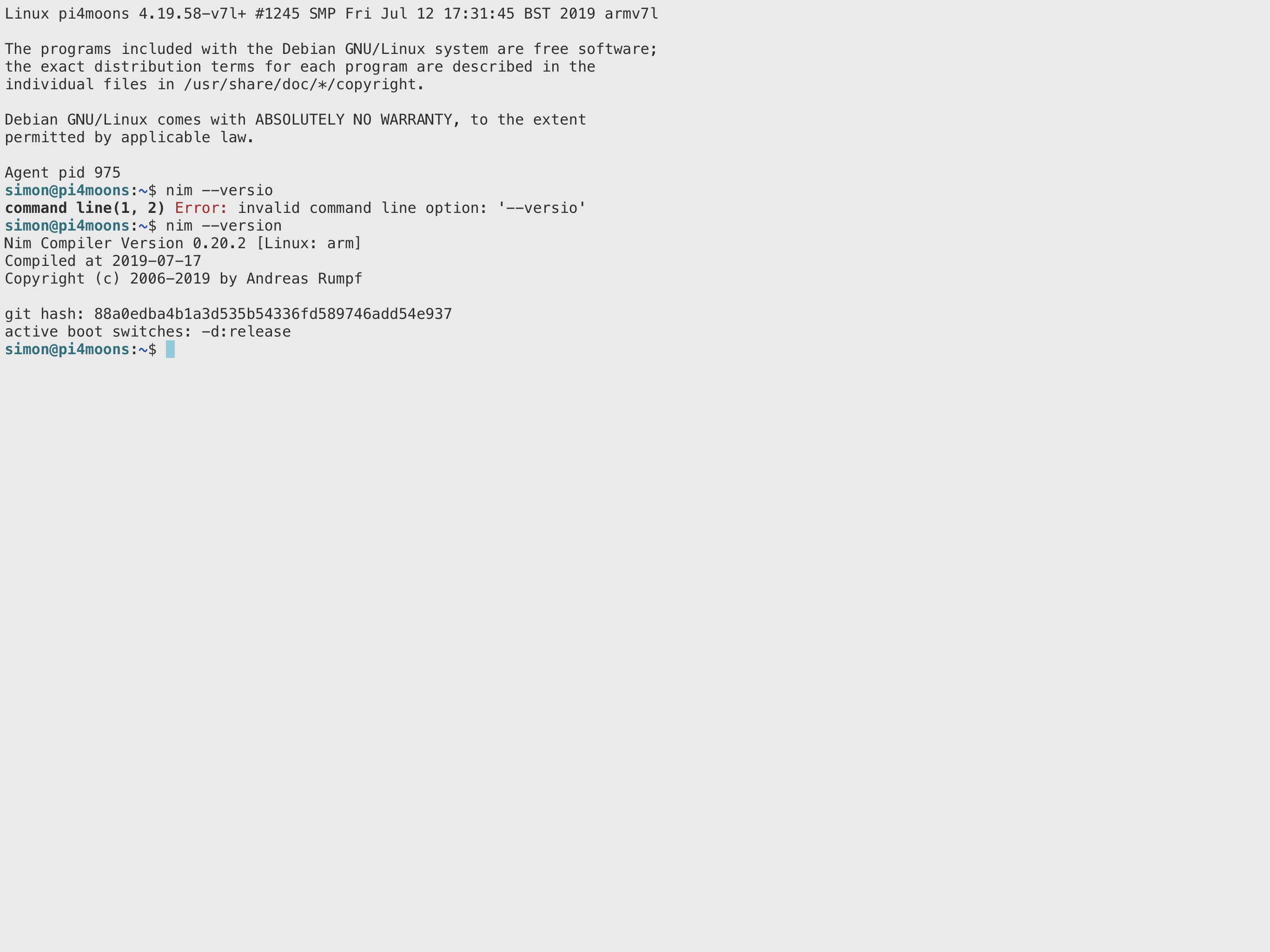
Images you requested are attached. Let me know if you need anything further.
Cheers
Simon
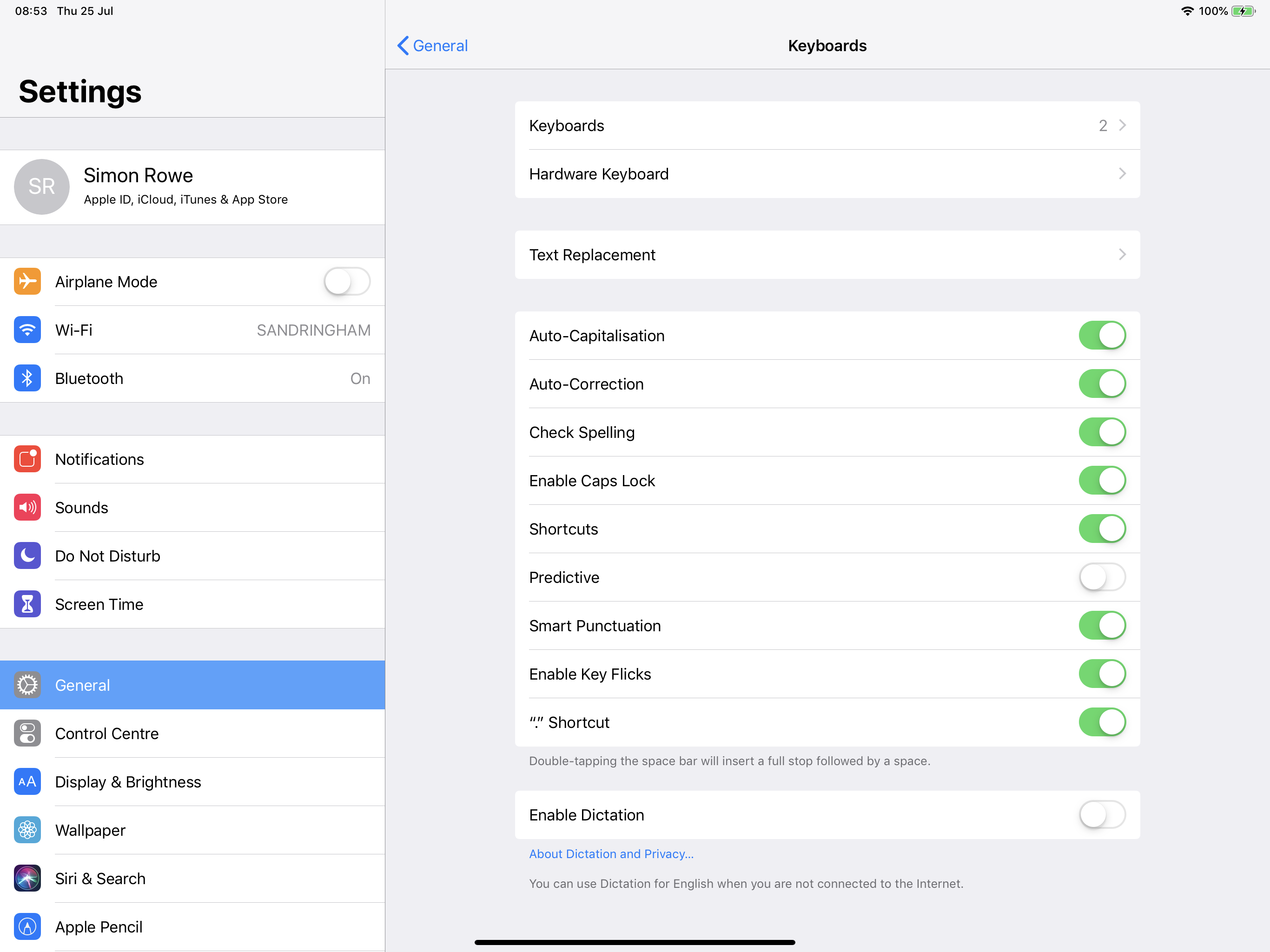
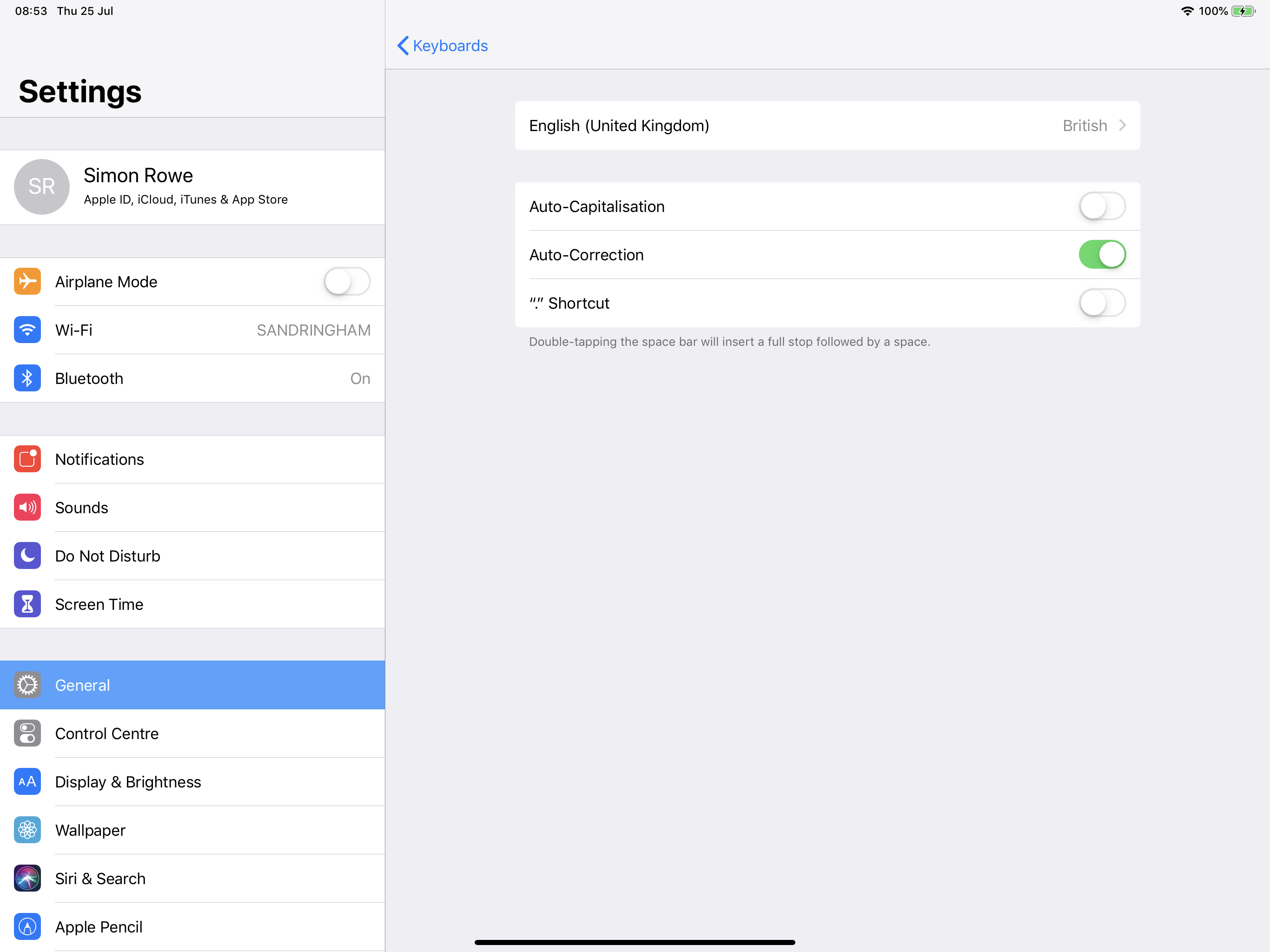
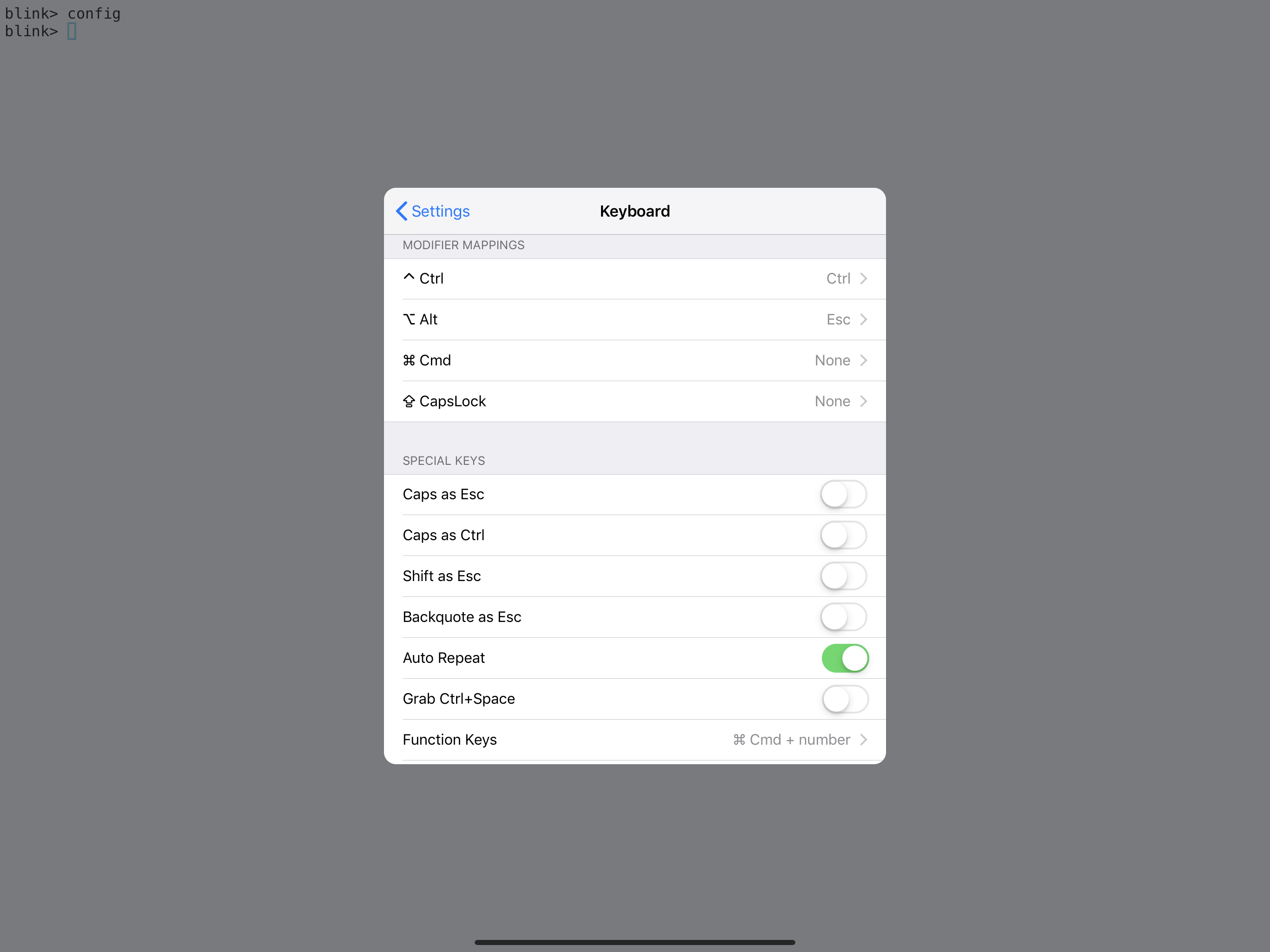
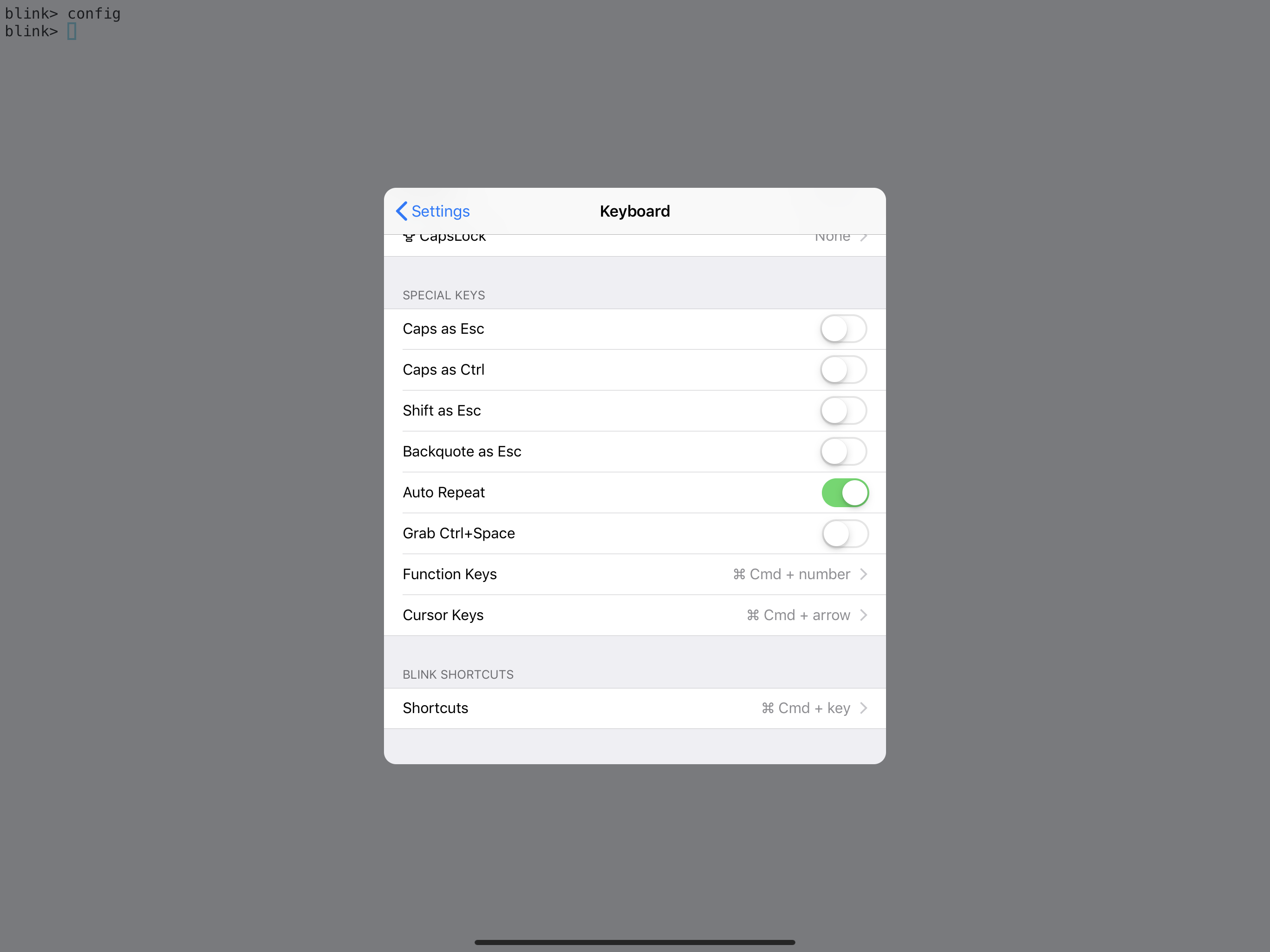
wiremoons
on 25 Jul 2019
Hi Yury
I have just removed the Apple iPad Pro folio keyboard, and instead connected an Apple Magic Keyboard via Bluetooth. It still has the same issue—so whatever the cause is not specific to the iPad Pro folio keyboard I suspect.
Just thought I would let you know.
Simon
wiremoons
on 25 Jul 2019
Hi Yury
Sorry for all the messages - just trying to help figure this out.
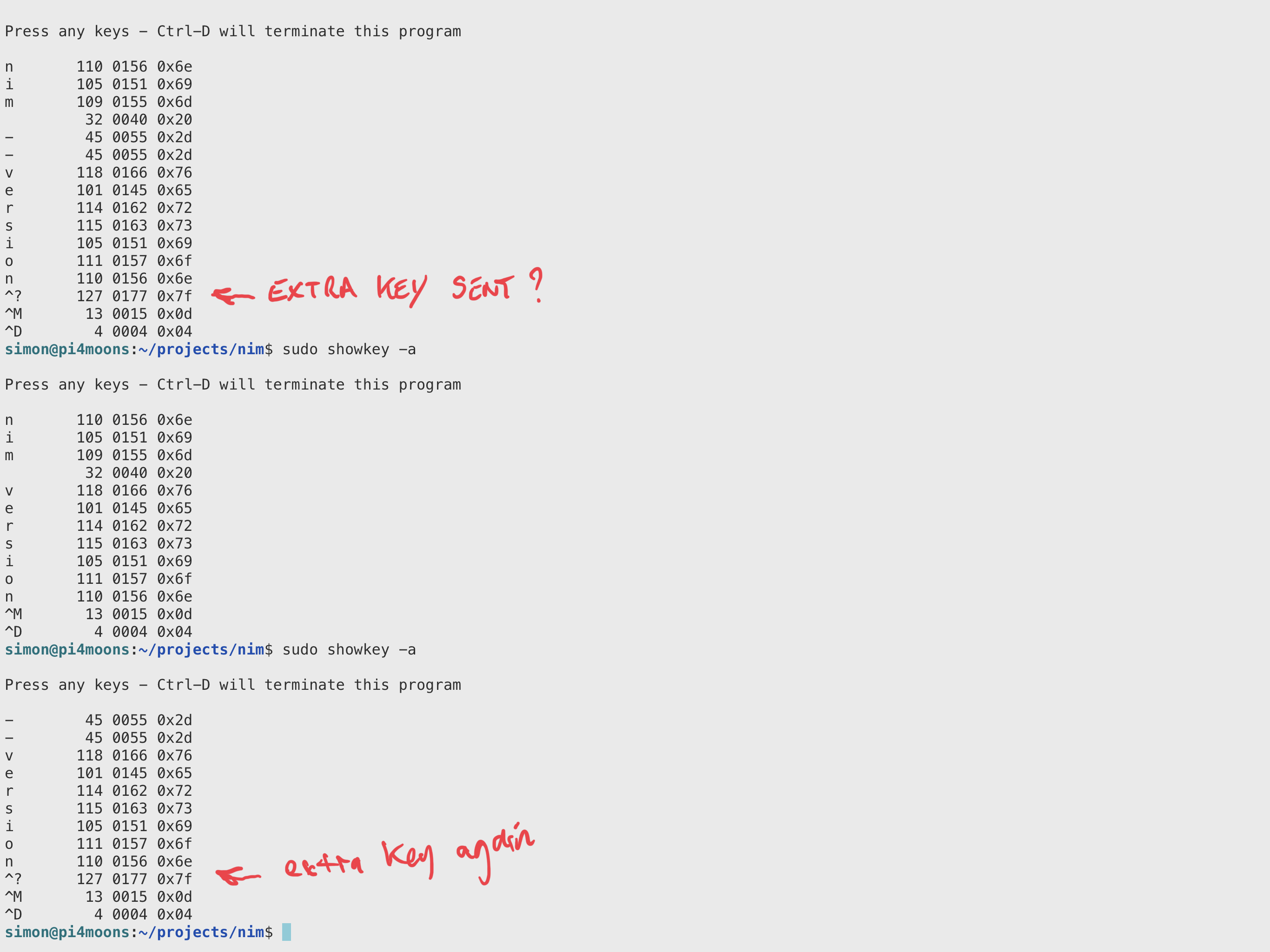
I have run the same command that drops the ‘n’ (ie nim —version) by typing the command in Blink while running sudo showkey -a. The is an extra key being sent ^? before the carriage return I think? It is not there if I type other text in and press return—so is this being generated by Blink somehow? Screen shot below of different outputs to show what I am seeing.
Simon
wiremoons
on 25 Jul 2019
same thing with showkey command in blink?
yury
on 25 Jul 2019
Still can't reproduce with your settings :(
yury
on 25 Jul 2019
The screen shot above showing the showkey outputs was done from within Blink.
wiremoons
on 25 Jul 2019
Hmm, I see you run showkey on linux box. But blink have its own showkey command
yury
on 25 Jul 2019
Ok - didn’t realise was in Blink too :)
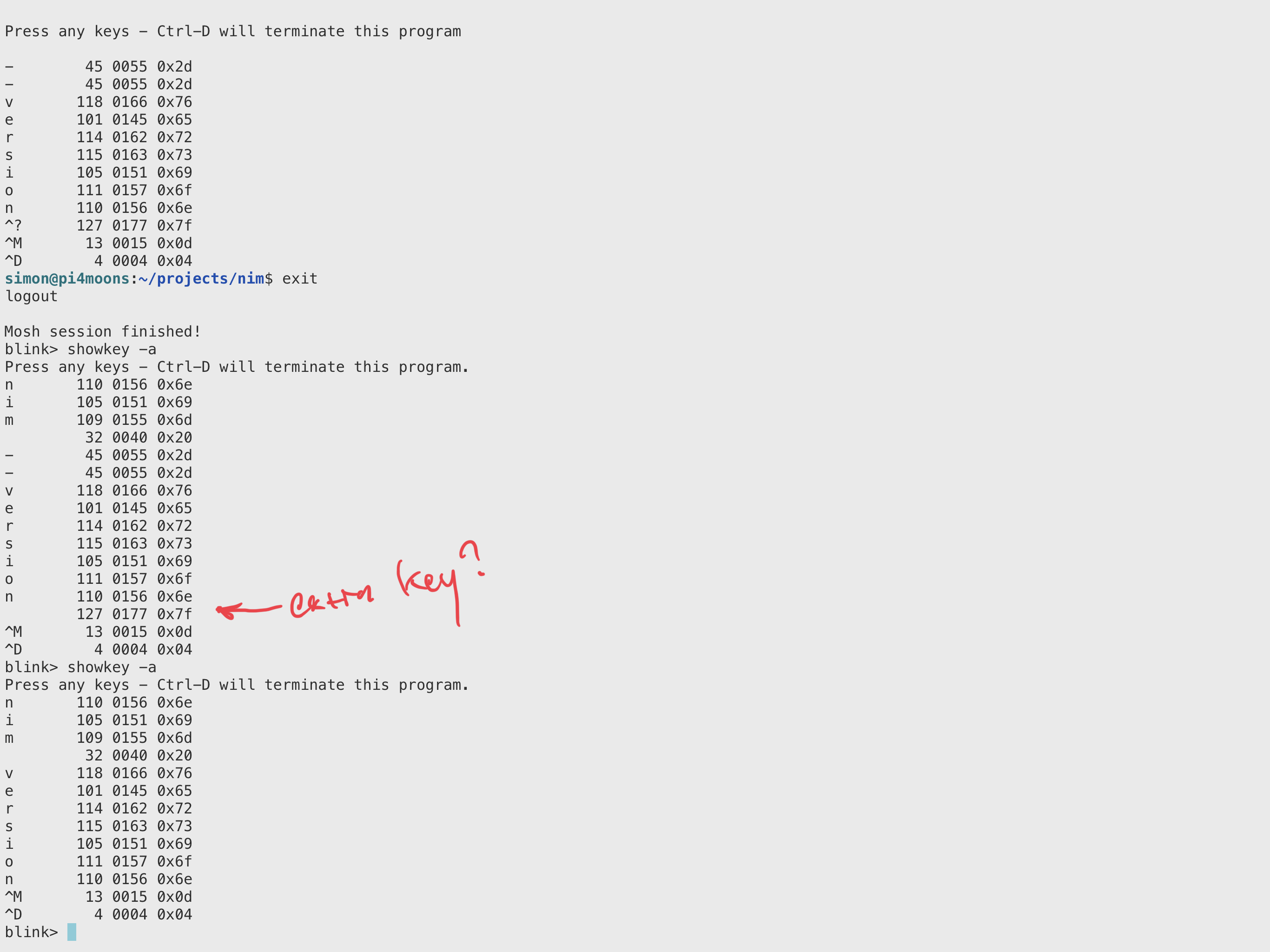
Run in Blink now too - shows extra key there as well. Appears to be to to do with — do you think?
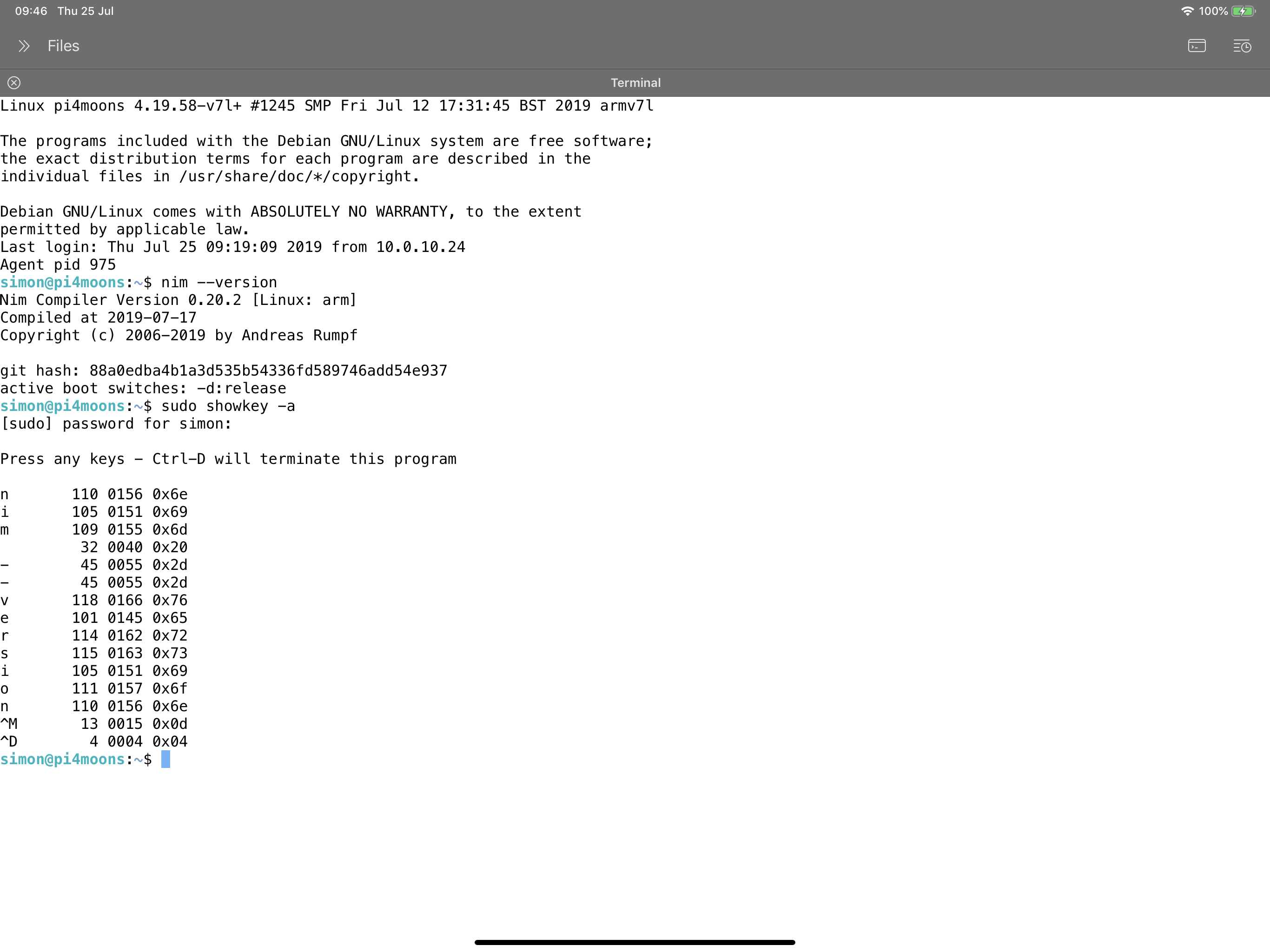
Also (second screenshot below) is captured showkey via SSH from within TextTastic app, which doesn’t include the extra key in the output... so guessing Blink is adding it for some reason?
wiremoons
on 25 Jul 2019
I'm trying on
- 12.9 second gen and iOS 12.4
- 11 iOS 13
still no luck...
May be you have smth under Settings.app -> General -> Text Replacement?
yury
on 25 Jul 2019
Also, can you try to turn off 'Auto Repeat' in Blink.app -> config -> Keyboard
yury
on 25 Jul 2019
Hi Yury
I have found the cause, at least in my case!
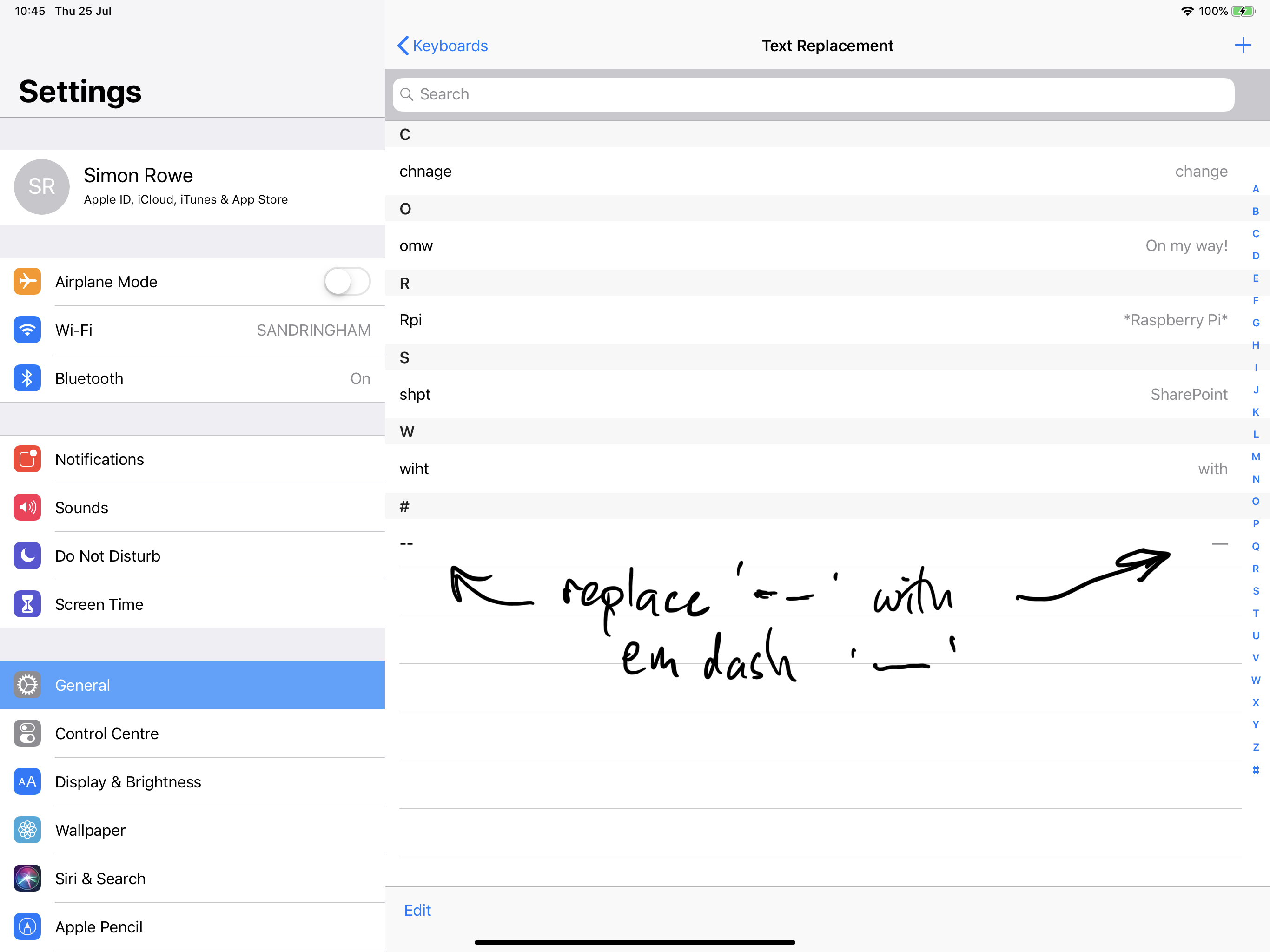
Under iOS Settings -> General -> Keyboard -> Text Replacement I had a text replacement setup (years ago I think) to replace two dashes ‘- -‘ with an em dash ‘—‘ which I use for writing in iOS text apps. See screenshot below for info.
I have removed this Text Replacement command and now the ‘n’ no longer gets chopped of the end off the command (as posted examples) in Blink! I guess that extra key being seen was iOS trying to replace the text because of the two dashes typed, as I expect it does the replacement at the end of the word or a carriage return.
Anyway - I have removed the Text Replacement and works as expect now, so at least you dont have some weird keyboard bug to find :) Not sure if @lyosha can confirm if that is the cause there too?
I am also not sure if this is desired behaviour for Blink to pass these Text Replacements into the Blink sessions? Your choice I guess as it might be seen as a feature in some way to other people..?
Thanks for your help @yury in looking into this anyway, I do appreciate your support and the fantastic Blink applications too :)
Simon
wiremoons
on 25 Jul 2019
For text replacements in blink. We have to support them for some soft keyboards with autocorrection.
But I'm super glad that you find the root of that.
yury
on 25 Jul 2019
Excellent find! Removing dash-dash to emdash replacement fixed blink for me.
I wonder if blink could add a setting to ignore text replacements.
lyosha
on 25 Jul 2019
I think this can be closed. Though if somebody has this issue again, how would they find the solution?
lyosha
on 15 Aug 2019
I'm closing this issue.
- Closed issues are searchable too.
- I will help to solve that issue for any new person :)
yury
on 15 Aug 2019
Thank you!
yury
on 15 Aug 2019
Related issues
 dlasky
·
4Comments
dlasky
·
4Comments
 jasondinh
·
3Comments
jasondinh
·
3Comments
 webdog
·
4Comments
webdog
·
4Comments
 carloscabanero
·
4Comments
carloscabanero
·
4Comments
 s8m2s
·
5Comments
s8m2s
·
5Comments
Most helpful comment
Hi Yury
I have found the cause, at least in my case!
Under
iOS Settings -> General -> Keyboard -> Text ReplacementI had a text replacement setup (years ago I think) to replace two dashes ‘- -‘ with an em dash ‘—‘ which I use for writing in iOS text apps. See screenshot below for info.I have removed this Text Replacement command and now the ‘n’ no longer gets chopped of the end off the command (as posted examples) in Blink! I guess that extra key being seen was iOS trying to replace the text because of the two dashes typed, as I expect it does the replacement at the end of the word or a carriage return.
Anyway - I have removed the Text Replacement and works as expect now, so at least you dont have some weird keyboard bug to find :) Not sure if @lyosha can confirm if that is the cause there too?
I am also not sure if this is desired behaviour for Blink to pass these Text Replacements into the Blink sessions? Your choice I guess as it might be seen as a feature in some way to other people..?
Thanks for your help @yury in looking into this anyway, I do appreciate your support and the fantastic Blink applications too :)
Simon