Blink: C-+ like key sequeces does not work
I’m using IPad Pro with external keyboard. When playing with emacs I found “Ctrl-+” key sequence only send “+”. Does anyone have a solution for this?
Thanks!
 naughtyclive
All 8 comments
@naughtyclive Do you literally mean ⌃ + — that is, hold down Ctrl and press plus (probably Shift and =)? Or do you mean Ctrl plus anything?
Because if it's the former, Blink _can't_ work any differently—nor can any other mosh or SSH client. The ASCII table splits its 256 characters into four sections based on the first (octal) digit:

Here,
- 00–1F are the control characters
- 20–3F are the printables
- 40–5F are the uppercase letters
- 60–7F are the lowercase letters
Note that there are only 32 control characters in the left two columns of the diagram. That means that Ctrl-⌃M takes M (0x4D) and strips the top two bits, resulting in 0x0D — carriage-return. In other words, any control code in the first two columns of the diagram can be produced with Ctrl and the key four columns to the right.
In the case of the Return key, Escape, Delete, and Tab, they send control characters with a single key, but it's the same control character. You can try this—you can use ⌃M and it will be interpreted as Return, or ⌃ [ and get the same effect as Escape.
But see that +, at 0x2B, is in the third column, so it is meaningless with the control key. On some systems, it would be equivalent to ⌃K because +, K and k are 0x2B, 0x4B and 0x6B, so ⌃+ would send a VT control code—but these days that's uncommon, and most systems only accept the keys in 0x40–0x5NF for generating control characters. (Except for one case—Ctrl-space, because it became commonly-used on older systems since ⌃@ required an awkward three-key combo to type. But if you're in a Unix terminal environment where control keys are being echoed, like cat > /dev/null, if you press Ctrl-space, it will print back ^@.
Since Blink is a terminal emulator, and Mosh is a remote terminal system, it can only deal with terminal inputs, and Ctrl-plus is not a valid terminal input.
Programs running locally on a Mac, PC or iPad can detect these "invalid" control characters because they accept input differently—instead of getting a stream of ASCII characters, they get "keyboard events" that not only allow for Ctrl-plus, but any chord of keys (like shift-alt-B-tab).
So what about the arrow keys, function keys, etc.? How can Blink send those? Well, those aren't actually control keys—they have complex "ANSI escape codes" that actually generate three to five "keys" each time you press them. Again, if you go into cat > /dev/null where you can see the actual characters, you'll find that the arrow keys are ^[[A, ^[[B, and so on.
It would be nice if the folks at DEC and ANSI had created ANSI codes to fill in the rest of the control-key population; there's no real reason they couldn't have. But they didn't. So, unfortunately, a unique Ctrl-plus is not a character that can ever be received by a terminal.
 treyharris
on 21 Dec 2018
treyharris
on 21 Dec 2018
@treyharris Thanks for your comprehensive explanation. According to
The ASCII table splits its 256 characters into four sections based on the first (octal) digit: ...
we can not send some key sequences like C-+, C--. But xterm-keys shows we can have those key sequences using
Well, those aren't actually control keys—they have complex "ANSI escape codes" that actually generate three to five "keys" each time you press them. Again, if you go into cat > /dev/null where you can see the actual characters, you'll find that the arrow keys are ^[[A, ^[[B, and so on.
It would be great if Blink supports these feathers as iTerm2 does.
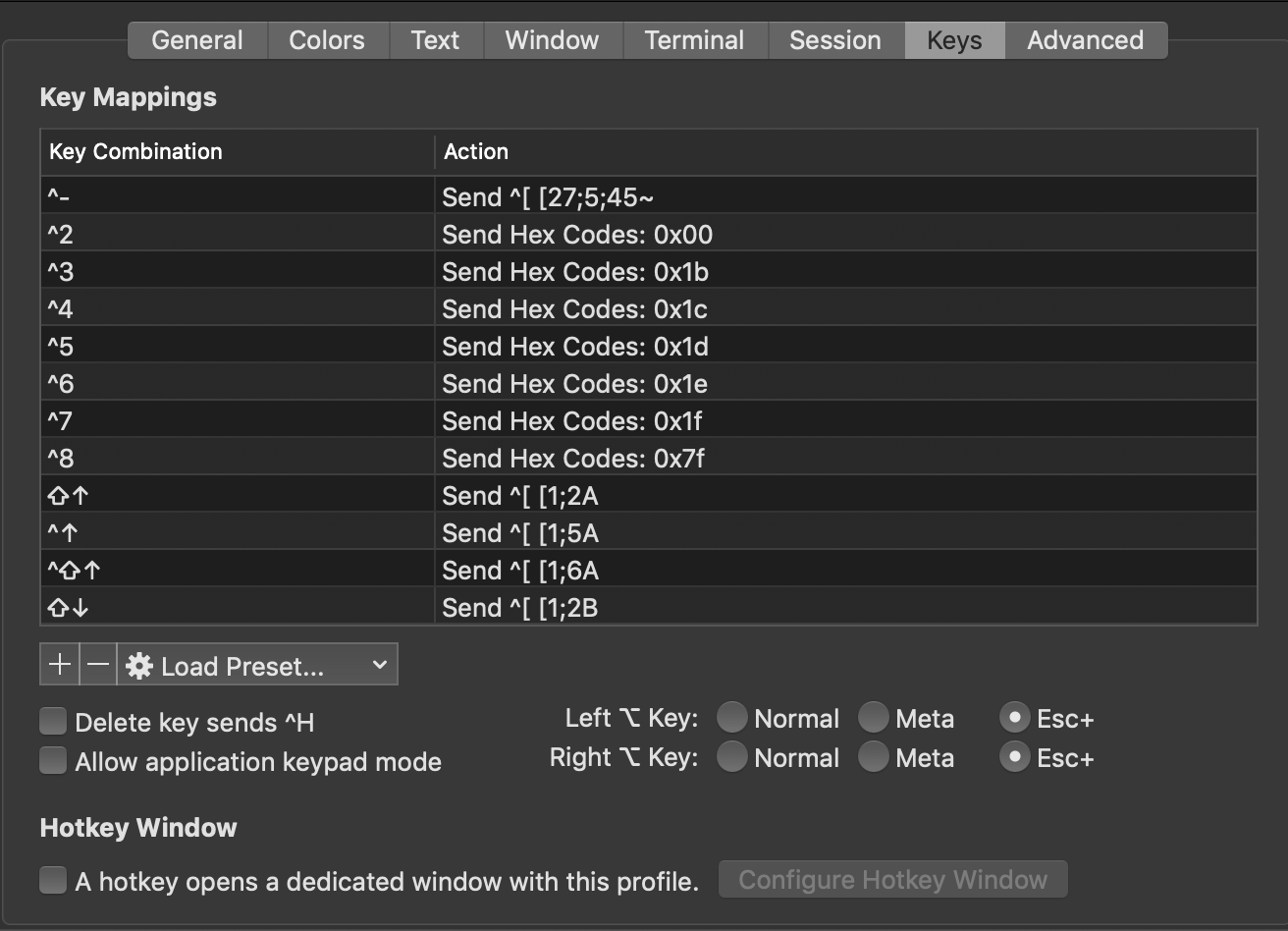
I have not investigated this technique thoroughly, but I am sure I can use C-- in iTerm2 which the remote is emacs26.1 running on Linux server. Duplicate of #682
 luluman
on 9 Mar 2019
luluman
on 9 Mar 2019
@luluman I don't understand how the syntax being shown by that screenshot can result in the behavior you describe...
Like, ^2 (which I assume is Control-2) sends 0x00? But 0x00 is NUL, which you already get with Ctrl-space or Ctrl-@ (which makes a certain amount of sense—it just means that Ctrl-2 or shift-Ctrl-2 both do the same thing). Is that what it does?
But if, as you wrote, it _does_ differentiate Ctrl-2 from Ctrl-@ somehow, I'd be curious to know what it's doing— it _can't_ be doing what the screenshot seems to show. So it would be veryuseful if you could do the following:
- Use iTerm2 to connect via SSH to the remote machine.
- On the remote machine, run
catwith no arguments and press return. - Type Ctrl-Space, Ctrl-@, and Ctrl-2 in sequence. They should each produce a printable code. Are they the same, or different?
- Try the same with Ctrl-3, 5, 6, 7, and 8 comparing them with (respectively) Escape, Ctrl-], Ctrl-^, Ctrl-_ (underscore), and Backspace. (This is what you get from these keys in Blink today).
_Note:_ Don't try Ctrl-4 until you've tried the rest—on Blink and as described in the screenshot, that maps the same as Ctrl-\, which sends aSIGQUIT. - Assuming they are different from what you get when you try those same keys in Blink, paste a screenshot of the iTerm2 window containing the
catsession so we can see what codes are actually being sent to let it discriminate in this mysterious way.
You can exit the cat (assuming the Ctrl-4 didn't already exit it) by pressing Ctrl-C or return to start a new line and then Ctrl-D.
I'm very curious to see the results you get.
treyharris
on 25 Mar 2019
@luluman Oops, I just saw you're not the one who opened this issue, so I'm tagging you for notification.
treyharris
on 25 Mar 2019
@treyharris The picture showed above is not right as you said.
It would be great if Blink supports these feathers as iTerm2 does.
I don't understand how the syntax being shown by that screenshot can result in the behavior you describe...
The commands showed in the picture which in the format of ^num (^2 ^3 ...) does not work, this is my fault, but the rest of the commands showed above should work.
After doing more search and dig this problem in-depth, I figure out that:
- "xterm" support most of the key sequences, such as
^1,^-,^+and so on. - "xterm" using a sequence of char leading by
^[to represent complex key combination. This page lists some key sequence used most. - Emacs support this feature too. There is a "xterm.el" file contains the definition of most keystrokes.
- If we want complex keystrokes function, "blinksh" could send the sequence defined by Emacs (I just use emacs and don't know whether it works on vim).
I hope "blinksh" could offer user define key mappings like "iTerm2". Thus we could use any key combination as we like. I'm not professional about this topic. If I'm wrong at some point, please tell me.
luluman
on 28 Mar 2019
@treyharris @yury Hey, I am looking forward to your reply. Thanks.
luluman
on 11 Apr 2019
@luluman I'd answer this very simply by turning the question around:
- If you're getting correct behavior from iTerm2 without making changes to system configuration on either end of your Mac's SSH connection _and_ it's behavior that's supported by Mosh too, then Blink can (and probably should, though some of these may be a stretch) implement them as well
- Otherwise, it's a more unusual feature of Xterm (probably that required messing with the old Xdefaults system) that iTerm2 happens to emulate, and so is more arguable.
You showed a screenshot, and sort of asserted it was working, but I want to be 100% sure on this.
I already use xterm.el with success for certain behavior.
All that said, this is partially an hterm issue; the Blink devs have been pretty clear that they don't want to maintain an ongoing fork of hterm. So any key handling that hterm doesn't support isn't really possible for Blink, either.
treyharris
on 25 Jun 2019
Duplicate of #1015
luluman
on 23 May 2020
Related issues
 jasondinh
·
3Comments
jasondinh
·
3Comments
 nriley
·
3Comments
nriley
·
3Comments
 jra
·
5Comments
jra
·
5Comments
 peppy
·
4Comments
peppy
·
4Comments
 basepi
·
5Comments
basepi
·
5Comments
Most helpful comment
@naughtyclive Do you literally mean
⌃ +— that is, hold down Ctrl and press plus (probably Shift and=)? Or do you mean Ctrl plus anything?Because if it's the former, Blink _can't_ work any differently—nor can any other mosh or SSH client. The ASCII table splits its 256 characters into four sections based on the first (octal) digit:
Here,
Note that there are only 32 control characters in the left two columns of the diagram. That means that Ctrl- can only work uniquely for 32 keys. Those happen to be the ones in columns 4–5 (unshifted). So, for instance,
⌃MtakesM(0x4D) and strips the top two bits, resulting in 0x0D — carriage-return. In other words, any control code in the first two columns of the diagram can be produced with Ctrl and the key four columns to the right.In the case of the Return key, Escape, Delete, and Tab, they send control characters with a single key, but it's the same control character. You can try this—you can use
⌃Mand it will be interpreted as Return, or⌃ [and get the same effect as Escape.But see that
+, at 0x2B, is in the third column, so it is meaningless with the control key. On some systems, it would be equivalent to⌃Kbecause+,Kandkare 0x2B, 0x4B and 0x6B, so⌃+would send aVTcontrol code—but these days that's uncommon, and most systems only accept the keys in 0x40–0x5NF for generating control characters. (Except for one case—Ctrl-space, because it became commonly-used on older systems since⌃@required an awkward three-key combo to type. But if you're in a Unix terminal environment where control keys are being echoed, likecat > /dev/null, if you press Ctrl-space, it will print back^@.Since Blink is a terminal emulator, and Mosh is a remote terminal system, it can only deal with terminal inputs, and Ctrl-plus is not a valid terminal input.
Programs running locally on a Mac, PC or iPad can detect these "invalid" control characters because they accept input differently—instead of getting a stream of ASCII characters, they get "keyboard events" that not only allow for Ctrl-plus, but any chord of keys (like shift-alt-B-tab).
So what about the arrow keys, function keys, etc.? How can Blink send those? Well, those aren't actually control keys—they have complex "ANSI escape codes" that actually generate three to five "keys" each time you press them. Again, if you go into
cat > /dev/nullwhere you can see the actual characters, you'll find that the arrow keys are^[[A,^[[B, and so on.It would be nice if the folks at DEC and ANSI had created ANSI codes to fill in the rest of the control-key population; there's no real reason they couldn't have. But they didn't. So, unfortunately, a unique Ctrl-plus is not a character that can ever be received by a terminal.