Blink: Allowing to map „^" as ESC (Germany keyboard layout)
It would be really nice if we could also use the „^"-key as an ESC key. This key is on the same position on the german keyboard as the backquote key for the English keyboard layout.

I‘m reposting this as an issue because I don’t know if this is getting attention in the closed PR.
_Originally posted by @rverton in https://github.com/blinksh/blink/pull/619#issuecomment-443507442_
 rverton
All 10 comments
this would be greatly appreciated. 👍🏻
 vorband
on 8 Dec 2018
vorband
on 8 Dec 2018
And similarly on the UK 2018 version the top-left key is this:
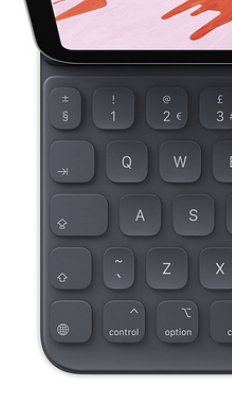
It would be great if that could be Escape! 😄
 j4mie
on 19 Dec 2018
j4mie
on 19 Dec 2018
maybe it would make sense to have a custom config option which allows the user to enter a certain character which is then mapped to esc?
I guess apple has several keyboard layouts floating around...
vorband
on 20 Dec 2018
Ref #694 here too
 yury
on 6 Mar 2019
yury
on 6 Mar 2019
@j4mie Actually I think the UK layout is the same as the Czech one I posted in #694. Not that it's bad (actually it's good for me, since I'm probably the only person with a Czech layout who cares about this hehe), just pointing it out since I found it interesting :)
 darthdeus
on 14 Mar 2019
darthdeus
on 14 Mar 2019
@yury: any chance of implementing this? Using caps lock as esc has some quirks, as it sets the caps lock status globally, so every time I end up with CAPITALS WHENEVER I SWITCH BACK FROM BLINK TO ANOTHER APP:::: (scnr) ;)
vorband
on 4 May 2019
Hi @vorband.
It is on the list.
cmd+. also works as esc. And it is iOS system wide shortcut for ESC. May be it could work for you for now.
yury
on 4 May 2019
@yury: Thank you, this works for now. I did not know this was a system wide shortcut. I will try to remember this now! 👍
However, it would be great if the user could choose his “esc” character, so any keyboard could be used, regardless of the local layout.
vorband
on 4 May 2019
+1 for custom ESC
 perelin
on 27 May 2019
perelin
on 27 May 2019
Hi @vorband.
It is on the list.
cmd+.also works as esc. And it is iOS system wide shortcut for ESC. May be it could work for you for now.
I did know about this but there a lot of scenarios where it doesn’t work and is generally less accessible/learnable.
I +1 for a custom key as I also have the UK keyboard with a ‘§’ which I NEVER use. 😬😬
 shaps80
on 10 Jul 2019
shaps80
on 10 Jul 2019
Related issues
 basepi
·
5Comments
basepi
·
5Comments
 goerz
·
4Comments
goerz
·
4Comments
 peppy
·
4Comments
peppy
·
4Comments
 zaptrem
·
4Comments
zaptrem
·
4Comments
 jwr
·
3Comments
jwr
·
3Comments
Most helpful comment
maybe it would make sense to have a custom config option which allows the user to enter a certain character which is then mapped to esc?
I guess apple has several keyboard layouts floating around...