Blink: Rotating the iPad resizes the terminal so that it becomes uselessly small
In the last few days (perhaps since the release of iOS 10.3?) I've experienced a very irritating bug. I can start out looking at the terminal screen in portrait mode:

When I turn it to landscape, there is a blank, unused space to the right of the text:

When I turn it back to portrait, the working screen is reduced to a small area at the top of the iPad's screen:


The problem continues even after returning to the blink> prompt. Only by typing exit can I return to using the whole screen.
Any ideas? Many thanks!
 agkozak
All 33 comments
Hi! Thanks for reporting this :) I wasn't able to replicate it myself, but I definitely saw it during development. I wonder if maybe it is an issue with the new iOS not triggering resizes properly.
While we investigate it, please try just opening another screen (two finger tap) and going back to the previous. That should also trigger the resize event.
 carloscabanero
on 4 Apr 2017
carloscabanero
on 4 Apr 2017
And by the way, really nice font! Glad to see people tweaking their Blink!
carloscabanero
on 4 Apr 2017
Just purchased the app and this issue is pretty bad for me.
iPhone 7 on 10.3:
Steps to reproduce:
- Launch App
- Rotate Right
You'll notice that the terminal area only takes up half the width now:

Rotate it again and you'll see the issue with the terminal area height.

I can sometimes get it to fix itself if I rotate it around but it isn't consistent.
This is all without connecting to a server.
 mmcdole
on 16 Apr 2017
mmcdole
on 16 Apr 2017
I'm also seeing this, at least the unused space. It's not getting progressively smaller with each rotation for me, though
 goerz
on 17 Apr 2017
goerz
on 17 Apr 2017
I haven't been able to replicate this one but I'm finishing a bunch of fixes for next week and wanna close it. Is this all with the new os?
carloscabanero
on 17 Apr 2017
As a quick fix, just please create a new shell and that should get it right.
carloscabanero
on 17 Apr 2017
Yup, responding to myself as I just had the chance of trying on a different device. This seems to be exclusive to 10.3.1
carloscabanero
on 17 Apr 2017
I actually don't find that opening a new shell and then switching back to the original resizes it at all. The incorrect dimensions are preserved perfectly.
Switching to another program and then returning to Blink Shell does seem to work, though.
agkozak
on 26 Apr 2017
This seems to be a bug on iOS, I think I might have a workaround. @agkozak are you also on Blink RAW?
carloscabanero
on 30 Apr 2017
@carloscabanero No, I'm just using version 5.028.1 from the App Store. I'll be happy to test out a beta version, if you like.
agkozak
on 1 May 2017
A fix for this would be greatly appreciated currently its making my coding experience a living nightmare because i only use my phone with blink and a bluetooth keyboard.
Everytime I switch to an app that forces a certain orientation I have to stop blink, reconnect and disconnect my previous tmux session.
 ghost
on 2 May 2017
ghost
on 2 May 2017
I'm on it. It isn't an issue on our side and at the same time, we have to update Xcode too, what triggered another set of issues :(
carloscabanero
on 2 May 2017
Thanks a lot :), I know that apple introduced some bug there so thanks a lot for trying!
ghost
on 2 May 2017
I also encountered this bug when dismissing split screen on ipad pro using latest testflight version:

 mtwebb
on 3 Jun 2017
mtwebb
on 3 Jun 2017
Somewhat tied to this, when using the AirPlay display, often the internal display loses sizing capability, and forgets offsets (such as not having the shortcut bar or not, leaving a black bar where the shortcut bar would be). Also noticed when using split screen views, which I now avoid like the plague when using Mosh, which is a pity as split screen is a huge part of my workflow. (Working Copy, etc. off to a side.) Sometimes the keyboard appearing and disappearing (with connected external keyboard) after switching out and back to the app also corrupts the geometry.
 amcgregor
on 3 Jun 2017
amcgregor
on 3 Jun 2017
I also am seeing similar behaviour using latest version from app store (5.028) on ios 10.3.2. I'm using an ipad Pro 12.9 with the apple smart keyboard.
If while I have the keyboard attached the screen rotates I see exactly the same as the previous pictures. In portrait it loses space on the bottom, upon rotating back to landscape I see lost space on the right hand side. This is repeatable every time I do the steps described above.
For those affected by this issue a temporary workaround to avoid restarting seems to be switching to another app and then back to blink forces a redraw of the screen, saves dropping your current connection.
 bradleyjones
on 8 Jun 2017
bradleyjones
on 8 Jun 2017
I'll confirm with my own screenshots. First, dismissed sidebar, then dismissed keyboard, then illustrating the transition between a session stuck with bad geometry and a freshly created one (created by tapping with two fingers after dismissing the keyboard). App Store stable version.
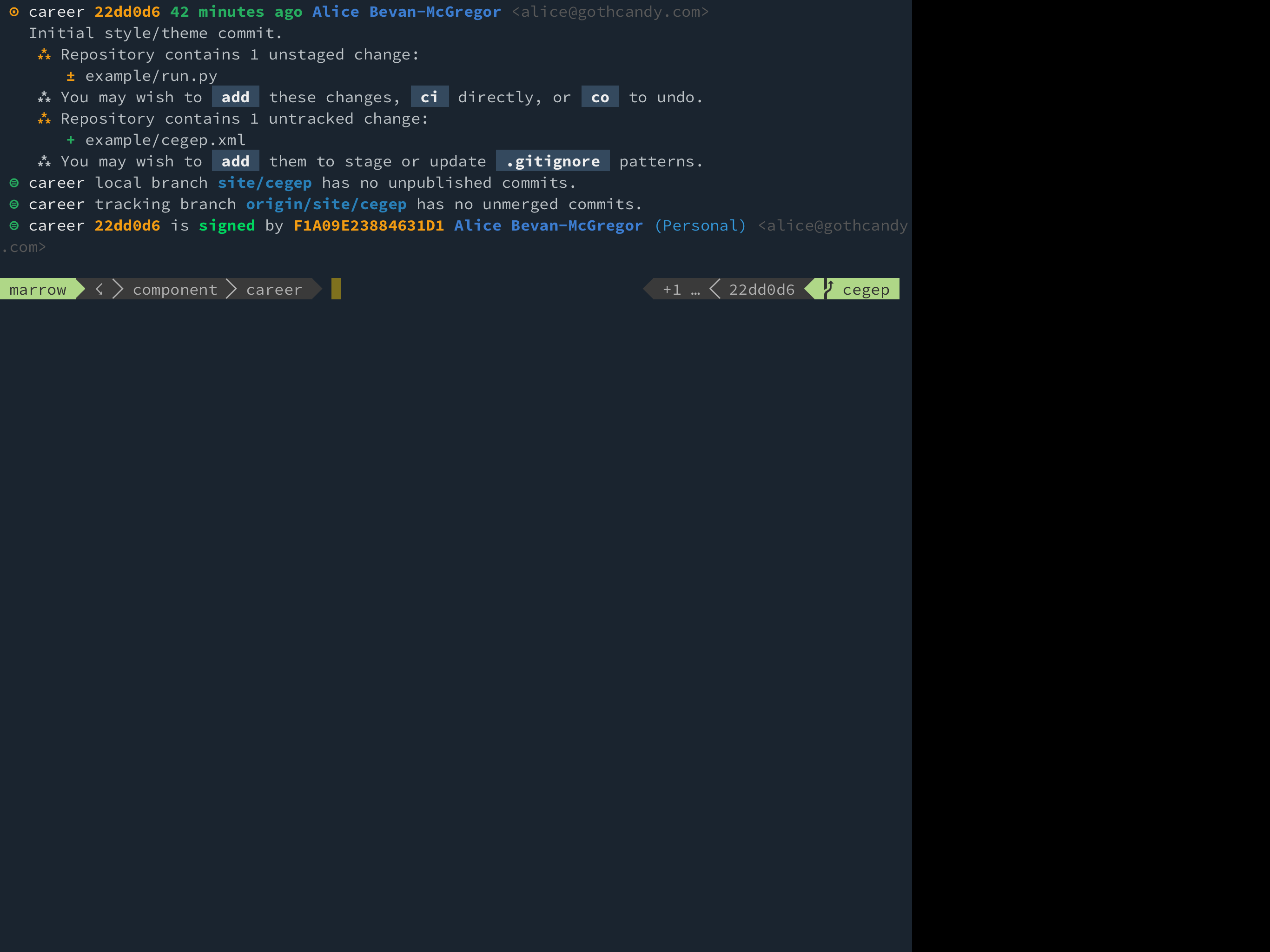
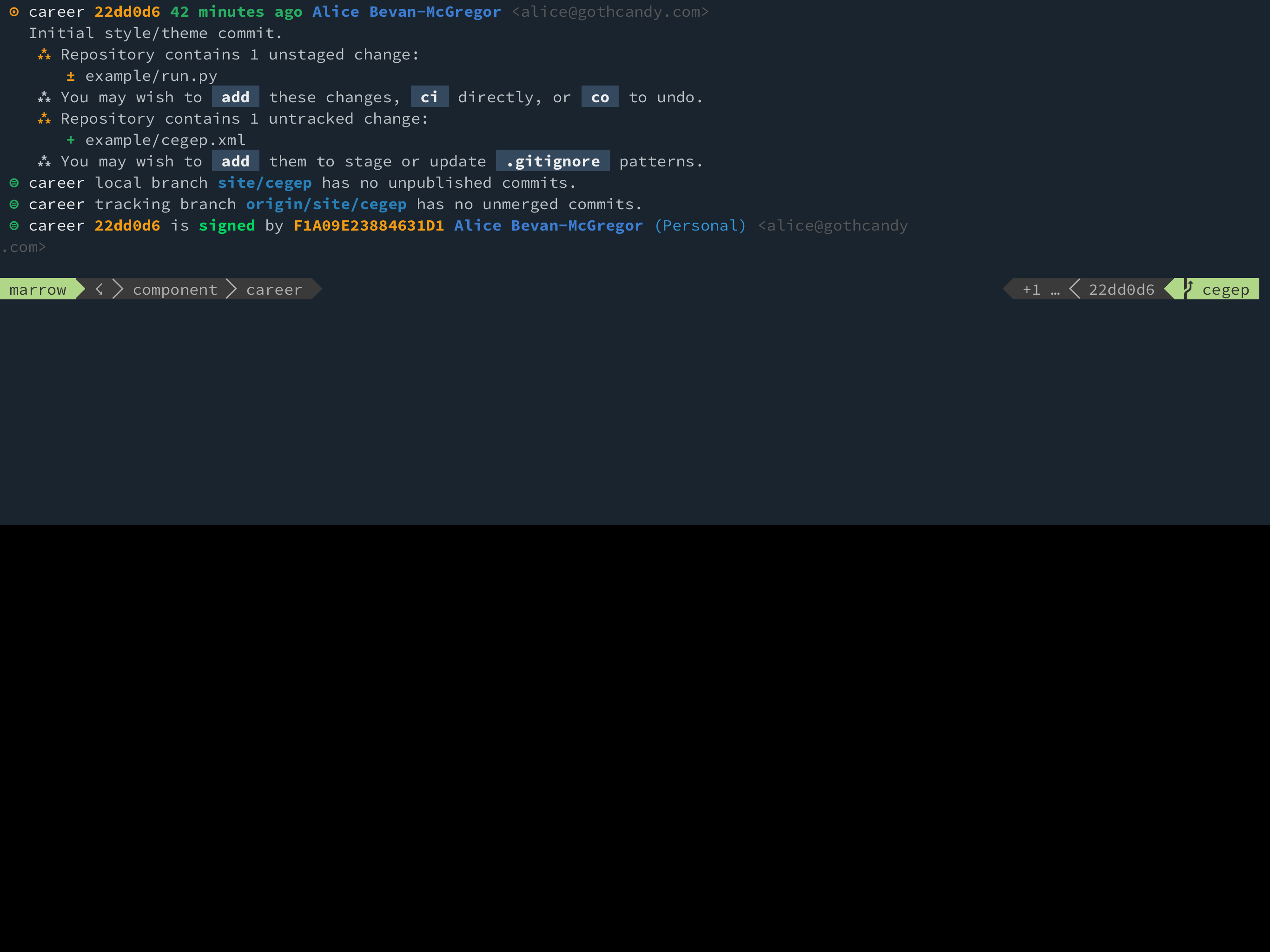
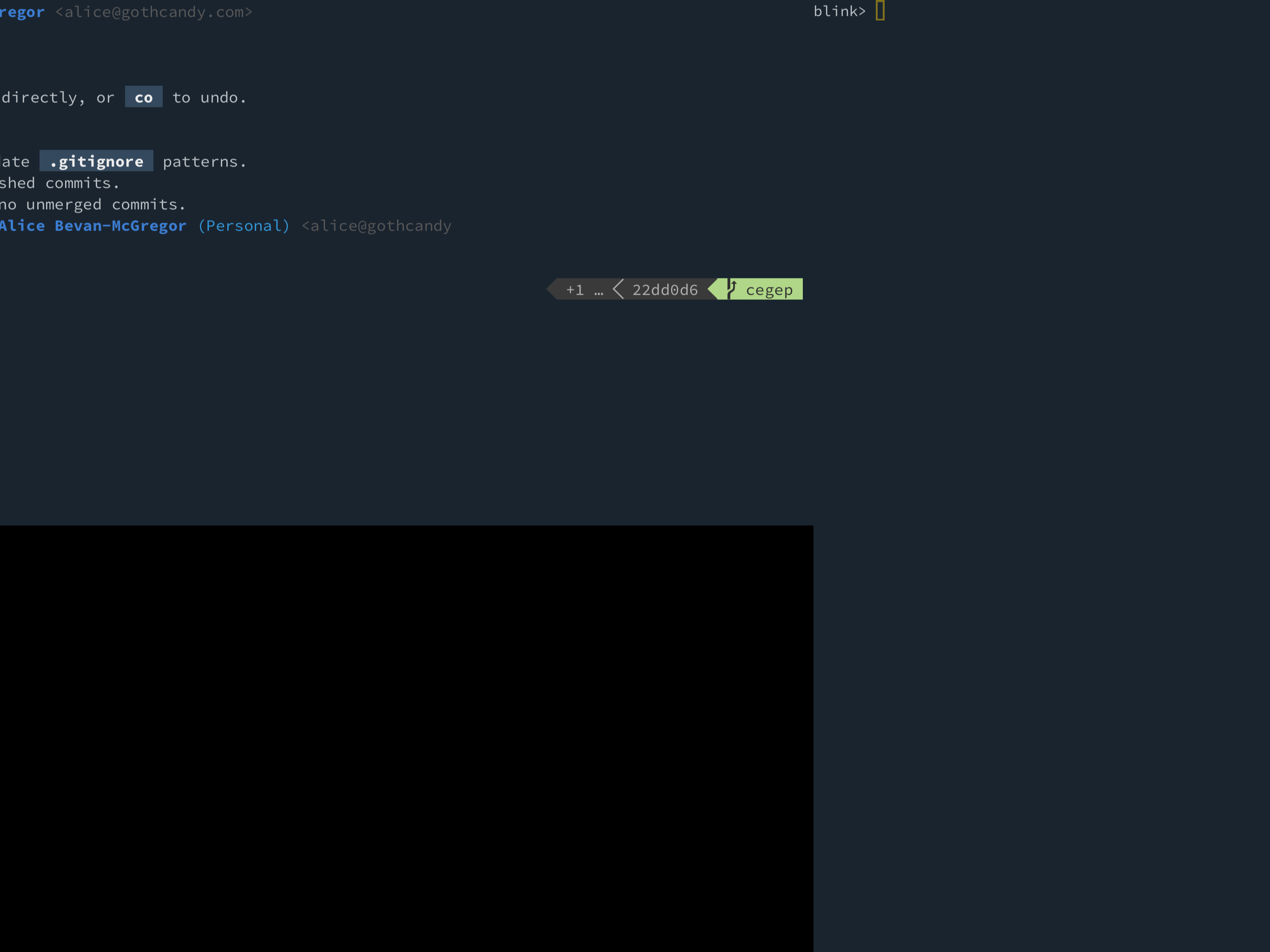
The geometry issue is very clearly tied to specific session instances.
amcgregor
on 8 Jun 2017
I finally had some time as I hit a wall with another project and just solved it.
Turns out the new iOS was sending the resize event to the JS before it happened on the WKWebView.
I will push a hot fix for everyone.
carloscabanero
on 8 Jun 2017
Just a quick update, the version on TestFlight got rejected because "booting on a black screen had to be a bug", had to explain them that is actually a feature 😄 Hopefully it will get approved soon.
The version for release on the AppStore got rejected for a different reason: TouchID controls when the device locks to enable itself, and they do not allow to do that anymore. Thinking about an alternative instead of enabling it all the time, but need ideas, maybe building some 10 mins tolerance?
Thanks guys!
carloscabanero
on 9 Jun 2017
@carloscabanero No worries! One of my own apps (a syntax highlighting source code viewer with cross-app integration, "View Source" in Safari, etc.) got rejected for "minimal useful functionality"—my reply was one sentence: "35 apps that fart when you touch the screen." (Still didn't get approved. ;)
Most of the apps I use that offer password locking enable it after the application goes inactive or is otherwise backgrounded or quit. Banking apps then go a step further and have things like five minute timeouts. How that is handled is typically exceptionally poor, e.g. pop up an alert about timing out, then show the Touch ID prompt… under the alert… never ends well and is the greatest anti-feature I encounter regularly. (If you do allow inactivity timeouts, make them configurable. My iPad itself is set to never sleep, for example.)
amcgregor
on 9 Jun 2017
Just a heads up. The TestFlight version 6.08 is already out! So this issue is fixed and we can also give a try to the new HTerm.
The fixes for this on the AppStore should be out as soon as I change the TouchID behavior, probably just trigger it when the app goes to background.
Let me know if anyone can still experience it, otherwise we close it.
Thanks to everyone for their help crashing this one :)
carloscabanero
on 13 Jun 2017
Works, but #280 would be a critical bug if this was released to the app store as-is (I had to revert from TestFlight to app store version to make it usable again)
goerz
on 13 Jun 2017
I think should allow a timer on touchid lock, wanting touchid every time switch back to app within a few minutes of last use would get annoying quickly.
 MacDragon
on 16 Jun 2017
MacDragon
on 16 Jun 2017
Alright, TouchID issues fixed, and still very good, without timers or hacks, still same or very similar experience.
I haven't pushed the new HTerm to the AppStore due to #280. But we have a few new small surprises :)
Hopefully on everyone's hands by Monday.
carloscabanero
on 17 Jun 2017
Any updates on this? "Monday" was two weeks ago. :/
 ideologysec
on 6 Jul 2017
ideologysec
on 6 Jul 2017
Same issue, though if you open Blink while holding the phone in landscape it gives you the full width.
 carlosvigil
on 11 Jul 2017
carlosvigil
on 11 Jul 2017
It is already on TestFlight and hopefully in a few hours in the AppStore. Got rejected yesterday for including the word iOS11 within the Changelog. Apologies for the delay.
carloscabanero
on 13 Jul 2017
7 is out! And we can finally close this :)
carloscabanero
on 14 Jul 2017
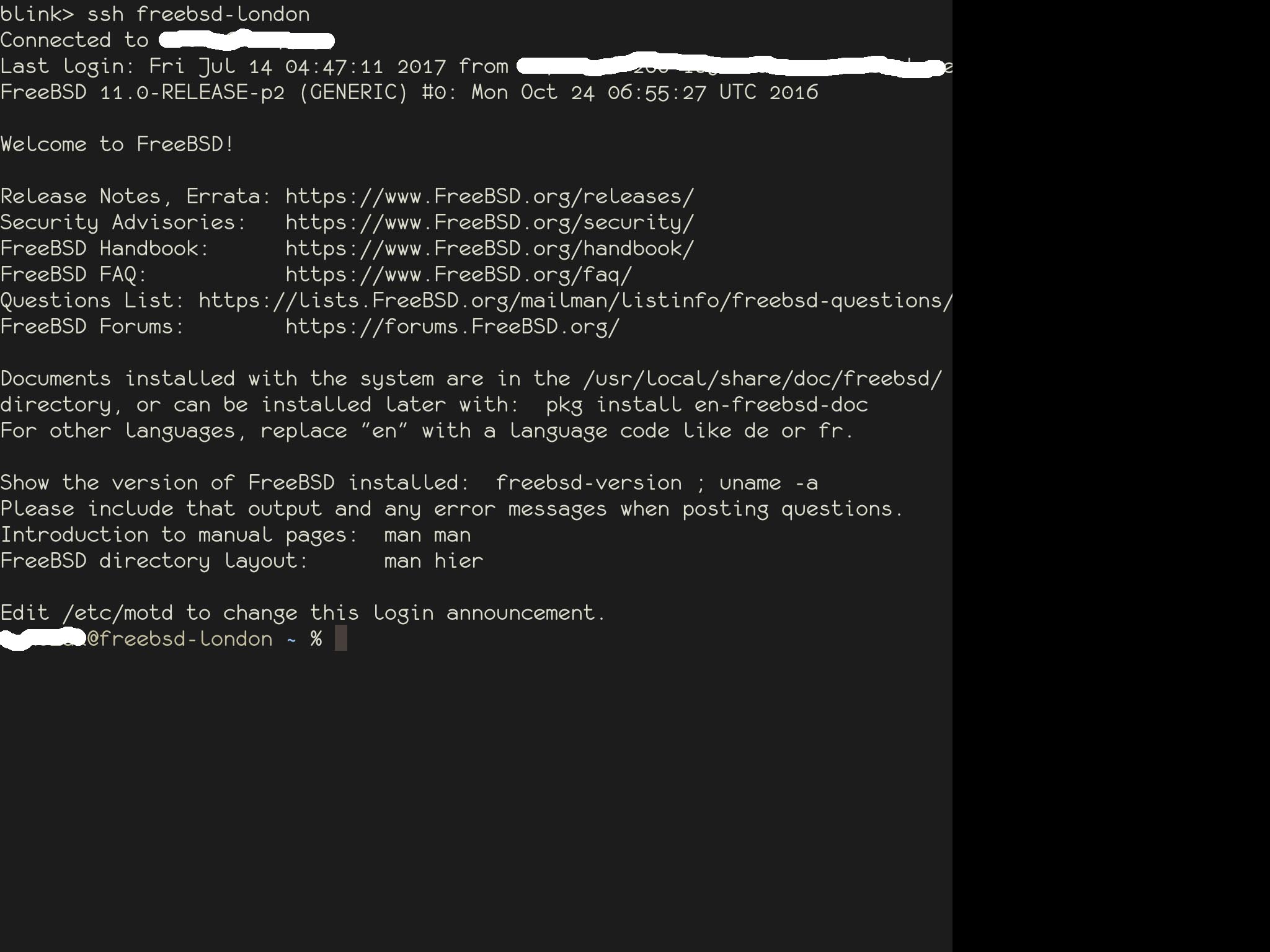
Version 7.0.1 is much better, thanks! But I'm still getting the old behavior intermittently on my iPad Air 2 running iOS 10.3.2.
Below is a screenshot from a FreeBSD server, but I also have the problem on Ubuntu, CloudLinux, and Raspbian -- all of the OSes I've tried.
agkozak
on 15 Jul 2017
Very sorry @agkozak. It is just outrageous that a d* WebView cannot, still, receive the right size from the window just because. I can definitely see what you mean in one specific case with iOS11. Works on 99% of the cases, but it is jus simply crazy that the event is thrown, captured, and the size of the window can be anything, even with a delay applied to it.
I'm done with this. I'm going rewrite the whole resize so that the real View tells the WebView what the size is instead of requesting it from the window.
carloscabanero
on 17 Jul 2017
Any news on this?
It's really really ruining my day in and out :(
I'd be happy to help wherever I can...
ghost
on 7 Dec 2017
I’m almost done myself with libssh and will prioritize this again.
carloscabanero
on 18 Dec 2017
This should have been out on v10. Closing here but feel free to reopen if anything weird happens again :)
carloscabanero
on 26 Feb 2018
Related issues
goerz
·
4Comments
 muammar
·
3Comments
muammar
·
3Comments
 treyharris
·
3Comments
treyharris
·
3Comments
 webdog
·
4Comments
webdog
·
4Comments
 s8m2s
·
5Comments
s8m2s
·
5Comments
Most helpful comment
I finally had some time as I hit a wall with another project and just solved it.
Turns out the new iOS was sending the resize event to the JS before it happened on the WKWebView.
I will push a hot fix for everyone.