Blink: Can't get Hosts configuration to work for mosh
I don't seem to be able to get the Hosts configuration working for mosh (ssh works fine)
With the following setup:

I get this error:
blink> mosh katamon
bash: katamon.physik.uni-kassel.de: command not found
Did not find remote IP address
 goerz
goerz
All 12 comments
Ok, the "Server" area equals the --server argument of mosh, which is used to specify the path to the mosh-server command. Just remove that and you should be good.
I will keep this open because the bug is that it isn't clear at all what that does.
 carloscabanero
on 28 Aug 2016
carloscabanero
on 28 Aug 2016
Ah, I see.. that works.
I think the confusion came from that the "SSH" and "Mosh" section look like they are equal in importance. Maybe it would be better to have an "Advanced" sub-dialog (or "Mosh settings (advanced)", or "Mosh settings", or whatever) to imply a hierarchy. I would imagine that most people will rarely change the mosh settings.
I would pre-fill the mosh "Server" field with mosh-server (in grey, just like the default port number in the SSH section). In the same way, I would pre-fill the Mosh "Port" field with UDP port or range, since it's not immediately clear how it differs from "Port" in the the SSH section. It's also not obvious what the "Startup Command" setting is.
goerz
on 28 Aug 2016
Great suggestions, I will do them just like that :)
carloscabanero
on 29 Aug 2016
Up on version 0.931
carloscabanero
on 31 Aug 2016
As someone new to mosh and trying to set everything up I too got hung up on putting the hostname in the mosh Server box until finding this github issue. Maybe the prompt text should say "path to mosh-server" or give a sane default example like /usr/local/bin/mosh-server. I don't know the best solution, but just know for this newb that it was unclear that mosh-server is even a command. Awesome app by the way!
 jeffswitzer
on 17 Jan 2018
jeffswitzer
on 17 Jan 2018
I was in the same boat as Jeff. My noob brain understood "mosh-server" to mean the IP address of the mosh server instead of the path to mosh-server. Now that I understand how mosh works it makes more sense.
 chris-neely
on 7 Aug 2018
chris-neely
on 7 Aug 2018
See https://github.com/blinksh/blink/issues/415#issuecomment-366393974
It would definitely be good to redesign the UI for this field for more clarity.
goerz
on 7 Aug 2018
+1 to making this dialog much clearer... The mosh-server hint isn't that clear; if you're new to mosh it's not that clear that it's referring to a path but rather might be taken to point to a "mosh-server" (i.e., the server that is running mosh)...
Once that's configured, the connection is quite fast!
 jjarava
on 8 Dec 2018
jjarava
on 8 Dec 2018
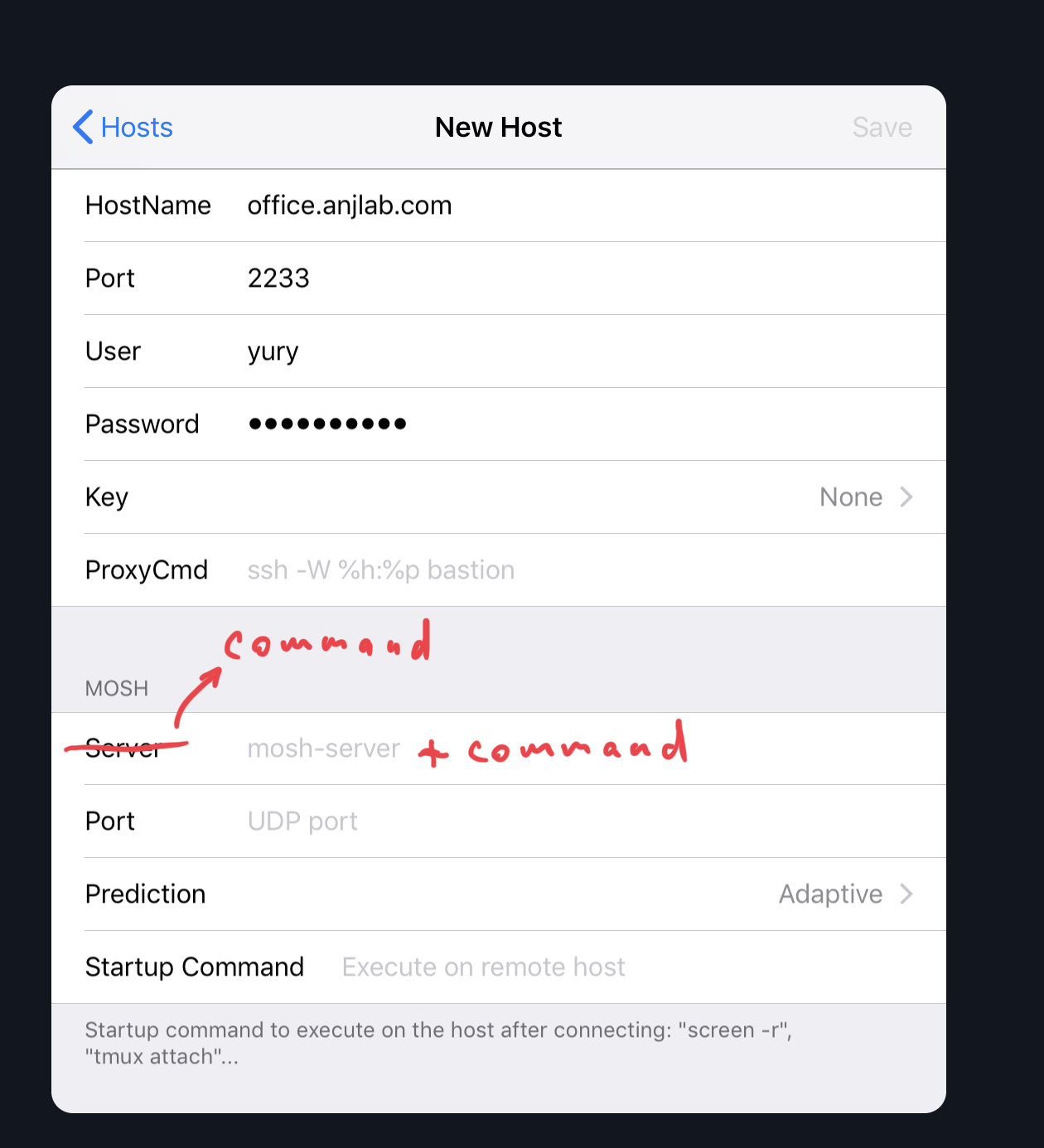
What about like that?
 yury
on 8 Dec 2018
yury
on 8 Dec 2018
That’d be much clearer — Probably just changing the fields title label to “Mosh server command” or similar; “server” makes you think of IP addresses
Sent with GitHawk
jjarava
on 9 Dec 2018
I think the path to mosh-server in the placeholder would be a lot more clear. Because command could be anything. Or command and path-to-moshserver
carloscabanero
on 9 Dec 2018
If you change the “Server” label to something else and then the “default” suggestion is something like /path/to/mosh-server (lets say /usr/bin/mosh-server as is the case on my Ubuntu box) then it’ll be much clearer.
Seeing “server” and then “Port” in another line makes for confusion
(Anyhow, this is mostly nitpicking on an otherwise great app!!)
jjarava
on 9 Dec 2018
Related issues
 balboah
·
3Comments
balboah
·
3Comments
 peppy
·
4Comments
peppy
·
4Comments
 basepi
·
5Comments
basepi
·
5Comments
 s8m2s
·
5Comments
s8m2s
·
5Comments
 nriley
·
3Comments
nriley
·
3Comments
Most helpful comment
As someone new to mosh and trying to set everything up I too got hung up on putting the hostname in the mosh Server box until finding this github issue. Maybe the prompt text should say "path to mosh-server" or give a sane default example like /usr/local/bin/mosh-server. I don't know the best solution, but just know for this newb that it was unclear that mosh-server is even a command. Awesome app by the way!