Ble.sh: [gitstatus] `stty: invalid argument` on `source ble.sh`, patch 0.3.3
ble version:
0.3.3+7fa584c
Bash version:
5.0.17(1)-release, x86_64-redhat-linux-gnu
I downloaded Patch 0.3.3 and want to try it out:
$ source ble.sh
/usr/bin/stty: invalid argument ‘_ble_term_stty_flags_enter+=("${@:2}")’
Try '/usr/bin/stty --help' for more information.
When I source it a second time:
$ source ble.sh
[ble: reload]
stty: invalid argument ‘_ble_term_stty_flags_leave+=("${@:2}")’
Try 'stty --help' for more information.
stty: invalid argument ‘_ble_term_stty_flags_leave+=("${@:2}")’
Try 'stty --help' for more information.
bash: eval: line 254: syntax error near unexpected token `('
bash: eval: line 254: `exec _ble_util_openat_fdlist+=("${@:2}")>&-'
bash: eval: line 254: syntax error near unexpected token `('
bash: eval: line 254: `exec _ble_util_openat_fdlist+=("${@:2}")>&-'
bash: eval: line 254: syntax error near unexpected token `('
bash: eval: line 254: `exec _ble_util_openat_fdlist+=("${@:2}")>&-'
^[[39;2Rbash: 10#fields: value too great for base (error token is "10#fields")
/usr/bin/stty: invalid argument ‘_ble_term_stty_flags_enter[${#_ble_term_stty_flags_enter[@]}]="$2"’
Try '/usr/bin/stty --help' for more information.
\033[01;32m\u@\h\033[00m \033[01;34m\w\033[00m\n\033[01;31m$\033[00m \e]0;\u@\h: \w\abash: /home/ofey/.cache/blesh/./cmap+default.3.xterm-256color.dump: line 9: syntax error near unexpected token `('
bash: /home/ofey/.cache/blesh/./cmap+default.3.xterm-256color.dump: line 9: `_ble_decode_csimap_tilde=([1]=key=(\${*:2}))'
            ble-bind: Unknown ble edit function `arr=(${*:2})'.
ble-bind: Unknown ble edit function `arr=(${*:2})'.

# ... About 150 lines replicate error.

ble-bind: Unknown ble edit function `arr=(${*:2})'.
bash: seq=(${*:2}): syntax error: operand expected (error token is "${*:2})")
Besides, my stty version is: 8.32
$ stty --version
stty (GNU coreutils) 8.32
Copyright (C) 2020 Free Software Foundation, Inc.
License GPLv3+: GNU GPL version 3 or later <https://gnu.org/licenses/gpl.html>.
This is free software: you are free to change and redistribute it.
There is NO WARRANTY, to the extent permitted by law.

Written by David MacKenzie.
After all, thank you all for creating this good thing.
 ofey404
All 17 comments
Thank you for your report! Do you define a function named builtin or eval? ble.sh works under the assumptions that some Bash builtins are not replaced by users.
 akinomyoga
on 20 Mar 2021
akinomyoga
on 20 Mar 2021
It seems that there is no such thing:
$ declare -F | grep "builtin\|eval"
declare -f _gitstatus_builtin
declare -f _gitstatus_builtin_wrapper
Thank you. I actually cannot reproduce the behavior, but with builtin() { "$@"; } I could reproduce a similar behavior. If builtin or eval is not replaced, currently I don't have an idea what happens in your environment. To narrow down the problem, I have additional questions:
- Q1. Is the problem reproduced with the plain Bash without any configuration? You can test it with the following commands:
$ INPUTRC=/dev/null bash --norc --noprofile
$ source ble.sh
- Q2. Is the problem reproduced with the devel version of
ble.sh(i.e.,masterbranch)?
akinomyoga
on 20 Mar 2021
I am having a similar issue when not using ble.sh but gitstatusd. It occurs when defining a function like in my bashrc.
docker-exec() {
  sudo --preserve-env="$ENV" \docker exec --interactive --tty "$@"
}
Escaping the eval fixed it:
docker-exec() {
  sudo --preserve-env="$ENV" \docker \exec --interactive --tty "$@"
}
 SuperSandro2000
on 20 Mar 2021
SuperSandro2000
on 20 Mar 2021
@SuperSandro2000 Thank you for the information! The two codes you have shown seem to be the same. Is there a typo in your codes? Where is the escaped eval? How is it similar? For example, did you get similar error messages?
Error messages provided by @ofey404 contains the string _ble_term_stty_flags_leave+=("${@:2}"), which is a part of the code in ble.sh. The related structure inside ble.sh is illustrated as follows:
$ append() { builtin eval '_ble_term_stty_flags_enter+=("$@")'; }
$ append kill undef
$ /usr/bin/stty "${_ble_term_stty_flags_enter[@]}"
ble.sh calls stty with the arguments specified in the array _ble_term_stty_flags_enter. As far as the builtin is functioning normally, _ble_term_stty_flags_enter contains the arguments specified to the function append. However, for example, builtin is defined by the user as builtin() { "$@"; }, _ble_term_stty_flags_enter will contain the arguments specified to the function builtin. This was my initial guess, but it seems @ofey404 hasn't defined a function named builtin.
akinomyoga
on 21 Mar 2021
Thank you! I have some ideas: It's caused by the gitstatus plugin. My version: commit
A1: The problem disappears when I use the plain Bash without any configuration.
With binary search in my .bashrc file, I find out where the problem happens.
There are some suspicious line in gitstatus.plugin.sh:
  if [[ "${GITSTATUS_STOP_ON_EXEC:-1}" == 1 ]]; then
    type -t _gitstatus_exec &>/dev/null    || function _gitstatus_exec()    { exec    "$@"; }
    type -t _gitstatus_builtin &>/dev/null || function _gitstatus_builtin() { builtin "$@"; }

    function _gitstatus_exec_wrapper() {
      (( ! $# )) || gitstatus_stop
      local ret=0
      _gitstatus_exec "$@" || ret=$?
      [[ -n "${GITSTATUS_DAEMON_PID:-}" ]] || gitstatus_start || true
      return $ret
    }

    function _gitstatus_builtin_wrapper() {
      while [[ "${1:-}" == builtin ]]; do shift; done
      if [[ "${1:-}" == exec ]]; then
        _gitstatus_exec_wrapper "${@:2}"
      else
        _gitstatus_builtin "$@"
      fi
    }

    alias exec=_gitstatus_exec_wrapper
    alias builtin=_gitstatus_builtin_wrapper

    _GITSTATUS_EXEC_HOOK=1
  else
    unset _GITSTATUS_EXEC_HOOK
  fi
There are also another problem: when I source ble.sh correctly, I can't use fzf's ctrl-r history fuzzy search.
The reverse history search seems to be replaced by ble.sh's builtin one.
[ofey@RX93 ble-0.3.3]$  dict test | nvimpager
(4: << !1209   ) `test'
The original:
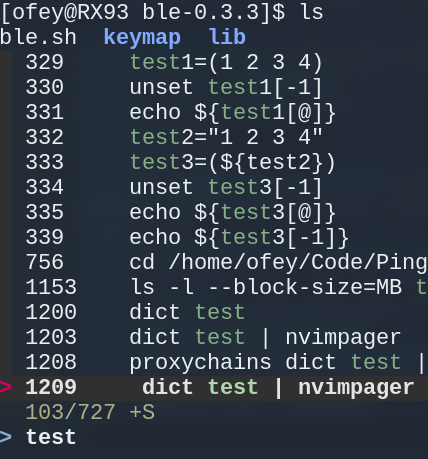
fzf seems to bind C-r to a function called __fzf_history(), in shell/key-bindings.bash. link
__fzf_history__() {
  local output
  output=$(
    builtin fc -lnr -2147483648 |
      last_hist=$(HISTTIMEFORMAT='' builtin history 1) perl -n -l0 -e 'BEGIN { getc; $/ = "\n\t"; $HISTCMD = $ENV{last_hist} + 1 } s/^[ *]//; print $HISTCMD - $. . "\t$_" if !$seen{$_}++' |
      FZF_DEFAULT_OPTS="--height ${FZF_TMUX_HEIGHT:-40%} $FZF_DEFAULT_OPTS -n2..,.. --tiebreak=index --bind=ctrl-r:toggle-sort,ctrl-z:ignore $FZF_CTRL_R_OPTS +m --read0" $(__fzfcmd) --query "$READLINE_LINE"
  ) || return
  READLINE_LINE=${output#*$'\t'}
  if [ -z "$READLINE_POINT" ]; then
    echo "$READLINE_LINE"
  else
    READLINE_POINT=0x7fffffff
  fi
}
OK! Thank you for the details! builtin was replaced by an alias but not by a function. For the time being you can run unalias builtin exec before the source of ble.sh, or set GITSTATUS_STOP_ON_EXEC=0 before the source of gitstatus.plugin.sh. I'll later add a workaround in ble.sh, but I think this gitstatus.plugin.sh may still cause problems in other plugins. Replacing builtin is a bad idea because the command builtin is provided to call the original builtins when builtins are replaced. If builtin itself is replaced, there is no way to call the original builtins.
For fzf, can you try master branch of ble.sh? If it doesn't work, you may also check instruction in contrib/fzf-integration. If you still want to use fzf with ble-0.3, you may source .fzf.bash after the source of ble.sh, but I haven't tested it well with ble-0.3.
akinomyoga
on 21 Mar 2021
Is there a typo in your codes? Where is the escaped eval?
yeah, I forgot to add the a \ to eval.
docker-exec() {
  sudo --preserve-env="$ENV" \docker \exec --interactive --tty "$@"
}
Also the example I provided was not entirely correct. The fully (not) working example is bellow:
$ source /nix/store/aipgxqxfdyswj3n5pmxbjyrcjyjl7kgl-gitstatus-1.4.4/gitstatus.plugin.sh
$ (set -x; sudo \docker exec container bash)
+ sudo docker _gitstatus_exec_wrapper container bash
fzf breaks easily for example if you source it before your bash-completion.
SuperSandro2000
on 21 Mar 2021
@akinomyoga master branch supports fzf well!
Besides, since aliasing exec is not a good idea, my solution to the problem is simply disable gitstatus plugin.
OOP: I'm surprised you are a postdoc in physics in Peking University! I'm a undergraduate in Fudan University majored physics too. Nice to meet you. Video of cxxmatrix really surprised me, it's awesome!
Besides, if I want to know more about bash, where should I start? I'm reading Advanced Bash Scripting Guide now.
ofey404
on 21 Mar 2021
Besides, since aliasing exec is not a good idea, my solution to the problem is simply disable gitstatus plugin.
Well, then my bash prompt takes 2 seconds to load which is unusable.
SuperSandro2000
on 21 Mar 2021
The first time I use ble.sh, my bash takes about 1 second to load, but after the first time it's fine. I guess ble.sh is doing some initialization(Sorry I don't save the outputs).
ofey404
on 21 Mar 2021
I was talking about gitstatusd. If I fall back to normal git status instead of using it my prompt is pretty slow in giant repositories like nixpkgs.
SuperSandro2000
on 21 Mar 2021
Sorry for the late reply. I'm now busy, so it will take some time to think about what is the proper way of the workaround and to implement it.
yeah, I forgot to add the a \ to eval. (comment by @SuperSandro2000)
OK, I see. It's exec but not eval, but this seems to be the same problem caused by gitstatus.plugin.sh.
OOP: I'm surprised you are a postdoc in physics in Peking University! I'm a undergraduate in Fudan University majored physics too. Nice to meet you. Video of cxxmatrix really surprised me, it's awesome! (comment by @ofey404)
Nice to meet you! And, thank you for trying out cxxmatrix!
Besides, if I want to know more about bash, where should I start? I'm reading Advanced Bash Scripting Guide now. (comment by @ofey404)
I think maybe I cannot make a satisfactory answer for you since I mainly learned Bash by reading man bash and searching related materials by taking a long time. When I started to use Bash, I have read some sections of man bash that seem to be useful, and gradually expanded to the other sections. When I found in man bash some Bash features that I couldn't get how to use, I searched it by Google, read related pages, and tried it by writing actual scripts. This is the way I learned Bash.
- The most reliable source is of course the official documents. You can check
man bashfor a good summary. A more detailed description of Bash can be found in Bash Reference Manual through HTML or the commandinfo bash. - I think BashGuide - Greg's Wiki and BashFAQ - Greg's Wiki are the most comprehensive guides and FAQ (from basic to advanced, etc.) on Bash scripting. This Wiki is well maintained by Greg Wooledge, one of regular participants of the official Bash mailing lists
bug-bashandhelp-bash(see the next item). - After you have roughly understood all the sections of
man bash, it would be also useful to subscribe bug-bash mailing list and help-bash mailing list to learn detailed Bash behaviors and techniques which are not fully documented in Bash man pages and manuals, but about which people often have questions. (Though just recently some guy is posting many unthoughtful questions and complaints.)
There are also some popular documents, but I don't fully recommend them. They will provide you some interesting techniques, but some techniques are not robust, so be careful:
- Bash Hackers Wiki is sometimes referenced by people. Most part of this Wiki is fine, yet it contains many suspicious descriptions partly because, I think, this Wiki is edited by anonymous not-well-trained Bash programmers.
- dylanaraps/pure-bash-bible is another popular document that contains useful techniques but also contains incomplete and inefficient techniques.
Well, then my bash prompt takes 2 seconds to load which is unusable. (comment by @SuperSandro2000)
I think you can put GITSTATUS_STOP_ON_EXEC=0 before the source of gitstatus.plugin.sh (instead of completely disabling gitstatusd).
I guess ble.sh is doing some initialization(Sorry I don't save the outputs). (comment by @ofey404)
Right. You can see the initialization process again after rm -rf "$_ble_base_cache"/*.
akinomyoga
on 22 Mar 2021
P.S. ⭐ bash-git-prompt seems fully compatible with ble.sh.
Besides, maybe we should close this issue?
ofey404
on 6 Apr 2021
Thank you for the information!
Besides, maybe we should close this issue?
Could we keep it open for a while? I think we should report it to gitstatus, but currently I'm busy. I actually would like to suggest gitstatus changing to turn off the replacement of builtins by default. In order to support the change, I would like to collect the patterns that can be broken by replacing exec and builtin, but it may take time.
builtin evalwould see wrong positional parameters$1, $2, ..., $@ifbuitlinis replaced by a function.builtin source file(without arguments) also have the same problem.- The file descriptors set up by
exec 3> fileis not persistent after theexecifexecis replaced by a function. - Also, as @SuperSandro2000 has reported,
sudo docker execwould be affected by the alias. - etc.
But I haven't yet really tested them.
akinomyoga
on 6 Apr 2021
@ofey404 @SuperSandro2000 I've reported the issue of gitstatus.plugin.sh at https://github.com/romkatv/gitstatus/pull/235, and a fix has been made in the master of gitstatus. I think the root cause of alias builtin and alias exec will be solved in the next release of gitstatus. Now let me close this issue.
Thank you very much for reporting the issue and having provided us with a related issue with gitstatus and docker!
akinomyoga
on 10 May 2021
Related issues
 cmplstofB
·
3Comments
cmplstofB
·
5Comments
cmplstofB
·
3Comments
cmplstofB
·
5Comments
 oc1024
·
6Comments
cmplstofB
·
5Comments
cmplstofB
·
8Comments
oc1024
·
6Comments
cmplstofB
·
5Comments
cmplstofB
·
8Comments
Most helpful comment
Sorry for the late reply. I'm now busy, so it will take some time to think about what is the proper way of the workaround and to implement it.
OK, I see. It's
execbut noteval, but this seems to be the same problem caused bygitstatus.plugin.sh.Nice to meet you! And, thank you for trying out
cxxmatrix!I think maybe I cannot make a satisfactory answer for you since I mainly learned Bash by reading
man bashand searching related materials by taking a long time. When I started to use Bash, I have read some sections ofman bashthat seem to be useful, and gradually expanded to the other sections. When I found inman bashsome Bash features that I couldn't get how to use, I searched it by Google, read related pages, and tried it by writing actual scripts. This is the way I learned Bash.man bashfor a good summary. A more detailed description of Bash can be found in Bash Reference Manual through HTML or the commandinfo bash.bug-bashandhelp-bash(see the next item).man bash, it would be also useful to subscribe bug-bash mailing list and help-bash mailing list to learn detailed Bash behaviors and techniques which are not fully documented in Bash man pages and manuals, but about which people often have questions. (Though just recently some guy is posting many unthoughtful questions and complaints.)There are also some popular documents, but I don't fully recommend them. They will provide you some interesting techniques, but some techniques are not robust, so be careful:
I think you can put
GITSTATUS_STOP_ON_EXEC=0before the source ofgitstatus.plugin.sh(instead of completely disablinggitstatusd).Right. You can see the initialization process again after
rm -rf "$_ble_base_cache"/*.