Bitwarden_rs: Can not sync vault on Safari (macOS 10.15)
I have raised the same issue in the extension repo. Anyone facing the same issue? This works as expected on other browsers and devices. It doesn't work only on safari.

related issue: https://github.com/bitwarden/browser/issues/664#issuecomment-547324080
 tckb
tckb
All 16 comments
@tckb I tested this yesterday on 10.15.1, and i have no issues when using Bitwarden v1.16.6.
Both the desktop app and the Safari extension.
As stated in by Zegorax in the Upstream project issue you linked you either need to let all headers pass through from bitwarden via the proxy to the client or add those headers your self in your proxy.
What reverse-proxy do you use?
 BlackDex
on 7 Nov 2019
BlackDex
on 7 Nov 2019
@BlackDex to clarify my app works just fine; so are the extensions on other browsers. I have my server running on K8s ingressed by Nginx controller. I resolved it by allowing the following additional header. I am not sure why the other extensions do not have this issue.
Access-Control-Allow-Headers "device-type";
For anyone out there who has the same issue (Self hosted, everything works perfectly except for Safari) here are the steps I took to get this to work (Thanks tckb for pointing me in the right direction):
Update /bwdata/config.yml:
generate_nginx_config: false
-This means if you update Bitwarden in the future, you have to maintain the nginx config yourself
Update /bwdata/nginx/default.conf
Add the following line inside "location / { ..... }
add_header Access-Control-Allow-Headers "device-type";
Go back to your root level for BitWarden then run
./bitwarden.sh rebuild;./bitwarden.sh start
 michaelbanet
on 8 Nov 2019
michaelbanet
on 8 Nov 2019
This is strange, since i tried it on macOS 10.15 with Desktop App, Safari Extension and browser using no proxy and using the nginx example. All generated no issue. And i never receive the "Access-Control-Allow-Headers" at all, and the app(s) and web-vault keep working.
But good to know that this solved the issue. If needed we maybe need to add this to the code-base it self.
BlackDex
on 8 Nov 2019
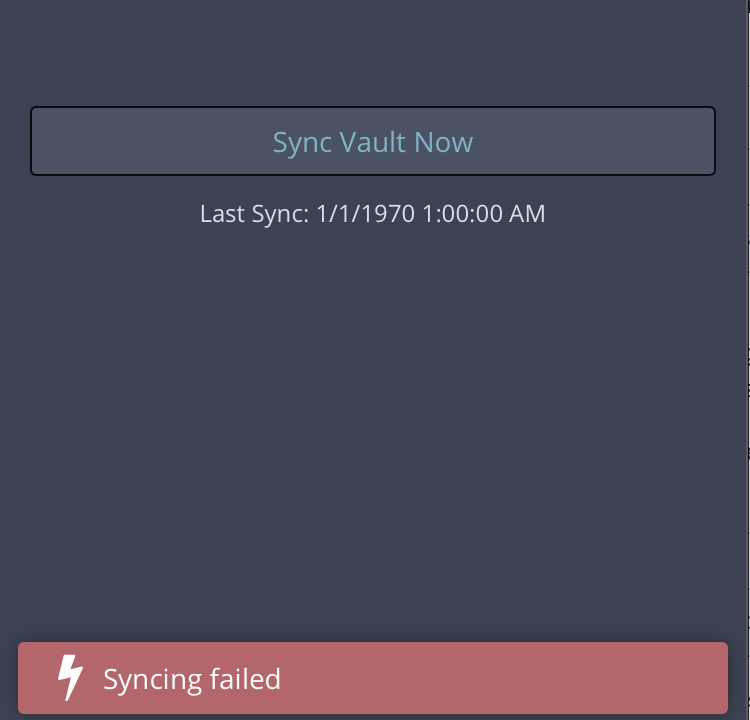
@BlackDex I am not sure what's the issue. As I mentioned before, I have no problems anywhere else. Web, All other browsers, except for Safari have been working good. I was able to login with the header fix but, unfortunately the sync fails! FFS
tckb
on 8 Nov 2019
@michaelbanet does the sync work with the header fix?
tckb
on 8 Nov 2019
Sorry @tckb, I don't have any issues syncing.
One bit of information I should add in case it has relevance to this problem. My self hosted environment is using an off-port, in my case, 4443. Valid SSL certificate from Let's Encrypt
After the custom change to nginx configuration, It works perfectly on both macOS 10.15.1 and 10.14.6
michaelbanet
on 8 Nov 2019
@michaelbanet I do have ssl certificate and mapping all setup on th server. Did you configure or make changes anywhere else?
tckb
on 8 Nov 2019
@tckb The port change (and now "Access-Control-Allow-Headers") is the only modifications I made from a standard installation
michaelbanet
on 8 Nov 2019
@michaelbanet that sucks, I am only able to login and can't use it :-/
tckb
on 14 Nov 2019
@tckb have you been able to get it work? I too get the sync failed and only thing in nginx logs is
84.50.18.56 - - [12/Dec/2019:16:41:54 +0100] "OPTIONS /api/sync HTTP/1.1" 204 0 "-" "Mozilla/5.0 (Macintosh; Intel Mac OS X 10_15) AppleWebKit/605.1.15 (KHTML, like Gecko)"
 urhovaldeko
on 13 Dec 2019
urhovaldeko
on 13 Dec 2019
@urhovaldeko nope, same thing. I had to move to firefox there's no fix for this :-/
tckb
on 13 Dec 2019
I had the same problem. I'm running bitwarden_rs on kubernetes using the nginx ingress controller. I applied the following CORS annotations and it started working. You can just use those headers and adapt it to your setup.
apiVersion: extensions/v1beta1
kind: Ingress
metadata:
  name: bitwarden
  labels:
    app: bitwarden
  annotations:
    [...]
    nginx.ingress.kubernetes.io/cors-allow-methods: "PUT, GET, POST, OPTIONS, DELETE"
    nginx.ingress.kubernetes.io/cors-allow-headers: "device-type, Content-Type, Authorization, Cache-Control, Pragma"
    nginx.ingress.kubernetes.io/cors-allow-credentials: "true"
    nginx.ingress.kubernetes.io/cors-allow-origin: "*"
Note the cors-allow-origin label the * is very important. The above configuration had me succesfully login and sync the client. Hope this helps some of you out. If you have any questions, I am happy to help :). However I noticed that the automatic changed with the websocket is not working. I think this is because the security restrictions of safari.
 haijeploeg
on 24 Feb 2020
haijeploeg
on 24 Feb 2020
Had another go and got it working with only these three lines:
add_header 'Access-Control-Allow-Methods' 'GET, POST, PUT, DELETE, OPTIONS';
add_header 'Access-Control-Allow-Headers' 'device-type, Content-Type, Authorization, Cache-Control, Pragma';
add_header 'Access-Control-Allow-Credentials' 'true';
I had to remove Origin statement as Safari was complaining about multiple ones.
urhovaldeko
on 24 Feb 2020
I had the same problem. I'm running bitwarden_rs on kubernetes using the nginx ingress controller. I applied the following CORS annotations and it started working. You can just use those headers and adapt it to your setup.
apiVersion: extensions/v1beta1
kind: Ingress
metadata:
  name: bitwarden
  labels:
    app: bitwarden
  annotations:
    [...]
    nginx.ingress.kubernetes.io/cors-allow-methods: "PUT, GET, POST, OPTIONS, DELETE"
    nginx.ingress.kubernetes.io/cors-allow-headers: "device-type, Content-Type, Authorization, Cache-Control, Pragma"
    nginx.ingress.kubernetes.io/cors-allow-credentials: "true"
    nginx.ingress.kubernetes.io/cors-allow-origin: "https://bitwarden.yourdomain.com/*"
Note the cors-allow-origin label the
/*is very important. The above configuration had me succesfully login and sync the client. Hope this helps some of you out. If you have any questions, I am happy to help :)
I will give this a try. @haijeploeg
@urhovaldeko I missed add_header 'Access-Control-Allow-Credentials' 'true'; headers. I will try this one too
tckb
on 26 Feb 2020
I have finally fixed the issue! 🎉 🎉 🎉
the config that actually worked --
      add_header Access-Control-Allow-Methods "POST, GET, OPTIONS, DELETE, PUT";
      add_header 'Access-Control-Allow-Headers' 'device-type, Content-Type, Authorization, Cache-Control, Pragma';
      add_header 'Access-Control-Allow-Credentials' 'true';
@urhovaldeko you get 🥇 thanks!
_turns out the issue was just allowing credentials in CORS_
tckb
on 26 Feb 2020
Related issues
 xhalo32
·
5Comments
xhalo32
·
5Comments
 SpinB
·
3Comments
SpinB
·
3Comments
 dominikstraessle
·
4Comments
dominikstraessle
·
4Comments
 jjlin
·
5Comments
jjlin
·
5Comments
 durd
·
3Comments
durd
·
3Comments