Bitwarden_rs: Unable to download attachments when ran from behind reverse proxy
I am having issues with downloading attachments and in some cases uploaded them from my bitwarden_rs behind an nginx reverse proxy. I am not seeing anything in the docker logs or the nginx logs that seems to be pointing me to any specific issue. Has anyone else ran into this? Attachments seem to be working fine if I upload them or download them from the machine running the docker container.
nginx config
    #BITWARDEN
    server {
        listen 80;
        server_name    bitwarden.domain.com www.bitwarden.domain.com vault.domain.com www.vault.domain.com;
        return 301 https://$server_name$request_uri;
    }
    server {
        listen 443 ssl http2;
        server_name bitwarden.domain.com www.bitwarden.domain.com vault.domain.com www.vault.domain.com;

        ssl_certificate     /ProgramData/letsencrypt-win-simple/httpsacme-v01.api.letsencrypt.org/domain.com-chain.pem;
        ssl_certificate_key /ProgramData/letsencrypt-win-simple/httpsacme-v01.api.letsencrypt.org/domain.com-key.pem;
        ssl_protocols       TLSv1 TLSv1.1 TLSv1.2;
        ssl_ciphers         HIGH:!aNULL:!MD5;

        location / {
            proxy_pass http://127.0.0.1:7080;
            proxy_set_header  X-Real-IP  $remote_addr;
            proxy_set_header        Host            $host;
            proxy_set_header        X-Forwarded-For $proxy_add_x_forwarded_for;
            proxy_set_header        X-Forwarded-Proto $scheme;
            proxy_redirect off;
        }

        location /.well-known {
            alias         C:/nginx/html/.well-known;
        }
    }
EDIT: If I don't redirect the reverse proxy to HTTPS then I am able to download them as expected.
I tried running the docker container enabling https internally to see if that would help but it does not seem to work even locally.
docker run -dit --restart unless-stopped -d --name bitwarden -e 'ROCKET_TLS={certs="/ProgramData/letsencrypt-win-simple/httpsacme-v01.api.letsencrypt.org/domain.com-chain.pem",key="/ProgramData/letsencrypt-win-simple/httpsacme-v01.api.letsencrypt.org/domain.com-key.pem"}' -v c:/bw-data/:/data/ -p 7080:443 mprasil/bitwarden:latest
I am guessing this may end up having more to do with rocket and not so much the server.
 shauder
All 28 comments
Yeah, the problem is the web server has to generate the URLS for the attachments, so the server has to 'guess' the correct URL to access them.
In the U2F branch (https://github.com/dani-garcia/bitwarden_rs/tree/u2f), I improved the detection algorithm a bit, hopefully that solves your problems.
Otherwise, the new branch accepts a DOMAIN environment variable, that should override the detection logic. Simply set DOMAIN=vault.domain.com (or whatever you use to access the server through the proxy).
 dani-garcia
on 12 Jul 2018
dani-garcia
on 12 Jul 2018
Thanks, I may build it from source and give it a try this weekend if I get some time. Thanks for the info.
shauder
on 12 Jul 2018
@dani-garcia I think we should use X-Forwarded-Host and X-Forwarded-Proto headers if they are available. It's de facto industry standard to provide the original domain and protocol requested to the service behind the proxy. Proxy servers often set it by default or these can be set easily and it would make for nice "just works" setup.
Perhaps we could use DOMAIN if provided, then try X-Forwarded-Host as fallback. Note that for attachments we should also use proper protocol, which is where we can use X-Forwarded-Proto and maybe fallback to "http"?
 mprasil
on 13 Jul 2018
mprasil
on 13 Jul 2018
To expand on the previous comment attachments do work for me behind proxy. Said proxy sets the proper X-Forwarded-Host and X-Forwarded-Proto. I need to check sources a bit closer, but I have the impression, that rocket might already take X-Forwarded-Host into consideration?
It's still not 100% correct as bitwarden generates the URLs with good domain but wrong protocol. (http instead of https - I have ssl terminated on the proxy which is probably why) This means that the request is blocked by browser if I'm trying to download from Vault (can't fetch insecure resource on secure page) but it works in Android for example that doesn't have such limitation. (and apparently follows webserver redirects to https)
mprasil
on 13 Jul 2018
I'm actually using X-Forwarded-Proto with the new revision, but forgot about X-Forwarded-Host and used the normal Host instead. I'll change that now.
Now the order of choice, from first to last, is:
- DOMAIN if provided
- Referer header, which seems to have the correct domain and protocol, at least without a proxy
- X-Forwarded-Proto & X-Forwarded-Proto, if either is present
- Rocket TLS config & Host header, as fallback for the two before.
Hopefully that handles all the cases. The last changes are in the U2F branch.
dani-garcia
on 13 Jul 2018
Thanks guys. @mprasil you are correct if I don't use ssl and the reverse proxy then they work. I'll try and test the new branch out. Is there an easy way to deploy dock from the new git branch? I don't use docker much. Otherwise I will try from source when I can.
shauder
on 13 Jul 2018
Hi, I've triggered build, once complete (will take about an hour) you can download and try the mprasil/bitwarden:u2f image. Note that I probably won't keep it around for too long after the changes are merged, so only use it to test the changes.
mprasil
on 13 Jul 2018
I am able to download attachments now =D. I cannot upload them through the iOS app but I can through the browser so I am going to assume its more an issue with the iOS app. I can download them through the app though!
For extra info, this is the run command I am using: docker run -dit --restart unless-stopped -d --name bitwarden -v c:/bw-data/:/data/ -p 7080:80 mprasil/bitwarden:u2f
shauder
on 13 Jul 2018
I also can't download my attachments uploading works fine but not able to download through desktop app, web interface or extensions. I've tried through https, http and IP adres non are working.
I'm running Bitwarden docker behind reverse proxy on a Synology NAS
Any suggestions how to fix this?
 BobWs
on 17 Apr 2019
BobWs
on 17 Apr 2019
Did you try setting the DOMAIN env variable to the full address you use to access the service? (Include protocol and the port if not using 80 or 443)
So if your service is available in https://vault.domain.com, set
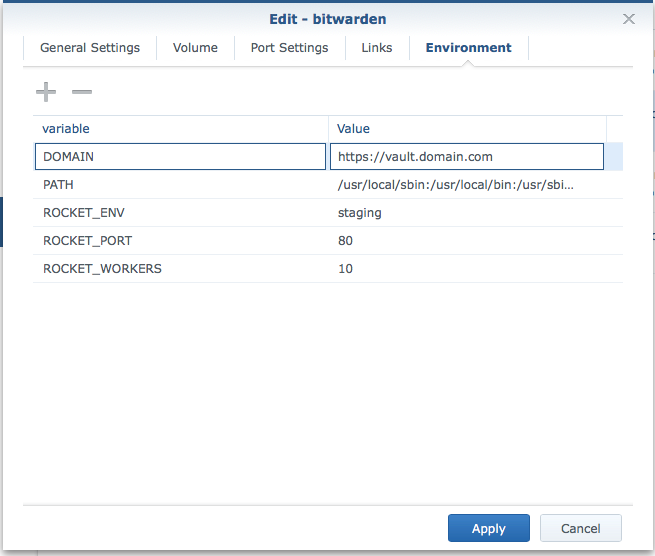
DOMAIN=https://vault.domain.com
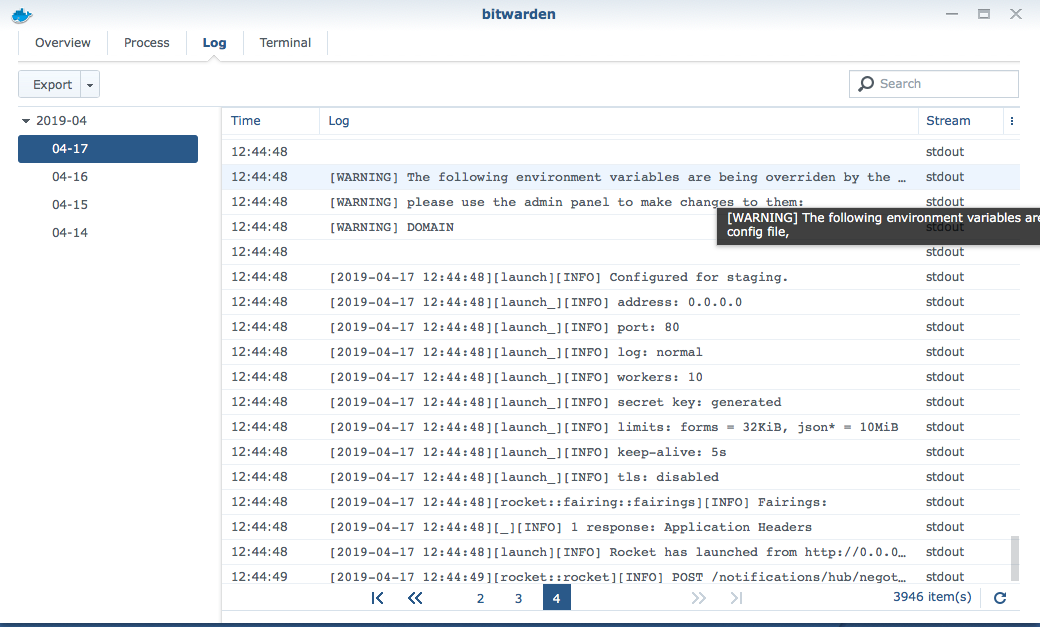
I have but still not working and I get a warning in my log (see attachments)
BobWs
on 17 Apr 2019
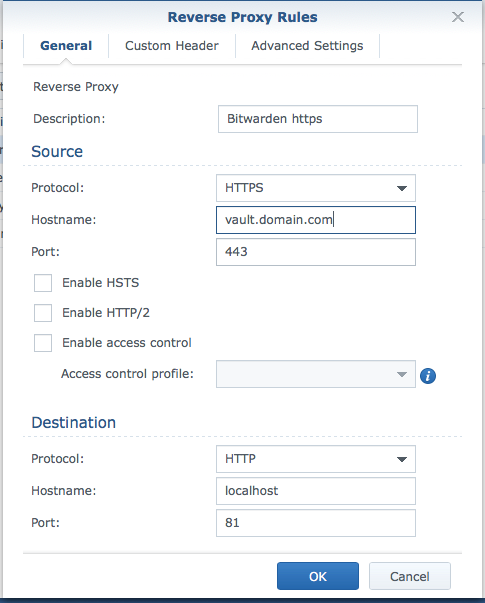
This is my reverse proxy setup (see attachment)
BobWs
on 17 Apr 2019
If you ever modified the config file from the admin panel, then you need to make the changes there, as the admin panel overrides the env variables.
Just set ADMIN_TOKEN to a random password and go to https://vault.domain.com/admin, from there you can modify the domain or just reset the config to defaults, that way the env variable would apply again.
dani-garcia
on 17 Apr 2019
When you try to download through Vault interface, turn on developer tools, switch to network tab and see how the download request fails. That can shed some light on what's going on.
mprasil
on 17 Apr 2019
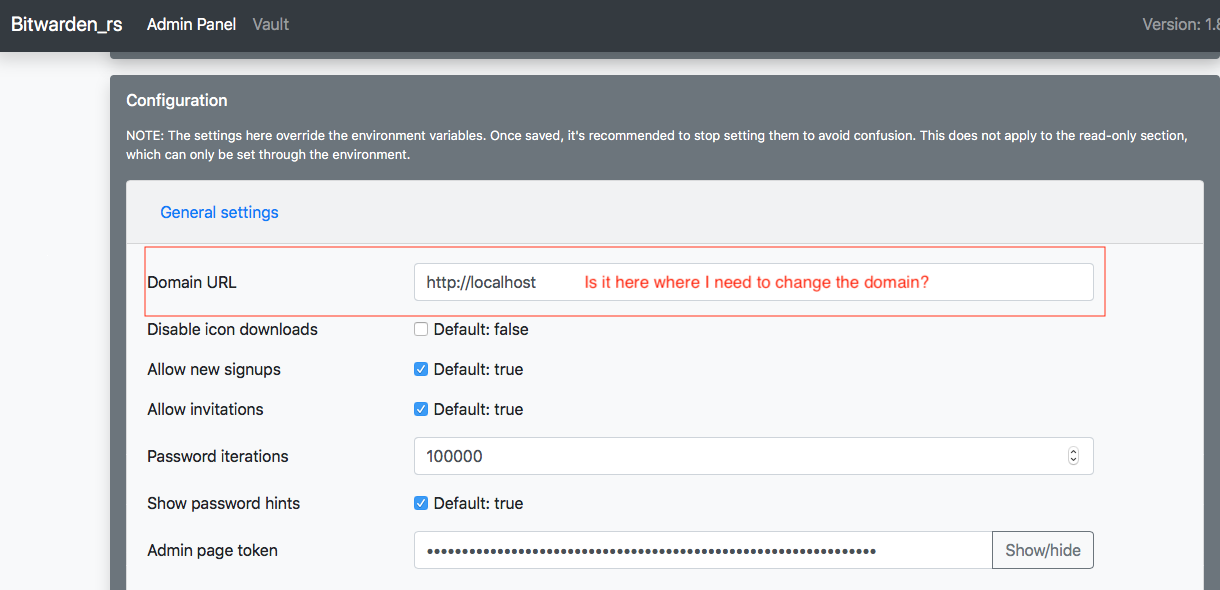
Do you mean this?
BobWs
on 17 Apr 2019
Yep, that's the place, change it there and click save, or click the reset button to delete the config and rely only on the environment variables.
dani-garcia
on 17 Apr 2019
When you try to download through Vault interface, turn on developer tools, switch to network tab and see how the download request fails. That can shed some light on what's going on.
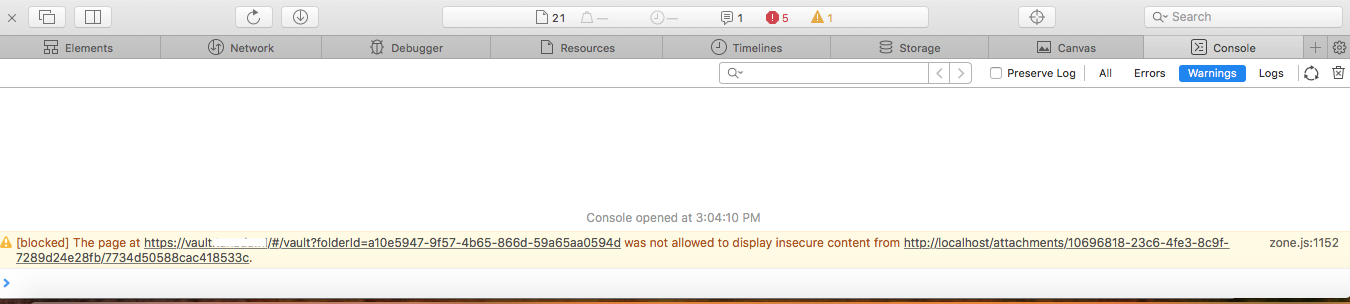
BobWs
on 17 Apr 2019
Okay it is working I can download the attachments from all the browsers and desktop apps.
But I still see an error in the console (see attachment)
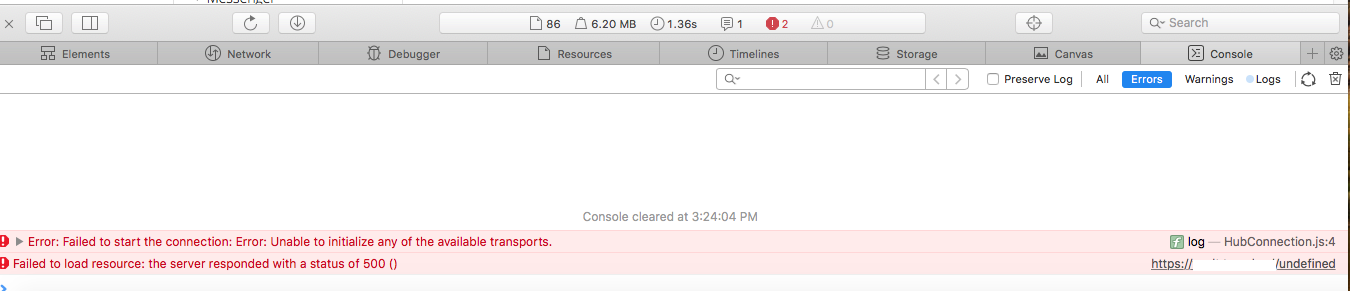
BobWs
on 17 Apr 2019
The first error is caused because you have websocket notifications enabled, but not configured correctly, which I believe can't be done with the Synology interface. You can disable it with the Websocket enabled from the admin panel, unchecking it.
The second error happens sometimes, i'm not sure what causes it, but it's harmless.
dani-garcia
on 17 Apr 2019
The websocket was disabled (see attachment) I cannot change anything because it is read only
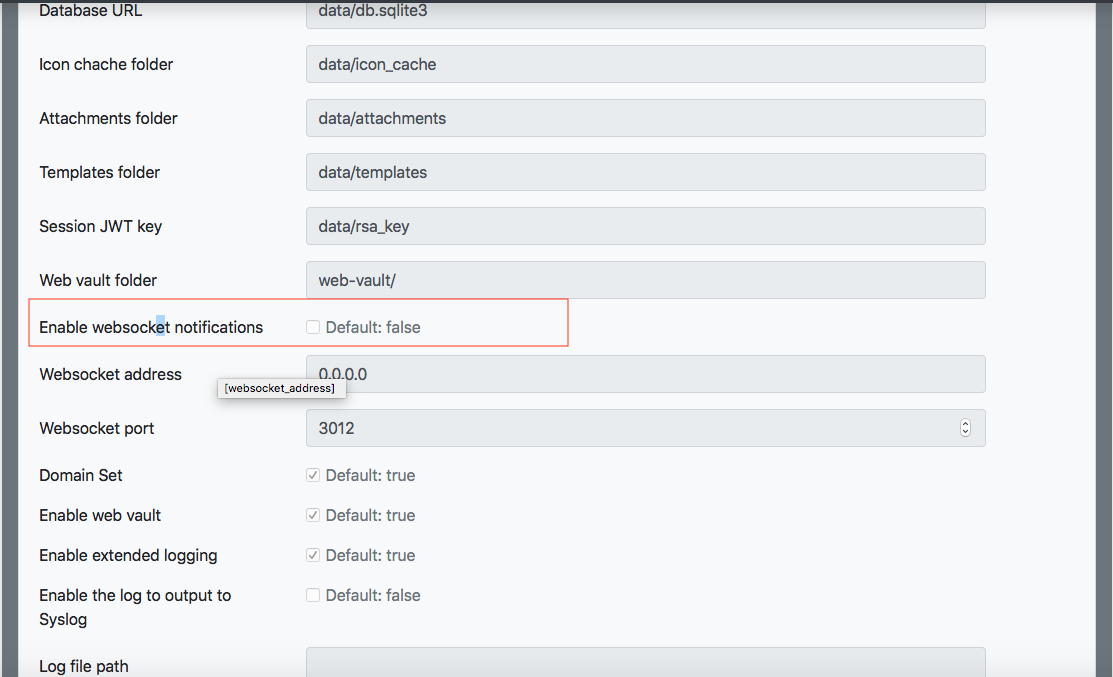
BobWs
on 17 Apr 2019
Ah, okay. Then it should be fine to ignore both errors!
dani-garcia
on 17 Apr 2019
okay thanks for your support!
BobWs
on 17 Apr 2019
@BobWs if you have a minute, add your device to the table here. Might help other Synology users to pick the correct image.
mprasil
on 17 Apr 2019
@BobWs if you have a minute, add your device to the table here. Might help other Synology users to pick the correct image.
Okay so I added my Synology to the table but it isn't showing?!
added this:
| Synology | DSM (DSM 6.2.1-23824 Update 6) | Docker-x64-17.05.0-0367 | mprasil/bitwarden:latest | OK |
|
BobWs
on 17 Apr 2019
Should be fixed now, it was missing a new line.
dani-garcia
on 17 Apr 2019
Hmmm. Having the same problems. Almost certainly because I'm not only using a reverse proxy, I'm also running at a suburl instead of a subdomain (see https://github.com/dani-garcia/bitwarden_rs/issues/241). Any idea where I'd look to patch the code which generates the link for the attachments so that I can add the suburl there as well?
Thanks in advance.
 skug67
on 6 May 2019
skug67
on 6 May 2019
The link for the attachments is generated from the DOMAIN env variable.
Are you configuring the DOMAIN variable correctly? In your case it should probably be something like http://www.domain.com/suburl.
Any errors in the browsers console or the network tab?
dani-garcia
on 7 May 2019
Wow. That was easy. Thanks for the quick response!
skug67
on 7 May 2019
Related issues
 jjlin
·
5Comments
jjlin
·
5Comments
 pageb018
·
3Comments
pageb018
·
3Comments
 esell
·
6Comments
esell
·
6Comments
 mrtargaryen
·
5Comments
mrtargaryen
·
5Comments
 tycho
·
5Comments
tycho
·
5Comments
Most helpful comment
okay thanks for your support!