Bitwarden_rs: U2F support should be implemented
When one attempts to enable U2F, they get an error in the web UI, as well as a log error from the app:
POST /api/two-factor/get-u2f application/json; charset=utf-8:
    => Error: No matching routes for POST /api/two-factor/get-u2f application/json; charset=utf-8.
    => Warning: Responding with 404 Not Found catcher.
    => Response succeeded.
I'll take a look at working on adding support for U2F as it's a mandatory feature for me!
 ChrisMacNaughton
All 25 comments
Is that the Yubikey based auth? Is there some way to test this without the actual HW key?
 mprasil
on 11 Jul 2018
mprasil
on 11 Jul 2018
I'm hoping to use it with a Yubikey U2F device, but it looks like Google has made a test device: https://github.com/google/u2f-ref-code
ChrisMacNaughton
on 11 Jul 2018
Hmm, the reason I hadn't implemented this before was that I didn't have the hardware to test on, and I didn't think to look for software devices, I'll have to check it out!
 dani-garcia
on 11 Jul 2018
dani-garcia
on 11 Jul 2018
It looks like there's already a crate that does u2f as well, which may be worth looking at: https://github.com/wisespace-io/u2f-rs
ChrisMacNaughton
on 12 Jul 2018
Looking at that crate, it seems to be a reasonably simple implementation, i'll see what I can do.
dani-garcia
on 12 Jul 2018
I also get an error when attempting to enable Duo. Is this something that has been looked at?
 shauder
on 12 Jul 2018
shauder
on 12 Jul 2018
At the moment only TOTP is available. I'm currently implementing U2F based on Google's spec and the crate mentioned before.
I don't know much about Duo, but after I finish with U2F, if there is interest for it, I'll investigate some.
dani-garcia
on 12 Jul 2018
Thanks, appreciate the work you and others have put into this. I only just found it and got it running but it is very fast and seems like a great alternative.
shauder
on 12 Jul 2018
@ChrisMacNaughton
I've implemented U2F support in the u2f branch (https://github.com/dani-garcia/bitwarden_rs/tree/u2f). I'd appreciate if you would be able to test it before merging it. It works for me on a virtual device on MacOS Chrome, but I lack a real device to test it on.
Note: You need to be using HTTPS and you need to set the DOMAIN environment variable to where bitwarden_rs is accessed from. For example
DOMAIN=https://bw.domain.tld
# or
DOMAIN=https://localhost:8443
Also, if you have any important data saved, backup first!
dani-garcia
on 12 Jul 2018
Hi, I've triggered build, once complete (will take about an hour) you can download and try the mprasil/bitwarden:u2f image. Note that I probably won't keep it around for too long after the changes are merged, so only use it to test the changes.
mprasil
on 13 Jul 2018
I get a couple of errors going through it, will attach screenshots in the UI in a moment, but here are the server logs:
GET /app/settings/views/settingsTwoStepU2f.html application/json:
    => Matched: GET /<p..>
    => Outcome: Success
    => Response succeeded.
POST /api/two-factor/get-u2f application/json; charset=utf-8:
    => Matched: POST /api/two-factor/get-u2f
    => Outcome: Success
    => Response succeeded.
POST /api/two-factor/u2f application/json; charset=utf-8:
    => Matched: POST /api/two-factor/u2f
thread '<unnamed>' panicked at 'called `Result::unwrap()` on an `Err` value: Error("missing field `challenge`", line: 1, column: 1296)', libcore/result.rs:945:5
note: Run with `RUST_BACKTRACE=1` for a backtrace.
On initial load of the u2f tab, after putting in my master password:
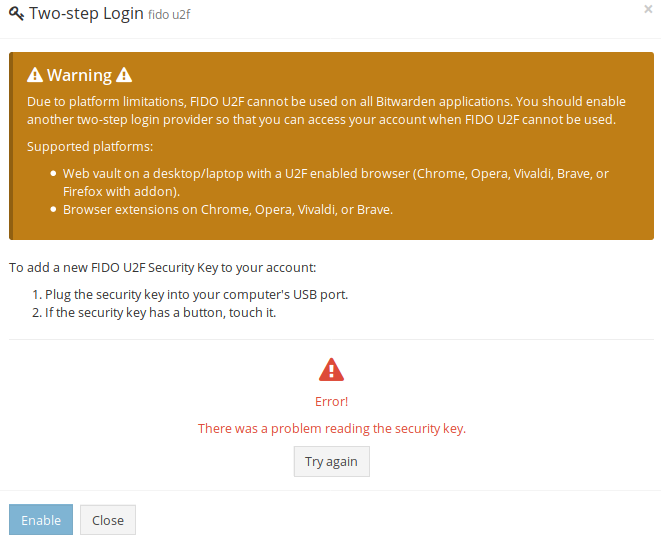
After clicking "Try Again," it progresses correctly to wait for my key. After I tap my key, I correctly get:
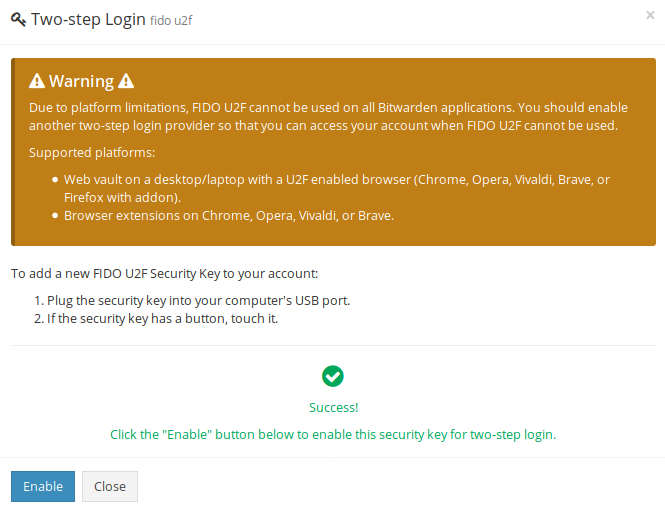
When I click "Enable", I get an error:
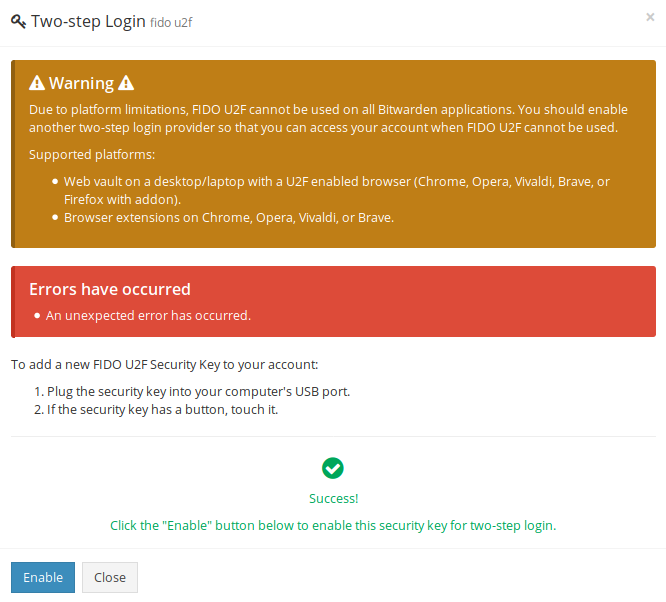
If I click "Enable" again, I get another error:

ChrisMacNaughton
on 13 Jul 2018
For reference, this is pulled down from your branch and built, not run in a container
ChrisMacNaughton
on 13 Jul 2018
It seems for some reason your browser is not sending the challenge field, hopefully it's something simple, like the browser sending the Challenge field instead.
In the latest version of the U2F branch I added some debug prints, to check what the server is receiving.
When everything is working correctly, this is what I see in the logs:
When registering the device
POST /api/two-factor/get-u2f application/json; charset=UTF-8:
    => Matched: POST /api/two-factor/get-u2f
    => Outcome: Success
    => Response succeeded.
GET /app-id.json:
    => Matched: GET /app-id.json
    => Outcome: Success
    => Response succeeded.
POST /api/two-factor/u2f application/json; charset=UTF-8:
    => Matched: POST /api/two-factor/u2f
RegisterResponse "{\"registrationData\":\"...\",\"version\":\"U2F_V2\",\"challenge\":\"...\",\"clientData\":\"...\"}"
    => Outcome: Success
    => Response succeeded.
When login
POST /identity/connect/token application/x-www-form-urlencoded; charset=UTF-8:
    => Matched: POST /identity/connect/token
Registrations "[{\"keyHandle\":[...],\"pubKey\":[...],\"attestationCert\":[...]}]"
ERROR: {"TwoFactorProviders":[4],"TwoFactorProviders2":{"4":{"Challenges":"[{\"appId\":\"https://<your_domain>/app-id.json\",\"challenge\":\"...\",\"keyHandle\":\"...\",\"version\":\"U2F_V2\"}]"}},"error":"invalid_grant","error_description":"Two factor required."}
Registrations "[{\"keyHandle\":[...],\"pubKey\":[...],\"attestationCert\":[...]}]"
    => Outcome: Success
    => Response succeeded
POST /identity/connect/token application/x-www-form-urlencoded; charset=UTF-8:
    => Matched: POST /identity/connect/token
challenge "{\"appId\":\"https://bw.dani.app/app-id.json\",\"challenge\":\"...\",\"timestamp\":\"2018-07-13T09:18:08.808352300Z\"}"
Registrations "[{\"keyHandle\":[...],\"pubKey\":[...],\"attestationCert\":[...]}]"
response "{\"keyHandle\":\"...\",\"clientData\":\"...\",\"signatureData\":\"...\"}"
O 0
    => Outcome: Success
    => Response succeeded.
I'd appreciate if you checked to make sure all the keys are present and using same casing.
dani-garcia
on 13 Jul 2018
Well, couldn't be easy, could it:
POST /api/two-factor/u2f application/json; charset=utf-8:
    => Matched: POST /api/two-factor/u2f
RegisterResponse "{\"clientData\":\"eyJjaGFsbGVuZ2UiOiJBYjBEbHlldGVIMTJzeG0wa3Z1OElMTFh6cHlLSStlWjM4Sm93bWQySTM4PSIsIm9yaWdpbiI6Imh0dHBzOi8vbG9jYWxob3N0OjgwMDAiLCJ0eXAiOiJuYXZpZ2F0b3IuaWQuZmluaXNoRW5yb2xsbWVudCJ9\",\"errorCode\":0,\"registrationData\":\"BQRNav7y50T0HH4Ij0b0abSNY8j76FrcuAD_r-4xiFmhjDaZNQPY3_ap-h3nxfCatSgSdh5WRZdtTi5ZRUCG-LWsQLkKKdK_9qXXr4bPQEwO_e9aoSUdD3c-a5VCIItrcrek8KOMKV5Rzsq-ebqBJyokRY9K5kLUyVRcCh8QtjhFqgEwggJEMIIBLqADAgECAgRVYr6gMAsGCSqGSIb3DQEBCzAuMSwwKgYDVQQDEyNZdWJpY28gVTJGIFJvb3QgQ0EgU2VyaWFsIDQ1NzIwMDYzMTAgFw0xNDA4MDEwMDAwMDBaGA8yMDUwMDkwNDAwMDAwMFowKjEoMCYGA1UEAwwfWXViaWNvIFUyRiBFRSBTZXJpYWwgMTQzMjUzNDY4ODBZMBMGByqGSM49AgEGCCqGSM49AwEHA0IABEszH3c9gUS5mVy-RYVRfhdYOqR2I2lcvoWsSCyAGfLJuUZ64EWw5m8TGy6jJDyR_aYC4xjz_F2NKnq65yvRQwmjOzA5MCIGCSsGAQQBgsQKAgQVMS4zLjYuMS40LjEuNDE0ODIuMS41MBMGCysGAQQBguUcAgEBBAQDAgUgMAsGCSqGSIb3DQEBCwOCAQEArBbZs262s6m3bXWUs09Z9Pc-28n96yk162tFHKv0HSXT5xYU10cmBMpypXjjI-23YARoXwXn0bm-BdtulED6xc_JMqbK-uhSmXcu2wJ4ICA81BQdPutvaizpnjlXgDJjq6uNbsSAp98IStLLp7fW13yUw-vAsWb5YFfK9f46Yx6iakM3YqNvvs9M9EUJYl_VrxBJqnyLx2iaZlnpr13o8NcsKIJRdMUOBqt_ageQg3ttsyq_3LyoNcu7CQ7x8NmeCGm_6eVnZMQjDmwFdymwEN4OxfnM5MkcKCYhjqgIGruWkVHsFnJa8qjZXneVvKoiepuUQyDEJ2GcqvhU2YKY1zBEAiBnZ3ezQzt-xm6R011hjPy33fy7rLPO7ASGDAKD6rRu7AIgKoy8tklvswg0yzlRm27DOswncqkcHAVp-Hb6I-KKf-4\",\"version\":\"U2F_V2\"}"
thread '<unnamed>' panicked at 'Can't parse DeviceResponse data: Error("missing field `challenge`", line: 1, column: 1295)', libcore/result.rs:945:5
note: Run with `RUST_BACKTRACE=1` for a backtrace.
The information sent from the browser is:
{"deviceResponse":"{\"clientData\":\"eyJjaGFsbGVuZ2UiOiJBYjBEbHlldGVIMTJzeG0wa3Z1OElMTFh6cHlLSStlWjM4Sm93bWQySTM4PSIsIm9yaWdpbiI6Imh0dHBzOi8vbG9jYWxob3N0OjgwMDAiLCJ0eXAiOiJuYXZpZ2F0b3IuaWQuZmluaXNoRW5yb2xsbWVudCJ9\",\"errorCode\":0,\"registrationData\":\"BQRNav7y50T0HH4Ij0b0abSNY8j76FrcuAD_r-4xiFmhjDaZNQPY3_ap-h3nxfCatSgSdh5WRZdtTi5ZRUCG-LWsQLkKKdK_9qXXr4bPQEwO_e9aoSUdD3c-a5VCIItrcrek8KOMKV5Rzsq-ebqBJyokRY9K5kLUyVRcCh8QtjhFqgEwggJEMIIBLqADAgECAgRVYr6gMAsGCSqGSIb3DQEBCzAuMSwwKgYDVQQDEyNZdWJpY28gVTJGIFJvb3QgQ0EgU2VyaWFsIDQ1NzIwMDYzMTAgFw0xNDA4MDEwMDAwMDBaGA8yMDUwMDkwNDAwMDAwMFowKjEoMCYGA1UEAwwfWXViaWNvIFUyRiBFRSBTZXJpYWwgMTQzMjUzNDY4ODBZMBMGByqGSM49AgEGCCqGSM49AwEHA0IABEszH3c9gUS5mVy-RYVRfhdYOqR2I2lcvoWsSCyAGfLJuUZ64EWw5m8TGy6jJDyR_aYC4xjz_F2NKnq65yvRQwmjOzA5MCIGCSsGAQQBgsQKAgQVMS4zLjYuMS40LjEuNDE0ODIuMS41MBMGCysGAQQBguUcAgEBBAQDAgUgMAsGCSqGSIb3DQEBCwOCAQEArBbZs262s6m3bXWUs09Z9Pc-28n96yk162tFHKv0HSXT5xYU10cmBMpypXjjI-23YARoXwXn0bm-BdtulED6xc_JMqbK-uhSmXcu2wJ4ICA81BQdPutvaizpnjlXgDJjq6uNbsSAp98IStLLp7fW13yUw-vAsWb5YFfK9f46Yx6iakM3YqNvvs9M9EUJYl_VrxBJqnyLx2iaZlnpr13o8NcsKIJRdMUOBqt_ageQg3ttsyq_3LyoNcu7CQ7x8NmeCGm_6eVnZMQjDmwFdymwEN4OxfnM5MkcKCYhjqgIGruWkVHsFnJa8qjZXneVvKoiepuUQyDEJ2GcqvhU2YKY1zBEAiBnZ3ezQzt-xm6R011hjPy33fy7rLPO7ASGDAKD6rRu7AIgKoy8tklvswg0yzlRm27DOswncqkcHAVp-Hb6I-KKf-4\",\"version\":\"U2F_V2\"}","masterPasswordHash":"UQopgcpIetL39Bcw7dz0+2A1mGiwGyGmHVNlsAnwgfc="}
It looks like the "masterPasswordHash" is sent from the server on the /api/two-factor/get-u2f request and returned on the POST to /api/two-factor/u2f
This is in Firefox 60.0.1, by the way
ChrisMacNaughton
on 13 Jul 2018
Alright, that's a bit strange, it must be different between browsers, because I tested on Chrome. I just updated the branch so the challenge parameter is ignored, we already have it in the database. With that it should work now (at least that part).
dani-garcia
on 13 Jul 2018
With the latest changes, I can register my yubikey, as well as login with it as the 2nd factor on firefox; however, in Chrome I get an interesting issue, my key isn't detected after entering my password, the server logs show:
POST /identity/connect/token application/x-www-form-urlencoded; charset=UTF-8:
    => Matched: POST /identity/connect/token
Registrations "[{\"keyHandle\":[14,146,33,79,92,140,234,36,175,171,59,54,51,213,80,212,151,140,92,188,105,135,24,138,119,137,98,172,72,190,170,41,76,103,3,140,187,198,43,90,175,35,80,128,181,212,214,253,31,52,240,80,12,91,160,125,82,62,19,119,1,48,237,153],\"pubKey\":[4,20,113,200,172,221,97,111,46,117,147,229,72,168,238,19,112,197,5,149,234,56,178,230,188,58,128,206,244,40,129,202,212,191,227,164,10,137,213,36,49,116,247,208,120,104,160,73,194,159,74,4,15,36,176,88,210,157,254,81,247,37,165,82,10],\"attestationCert\":[48,130,2,68,48,130,1,46,160,3,2,1,2,2,4,85,98,190,160,48,11,6,9,42,134,72,134,247,13,1,1,11,48,46,49,44,48,42,6,3,85,4,3,19,35,89,117,98,105,99,111,32,85,50,70,32,82,111,111,116,32,67,65,32,83,101,114,105,97,108,32,52,53,55,50,48,48,54,51,49,48,32,23,13,49,52,48,56,48,49,48,48,48,48,48,48,90,24,15,50,48,53,48,48,57,48,52,48,48,48,48,48,48,90,48,42,49,40,48,38,6,3,85,4,3,12,31,89,117,98,105,99,111,32,85,50,70,32,69,69,32,83,101,114,105,97,108,32,49,52,51,50,53,51,52,54,56,56,48,89,48,19,6,7,42,134,72,206,61,2,1,6,8,42,134,72,206,61,3,1,7,3,66,0,4,75,51,31,119,61,129,68,185,153,92,190,69,133,81,126,23,88,58,164,118,35,105,92,190,133,172,72,44,128,25,242,201,185,70,122,224,69,176,230,111,19,27,46,163,36,60,145,253,166,2,227,24,243,252,93,141,42,122,186,231,43,209,67,9,163,59,48,57,48,34,6,9,43,6,1,4,1,130,196,10,2,4,21,49,46,51,46,54,46,49,46,52,46,49,46,52,49,52,56,50,46,49,46,53,48,19,6,11,43,6,1,4,1,130,229,28,2,1,1,4,4,3,2,5,32,48,11,6,9,42,134,72,134,247,13,1,1,11,3,130,1,1,0,172,22,217,179,110,182,179,169,183,109,117,148,179,79,89,244,247,62,219,201,253,235,41,53,235,107,69,28,171,244,29,37,211,231,22,20,215,71,38,4,202,114,165,120,227,35,237,183,96,4,104,95,5,231,209,185,190,5,219,110,148,64,250,197,207,201,50,166,202,250,232,82,153,119,46,219,2,120,32,32,60,212,20,29,62,235,111,106,44,233,158,57,87,128,50,99,171,171,141,110,196,128,167,223,8,74,210,203,167,183,214,215,124,148,195,235,192,177,102,249,96,87,202,245,254,58,99,30,162,106,67,55,98,163,111,190,207,76,244,69,9,98,95,213,175,16,73,170,124,139,199,104,154,102,89,233,175,93,232,240,215,44,40,130,81,116,197,14,6,171,127,106,7,144,131,123,109,179,42,191,220,188,168,53,203,187,9,14,241,240,217,158,8,105,191,233,229,103,100,196,35,14,108,5,119,41,176,16,222,14,197,249,204,228,201,28,40,38,33,142,168,8,26,187,150,145,81,236,22,114,90,242,168,217,94,119,149,188,170,34,122,155,148,67,32,196,39,97,156,170,248,84,217,130,152,215]}]"
ERROR: {"TwoFactorProviders":[4],"TwoFactorProviders2":{"4":{"Challenges":"[{\"appId\":\"https://localhost:8443/app-id.json\",\"challenge\":\"V2FIZ015K2tPSUlWeVYyZktEL0hKNWJBQS8wNWQzZDBkNk95V3pjZUVYYz0=\",\"keyHandle\":\"DpIhT1yM6iSvqzs2M9VQ1JeMXLxphxiKd4lirEi-qilMZwOMu8YrWq8jUIC11Nb9HzTwUAxboH1SPhN3ATDtmQ\",\"version\":\"U2F_V2\"}]"}},"error":"invalid_grant","error_description":"Two factor required."}
Registrations "[{\"keyHandle\":[14,146,33,79,92,140,234,36,175,171,59,54,51,213,80,212,151,140,92,188,105,135,24,138,119,137,98,172,72,190,170,41,76,103,3,140,187,198,43,90,175,35,80,128,181,212,214,253,31,52,240,80,12,91,160,125,82,62,19,119,1,48,237,153],\"pubKey\":[4,20,113,200,172,221,97,111,46,117,147,229,72,168,238,19,112,197,5,149,234,56,178,230,188,58,128,206,244,40,129,202,212,191,227,164,10,137,213,36,49,116,247,208,120,104,160,73,194,159,74,4,15,36,176,88,210,157,254,81,247,37,165,82,10],\"attestationCert\":[48,130,2,68,48,130,1,46,160,3,2,1,2,2,4,85,98,190,160,48,11,6,9,42,134,72,134,247,13,1,1,11,48,46,49,44,48,42,6,3,85,4,3,19,35,89,117,98,105,99,111,32,85,50,70,32,82,111,111,116,32,67,65,32,83,101,114,105,97,108,32,52,53,55,50,48,48,54,51,49,48,32,23,13,49,52,48,56,48,49,48,48,48,48,48,48,90,24,15,50,48,53,48,48,57,48,52,48,48,48,48,48,48,90,48,42,49,40,48,38,6,3,85,4,3,12,31,89,117,98,105,99,111,32,85,50,70,32,69,69,32,83,101,114,105,97,108,32,49,52,51,50,53,51,52,54,56,56,48,89,48,19,6,7,42,134,72,206,61,2,1,6,8,42,134,72,206,61,3,1,7,3,66,0,4,75,51,31,119,61,129,68,185,153,92,190,69,133,81,126,23,88,58,164,118,35,105,92,190,133,172,72,44,128,25,242,201,185,70,122,224,69,176,230,111,19,27,46,163,36,60,145,253,166,2,227,24,243,252,93,141,42,122,186,231,43,209,67,9,163,59,48,57,48,34,6,9,43,6,1,4,1,130,196,10,2,4,21,49,46,51,46,54,46,49,46,52,46,49,46,52,49,52,56,50,46,49,46,53,48,19,6,11,43,6,1,4,1,130,229,28,2,1,1,4,4,3,2,5,32,48,11,6,9,42,134,72,134,247,13,1,1,11,3,130,1,1,0,172,22,217,179,110,182,179,169,183,109,117,148,179,79,89,244,247,62,219,201,253,235,41,53,235,107,69,28,171,244,29,37,211,231,22,20,215,71,38,4,202,114,165,120,227,35,237,183,96,4,104,95,5,231,209,185,190,5,219,110,148,64,250,197,207,201,50,166,202,250,232,82,153,119,46,219,2,120,32,32,60,212,20,29,62,235,111,106,44,233,158,57,87,128,50,99,171,171,141,110,196,128,167,223,8,74,210,203,167,183,214,215,124,148,195,235,192,177,102,249,96,87,202,245,254,58,99,30,162,106,67,55,98,163,111,190,207,76,244,69,9,98,95,213,175,16,73,170,124,139,199,104,154,102,89,233,175,93,232,240,215,44,40,130,81,116,197,14,6,171,127,106,7,144,131,123,109,179,42,191,220,188,168,53,203,187,9,14,241,240,217,158,8,105,191,233,229,103,100,196,35,14,108,5,119,41,176,16,222,14,197,249,204,228,201,28,40,38,33,142,168,8,26,187,150,145,81,236,22,114,90,242,168,217,94,119,149,188,170,34,122,155,148,67,32,196,39,97,156,170,248,84,217,130,152,215]}]"
    => Outcome: Success
    => Response succeeded.
and chrome's logs show a 400 on the above request
ChrisMacNaughton
on 13 Jul 2018
That sounds more like a client problem, that request is the user and password login one, that returns 400 and that error to indicate to the client the need for two-factor auth.
At that point the browser should show the U2F auth page, which should detect the key.
Is there any message in Chromes console?
It should print something like:
- POST domain/identity/connect/token 400 Bad Request
- listening for u2f key...
And after that, it may print an error number.
Does this U2F demo work in Chrome for you?
dani-garcia
on 13 Jul 2018
In Chrome's console, I see:
angular.min.js?v=y2a0i8:110 POST https://localhost:8000/identity/connect/token 400 (Bad Request)
(anonymous) @ angular.min.js?v=y2a0i8:110
q @ angular.min.js?v=y2a0i8:105
(anonymous) @ angular.min.js?v=y2a0i8:102
(anonymous) @ angular.min.js?v=y2a0i8:137
$digest @ angular.min.js?v=y2a0i8:148
(anonymous) @ angular.min.js?v=y2a0i8:151
e @ angular.min.js?v=y2a0i8:48
(anonymous) @ angular.min.js?v=y2a0i8:51
setTimeout (async)
h.defer @ angular.min.js?v=y2a0i8:51
$evalAsync @ angular.min.js?v=y2a0i8:151
(anonymous) @ angular.min.js?v=y2a0i8:135
k @ angular.min.js?v=y2a0i8:137
then @ angular.min.js?v=y2a0i8:139
d @ angular.min.js?v=y2a0i8:100
n @ angular.min.js?v=y2a0i8:102
Resource.(anonymous function) @ lib.min.js?v=y2a0i8:3719
(anonymous) @ app.min.js?v=y2a0i8:5795
Promise.then (async)
_service.logIn @ app.min.js?v=y2a0i8:5769
$scope.login @ app.min.js?v=y2a0i8:722
(anonymous) @ angular.min.js?v=y2a0i8:259
(anonymous) @ angular.min.js?v=y2a0i8:264
e @ angular.min.js?v=y2a0i8:287
$eval @ angular.min.js?v=y2a0i8:151
$apply @ angular.min.js?v=y2a0i8:151
(anonymous) @ angular.min.js?v=y2a0i8:287
dispatch @ jquery.min.js?v=y2a0i8:3
q.handle @ jquery.min.js?v=y2a0i8:3
app.min.js?v=y2a0i8:926 listening for u2f key...
bw.min.js?v=y2a0i8:663 Extension JS API Version:  1.1
app.min.js?v=y2a0i8:937 2
app.min.js?v=y2a0i8:926 listening for u2f key...
app.min.js?v=y2a0i8:937 2
app.min.js?v=y2a0i8:926 listening for u2f key...
app.min.js?v=y2a0i8:937 2
app.min.js?v=y2a0i8:926 listening for u2f key...
app.min.js?v=y2a0i8:937 2
app.min.js?v=y2a0i8:926 listening for u2f key...
app.min.js?v=y2a0i8:937 2
app.min.js?v=y2a0i8:926 listening for u2f key...
app.min.js?v=y2a0i8:937 2
app.min.js?v=y2a0i8:926 listening for u2f key...
app.min.js?v=y2a0i8:937 2
app.min.js?v=y2a0i8:926 listening for u2f key...
app.min.js?v=y2a0i8:937 2
app.min.js?v=y2a0i8:926 listening for u2f key...
app.min.js?v=y2a0i8:937 2
app.min.js?v=y2a0i8:926 listening for u2f key...
app.min.js?v=y2a0i8:937 2
app.min.js?v=y2a0i8:926 listening for u2f key...
app.min.js?v=y2a0i8:937 2
app.min.js?v=y2a0i8:926 listening for u2f key...
app.min.js?v=y2a0i8:937 2
...
The linked Yubikey demo works fine for in Chrome using the same U2F device
ChrisMacNaughton
on 13 Jul 2018
According to https://developers.yubico.com/U2F/Libraries/Client_error_codes.html, that's probably an AppId error.
Do you have the DOMAIN env variable set?
If you go to https://<domain>/app-id.json, the first id should be equal to https://<domain>
dani-garcia
on 13 Jul 2018
DOMAIN=https://localhost:8000 ROCKET_TLS={certs="/home/chris/code/certs/cert.pem",key="/home/chris/code/certs/key.pem"} cargo run is my invocation; if I set DOMAIN to _not_ include the https, firefox doesn't work either (and Chrome still won't)
ChrisMacNaughton
on 13 Jul 2018
Well, after some searching I found this (https://stackoverflow.com/questions/33610042/u2f-integration-with-multiple-facetids-without-chrome-extension-but-u2f-api-js).
According to that, U2F Facets shouldn't work in self signed certificates, and I was trying with a Let's Encrypt certificate, no wonder we were getting different results!
I could create an option to set the AppID to be a single URL, but then the mobile apps would stop working.
Is there any chance you have an actual domain to test it on?
dani-garcia
on 13 Jul 2018
I do, will get back to you in a bit
ChrisMacNaughton
on 13 Jul 2018
Good stuff; chrome and firefox handle it correctly when you use a real certificate! I guess chrome treats the self signed differently since you "accept" the self-signed cert in firefox but don't in chrome
ChrisMacNaughton
on 13 Jul 2018
Great! Good to know! If it's all fixed I'll merge the branch into master and close this. If any other problem appears, simply reopen this issue or create a new one.
dani-garcia
on 13 Jul 2018
Related issues
 SpinB
·
3Comments
SpinB
·
3Comments
 Jungack
·
3Comments
Jungack
·
3Comments
 ghost
·
6Comments
ghost
·
6Comments
 newkind
·
4Comments
newkind
·
4Comments
 kspearrin
·
5Comments
kspearrin
·
5Comments
Most helpful comment
Great! Good to know! If it's all fixed I'll merge the branch into master and close this. If any other problem appears, simply reopen this issue or create a new one.