Hi there, love BitBar. I've just started using the href option, but what's missing (for me at least), is a combination of href and a text input field, so you can search on certain user-defined websites or webpages, e.g. add a "search-item" in the BitBar menu—possible format would be | search=URL—, click on it, a window pops up, or (better) a text input field opens within the BitBar menu, and you can enter a term like "bit bar", and it will be added as "bit+bar" to a search URL that the user has predefined for that menu item (see example below), and the full URL is then sent to the default browser. I guess you could concoct a workaround, e.g. call a shell script instead that runs an osascript which opens a window where you can input your search term, but that kinda defeats the purpose of BitBar. ;)
Another possibility would also be to listen for click&ALT… if you click on a menu item, then it's just a standard href, if you click on it and press ALT, you get the search function.
Full format e.g. (for click _and_ click&ALT, with in this case @@@ as string for the search term):
$ echo "GitHub | href=https://github.com search=https://github.com/search?utf8=✓&q=@@@ color=whatever"
PS: If possible, an additional feature could be that if you press ALT the text changes, in this example from "GitHub" to "Search GitHub"… don't know how you could implement it, though.
 JayBrown
All 9 comments
Updated the above post: CMD > ALT, and added @@@ for the search term string.
JayBrown
on 14 Feb 2016
its possible to do this now with an Applescript call in the same plug-in script based on a param and passing the text result entered to a search, like Google, etc. Example:
#!/bin/sh

function getSearchText ()
{

searchString=$(/usr/bin/osascript << EOF
set theString to text returned of (display dialog "What are you searching for?" default answer "" buttons {"Search","Cancel"} default button 1)
EOF)

if [ ! -z "$searchString" ]; then
    textToSearch=$(echo "$searchString" | perl -MURI::Escape -wlne 'print uri_escape $_')
else
    exit
fi

}

if [ "$1" == "search" ]; then
    getSearchText
    open https://www.google.com/#q=$textToSearch
fi


echo "Web Search
---
Go to Google| href=https://www.google.com
Search Google| alternate=true terminal=false bash=$0 param1=search"
I know it would be better somehow built in, but the above is pretty self contained since its not trying to call an external script to do the text input.
 mm2270
on 1 Mar 2016
mm2270
on 1 Mar 2016
@mm2270 Nice! I could really use this for my downloads plugin.
 iosdeveloper
on 1 Mar 2016
iosdeveloper
on 1 Mar 2016
Is there any chance that the above script could be translated to python?
Thank you!
 frakman1
on 27 Jun 2017
frakman1
on 27 Jun 2017
You can run AppleScript within a python script, so that shouldn't really be a problem:
https://stackoverflow.com/questions/2940916/how-do-i-embed-an-applescript-in-in-a-python-script
JayBrown
on 27 Jun 2017
Unfortunately, it is posing quite a problem. When I run my script from the terminal with the right parameter, it works as expected and I get the text input dialog box:
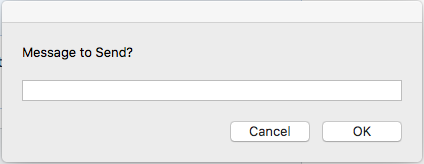
However, when I run it from within the plugin, the dialog box is wrong:
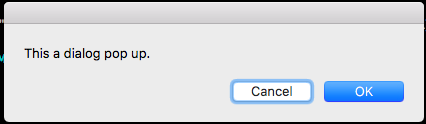
The examples in the link didn't make any sense so I am using this form:
import subprocess

def run_script(script):
    return subprocess.Popen([script], stdout=subprocess.PIPE, shell=True).communicate()[0].strip()

cmd = "osascript -e 'set T to text returned of (display dialog \"Message to Send?\" buttons {\"Cancel\", \"OK\"} default button \"OK\" default answer \"\")'

print run_script(cmd)
As you can see, nowhere in my script do the words "This a dialog popup" show up. Again, this works when running in Terminal, but not through the BitBar plugin.
@iosdeveloper @JayBrown @mm2270
frakman1
on 28 Jun 2017
I found out what was going on. Apparently, the bash handler/parser can't handle ANSI codes which was causing the problem. Instead of terminal=false, I was getting terminal is: false\^[[0m
class bcolors:
   GREEN = '\033[32m'
   ENDC = '\033[0m'

print "---- " + bcolors.GREEN + "<Custom Message> | image="+str(imsgicon).encode("utf-8") + " bash=%s param1=-t param2=%s terminal=false" % (sys.argv[0], d['Mobile']) + bcolors.ENDC
I had to add a + " " + before the bcolors.ENDC before it would finally work.
UPDATE
Putting the + bcolors.ENDC after the <Custome Message> and before the | image is the better way to do it.
frakman1
on 2 Jul 2017
On this same topic, and using the sample code above to get user input, I always get an error when a user types an apostrophe in the message being inputed. So Typing I'm always causes this error when I print the return value of run_script(cmd):
I'm on my way
/bin/sh: -c: line 0: unexpected EOF while looking for matching `"'
/bin/sh: -c: line 1: syntax error: unexpected end of file
It looks like a shellcheck thing but I don't know how to resolve it in python. Is there a standard way to sanitize user input that is retrieved using a dialog box?
frakman1
on 5 Jul 2017
I was able to work around this issue by replacing the apostrophe ' with the angled apostrophe ’ at the end of the function like this:
def run_script(script):
    return (subprocess.Popen([script], stdout=subprocess.PIPE, shell=True).communicate()[0].strip()).replace("'", "’")
Related issues
 jakeoid
·
3Comments
jakeoid
·
3Comments
 phaistonian
·
4Comments
phaistonian
·
4Comments
 reteps
·
5Comments
reteps
·
5Comments
 insiderq
·
10Comments
insiderq
·
10Comments
 pablo-zocdoc
·
6Comments
pablo-zocdoc
·
6Comments
Most helpful comment
its possible to do this now with an Applescript call in the same plug-in script based on a param and passing the text result entered to a search, like Google, etc. Example:
I know it would be better somehow built in, but the above is pretty self contained since its not trying to call an external script to do the text input.