Bit: Using a bit component in another Bit component
Question:
I have a ui library of components and I've added them all to bit.
My ui components repo is using Storybook.
Each component folder includes a ...story.js file, and some of the stories are using other components (from sibling folders), and this is used only for the purpose of the story.
Here's the component's directory structure:
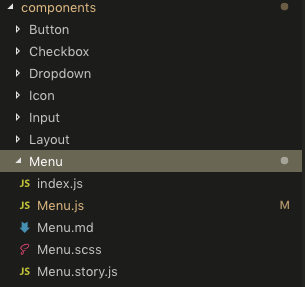
Menu.story.js
import { Menu } from "./Menu";
import { Icon } from "../Icon"; // needed only for this story
import { Button } from "../Button"; // needed only for this story
As you can see, the path is relative, but.. this component is being imported in another App (different repo), and the story should run there also.
The other App also should use the imported stories, since it also uses Storybook.
The other App also has the Icon & Button bit components imported, luckily the same relative paths above should work.
After I run bit add src/components/Menu
Seem I must also run bit tag --all so I could export that component.
Not finally running bit export ... but the exported component does now show up as expected. It does not have any index.js, or any other js file in the path (unlike all the other components I've exported):
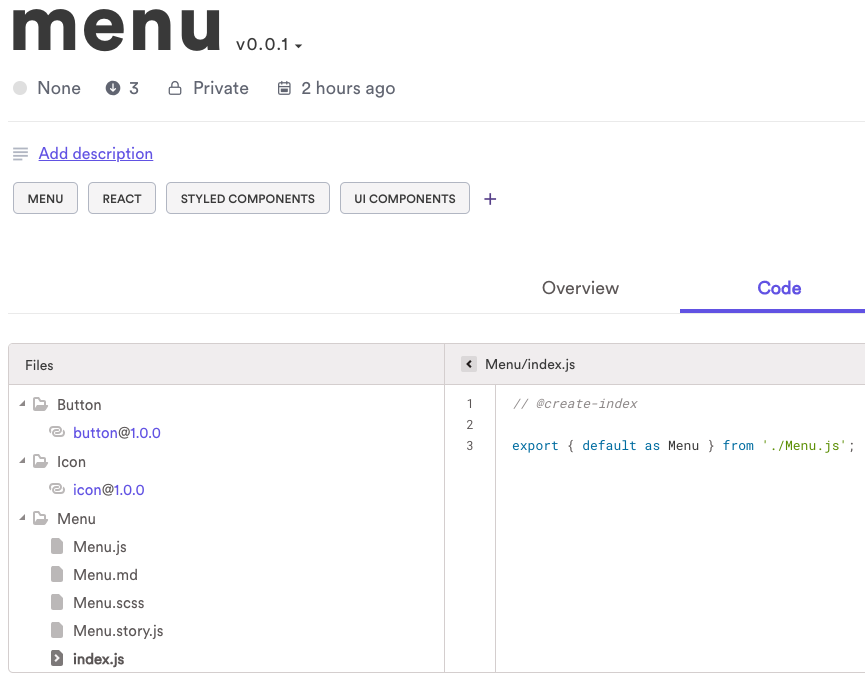
Why are the actual Menu files are not in the _root_ path?
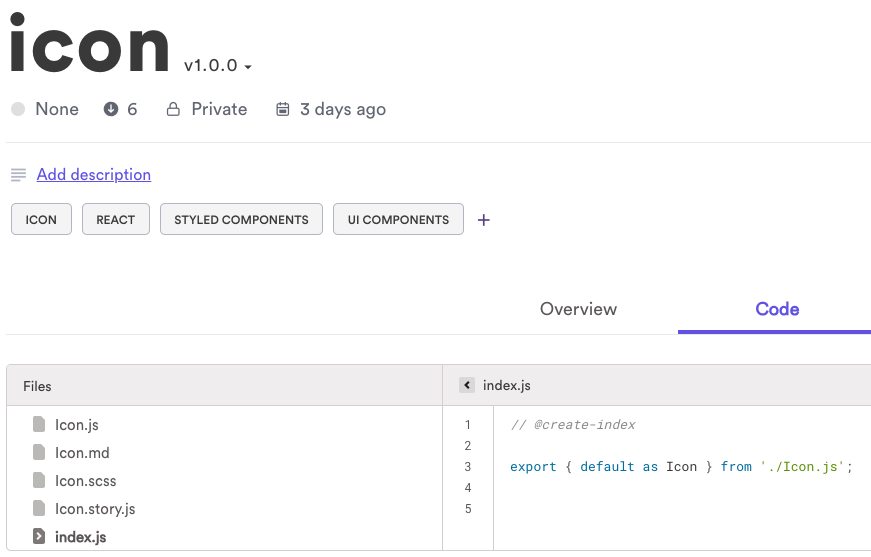
Other components structure is as expected:
 yairEO
All 19 comments
The tree viewer adds folders and links if there are any relative file imports to other components. When you open the menu folder, does it show the files correctly? What is the content of the other dirs (icons, button).
You can see how Bit tracks each component before you tag or export by running bit show menu.
On a side note, I'd recommend tracking the storybook files with --tests. The main benefit of it is that it allows Bit to build a devDependencies graph for the component. Meaning that only when you import the component you get the dependencies that defined in the stories, and if you use npm i, you only get the dependencies.
So in your case - bit add src/components/menu --tests menu.story.js.
 itaymendel
on 22 May 2019
itaymendel
on 22 May 2019
But why are the actual menu component files in a folder called "Menu" and are not on the root path of the component? I want them to be in the root. Being in the root causes no issues and I don't see any reason why not.
I need this for consistency when importing components by others, so each component would be imported the same way. why should menu be different when importing?
import {Layout} from '../@layout'     // good, exported root path index.js
import {Icon}   from '../@icon'       // good, exported root path index.js
import {Menu}   from '../@menu/Menu'  // ← no need for nested path
I would like to suggest adding some project-scoped bit configuration where global add patterns could be defined, so for example every story file (regex) will be automatically added with --tests.
Also, I've added all of my components at once, as shown in most tutorials, so how could I have know about this devDependencies suggestion? I simply had no notion of this, so I guess now I would have to remove all my bit components and re-add them? (what would be the best way to fix this for all packages retro?)
And, could I have used the --tests option (for _story_ files) when adding all packages with
bit add src/components/*
?
I don't want to manually type a custom command for each component separately
yairEO
on 22 May 2019
There's no need to remove all components and track fresh ones.
bit add works by appending "layers" of files to track. So if you run bit add --tests src/components/menu/menu.story.js --id menu for example, Bit will track menu.story.js as a test file.
By the way, if you are having trouble with the CLI, you can use the programmatic API for adding components.
When you import a component Bit points to the correct entry point of the component by generating a package.json file for the component which you then require by import Comp from '@bit/owner.collection.comp'. I think that in terms of consistency and usability its a bit better.
There's an example here (by the way, once you export components, you can use the same absolute import statement in the project the component was exported from).
This is so import statements stay the same, no matter if you use bit import or npm install (for cases where the consumer uses npm i as first, but then wants to modify the component so they run bit import, and move back to use npm package by running bit export --eject).
As for the tutorials, sadly the one in the blog does not contain any tests at all. I've written a very detailed one and added it to the docs about 2 months ago. Perhaps it'll provide you with the missing information.
itaymendel
on 22 May 2019
Thanks for the detailed answer, helpful information.
But what about my question regarding Menu being exported in a nested way, which does not reflect the real & desired component directory structure? (updated the screenshot at the top of this thread)
Or should I replace all of my bit relative imports to global ones?
// current:
import {Menu} from '../@menu/Menu'

// better:
import Menu from '@bit/owner.collection.menu'
_That would indeed solve any path issues since I wouldn't care about how bit structure is generated per component._
Are there any implications converting everything to this format?
yairEO
on 22 May 2019
For some reason importing directly from the bit collection doesn't work:
import Menu from '@bit/owner.collection.menu'
// Attempted import error: '@bit/✱✱✱✱.✱✱✱✱.menu' does not contain a default export (imported as 'Menu').
nor this
import {Menu} from '@bit/owner.collection.menu'
// "export 'default' (reexported as 'Menu') was not found in './Menu.js'
Even though the overview tab in the component (in bit.dev) shows the first use example.
I think bit is trying to fetch Menu.js from the root path as well and is not aware it isn't there.
yairEO
on 22 May 2019
Does the package.json of the imported component points to the correct entry point, and that entry point links to the correct file?
Can you give me read permissions so that I can try and reproduce it locally? my email is itayATbit.dev (you know where the @ should be :) )
itaymendel
on 22 May 2019
appears so..
"main": "Menu/index.js"
I'll give you permissions now, thanks!
yairEO
on 22 May 2019
Added.
BTW - when adding user permissions from _bit.dev_, the email field is not trimmed thus does not pass validations.
I got an error when pasting your email with a trailing space (ticket should be opened separately)
yairEO
on 22 May 2019
I think that you forgot to add a compiler to your component, as the code is in es6 and needs to be transpilied.
Please run bit import bit.envs/compilers/react --compiler in your project. Afterward run bit status to see that all components are modified (as they will have a compiler defined for them).
Now tag and export, and update the version in the consuming project to see if that helps.
I did it locally and was able to properly import menu.
itaymendel
on 22 May 2019
Why must I add a compiler? I thought it's an optional step.
I don't want the code to be transpiled.. Why would I want that?
I cannot understand why is that necessary, and why bit has created the folder "Menu".. It seems like a bug. if it hadn't have done that, and keeps the files structure as is, it would be better, no?
yairEO
on 23 May 2019
I feel there should more documentation regarding frequently asked questions, perhaps a page listing common issues and how to solve them
yairEO
on 23 May 2019
A compiler is needed for code transpilation. It is not mandatory for vanilla JS (and Angular, but this is for completely different reasons), other than that - it's pretty important.
If you are shipping uncompiled code, the consumer will have to make sure to compile the components. Meaning that consumers can install components with npm and use them as packages. So there's no need for bit import. And even if you import the code with Bit, it comes with the compiler, so a consumer that uses es5 can require a component that is written in es6, as Bit ensures the component is transpiled to es5.
Bit creates the directories it needs to support the relative require paths that you use in your code. This is so that Bit will not need to try and modify the import statements in the code.
Bit creates the dir structure that supports all the required paths. Then, if in these paths contains components, Bit creates "link files" that import and export the component that is expected to be there.
itaymendel
on 23 May 2019
Thanks for the detailed answer (though I already have understanding of everything that was said)
But, I have some questions:
why would anyone prefer consume a bit component as an NPM/Yarn package rather then Bit, there is no benefit in limiting yourself, over adding a component using
bit import..I've imported components into my project using
bit import..., and they show in the correct directory in my/src/components, but why are they also being created inside thenode_modules/@bitdirectory? it's very odd.Why the docs mention
bit.jsonwhere in fact the bit configuration is written inside the mainpackage.jsonfile? it's very confusing where docs and articles mentionbit.jsonbut the file is non-existentI've created a collection of components and had imported them to a project.
I want to copy all the components in a collection to a new collection in anotherbit.devprofile, what's the fastest way of doing that?is
import Menu from '@bit/owner.collection.menu'the suggested way and not
import {Menu} from '../@menu/Menu'? Because it's clearly taking the component code fromnode_modulesdirectory (as mentioned in(2)), so how can _bit_ know if I modify an imported component in/src/components/menu. How can both exist?
I will probably have more questions soon, thanks!
yairEO
on 23 May 2019
- It's just a feature. The consumer can decide if they want it. Some people feel its much simpler to use.
- The dir Bit creates in the
nodem_modulescontains a link to the imported component. This is so a consumer could use absolute import instead of relative one (@bit/componentinstead of../../../component). - It's a rather new change (moving the configuration from
bit.jsontopackage.json). We've tried to update all the docs, perhaps we've missed a few places. You can still move thebitobject to a file namedbit.json. - You can re-export the components to a new collection. At the moment moving of content is not available, as it can change the dependency graphs of the components. We do plan on handling it in the near future. I don't have an ETA for it.
- If you are modifying a component, you can run
bit build(or usebit watchto automate the rebuild process). Bit then rebuild the dist from the modified source. You can also import components with the--ignore-distflag and skip that feature completely.
itaymendel
on 23 May 2019
@yairEO
Some more info:
- There are advantages when using npm/yarn.
First, you can use semver for updating automatically. (we will soon add more powerful mechanism to update imported components)
Second, if this component is not yours, or you don't change it or know it well, you probably don't want it in your source code. you probably don't want to import it, don't want to commit it to your vcs. You just want to use it. - If you have a workspace and you just want to re-export them all to a new collection, you can use my extension that can be found here. keep in mind that this extension is messing with the internal files of bit, and it's not a formal one, so make sure to backup everything before using it.
It will reset the state of your workspace to a state after the bit add but before tag and export. so you should have a bunch of components as new after running it. then you can tag and export them to a new collection. (no links / refs or anything else will point to the old collection, they will be completely new components). - bit will create a symlink from the node_modeuls to the source folder. so you can require it with @bit/ from the node_modules, change the source code, bit build and the changes will be applied even though you require it from the node_modules.
Using an absolute path is more simple and works with both bit import and npm install. and it also has some other advantages like creating a more flat tree for your components, since bit doesn't need to maintain all the relative requires inside your component.
 GiladShoham
on 23 May 2019
GiladShoham
on 23 May 2019
Thanks a lot @itaymendel and @GiladShoham.
The "puzzle" in my head is now more complete.
yairEO
on 24 May 2019
I have a huge problem. I am changing components which were imported, locally, and the changes aren't applied. This is because, as I said in (2), there is a duplication of code in node_modules/@bit/... so when I change the component which is in the /src/comp directory, then same file changes are not being applied in component's files in node_modules/@bit/..
I've tried running bit watch as suggested by you in this discussion, and indeed it detected a component change: ...index.js has been changed, calling build..
But still the code in node_modules/@bit/.. does not update to reflect changes in the "real" component's code in /src/comp
What should I do?
yairEO
on 26 May 2019
@yairEO We just found out about few bugs with the bit watch command. Sometimes it's not working as expected.
If you can open a new issue about it with steps to reproduce, it will be awesome.
I'm working to solve this.
GiladShoham
on 26 May 2019
@yairEO We just found out about few bugs with the
bit watchcommand. Sometimes it's not working as expected.
If you can open a new issue about it with steps to reproduce, it will be awesome.
I'm working to solve this.
Are there any updates? This seems like an important issue.
 DylanCulfogienis
on 29 Dec 2020
DylanCulfogienis
on 29 Dec 2020
Related issues
 AlexanderKaran
·
22Comments
AlexanderKaran
·
22Comments
 DeividZavala
·
15Comments
DeividZavala
·
15Comments
 ranm8
·
14Comments
ranm8
·
14Comments
 nsams
·
12Comments
nsams
·
12Comments
 poriaz
·
15Comments
poriaz
·
15Comments
Most helpful comment
@yairEO We just found out about few bugs with the
bit watchcommand. Sometimes it's not working as expected.If you can open a new issue about it with steps to reproduce, it will be awesome.
I'm working to solve this.