Bit: Wrong absolute paths to gifs used in component
Expected Behavior
External asset of component (gif) should be positioned on the right folder.
Actual Behavior
External assest in wrong folder or path to asset (gif) is wrong.
Steps to Reproduce the Problem
I developed following component: https://bit.dev/nadzic/test/loader/~code (exported it with omg_loader.gif) and tried to reuse in another project. So when I reuse it, I get following error:

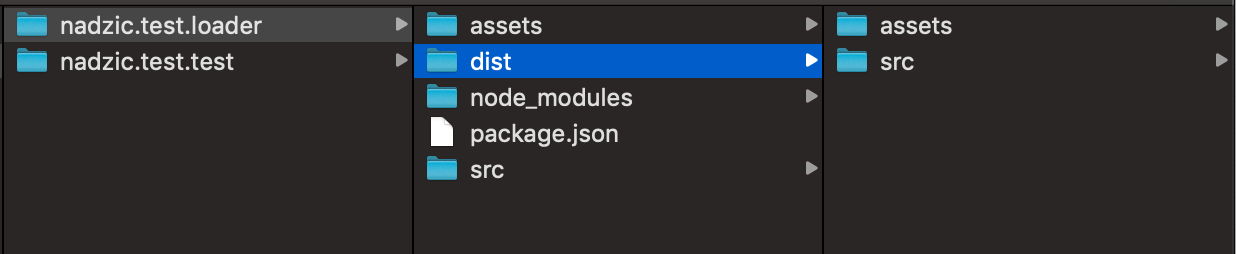
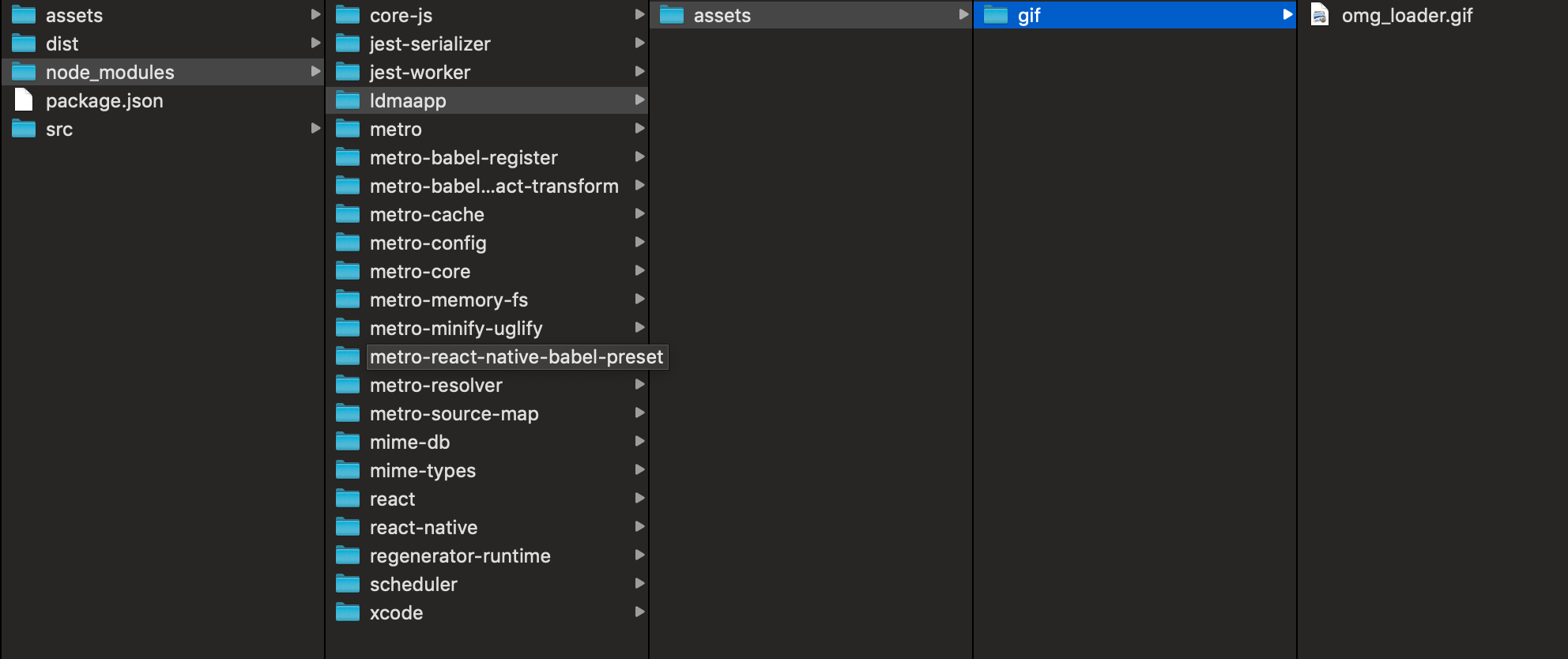
Because the omg_loader.gif is not in wanted folder. The folder structure looks like this:
Specifications
- Bit version: 14.0.6
- Node version: v8.6.0
- npm / yarn version: 6.4.1
- Platform: Mac os X
- Bit compiler (include version): bit.envs/compilers/[email protected]
- Bit tester (include version): bit.envs/testers/[email protected]
Is there only an option to use relative links for resources or is there any option that we keep absolute urls? For both apps I tried to set app name ldmaapp.
 nadzic
All 8 comments
It's a bug.
It happens when these three conditions met:
- using binary files (.gif in this case).
- using custom-resolve-modules. (
require('ldmaapp/assets/gif/omg_loader.gif')) in this case). - requiring the file within the same component and not as a dependency.
As a workaround, you can change #2 or #3 and it should work. In other words, try one of the following:
- require the
.giffile with relative syntax. (something likerequire('../../assets/gif/omg_loader.gif') - export the gif file as a separate component and require it from the loader component.
 davidfirst
on 30 Apr 2019
davidfirst
on 30 Apr 2019
@davidfirst @GiladShoham Are you sure it is fixed?
I upgraded bit to 14.1.0, re-exported the component and reinstalled node_modules in the project where I want to use the component and still getting the following:


Here is the link to the component:
nadzic
on 2 May 2019
Maybe you can try to install it by yourself
nadzic
on 2 May 2019
@nadzic Thanks for the update, we will check it again and post an update soon
 GiladShoham
on 2 May 2019
GiladShoham
on 2 May 2019
The issue is, in file node_modules/nadzic.test.loader/dist/src/components/common/Loader.js (after installing it via npm install) is always requring in the following way: source:require('ldmaapp/assets/gif/omg_loader.gif') - even if I set relative paths in component, as in example: https://bit.dev/nadzic/test/loader/~code.
It works if I change this line after npm install in the following: source:require('../../../assets/gif/omg_loader.gif')
nadzic
on 2 May 2019
@nadzic , the fix above was to get the module path (require('ldmaapp/assets/gif/omg_loader.gif')) working instead of the relative.
The relative syntax should work regardless of Bit because both files are in the same component, so Bit doesn't generate any link here.
I tried to install your component using NPM and in the dist I see the following:
source:require('../../../assets/gif/omg_loader.gif'), which looks good to me.
Where do you get the error above? maybe you can paste here a snippet I could run to get that error.
davidfirst
on 2 May 2019
@davidfirst Hi!
- I tried the option that omg_loader (gif) was its own component and it did not work. Never mind - leave that option for now.
- I tried to have the option with absolute path, I also upgraded bit to 14.1.0 before the export and I was getting the same issue, that is why I moved to point 3 (I know your fix was for absolute path).
- As 2. version did not work for me, I tired with relative path and was getting in file node_modules/nadzic.test.loader/dist/src/components/common/Loader.js after remove node_modules and reinstall node_modules following line: source:require('../../../assets/gif/omg_loader.gif'). So, maybe I am assuming is problem with npm cache that I did not get the same component content as you did?
I will try to reinstall node_modules, clean cache and will report you again here.
nadzic
on 2 May 2019
Got it working.
Looks like there was a problem with cache.
It works now with absolute and relative urls.
Thank you very much for your help!
Kinds,
Nik
nadzic
on 2 May 2019
Related issues
 itaymendel
·
4Comments
itaymendel
·
4Comments
 JamesNorris11
·
4Comments
JamesNorris11
·
4Comments
 shakercs
·
3Comments
shakercs
·
3Comments
 Nuruddinjr
·
3Comments
Nuruddinjr
·
3Comments
 KutnerUri
·
4Comments
KutnerUri
·
4Comments
Most helpful comment
Got it working.
Looks like there was a problem with cache.
It works now with absolute and relative urls.
Thank you very much for your help!
Kinds,
Nik