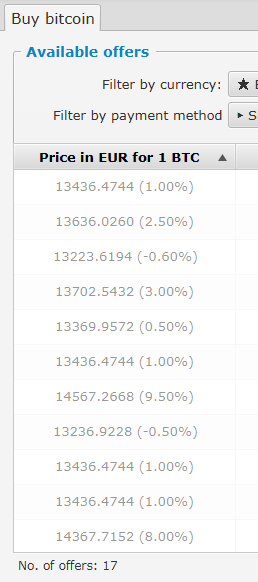
Bisq: Incorrect ordering of Available offers

happens sometimes after startup - after clicking the header the problem corrects it self
 ligi
ligi
All 7 comments
There are a number of bugs associated with the initialization of the program, which correct themselves once it has been running for a couple of minutes and establishes price feeds. Seems to me if one is fixed it should resolve the whole lot.
 haiqu
on 3 Oct 2016
haiqu
on 3 Oct 2016
Just looked into it. The reason is that the price feed comes a bit later when the list is already sorted and the percentage prices need the market price to get calculated.
An update on the list when the price response is completed should fix it, but not sure if it will make it to the next release, wanted to keep it as minimal as possible to not requiring much time for testing and to move on the work on the Bitsquare foundation...
 ManfredKarrer
on 5 Oct 2016
ManfredKarrer
on 5 Oct 2016
I tried to reproduce it and saw strange sort behavior by market column. Is it ok, or I can try to fix it?

 ghost
on 3 Dec 2017
ghost
on 3 Dec 2017
Ah good spot! Hm no idea why that is so strange. Maybe because the Coin name is used not the ticker? But should be alphabetically to that what the user sees... PR welcome :-)
ManfredKarrer
on 3 Dec 2017
Unlike other columns the market column doesn't have custom comparator and JavaFX sort it using OfferBookListItem.toString() - also doesn't defined and provided by JDK, as a result - pseudo-random sort.
ghost
on 7 Dec 2017
The reported error is reproducible on the latest version (v0.6.1), I will try to fix it too:
ghost
on 7 Dec 2017
This problem occurs for me not every start up, but only together with N/A values. After values were actualized - they order doesn't changed. In code (OfferViewBook::getPriceColumn):
if (priceChangedListener == null) {
    priceChangedListener = (observable, oldValue, newValue) -> {
        if (offerBookListItem != null && offerBookListItem.getOffer().getPrice() != null) {
(2) >>>            setText(model.getPrice(offerBookListItem));
        }
    };
    model.priceFeedService.updateCounterProperty().addListener(priceChangedListener);
}
(1) >>> setText(item.getOffer().getPrice() == null ? Res.get("shared.na") : model.getPrice(item));
Value is changed in place in priceChangedListener without resorting, because sort is initiated only when OfferBookViewMode::getOfferList collection is modified. The solution - add & remove changed item forcefully or add model.priceFeedService.updateCounterProperty() as ObservableList extractor - FXCollections.observableArrayList(it -> new Observable[] { model.priceFeedService.updateCounterProperty() } ). I will test both variants.
ghost
on 7 Dec 2017
Related issues
 5andr0
·
6Comments
5andr0
·
6Comments
 ifarnung
·
4Comments
ifarnung
·
4Comments
 julianknutsen
·
3Comments
julianknutsen
·
3Comments
 0xb100d
·
4Comments
0xb100d
·
4Comments
 wenk2018
·
3Comments
wenk2018
·
3Comments