Biopython: 'ls_orchid.fasta' can't be read
Still got an error, how do i ?
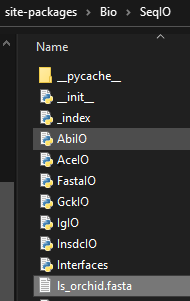
3315
FileNotFoundError                         Traceback (most recent call last)
<ipython-input-32-77ca58053425> in <module>
      1 from Bio import SeqIO
----> 2 for seq_record in SeqIO.parse("ls_orchid.fasta", "fasta"):
      3         print(seq_record.id)
      4         print(repr(seq_record.seq))
      5         print(len(seq_record))
~\anaconda3\lib\site-packages\Bio\SeqIO\__init__.py in parse(handle, format, alphabet)
    605     iterator_generator = _FormatToIterator.get(format)
    606     if iterator_generator:
--> 607         return iterator_generator(handle)
    608     if format in AlignIO._FormatToIterator:
    609         # Use Bio.AlignIO to read in the alignments
~\anaconda3\lib\site-packages\Bio\SeqIO\FastaIO.py in __init__(self, source, alphabet, title2ids)
    181             raise ValueError("The alphabet argument is no longer supported")
    182         self.title2ids = title2ids
--> 183         super().__init__(source, mode="t", fmt="Fasta")
    184
    185     def parse(self, handle):
~\anaconda3\lib\site-packages\Bio\SeqIO\Interfaces.py in __init__(self, source, alphabet, mode, fmt)
     45             raise ValueError("The alphabet argument is no longer supported")
     46         try:
---> 47             self.stream = open(source, "r" + mode)
     48             self.should_close_stream = True
     49         except TypeError:  # not a path, assume we received a stream
FileNotFoundError: [Errno 2] No such file or directory: 'ls_orchid.fasta'
 ardsatcg
All 9 comments
This is a path problem - if you use just a filename like ls_orchid.fasta it has to be in the current directory, i.e. next to your Python script.
You may prefer to use absolute paths, e.g. something like /home/ardsatcg/project/biopython_tests/ls_orchid.fasta
Also, you should NOT put your scripts within Python's site-packages folder mixed up with Biopython's files. That will cause problems with import commands.
 peterjc
on 21 Oct 2020
peterjc
on 21 Oct 2020
This is a path problem - if you use just a filename like
ls_orchid.fastait has to be in the current directory, i.e. next to your Python script.You may prefer to use absolute paths, e.g. something like
/home/ardsatcg/project/biopython_tests/ls_orchid.fastaAlso, you should NOT put your scripts within Python's
site-packagesfolder mixed up with Biopython's files. That will cause problems with import commands.
I put this file on C:\Users\LENOVO\anaconda3\Scripts\biopython_testsls_orchid.fasta
but seem's didn't work, still the same message
ardsatcg
on 21 Oct 2020
Beware with Windows paths that Python treats \t as a tab, \n as a new line etc. It is wise to explicitly use raw string mode to avoid this:
filename = r"C:\Users\LENOVO\anaconda3\Scripts\biopython_tests\ls_orchid.fasta"
If you are still using just ls_orchid.fasta, is your script in C:\Users\LENOVO\anaconda3\Scripts\biopython_tests\ now?
Now, can you share the path of your script, and the new exception message please?
Tip: You might find this useful for diagnosing where you are:
import os
print(os.path.abspath("."))
print(os.listdir())
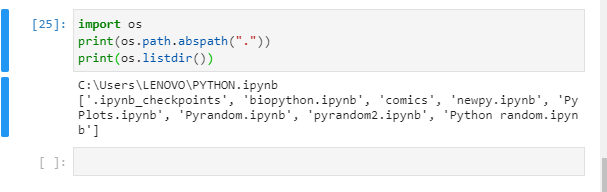
like this?, i put "ls_orchid.fasta" also on C:\Users\LENOVO\PYTHON.ipynb, still did'nt work, and get error output like above message.
ardsatcg
on 21 Oct 2020
OK, so your code is running in C:\Users\LENOVO\ - If you refer to the FASTA file as just ls_orchid.fasta then Python will look for C:\Users\LENOVO\ls_orchid.fasta
Beyond that since I can now see you are using Jypyter, have a look at e.g. https://stackoverflow.com/questions/15680463/change-ipython-jupyter-notebook-working-directory and the Jypyter commands for setting or changing the default.
peterjc
on 21 Oct 2020
OK, so your code is running in
C:\Users\LENOVO\- If you refer to the FASTA file as justls_orchid.fastathen Python will look forC:\Users\LENOVO\ls_orchid.fastaBeyond that since I can now see you are using Jypyter, have a look at e.g. https://stackoverflow.com/questions/15680463/change-ipython-jupyter-notebook-working-directory and the Jypyter commands for setting or changing the default.
So, what i'm gonna do with this jupyter nb/lab, i'll changes the jupyter directory or make new ones?
ardsatcg
on 22 Oct 2020
I personally have not used Jupyter enough to have a strong view on how best to work with directories there. I would suggest having the notebook and the data files together in the same directory?
Can we close this issue now?
peterjc
on 22 Oct 2020
I personally have not used Jupyter enough to have a strong view on how best to work with directories there. I would suggest having the notebook and the data files together in the same directory?
Can we close this issue now?
yup, thx 👍
ardsatcg
on 22 Oct 2020
Hope that was helpful.
peterjc
on 22 Oct 2020
Related issues
 vanya-antonov
·
6Comments
vanya-antonov
·
6Comments
 satta
·
12Comments
peterjc
·
4Comments
satta
·
12Comments
peterjc
·
4Comments
 dmenning
·
8Comments
peterjc
·
8Comments
dmenning
·
8Comments
peterjc
·
8Comments
Most helpful comment
This is a path problem - if you use just a filename like
ls_orchid.fastait has to be in the current directory, i.e. next to your Python script.You may prefer to use absolute paths, e.g. something like
/home/ardsatcg/project/biopython_tests/ls_orchid.fastaAlso, you should NOT put your scripts within Python's
site-packagesfolder mixed up with Biopython's files. That will cause problems with import commands.