Binderhub: How to set up SSL with a binderhub?
When setting up our own binderhub deployment how should we set up SSL encryption? For security to be sure, but I'm also having issues with the rocker/binder implementation of RStudio Server over http due to some browsers block unencrypted content.
 brooksambrose
All 15 comments
Or TLS as it were. I know how to do this in the abstract, just not in the kubernetes framework. I'm asking students to send GitHub passwords over http! @yuvipanda would this need to be done manually on a per-node basis?
brooksambrose
on 17 Nov 2017
Not an expert either but you might be able to find something useful from the mybinder.org helm chart Looks like kube-lego is the things to google/read about.
 betatim
on 17 Nov 2017
betatim
on 17 Nov 2017
@brooksambrose we recently made security updates to the z2jh documentation: https://zero-to-jupyterhub.readthedocs.io/en/v0.5-doc/security.html
does your answer lie in there somewhere?
 choldgraf
on 12 Jan 2018
choldgraf
on 12 Jan 2018
I followed those instructions, but my helm chart creates a connection on port 443 but not for the binderhub load balancer
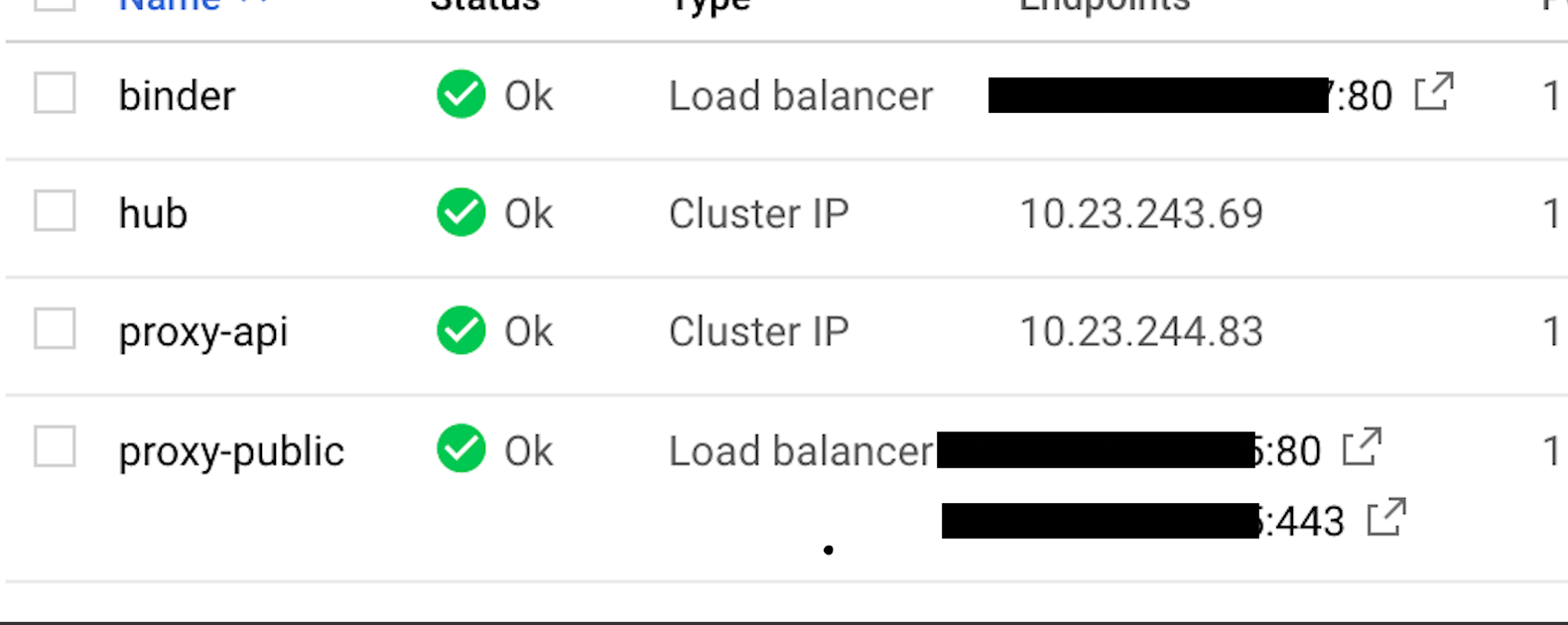
what does my helm chart need to look like to set up ssl for the binderhub application itself?
 amn41
on 11 May 2019
amn41
on 11 May 2019
@amn41 I set it up once, and that setup can be found in https://github.com/consideratio/neurips.mybinder.org-deploy.
I used the helm chart cert-manager to request certificates etc instead of kube-lego which is an option to doing so at least for the jupyterhub itself, but how it is typically done for the binderhub I'm uncertain of. Hmmmm.... I'm also uncertain if proxy-public part is supposed to be the endpoint of all incomming traffic or not... hmmm hmmm...
 consideRatio
on 11 May 2019
consideRatio
on 11 May 2019
@amn41 were you able to fix this issue? I'm currently having the same problem of not having https working on the binder service. Only port 80 is being exposed.
 kaseyhackspace
on 26 Jun 2019
kaseyhackspace
on 26 Jun 2019
unfortunately not
amn41
on 26 Jun 2019
Thanks for the reply @amn41 , I'm knee deep into this, looks like an issue with ingress though. Maybe I'll use cert-manager like @consideRatio has done.
kaseyhackspace
on 27 Jun 2019
Please keep me posted! I’m very interested in getting this to work
amn41
on 27 Jun 2019
Will do @amn41 , might I ask how your setup is going? Is it running HTTP on Binderhub and HTTPS on Jupyterhub? That's where my current setup is at.
kaseyhackspace
on 28 Jun 2019
I was running my own jupyterhub fine, but I'm using it as a backend for https://github.com/ines/juniper code snippets.
Then I switched to an SSL-only site hosting service so I had to switch back to using mybinder.org :(
(bc otherwise would have mixed-content errors)
amn41
on 28 Jun 2019
Should we restart this thread on the forum with a post that describes the problem and show the minimal config to reproduce the problem?
As a super rough outline: for mybinder.org we use nginx-ingress to play the role of https://kubernetes.io/docs/concepts/services-networking/ingress/. We use kube-lego (yes old but works ;)) for the SSL certs part. Then you annotate each Ingress object (random example) to let the ignress controller know you want it to be reachable via HTTPS. That should be it.
betatim
on 28 Jun 2019
Hey @amn41 and @betatim I managed to make my SSL configuration work. I think our approaches are similar. What I did was use ingress-nginx as the ingress controller then I used cert-manager as the SSL cert generator. I also pointed my domain to the load balancer that ingress-nginx deploys after the helm install so that it'll route appropriately to the ingress. Just need to replicate and check it one more time before I share the solution here and maybe in the forum :)
kaseyhackspace
on 28 Jun 2019
SSL for binderhub
- Install cert-manager using steps in https://docs.cert-manager.io/en/latest/getting-started/install/kubernetes.html#steps
# Install the CustomResourceDefinition resources separately
kubectl apply -f https://raw.githubusercontent.com/jetstack/cert-manager/release-0.8/deploy/manifests/00-crds.yaml

# Create the namespace for cert-manager
kubectl create namespace cert-manager

# Label the cert-manager namespace to disable resource validation
kubectl label namespace cert-manager certmanager.k8s.io/disable-validation=true

# Add the Jetstack Helm repository
helm repo add jetstack https://charts.jetstack.io

# Update your local Helm chart repository cache
helm repo update

# Install the cert-manager Helm chart
helm install \
  --name cert-manager \
  --namespace cert-manager \
  --version v0.8.1 \
  jetstack/cert-manager
- Create binderhub-issuer.yaml
apiVersion: certmanager.k8s.io/v1alpha1
kind: Issuer
metadata:
  name: letsencrypt-production
  namespace: <binderhub-namespace>
spec:
  acme:
    # You must replace this email address with your own.
    # Let's Encrypt will use this to contact you about expiring
    # certificates, and issues related to your account.
    email: <email-address>
    server: https://acme-v02.api.letsencrypt.org/directory
    privateKeySecretRef:
      # Secret resource used to store the account's private key.
      name: letsencrypt-production
    http01: {}
- Apply issuer with kubectl
kubectl apply -f binderhub-issuer.yaml
- Install nginx-ingress controller
helm install stable/nginx-ingress --name quickstart
- Point your domain to the loadbalancer IP of the nginx-ingress controller
# This shows you the external IP to point to
kubectl get service quickstart
- Append ingress object on top level indentation in your config.yaml
config:
  BinderHub:
    use_registry: true
    image_prefix: <dockerhub prefix>
    hub_url: <jupyterhub-url>

ingress:
  enabled: true
  hosts:
    - <domain-name>
  annotations:
    ingress.kubernetes.io/ssl-redirect: "true"
    kubernetes.io/ingress.class: nginx
    kubernetes.io/tls-acme: "true"
    certmanager.k8s.io/issuer: letsencrypt-production
  https:
    enabled: true
    type: nginx
  tls:
    - secretName: <domain-name>-tls
      hosts:
        - <domain-name>
- Perform helm upgrade to enable ingress:
helm upgrade binderhub jupyterhub/binderhub --version=0.2.0-3b53fce -f secret.yaml -f config.yaml
- Have a cup of coffee and try accessing your binderhub domain via https in about 10 minutes (SSL won't work right away).
Tested with AWS EKS and DigitalOcean
kaseyhackspace
on 29 Jun 2019
I'm having a similar problem but I'm unable to use Let's Encrypt.
Is there a way to manually add the certificates similar to Jupyterhub directly in the configuration?
proxy:
  https:
    hosts:
      - <your-domain-name>
    type: manual
    manual:
      key: |
        -----BEGIN RSA PRIVATE KEY-----
        ...
        -----END RSA PRIVATE KEY-----
      cert: |
        -----BEGIN CERTIFICATE-----
        ...
        -----END CERTIFICATE-----
I have configured the Jupyterhub instance spawning the notebooks to run in HTTPS but the main Binderhub page is running in HTTP.
 aicampbell
on 3 Oct 2019
aicampbell
on 3 Oct 2019
Related issues
 fm75
·
5Comments
choldgraf
·
5Comments
consideRatio
·
5Comments
betatim
·
3Comments
fm75
·
5Comments
choldgraf
·
5Comments
consideRatio
·
5Comments
betatim
·
3Comments
 ashtonmv
·
6Comments
ashtonmv
·
6Comments
Most helpful comment
SSL for binderhub
Tested with AWS EKS and DigitalOcean