Is it possible to use R magics in Jupyter notebooks in Binder? If so, how?
 andrewjohnlowe
All 23 comments
Hi there, Yes it is possible. It will not be a question for binder itself but a question for https://github.com/jupyter/repo2docker (documentation) which will be responsible for building the image file and is easy to test on your own machine. The docs will also tell you more about how things got build.
We're still polishing how to install R and R packages, but one this is done once you have a r-requirement and a python-requirement file that list rpy2 it should "just works".
I believe if you use an environment.yml (ie you use R via conda), then list, r, python and rpy2 it should also works, and we should document it there. Or better if it does work you can send a PR to the documentation :-)
For now you might need to write your own Dockerfile (see this example),
 Carreau
on 12 Nov 2017
Carreau
on 12 Nov 2017
Hi, thanks for the reply.
There might be an easy fix for what I want to do, so perhaps it might help if I explain exactly what it is that I want to do, and my motives. Sorry for the long explanation.
I'm not a Python user. I've learning, but still at novice level. Ditto Jupyter Notebooks and Docker. I'm an R user. I'm interested in figuring out how to make R Markdown documents executable in-browser, just like Binder does for Python Jupyter Notebooks. This is to facilitate reproducible research in my own academic field (particle physics). We're not good at doing this. I like R Markdown; I can develop an analysis interactively and then, with one click, knit an elegantly-formatted document that is ready for journal publication. This is very easy, and can be adapted to work with other code execution engines, which means this method could be a good "gateway" to reproducible research for my colleagues. If anyone wants to reproduce my findings, they can just grab the Rmd file and re-run it to get the same results. Great! _But my colleagues still have to download a bunch of software that they don't know how to use. R is unknown in my field, and Python has only 30% penetration, mostly just the younger people._
Binder would solve all of these problems!
The idea would be to link from the paper to the R Markdown that generated it and provide a link to the binder so that the paper is immediately reproducible by anyone, anywhere. My colleagues just have to click a link to re-run the analysis. No fuss, and no need for a reproducibility editor or someone else to check that the work is reproducible.
I'm not aware of any service like Binder for R Markdown documents. Surely I can't be the only R user who would want to do this. I want to find an _easy_ recipe to do this so that I can encourage my colleagues to make their analyses reproducible. This could have a big impact on the field.
Can you help?
I'm using this to convert Rmd to ipynb:
https://github.com/aaren/notedown
An example converted Rmd can be found here:
https://github.com/andrewjohnlowe/binder_test
My first cell is this:
%load_ext rpy2.ipython
which I understand I need to make %%R magics work.
The error I get is:
ImportError                               Traceback (most recent call last)
<ipython-input-1-fb23c6edefe4> in <module>()
----> 1 get_ipython().run_line_magic('load_ext', 'rpy2.ipython')

/srv/venv/lib/python3.5/site-packages/IPython/core/interactiveshell.py in run_line_magic(self, magic_name, line, _stack_depth)
   2093                 kwargs['local_ns'] = sys._getframe(stack_depth).f_locals
   2094             with self.builtin_trap:
-> 2095                 result = fn(*args,**kwargs)
   2096             return result
   2097

<decorator-gen-65> in load_ext(self, module_str)

/srv/venv/lib/python3.5/site-packages/IPython/core/magic.py in <lambda>(f, *a, **k)
    185     # but it's overkill for just that one bit of state.
    186     def magic_deco(arg):
--> 187         call = lambda f, *a, **k: f(*a, **k)
    188
    189         if callable(arg):

/srv/venv/lib/python3.5/site-packages/IPython/core/magics/extension.py in load_ext(self, module_str)
     31         if not module_str:
     32             raise UsageError('Missing module name.')
---> 33         res = self.shell.extension_manager.load_extension(module_str)
     34
     35         if res == 'already loaded':

/srv/venv/lib/python3.5/site-packages/IPython/core/extensions.py in load_extension(self, module_str)
     83             if module_str not in sys.modules:
     84                 with prepended_to_syspath(self.ipython_extension_dir):
---> 85                     mod = import_module(module_str)
     86                     if mod.__file__.startswith(self.ipython_extension_dir):
     87                         print(("Loading extensions from {dir} is deprecated. "

/usr/lib/python3.5/importlib/__init__.py in import_module(name, package)
    124                 break
    125             level += 1
--> 126     return _bootstrap._gcd_import(name[level:], package, level)
    127
    128

/usr/lib/python3.5/importlib/_bootstrap.py in _gcd_import(name, package, level)

/usr/lib/python3.5/importlib/_bootstrap.py in _find_and_load(name, import_)

/usr/lib/python3.5/importlib/_bootstrap.py in _find_and_load_unlocked(name, import_)

/usr/lib/python3.5/importlib/_bootstrap.py in _call_with_frames_removed(f, *args, **kwds)

/usr/lib/python3.5/importlib/_bootstrap.py in _gcd_import(name, package, level)

/usr/lib/python3.5/importlib/_bootstrap.py in _find_and_load(name, import_)

/usr/lib/python3.5/importlib/_bootstrap.py in _find_and_load_unlocked(name, import_)

ImportError: No module named 'rpy2'
If I can get this working, I'd be happy to write the documentation for it to encourage my colleagues to use Binder for their own analyses!
Thanks!
andrewjohnlowe
on 13 Nov 2017
hey @andrewjohnlowe - Binder is definitely meant to exist for this use-case! As @Carreau mentions right now we have nominal support for RStudio, in the sense that there are examples of how to get RStudio running by putting a Dockerfile in your repository.
Either way, I see that in your repo you don't have any Binder configuration files - this is the only way that Binder knows how to build you computational environment. E.g., in your error you don't have an environment.yml file that specifies "rpy2" which is why you get an error that no module for this package exists!
I recommend checking out the documentation for Binder, which has information about how to prepare a repository so that it is "binderable": docs.mybinder.org
 choldgraf
on 13 Nov 2017
choldgraf
on 13 Nov 2017
We're definitively happy to see an R user interested, we lack R experience so now the difficult par will be to communicate and understand each other.
If I understand your use case correctly and and @choldgraf pointed out, you actually do not care about running Jupyter and the R magic, Rstudio and pure R would be better suited. Do I understand this right ?
If that is right you should look at this repo, right now it uses it own Dockerfile (don't be affraid of dockerfile they are just like sequence of bash commands).
If you click "Launch Binder" button in the readme, you should get a notebook server.
Click "New > RStudio Session".
The data for the repo are no copied over but that a bug. Missing COPY command in dockerfile ?
The next steps on our side would be to layout what a more pleasant workflow for R user would be. My guess is : if we see a install.r file : install R and run it to get dependencies and autogenerate the Dockerfile. Does that sounds right @andrewjohnlowe ? Is that what you would expect ? Otherwise how would you list your dependencies ?
@choldgraf there is probably an issue that was open a month ago during the binder workshop, do you know where ?
I'll investigate why the data is missing in binder-examples/dockerfile-rstudio and if we can make a R kernel with conda.
Carreau
on 13 Nov 2017
I believe that @yuvipanda put some work into this on the way back from the MSDSE conference, but I don't believe we're at the PR stage yet :-)
choldgraf
on 13 Nov 2017
@choldgraf : I don't know what an environment.yml file is supposed to look like. I found an example, which I have amended to include rp2:
name: example-environment
channels:
  - conda-forge
dependencies:
  - python
  - numpy
  - psutil
  - toolz
  - matplotlib
  - dill
  - pandas
  - partd
  - bokeh
  - dask
  - rpy2
Unfortunately this did not work for me: ImportError: No module named 'rpy2'
@Carreau : Jupyter or RStudio: I don't really mind. Jupyter notebooks have a cleaner and simpler interface, and that could make executable papers produced in this format more user-friendly for my (older) colleagues, many of whom are unfamiliar with this kind of technology. They can interpret Jupyter notebooks as fancy webpages with some interactive functionality. Running RStudio in-browser is nice, but might be too complex for consumers of my analyses. If it's possible to actually knit a PDF from RStudio running in Binder and have it pop up somewhere, then this would be the more appealing option. Basically, I prefer whatever is closest to the printed journal article. Either a notebook or a regenerated PDF of the paper.
This repo you linked to does run RStudio, and I can now access the R script, but I can't run it: Error: Status code 403 returned printed in the console.
To begin with, it would be good to Jupyter notebooks working with R magics, because at least I have a method for converting Rmd to ipynb, and Jupyter notebooks work fine for me if they don't have R magics. If this can be made to work, I'm done and I can plant my victory flag.
How can I ensure that the correct R package versions are picked up? I have a solution that works locally that uses the Packrat R package to create a local R package library on disk from a snapshot that I distribute with the Rmd. It creates a directory that contains all the package libraries and their dependencies, and ensures that another user will be using exactly the same package versions that I used. Do file operations performed in Binder work as they do locally, i.e., if Packrat wants to create a directory to hold a local package library, will it happen in the Binder environment just as it would locally?
andrewjohnlowe
on 14 Nov 2017
Alternatively... Instead of using R magics, how can I start Binder with R as the kernel? I know I can select it, but I'd like to not force users to hunt for that menu option if they're not familiar with Jupyter.
andrewjohnlowe
on 14 Nov 2017
OK, I see how to do that: https://github.com/binder-examples/dockerfile-r
But this isn't working for me. My repo has the same Dockerfile. What have I done wrong?
andrewjohnlowe
on 14 Nov 2017
@andrewjohnlowe I've done two things to make your example work:
- I've modified your Dockerfile to use the https://github.com/binder-examples/dockerfile-rstudio Dockerfile (the existing Dockerfile that you have may work - I didn't test after I modified your notebook)
- I modified your notebook to include metadata for the R kernel and language info (see the raw view of the notebook in my repo and scroll to end)
Entering this repo link in mybinder.org should work for you:
https://github.com/willingc/binder_test
 willingc
on 14 Nov 2017
willingc
on 14 Nov 2017
Thanks @willingc for doing this.
A few comments @andrewjohnlowe
Unfortunately this did not work for me: ImportError: No module named 'rpy2'
I'm going to guess but the notebook might have not used the kernel inside the environement ? Hard to tell.
Jupyter or RStudio: I don't really mind. Jupyter notebooks have a cleaner and simpler interface, and that could make executable papers produced in this format more user-friendly for my (older) colleagues, many of whom are unfamiliar with this kind of technology. They can interpret Jupyter notebooks as fancy webpages with some interactive functionality. Running RStudio in-browser is nice, but might be too complex for consumers of my analyses. If it's possible to actually knit a PDF from RStudio running in Binder and have it pop up somewhere, then this would be the more appealing option. Basically, I prefer whatever is closest to the printed journal article. Either a notebook or a regenerated PDF of the paper.
Good to know. Most R users tend to prefer RStudio.
This repo you linked to does run RStudio, and I can now access the R script, but I can't run it: Error: Status code 403 returned printed in the console.
Hum, that is strange. Are you behind a proxy or firewall ? It appears to work for me:
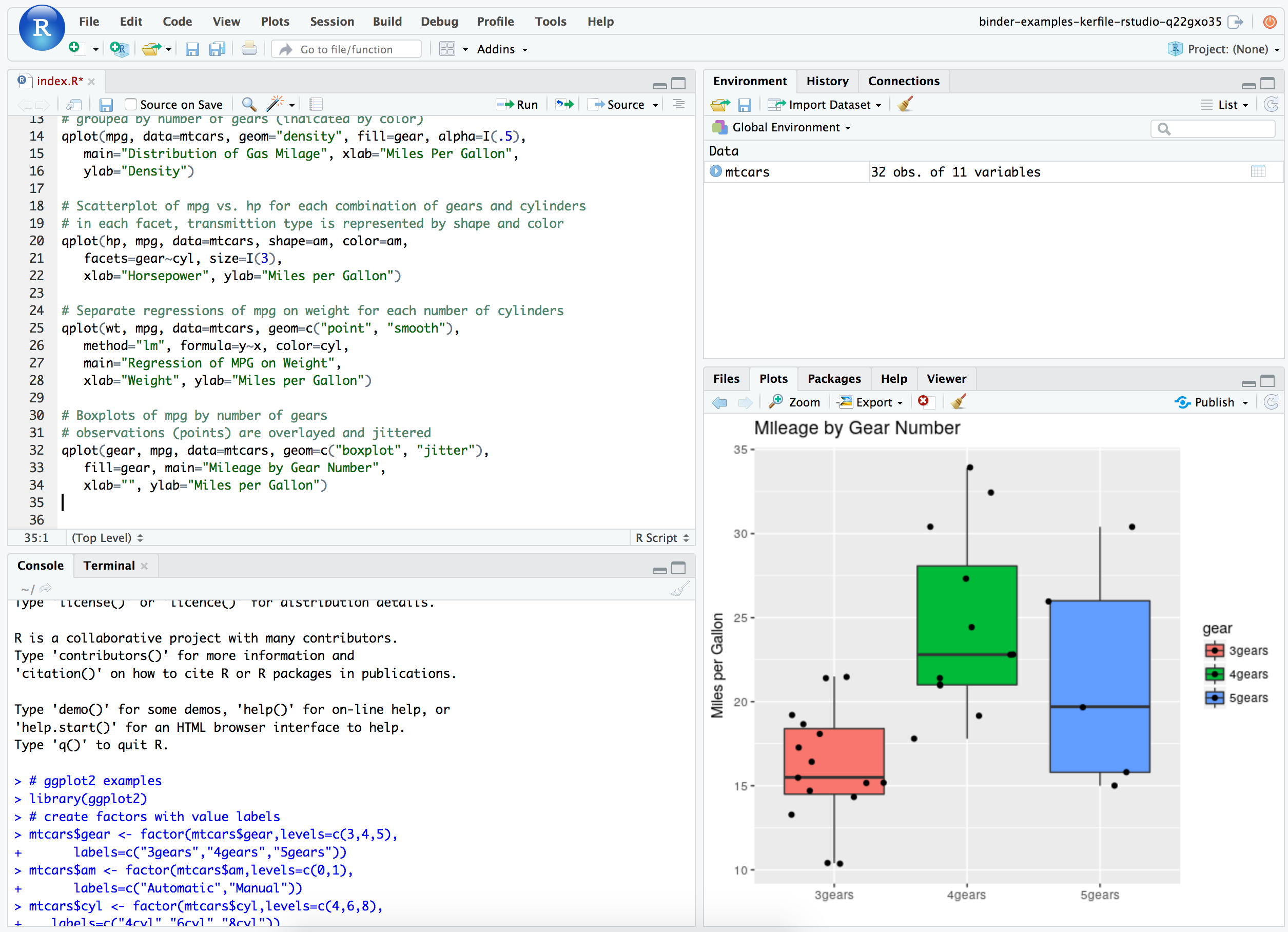
Though I'm not familiar with R/Rstudio.
How can I ensure that the correct R package versions are picked up? I have a solution that works locally that uses the Packrat R package to create a local R package library on disk from a snapshot that I distribute with the Rmd. It creates a directory that contains all the package libraries and their dependencies, and ensures that another user will be using exactly the same package versions that I used
You have more experience with R than we do ! I did not even knew Packrat was a thing.
Do file operations performed in Binder work as they do locally, i.e., if Packrat wants to create a directory to hold a local package library, will it happen in the Binder environment just as it would locally?
It should. What happening is all the code in the Dockerfile (whether you create the docker file, or binder create it for you) is ran once the first time a repository is binderified. Then the state is frozen into a docker-image. Now everyone that try to access for a repository get an unfrozen (and copied) version of this image. It takes some time to understand all the pieces.
We don't impose reproducibility of repository but at some point we have the plan of having a "linter" that would grade repo on their reproducibility. linting for somethign like packrat for R could be an option !
Alternatively... Instead of using R magics, how can I start Binder with R as the kernel? I know I can select it, but I'd like to not force users to hunt for that menu option if they're not familiar with Jupyter.
Usually the "name" of the kernel which is last used for a notebook is recorded in the notebook-files themselves. If locally you had a notebook to run with R it _should_ start with R automatically on binder.
@willingc managed to have that work :cake: ! You can see all the difference between your two repositories here.
Again thanks a lot for all these information and for putting up with beta software and services, your input and example are invaluable in shaping what R support should do and give us quite a bit to chew on as well as many hints on how we can move forward !
Carreau
on 15 Nov 2017
Thanks @willingc ! I've looked at the difference between the two repos, and I see that the Dockerfile is a lot smaller, but there's also several changes to the ipynb; is there a way to get this working without modifying the ipynb? I use an automated method for converting the Rmd to ipynb, and I'd rather not have to hack the ipynb and add the metadata after the conversion with notedown. Is this possible?
@Carreau : I'm an R user and prefer RStudio, but I'm outnumbered by Python users who prefer Jupyter notebooks. For the specific task I have in mind, Jupyter notebooks are better suited. The 403 error might be because I tried from my work laptop. I don't know how things are setup here. There may be a proxy or firewall. In any case, the fact that I got this error indicates that there are some edge cases for which the RStudio solution is unsuitable. Good to know.
With regards to Packrat: I was trying to figure out a way to ensure that people who try to reproduce my work have exactly the same package versions as I used. Different package versions might yield different results. There is the checkpoint package. It works for R scripts, but doesn't work reliably with knitr and notebooks. Packrat creates a local package library from a snapshot. I've discovered that I don't need to disseminate the generated package library with the Rmd; the snapshot alone is sufficient.
andrewjohnlowe
on 16 Nov 2017
Hey all - some quick thoughts from me:
- Perhaps we should have a conversation about what UIs to allow always with the idea being that a user could use any of, e.g., notebooks, jupyterlab, or rstudio if they used an R build file.
- re: packrat and R installs more generally, see this issue: https://github.com/jupyter/repo2docker/issues/24 where we've had a number of discussions about the best way to handle R environment installs etc. The R world is a bit more challenging because the community doesn't really have a concept of "give me this version of this package and that version of that package"
choldgraf
on 16 Nov 2017
is there a way to get this working without modifying the ipynb?
No not really, well your users can change the kernel on binder directly, but if you want to automatically start with the right kernel that should be easy. Though if you are using notedown, it should be possible to teach it how to generate the ipynb correctly. Worse case, notebook are just json the followign just works as a postprocessing of notebdown
$ cat rify.py
import sys
import json

rspec = {
    "kernelspec": {
        "display_name": "R",
        "language": "R",
        "name": "ir"
    },
    "language_info": {
        "codemirror_mode": "r",
        "file_extension": ".r",
        "mimetype": "text/x-r-source",
        "name": "R",
        "pygments_lexer": "r",
        "version": "3.4.1"
    }
}

ipynb = sys.argv[1]

with open(ipynb, 'r') as f:
    data = json.loads(f.read())
data['metadata'].update(rspec)

with open(ipynb, 'w') as f:
    f.write(json.dumps(data, indent=2))

$ python rify.py mynotebook.ipynb
I'm an R user and prefer RStudio, but I'm outnumbered by Python users who prefer Jupyter notebooks.
Understandable, we can try to have a Binder Image that allow to run both the R kernel and RStudio to leave some choice to the user.
The 403 error might be because I tried from my work laptop. I don't know how things are setup here. There may be a proxy or firewall. In any case, the fact that I got this error indicates that there are some edge cases for which the RStudio solution is unsuitable. Good to know.
Yes we should figure that out. It is strange and would be nice to document/detect if possible.
Carreau
on 21 Nov 2017

It works! This recipe will work fine for me.
I'm thinking that it might be really cool if there was a way that Binder, on seeing a repo containing an Rmd file, can run notedown itself, plus your rify.py script if also required, and then launch with the auto-generated ipynb and the R kernel auto-magically. Lots of people have repos with Rmd files in them! Maybe there's a recipe with a Docker file that people can copy, or perhaps this can be handled by Binder itself without the user specifying a Docker file? Feature request! Pretty please?
andrewjohnlowe
on 21 Nov 2017
Well, I guess I can close now; my original issue has been addressed. Thanks to everyone that helped!
_I would like to see the feature I suggested in my last post made available though, because I think it would increase Binder's value as a resource for reproducible research, and (naively?) I assume this merely involves running a couple of scripts behind the scenes to invoke notedown and @Carreau 's rify.py script when encountering a repo containing an Rmd. Would be a very nice feature to have! Please do consider it! But in the meantime, the recipe you described will do just fine. Thanks again!_
andrewjohnlowe
on 23 Nov 2017
It works! This recipe will work fine for me.
🎉 🎉
or perhaps this can be handled by Binder itself without the user specifying a Docker file
Yes, that is possible an once binder is more advance it should do that on its own and not require people to write Dockerfiles ! That's the goal and you were of great help going through this.
If you don't mind I'm going to reopen the issue as a way to keep tracking the multiple goals describe here and your last request.
Technically all of this should likely be opened on repo2docker, and the way I see it we could also develop a notebook Content manager that convert rmd files on the fly, so they still look like Rmd files, and can be opened either by rstudio or Notebook without having 2 files w/ the same name. I believe notedown does that, but then it hides normal ipynbs, so we may want to work around this.
Carreau
on 23 Nov 2017
just a note to @andrewjohnlowe that there is now R support on Binder w/o Dockerfiles (in kinda "beta" form) and we'd love if you gave it a shot! You can find an example here:
github.com/binder-examples/r
Wanna take a look and see if you can meet your request above with a combination of runtime.txt and install.R files?
choldgraf
on 10 Feb 2018
That's fantastic! I just gave the example you posted a whirl, and it works a treat! I'll try this with my own repo and code shortly.
Questions: Is it possible to launch RStudio with a script or notebook loaded, just as with Jupyter and ipynb files? This would mean that the user would be presented with the script or notebook in a state that is ready to knit or run, without having to navigate to the .R or .Rmd first. Is it also possible to define the initial state of the RStudio instance, for example, which panes are visible?
andrewjohnlowe
on 13 Feb 2018
@Carreau @choldgraf @willingc @ellisonbg @yuvipanda: Have you considered presenting this work at the European R Users Meeting (eRum 2018) this May? I think people there would be interested in seeing what you've done. Abstract submissions are still being accepted. The deadline is 25 February. Details here: https://2018.erum.io/.
andrewjohnlowe
on 13 Feb 2018
That overlaps with PyCon for me, maybe our european contingent ? @sylvaincorlay, @takluyver ? @betatim ?
Carreau
on 13 Feb 2018
Undecided if I have time to go. Probably not (personal events overlapping) and my travel budget is already pretty used up.
 betatim
on 18 Feb 2018
betatim
on 18 Feb 2018
Perhaps @takluyver would be interested...
willingc
on 20 Feb 2018
Thanks, but as I'm starting a new position in April I don't want to plan on going to a conference so soon.
 takluyver
on 26 Feb 2018
takluyver
on 26 Feb 2018
Related issues
 davidanthoff
·
4Comments
davidanthoff
·
4Comments
 minrk
·
5Comments
minrk
·
5Comments
 raffadrummer
·
4Comments
raffadrummer
·
4Comments
 rprimet
·
5Comments
rprimet
·
5Comments
 bitnik
·
3Comments
bitnik
·
3Comments