Bfg-repo-cleaner: [rejected] failed to push to some refs
I followed the instructions correctly but then when I go to push I get this error. The repo was up to date beforehand.
! [rejected] master -> master (fetch first)
error: failed to push some refs to ''
hint: Updates were rejected because the remote contains work that you do
hint: not have locally. This is usually caused by another repository pushing
hint: to the same ref. You may want to first integrate the remote changes
hint: (e.g., 'git pull ...') before pushing again.
hint: See the 'Note about fast-forwards' in 'git push --help' for details.
 JonnyD
All 247 comments
Are you sure you followed the instructions exactly?
http://rtyley.github.io/bfg-repo-cleaner/#usage
The error message you're seeing is what you would see if you hadn't used the '--mirror' flag when doing the clone. To ensure you get a fully updated repo, it's best to redo your clone, this time ensuring you use '--mirror', and run The BFG again.
 rtyley
on 28 Jan 2014
rtyley
on 28 Jan 2014
Thank you! I forgot to clone. It's working now.
JonnyD
on 28 Jan 2014
Try this git command
git push origin master --force
or short of force -f
git push origin master -f
 javparra
on 13 May 2015
javparra
on 13 May 2015
its works thanks #@javparra
 heriipurnama
on 13 Oct 2016
heriipurnama
on 13 Oct 2016
its working @javparra
 08shubhamjindal
on 20 Mar 2017
08shubhamjindal
on 20 Mar 2017
its working thanks @javprra
 qingfeng825
on 13 May 2017
qingfeng825
on 13 May 2017
it's working nicely thanks for help @javparra
 gaurang444
on 23 May 2017
gaurang444
on 23 May 2017
it working @javparra
 harsimarsingh8
on 31 May 2017
harsimarsingh8
on 31 May 2017
Thanks @javparra !
 suyashgulati
on 23 Jul 2017
suyashgulati
on 23 Jul 2017
Works! Thx @javparra
 selfxss
on 9 Aug 2017
selfxss
on 9 Aug 2017
hey its working !!! thank you bro !!!
 PriyankaSundar7
on 2 Oct 2017
PriyankaSundar7
on 2 Oct 2017
Yeah! Its works.
Thanks
 sumyathlaing
on 24 Nov 2017
sumyathlaing
on 24 Nov 2017
Thank you so much @javparra
 rajeshdumpeti
on 22 Dec 2017
rajeshdumpeti
on 22 Dec 2017
It's works..Thanks @javparra
 saikumarbikki
on 27 Dec 2017
saikumarbikki
on 27 Dec 2017
Greate... thx a bunch!
 bestopensource
on 28 Dec 2017
bestopensource
on 28 Dec 2017
Thanks Ya
 aslamanver
on 1 Jan 2018
aslamanver
on 1 Jan 2018
Its working thank you
 manisha-sinha01
on 4 Jan 2018
manisha-sinha01
on 4 Jan 2018
Excelente, me alegro que te haya podido ayudar.
;)
El 4 ene. 2018 13:28, "manisha-sinha01" notifications@github.com escribió:
Its working thank you
—
You are receiving this because you were mentioned.
Reply to this email directly, view it on GitHub
https://github.com/rtyley/bfg-repo-cleaner/issues/29#issuecomment-355328375,
or mute the thread
https://github.com/notifications/unsubscribe-auth/AHU06jgy89Q2DIwZCHN8ERUGZthV0sXuks5tHPwUgaJpZM4Bc_Ve
.
javparra
on 4 Jan 2018
Thank you very much @javparra
 Anirudh0509
on 7 Jan 2018
Anirudh0509
on 7 Jan 2018
Thanks, great solution!
 heltondenis
on 9 Jan 2018
heltondenis
on 9 Jan 2018
thank @javparra
 kumochan
on 18 Jan 2018
kumochan
on 18 Jan 2018
Thanks @javparra
 namigalyv
on 18 Jan 2018
namigalyv
on 18 Jan 2018
Thanks @javparra
 tuananhbui89
on 19 Jan 2018
tuananhbui89
on 19 Jan 2018
this work fine for me. thanks @javparra
 chisom5
on 21 Jan 2018
chisom5
on 21 Jan 2018
I am having the same issue, use git remote -v to check the origin list
try changing git remote repo name by using git remote add origin [repo-url] and then push
 mtalha91
on 5 Feb 2018
mtalha91
on 5 Feb 2018
Had same issue with a Beanstalk repo. Discovered by default they disable "non Fast-Forward pushes" on their end. To enable you need to check a box located https://[account-name].beanstalkapp.com/repositories/[git-repo]/edit.
 austinginder
on 6 Feb 2018
austinginder
on 6 Feb 2018
Thanks. It;'s working
 hostmakersyl
on 21 Mar 2018
hostmakersyl
on 21 Mar 2018
Its works, thanks for #@javparra
 f97
on 8 Apr 2018
f97
on 8 Apr 2018
i found this helpfull, thanks!
 Velimir10
on 9 Apr 2018
Velimir10
on 9 Apr 2018
it's working nicely, thanks idea @javparra
 michaelDnguyen
on 12 Apr 2018
michaelDnguyen
on 12 Apr 2018
@javparra thanks for the advice. now working.
 LlapitanChris
on 13 Apr 2018
LlapitanChris
on 13 Apr 2018
@javparra Thanks
 katoB
on 18 Apr 2018
katoB
on 18 Apr 2018
@javparra thanks so much
 RedhwanGhailan
on 23 Apr 2018
RedhwanGhailan
on 23 Apr 2018
I had the same problem, using bitbucket. Solved after the --force, but I'm still wondering why it needs to be forced. Thanks anyway! <3
 tsainte
on 26 Apr 2018
tsainte
on 26 Apr 2018
Thanks
i had the same issue but it has bn fixed
 Eazybright
on 28 Apr 2018
Eazybright
on 28 Apr 2018
thanks @javparra
 anandtiwari767
on 29 Apr 2018
anandtiwari767
on 29 Apr 2018
thanks @javparra ^^
 fathiafrazna
on 9 May 2018
fathiafrazna
on 9 May 2018
thanks. it works with me! ><
 titiarimba
on 9 May 2018
titiarimba
on 9 May 2018
Thanks @javparra
It's working
 mjasimuddin
on 19 May 2018
mjasimuddin
on 19 May 2018
Thanks @javparra
It's working
 uid01themener
on 22 May 2018
uid01themener
on 22 May 2018
Working perfect thank @javparra
 YuvrajKhavad
on 6 Jun 2018
YuvrajKhavad
on 6 Jun 2018
It's working, thanks for the help @javparra
 Paul-uk2
on 25 Jun 2018
Paul-uk2
on 25 Jun 2018
special thanks! it working for me! @javparra
 alisalmabadi
on 2 Jul 2018
alisalmabadi
on 2 Jul 2018
Thanks man @javparra
 BamdadNouri
on 3 Jul 2018
BamdadNouri
on 3 Jul 2018
thanks broth you save my night!
 Michaelxk
on 2 Aug 2018
Michaelxk
on 2 Aug 2018
thank you so much @javparra
 ardiansah21
on 3 Aug 2018
ardiansah21
on 3 Aug 2018
Its working Thank you so much @javparra
 niteshthakur498
on 5 Aug 2018
niteshthakur498
on 5 Aug 2018
thanks @javparra
 maibono
on 7 Aug 2018
maibono
on 7 Aug 2018
@javparra most don't know the difference between adding mirror and without mirror can you please add it in documentation in the website that adding mirror is important
maibono
on 7 Aug 2018
Atlast it worked....Thanks alot @javparra. Can you explain what went wrong?
 Jaseemck
on 15 Aug 2018
Jaseemck
on 15 Aug 2018
@javparra thanks thanks thanks
 mic7x4
on 17 Aug 2018
mic7x4
on 17 Aug 2018
Thank you git push origin master --force worked @javparra
 Kirul
on 23 Aug 2018
Kirul
on 23 Aug 2018
thank you it helps me @javparra
 fadlyansy
on 24 Aug 2018
fadlyansy
on 24 Aug 2018
Thanks.
 Fiatinnovations
on 3 Sep 2018
Fiatinnovations
on 3 Sep 2018
3 years later and still... thanks @javparra
 AndrewAlizaga
on 3 Sep 2018
AndrewAlizaga
on 3 Sep 2018
@javparra thank you so much this does works but can anybody explain why that error was coming?
 richa031
on 8 Sep 2018
richa031
on 8 Sep 2018
still works.......thx
 ADAM111993
on 12 Sep 2018
ADAM111993
on 12 Sep 2018
it's working Thank you @javparra .but can anyone explain why that error was showing?
 Kullay
on 13 Sep 2018
Kullay
on 13 Sep 2018
Hi guys, I also have a kind of similar problem
$ git push -u origin master
error: src refspec master does not match any.
error: failed to push some refs to 'https://github.com/xyzzzz.git'
 jawadahmad777
on 2 Oct 2018
jawadahmad777
on 2 Oct 2018
Try this git command
git push origin master --force
or short of force -fgit push origin master -f
thanks, with this command, my problem solved, :-)
 restu1234
on 3 Oct 2018
restu1234
on 3 Oct 2018
thanks @javparra its working
 irshadmv21
on 4 Oct 2018
irshadmv21
on 4 Oct 2018
Hi guys please help ,
ANNET@ANN MINGW64 ~/........../.....(master)
$ git push origin master
error: src refspec master does not match any.
error: failed to push some refs to 'ssh://github.com/............../..............git'
 digit2018
on 11 Dec 2018
digit2018
on 11 Dec 2018
thanks yo . javara
 triabagus
on 19 Jan 2019
triabagus
on 19 Jan 2019
follow this method step by step
1.git init
2.git config user.name "someone"
3.git config user.email "[email protected]"
4.git add *
5.git commit -m "some init msg"
 anshu300
on 21 Jan 2019
anshu300
on 21 Jan 2019
thanks it's work !!
 hamid97m
on 23 Jan 2019
hamid97m
on 23 Jan 2019
thanks its works 100%
@javparra
 LotfiBoukhemerra
on 26 Jan 2019
LotfiBoukhemerra
on 26 Jan 2019
Try this git command
git push origin master --force
or short of force -fgit push origin master -f
great job bro
 vikas36714
on 2 Feb 2019
vikas36714
on 2 Feb 2019
it's working)thank u so much @javparra
 VadimVolin
on 11 Feb 2019
VadimVolin
on 11 Feb 2019
It's working. Thank you so much @javparra
 MachireddyRavindraReddy
on 16 Feb 2019
MachireddyRavindraReddy
on 16 Feb 2019
Great!!! It's working. Thanks alot!!!!
 malli1232
on 20 Feb 2019
malli1232
on 20 Feb 2019
Thanks @javparra the command is perfect.
 Darwin325
on 1 Mar 2019
Darwin325
on 1 Mar 2019
Works! Thanks a lot! @javparra
 yuhanzhu
on 9 Mar 2019
yuhanzhu
on 9 Mar 2019
Even after ensuring I have cloned with --mirror, I get the error:
 ! [remote rejected] master -> master (pre-receive hook declined)
error: failed to push some refs to '[email protected]'
Edit and solved: I needed to "unprotect" the master branch at GitLab; after that git push worked
 poinck
on 11 Mar 2019
poinck
on 11 Mar 2019
Write this command on terminal
git push origin master --force
This means you are forcing code to push on remote and this works for me hopefully it will work for you as well
 awais-ijaz-brainx
on 15 Mar 2019
awais-ijaz-brainx
on 15 Mar 2019
If you got
 ! [remote rejected] master -> master (pre-receive hook declined)
error: failed to push some refs to 'ssh://git*****'
You need unprotect the branch,
Refer to https://docs.gitlab.com/ee/user/project/protected_branches.html
Navigate to your project’s Settings ➔ Repository
Scroll to find the Protected branches section.
From the Branch dropdown menu, select the branch you want to protect and click Protect.
In the screenshot below, we chose the develop branch.
 eromoe
on 16 Mar 2019
eromoe
on 16 Mar 2019
thank you so much @javparra
 kntszmlk
on 22 Mar 2019
kntszmlk
on 22 Mar 2019
thank you very much @javparra
 Amoldreamer
on 25 Mar 2019
Amoldreamer
on 25 Mar 2019
Thanks @javparra
 saketgupta1008
on 31 Mar 2019
saketgupta1008
on 31 Mar 2019
Thanks @javparra
 cooldeeparmar
on 13 Apr 2019
cooldeeparmar
on 13 Apr 2019
error: failed to push some refs to ''
This will happen when someone tries to push the files before committing
 gnsalok
on 23 Apr 2019
gnsalok
on 23 Apr 2019
Thanks it worked @javparra
 johngoff18
on 26 Apr 2019
johngoff18
on 26 Apr 2019
Thanks @javparra, its working!
 vinirafaelsch
on 27 Apr 2019
vinirafaelsch
on 27 Apr 2019
Thanks So much @javparra
 taolaolatao
on 27 Apr 2019
taolaolatao
on 27 Apr 2019
@javparra Hola Javier, me ha funcionado perfectamente pero me podrias explicar brevemente el origen de este error, y si tengo que hacer esto cada vez que quiera hacer un push? muchas gracias
 albertoabreu91
on 2 May 2019
albertoabreu91
on 2 May 2019
Jackpot!!!
 behnood-eghbali
on 4 May 2019
behnood-eghbali
on 4 May 2019
Thanks it worked @javparra
 deepa-g
on 15 May 2019
deepa-g
on 15 May 2019
Thank again @javparra
 zinmyoswe
on 16 May 2019
zinmyoswe
on 16 May 2019
Ya it's working
 RajeshThakur1
on 19 May 2019
RajeshThakur1
on 19 May 2019
@javparra i've serch all the day, you really save me, thank you!! (sorry if i write something wrong i dont speak inglish jajaj)
 facusanchez1298
on 27 May 2019
facusanchez1298
on 27 May 2019
No te preocupes, tampoco soy bueno con el inglés. Enviado desde mi smartphone Samsung Galaxy.
-------- Mensaje original --------De: Facundo Sanchez notifications@github.com Fecha: 26/5/19 23:05 (GMT-03:00) Para: rtyley/bfg-repo-cleaner bfg-repo-cleaner@noreply.github.com Cc: Javier Parra javparra@gmail.com, Mention mention@noreply.github.com Asunto: Re: [rtyley/bfg-repo-cleaner] [rejected] failed to push to some refs (#29) @javparra i've serch all the day, you really save me, thank you!! (sorry if i write something wrong i dont speak inglish jajaj)
—You are receiving this because you were mentioned.Reply to this email directly, view it on GitHub, or mute the thread.
[
{
"@context": "http://schema.org",
"@type": "EmailMessage",
"potentialAction": {
"@type": "ViewAction",
"target": "https://github.com/rtyley/bfg-repo-cleaner/issues/29?email_source=notifications\u0026email_token=AB2TJ2XZZENTI7T2M7YGYLDPXM6VNA5CNFSM4ALT6VPKYY3PNVWWK3TUL52HS4DFVREXG43VMVBW63LNMVXHJKTDN5WW2ZLOORPWSZGODWIS6VI#issuecomment-496054101",
"url": "https://github.com/rtyley/bfg-repo-cleaner/issues/29?email_source=notifications\u0026email_token=AB2TJ2XZZENTI7T2M7YGYLDPXM6VNA5CNFSM4ALT6VPKYY3PNVWWK3TUL52HS4DFVREXG43VMVBW63LNMVXHJKTDN5WW2ZLOORPWSZGODWIS6VI#issuecomment-496054101",
"name": "View Issue"
},
"description": "View this Issue on GitHub",
"publisher": {
"@type": "Organization",
"name": "GitHub",
"url": "https://github.com"
}
}
]
javparra
on 27 May 2019
@javparra : Thanks that worked, but I have lost the other files from master. Is there any way to retain the old files and just push the new file to the master?
Yes the option is obviously we can create a pull request again from another branch but is there any way to retain the other files in master instead of following pull request procedure.
 jayantosen
on 29 May 2019
jayantosen
on 29 May 2019
Works! Thanks a lot! @javparra
 selamawitTad
on 6 Jun 2019
selamawitTad
on 6 Jun 2019
git push origin master -f
But I highly recommend that you must not push to the master.
Better create your own branch and make your changes there
and push your changes to your branch like this
git add -A (to save your changes to stage)
git commit -m "Your commit message eg.(Able to login)" ( to commit your changes)'
git push origin branchname (to push it your repository)
and create merge request(gitlab)/pull request(github) and let your lead to code review and merge it to the master :)
if your tech lead wants you to correct something in your branch, go to your branch and correct it.
to push the changes to your your branch in gitlab
git add -A (to save your additional changes)
git --amend ( to add your changes to your first commit 'Able to login')
git push origin branchname -f (to push your additional changes to the repository)
 fabellonnoe
on 9 Jun 2019
fabellonnoe
on 9 Jun 2019
git push --set -f origin master
worked for me
 Jadamoureen
on 12 Jun 2019
Jadamoureen
on 12 Jun 2019
$ git push origin master --force
error: src refspec master does not match any
error: failed to push some refs to 'https://github.com/aarifali/sampleweblogin.git'
 aarifali
on 22 Jun 2019
aarifali
on 22 Jun 2019
@javparra : Thanks that worked, but I have lost the other files from master. Is there any way to retain the old files and just push the new file to the master?
Yes the option is obviously we can create a pull request again from another branch but is there any way to retain the other files in master instead of following pull request procedure.
yes
git reset --soft HEAD~1
fabellonnoe
on 22 Jun 2019
git push --set -f origin master
worked for me
thanks, it worked for me!
 wind-s
on 2 Jul 2019
wind-s
on 2 Jul 2019
"git push origin master -f" work correctly, thanks !
 lephap999
on 10 Jul 2019
lephap999
on 10 Jul 2019
git push --set -f origin master worked for me! Thanks
 CodeByNick
on 4 Aug 2019
CodeByNick
on 4 Aug 2019
This also can happen in git push --set-upstream origin new-branch if a new-branch name contain typo or mistype
 elirehema
on 8 Aug 2019
elirehema
on 8 Aug 2019
Try this git command
git push origin master --force
or short of force -fgit push origin master -f
thank you @javparra, it worked like magic.
 princewillopah
on 19 Aug 2019
princewillopah
on 19 Aug 2019
git push --set -f origin master
worked for me as well
 zeeshan-mehdi
on 31 Aug 2019
zeeshan-mehdi
on 31 Aug 2019
It worked. Thanks a bunch @javparra
 ShivaPrasadMKL18
on 10 Sep 2019
ShivaPrasadMKL18
on 10 Sep 2019
Wow... Thanks so Much @javparra
 joachim-junior
on 11 Sep 2019
joachim-junior
on 11 Sep 2019
thinks @javparra
 modoudjuff
on 17 Sep 2019
modoudjuff
on 17 Sep 2019
Try this git command
git push origin master --force
or short of force -fgit push origin master -f
thanks so much. It worked
 kingisdave
on 19 Sep 2019
kingisdave
on 19 Sep 2019
Thanks, @javparra.
 zohaib304
on 20 Sep 2019
zohaib304
on 20 Sep 2019
Wow ! it works like a charm, Thanks .....
 efochristian
on 22 Sep 2019
efochristian
on 22 Sep 2019
@javparra you are a superman
 ZeeshanAhmadKhalil
on 24 Sep 2019
ZeeshanAhmadKhalil
on 24 Sep 2019
It worked. tysm!
 AMARAYANK
on 6 Oct 2019
AMARAYANK
on 6 Oct 2019
Its not working for me. I have cloned it and tried also the -force option :(
still get the error above
 nashtash
on 8 Oct 2019
nashtash
on 8 Oct 2019
It worked :)
thnx
 FatimaAlmashi
on 9 Oct 2019
FatimaAlmashi
on 9 Oct 2019
Try this git command
git push origin master --force
or short of force -fgit push origin master -f
Thanks it worked for me
 AdityaRajGaur
on 17 Oct 2019
AdityaRajGaur
on 17 Oct 2019
git push origin master --force
This will work
 pritamshinde
on 26 Oct 2019
pritamshinde
on 26 Oct 2019
Try this git command
git push origin master --force
or short of force -fgit push origin master -f
It works for me,thanks..
 GGDinesh
on 28 Oct 2019
GGDinesh
on 28 Oct 2019
Thumbs up man!!!! it worked.
 Great-Emeka
on 1 Nov 2019
Great-Emeka
on 1 Nov 2019
its not working
 sanjay1102
on 5 Nov 2019
sanjay1102
on 5 Nov 2019
tell me your error!
 prateektiwari7
on 5 Nov 2019
prateektiwari7
on 5 Nov 2019
error: failed to push some refs to
i tried these codes but it doesnt work for any of code
git push origin master
git push origin master -f
sanjay1102
on 5 Nov 2019
git add .
git commit -m "initial commit"
git push -u origin master
prateektiwari7
on 5 Nov 2019
no man it doesnt work too...
error: src refspec master does not match any
error: failed to push some refs to
threse are the errors showing in cmd
sanjay1102
on 5 Nov 2019
close your terminal.
If you have mac. Go to your projet directory click window+shift+. will give you all hidden folders. Delete the git files. Do again same process will work
prateektiwari7
on 5 Nov 2019
Check if there are changes you have not committed.
 ahadGitHub
on 7 Nov 2019
ahadGitHub
on 7 Nov 2019
It works, thanks :+1: @javparra
 ashfaqueraza
on 10 Nov 2019
ashfaqueraza
on 10 Nov 2019
unable to auto-detect email address ()
sanjay1102
on 11 Nov 2019
its work thank you @javparra
 MohammadK1373
on 11 Nov 2019
MohammadK1373
on 11 Nov 2019
Thank you @javparra it works
 Chantha-123
on 16 Nov 2019
Chantha-123
on 16 Nov 2019
Try this git command
git push origin master --force
or short of force -fgit push origin master -f
thank you .its working
 chetanba
on 16 Nov 2019
chetanba
on 16 Nov 2019
I set VSCode on my new computer, I believe this happens because is a "remote" push. Thank you @javparra 💃
 Marciagzq
on 23 Nov 2019
Marciagzq
on 23 Nov 2019
packet_write_wait: Connection to 140.82.113.3 port 22: Broken pipe
fatal: the remote end hung up unexpectedly
fatal: the remote end hung up unexpectedly
:-(
 ItaloPerez2019
on 23 Nov 2019
ItaloPerez2019
on 23 Nov 2019
Hi! Why am I receiving this email?
Thanks
On Sat, Nov 23, 2019 at 12:30 PM Italo Perez notifications@github.com
wrote:
packet_write_wait: Connection to 140.82.113.3 port 22: Broken pipe
fatal: the remote end hung up unexpectedly
fatal: the remote end hung up unexpectedly:-(
—
You are receiving this because you commented.
Reply to this email directly, view it on GitHub
https://github.com/rtyley/bfg-repo-cleaner/issues/29?email_source=notifications&email_token=AL7M5PH25RVL4IOG4Z6KUUDQVFSDXA5CNFSM4ALT6VPKYY3PNVWWK3TUL52HS4DFVREXG43VMVBW63LNMVXHJKTDN5WW2ZLOORPWSZGOEE7ZZ6A#issuecomment-557817080,
or unsubscribe
https://github.com/notifications/unsubscribe-auth/AL7M5PGQRBYQJ5NSFHQFNKLQVFSDXANCNFSM4ALT6VPA
.
Marciagzq
on 23 Nov 2019
Your error might be because of the merge branch.
Just follow this:
step 1 : git pull origin master (in case if you get any message then ignore it)
step 2 : git add .
step 3 : git commit -m 'your commit message'
step 4 : git push origin master
 knsaicharan
on 2 Dec 2019
knsaicharan
on 2 Dec 2019
Refer this ticket on stack overflow https://stackoverflow.com/questions/28429819/rejected-master-master-fetch-first/39669406
knsaicharan
on 2 Dec 2019
@Marciagzq You have once commented in this issue checkout here
elirehema
on 2 Dec 2019
--force did not work for me :(
 manoadamro
on 3 Dec 2019
manoadamro
on 3 Dec 2019
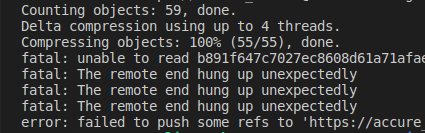
I am getting this error. I am not sure why.
 mdrahiem
on 3 Dec 2019
mdrahiem
on 3 Dec 2019
--forcedid not work for me :(
try this steps
step 1 : git pull origin master (in case if you get any message then ignore it)
step 2 : git add .
step 3 : git commit -m 'your commit message'
step 4 : git push origin master
knsaicharan
on 3 Dec 2019
I am getting this error. I am not sure why.
git reset --mixed origin/master
git add .
git commit -m "This is a new commit for what I originally planned to be an amendmend"
git push origin master
It worked for me.
Credits: https://stackoverflow.com/a/18589043/3272407
mdrahiem
on 3 Dec 2019
--forcedid not work for me :(
try this steps
step 1 : git pull origin master (in case if you get any message then ignore it)
step 2 : git add .
step 3 : git commit -m 'your commit message'
step 4 : git push origin master
yeah, I saw those docs too. I think there is something else going on. I've never seen this before in all the years I have been gitting
manoadamro
on 3 Dec 2019
Try this git command
git push origin master --force
or short of force -fgit push origin master -f
Thanks @javparra
It worked!
 TechnoidicAsh
on 12 Dec 2019
TechnoidicAsh
on 12 Dec 2019
til this day it works! thank you so much @javparra
 newnightcoder
on 15 Dec 2019
newnightcoder
on 15 Dec 2019
thank you@javparra
 Shubham-p-joshi
on 9 Jan 2020
Shubham-p-joshi
on 9 Jan 2020
@javparra Thanks
 ChDalel
on 9 Jan 2020
ChDalel
on 9 Jan 2020
Are you sure you followed the instructions exactly?
http://rtyley.github.io/bfg-repo-cleaner/#usage
The error message you're seeing is what you would see if you hadn't used the '--mirror' flag when doing the clone. To ensure you get a fully updated repo, it's best to redo your clone, this time ensuring you use '--mirror', and run The BFG again.
Why should we clone a repo before pushing it?
 rahuls
on 12 Jan 2020
rahuls
on 12 Jan 2020
For me it was that I didn't make commit
 lukasbee1
on 21 Jan 2020
lukasbee1
on 21 Jan 2020
git add .
git commit -m "initial commit"
git push -u origin master
Good, worked
 LucasCaputo
on 26 Jan 2020
LucasCaputo
on 26 Jan 2020
Try this git command
git push origin master --force
or short of force -fgit push origin master -f
Thank you soo much, it works now for me too! :)
 SigmaDemon
on 27 Jan 2020
SigmaDemon
on 27 Jan 2020
Try this git command
git push origin master --force
or short of force -fgit push origin master -f
Thanks This works like a charm
 arnoldalphonce
on 27 Jan 2020
arnoldalphonce
on 27 Jan 2020
its working,thanks @javparra
 Shanika123
on 5 Feb 2020
Shanika123
on 5 Feb 2020
@javparra its work
 TharakaCz
on 8 Feb 2020
TharakaCz
on 8 Feb 2020
thank you it works perfectly
 rushi8888
on 12 Feb 2020
rushi8888
on 12 Feb 2020
Thank you it works perfectly
 omarzoghayyer
on 15 Feb 2020
omarzoghayyer
on 15 Feb 2020
Thank you it works for me
 bushmusi
on 15 Feb 2020
bushmusi
on 15 Feb 2020
thanks for the help
 LeoNaiyem
on 24 Feb 2020
LeoNaiyem
on 24 Feb 2020
works for me ..
thankyou @LucasCaputo
 ayeshanov19
on 24 Feb 2020
ayeshanov19
on 24 Feb 2020
Try this git command
git push origin master --force
or short of force -fgit push origin master -f
it worked for me too. Thanks man.
 Vllaadd
on 26 Feb 2020
Vllaadd
on 26 Feb 2020
Try these steps it will successfully push when you had seen some issus while push
- git init
- git add "your file name"
- git commit -m "what commit need to add"
- git remote origin https://github.com/"yourgithubdirectory.git"
- git push orgin master --force.
try the above steps...you will
 SIVAPRAVEEN333
on 27 Feb 2020
SIVAPRAVEEN333
on 27 Feb 2020
Try this git command
git push origin master --force
or short of force -fgit push origin master -f
Muchas gracias tu respuesta fue de gran ayuda
 yoelysfigueredopadron
on 7 Mar 2020
yoelysfigueredopadron
on 7 Mar 2020
🖒
El sáb., 7 mar. 2020 0:23, yoelysfigueredopadron notifications@github.com
escribió:
Try this git command
git push origin master --force
or short of force -fgit push origin master -f
Muchas gracias tu respuesta fue de gran ayuda
—
You are receiving this because you were mentioned.
Reply to this email directly, view it on GitHub
https://github.com/rtyley/bfg-repo-cleaner/issues/29?email_source=notifications&email_token=AB2TJ2VDE6ZXTFYYHBWTQ5TRGG443A5CNFSM4ALT6VPKYY3PNVWWK3TUL52HS4DFVREXG43VMVBW63LNMVXHJKTDN5WW2ZLOORPWSZGOEODNYIQ#issuecomment-596040738,
or unsubscribe
https://github.com/notifications/unsubscribe-auth/AB2TJ2UCD475XGZ2EW7BW2LRGG443ANCNFSM4ALT6VPA
.
javparra
on 7 Mar 2020
Try this git command
git push origin master --force
or short of force -fgit push origin master -f
Thanks. It worked for me: git push origin master --force
 ghost
on 17 Mar 2020
ghost
on 17 Mar 2020
thanks. It worked....
 OnionSmit
on 22 Mar 2020
OnionSmit
on 22 Mar 2020
Try this git command
git push origin master --force
or short of force -fgit push origin master -f
Thanks. It worked ...
 HaiLe81
on 28 Mar 2020
HaiLe81
on 28 Mar 2020
Try this git command
git push origin master --force
or short of force -fgit push origin master -f
It worked!! Thanks
 sth34
on 4 Apr 2020
sth34
on 4 Apr 2020
thanks
في السبت، 4 أبريل 2020 في 3:40 م تمت كتابة ما يلي بواسطة sth34 <
[email protected]>:
Try this git command
git push origin master --force
or short of force -fgit push origin master -f
It worked!! Thanks
—
You are receiving this because you are subscribed to this thread.
Reply to this email directly, view it on GitHub
https://github.com/rtyley/bfg-repo-cleaner/issues/29#issuecomment-609022820,
or unsubscribe
https://github.com/notifications/unsubscribe-auth/AIIWCEH7Q5L7TX5BCVKK2UDRK4TE3ANCNFSM4ALT6VPA
.
 SaddamAlwheeb
on 4 Apr 2020
SaddamAlwheeb
on 4 Apr 2020
it did not work for me
 idowuogedengbe
on 7 Apr 2020
idowuogedengbe
on 7 Apr 2020
Try this git command
git push origin master --force
or short of force -fgit push origin master -f
Thank you man
 itsAbdullah
on 11 Apr 2020
itsAbdullah
on 11 Apr 2020
its working thanks @javprra
 alikaramniya
on 11 Apr 2020
alikaramniya
on 11 Apr 2020
I followed the instructions correctly but then when I go to push I get this error. The repo was up to date beforehand.
! [rejected] master -> master (fetch first)it
error: failed to push some refs to ''
hint: Updates were rejected because the remote contains work that you do
hint: not have locally. This is usually caused by another repository pushing
hint: to the same ref. You may want to first integrate the remote changes
hint: (e.g., 'git pull ...') before pushing again.
hint: See the 'Note about fast-forwards' in 'git push --help' for details.
I had same problem because i was one folder away in my bash pwd to the main repository folder .May be it will work for some
 VIVG123
on 15 Apr 2020
VIVG123
on 15 Apr 2020
Try this git command
git push origin master --force
or short of force -fgit push origin master -f
still its no t working
 danishbalti1
on 15 Apr 2020
danishbalti1
on 15 Apr 2020
thank you this is working
Try this git command
git push origin master --force
or short of force -fgit push origin master -f
thank you this is working
 shivam0912
on 23 Apr 2020
shivam0912
on 23 Apr 2020
@javparra it worked
 buriihenry
on 24 Apr 2020
buriihenry
on 24 Apr 2020
Try
Thank you , it worked
 jishnusaurav
on 27 Apr 2020
jishnusaurav
on 27 Apr 2020
Try this git command
git push origin master --force
or short of force -f
git push origin master -f
Thank you, It works! :100: :+1: @javparra
Salut
 Leonardoleo
on 30 Apr 2020
Leonardoleo
on 30 Apr 2020
It worked. 👍
 yshnavraj
on 3 May 2020
yshnavraj
on 3 May 2020
Its working.Thank u
 Vish770
on 3 May 2020
Vish770
on 3 May 2020
push -f works
 neezystudio
on 9 May 2020
neezystudio
on 9 May 2020
Try this git command
git push origin master --force
or short of force -fgit push origin master -f
It works , great man
 arabinda-gloify
on 10 May 2020
arabinda-gloify
on 10 May 2020
thanks it work, git push origin master -f
 BaraAksayeth25
on 10 May 2020
BaraAksayeth25
on 10 May 2020
Try this git command
git push origin master --force
or short of force -fgit push origin master -f
thanks It works for me
 Mushtaq25
on 11 May 2020
Mushtaq25
on 11 May 2020
Try this git command
git push origin master --force
or short of force -fgit push origin master -f
Thx it works
 Mustafa-Coder
on 12 May 2020
Mustafa-Coder
on 12 May 2020
Thanks a ton @javparra 👍
 Naveenchandar
on 19 May 2020
Naveenchandar
on 19 May 2020
thank @javparra it works
 thanghoangxt18
on 23 May 2020
thanghoangxt18
on 23 May 2020
Thnks a Alot It works
On Sat, May 23, 2020 at 2:21 PM thanghoangxt18 notifications@github.com
wrote:
thank @javparra https://github.com/javparra it works
—
You are receiving this because you commented.
Reply to this email directly, view it on GitHub
https://github.com/rtyley/bfg-repo-cleaner/issues/29#issuecomment-633009270,
or unsubscribe
https://github.com/notifications/unsubscribe-auth/AKFYR7D7BD7XTQYL3E7ZBRDRS6FBFANCNFSM4ALT6VPA
.
Mushtaq25
on 23 May 2020
I had same issue, but on some pages they mentioned
" git push origin master --force "
could cause some problem in future. but not sure.
 AlhiloMustafa
on 10 Jun 2020
AlhiloMustafa
on 10 Jun 2020
Try this git command
git push origin master --force
or short of force -fgit push origin master -f
thanks man... worked for me :)
 JungleeBHAALU
on 10 Jun 2020
JungleeBHAALU
on 10 Jun 2020
you are pushing an empty repo sometimes
 smdp2000
on 14 Jun 2020
smdp2000
on 14 Jun 2020
git push origin master --force
git push origin master
both the commands are not working for me ... plz help out
 Shivaraj1995
on 17 Jun 2020
Shivaraj1995
on 17 Jun 2020
it doesn't work
 komyoeungvet2020
on 18 Jun 2020
komyoeungvet2020
on 18 Jun 2020
Then how should I push the file into GitHub?
Shivaraj1995
on 18 Jun 2020
Try this git command
git push origin master --force
or short of force -fgit push origin master -f
thanks
 jitendershiprocket
on 26 Jun 2020
jitendershiprocket
on 26 Jun 2020
Try this git command
git push origin master --force
or short of force -fgit push origin master -f
nice
 nidhi-anilabsinc
on 1 Jul 2020
nidhi-anilabsinc
on 1 Jul 2020
This error could have occured in following scenarios as well
- If you have changed your github username, password or email
If you are trying to push commits to someone else's branch while your windows is configured with your github credentials
I have got this error in above scenarios, and this is how i solved it
Deleted github credentials stored in Credential Manager in Windows
- After that, I tried to push my commits again with following command, and then it prompted me to enter github credentials. (if you are pushing to someone else's repo, make sure that you enter the credentials of that github user's account
git push -u (repo-url) (branch-name)
 sankharr
on 4 Jul 2020
sankharr
on 4 Jul 2020
If you didn't make the first commit from github (by creating a readme) you will need to do git commit -am "{commit message}" prior to git push origin master
 SeanJManning
on 4 Jul 2020
SeanJManning
on 4 Jul 2020
@javparra you are pro, dude! Thanks a lot!
 akanshapanchal85
on 8 Jul 2020
akanshapanchal85
on 8 Jul 2020
Try this git command
git push origin master --force
or short of force -fgit push origin master -f
Thankyou its work
 alfianhidayah
on 11 Jul 2020
alfianhidayah
on 11 Jul 2020
Thanks..it worked
 walumbe
on 22 Jul 2020
walumbe
on 22 Jul 2020
git push origin master --force
git push origin masterboth the commands are not working for me ... plz help out
Hey @Shivaraj1995 follow these steps::
- go to that directory which have file present that you want to push to github. Then run: git init >> it will create a empty .git invisible directory
- Then git add . >> this will add all file present in present directory to .git invisible directory
- Then git status >> it will show files to be pushed to github
- Then git commit -m " any message you want to write" >> its done to have record of all docs that you push to github.
- Then git remote add origin 'https://url_of repo_you_created_on_github_where_ypu_want_to_push_your_code'
- Then git push -u origin master >> to push code on github
- If above cmd not working then run git push origin master --force
This is how I pushed my code to github first time.
 miniamisha
on 23 Jul 2020
miniamisha
on 23 Jul 2020
error: failed to push some refs to 'https://github.comt'
its error
 shivasaitechatcore
on 29 Jul 2020
shivasaitechatcore
on 29 Jul 2020
failed to push some refs to 'https://github.com/1706810048/AniPracticePython.git'
 1706810048
on 30 Jul 2020
1706810048
on 30 Jul 2020
NOTE / $ git remote add ** URL (use any name other than origin because origin was exist already for example "alhilo")
IT WORKS FOR ME
$git remote add alhilo
$ git push -u alhilo master
AlhiloMustafa
on 2 Aug 2020
😎
El vie., 7 ago. 2020 a las 5:59, Hamza Ilyas (notifications@github.com)
escribió:
Try this git command
git push origin master --force
or short of force -fgit push origin master -f
It Works! Thanks alot
—
You are receiving this because you were mentioned.
Reply to this email directly, view it on GitHub
https://github.com/rtyley/bfg-repo-cleaner/issues/29#issuecomment-670412558,
or unsubscribe
https://github.com/notifications/unsubscribe-auth/AB2TJ2SV4UUALLHBEK5CDKLR7O7ANANCNFSM4ALT6VPA
.
javparra
on 7 Aug 2020
@javparra thanks man
 itssadia
on 17 Aug 2020
itssadia
on 17 Aug 2020
@javparra thanks man it works.
 microrony
on 27 Aug 2020
microrony
on 27 Aug 2020
@javparra thanks man! saved me from the trouble
 kiranojhanp
on 1 Sep 2020
kiranojhanp
on 1 Sep 2020
@javparra thanks a lot. it worked for me
 Osigbemes
on 14 Sep 2020
Osigbemes
on 14 Sep 2020
thanks its work @javparra
 MadeWelly
on 15 Sep 2020
MadeWelly
on 15 Sep 2020
It worked!! thank you @javparra
 DaniSanta
on 24 Sep 2020
DaniSanta
on 24 Sep 2020
its not work form me
i try git push origin master --force
but still get same error
error: failed to push some refs to 'github.com:zajanah/github-followers.git'
 zajanah
on 26 Sep 2020
zajanah
on 26 Sep 2020
Try this git command
git push origin master --force
or short of force -fgit push origin master -f
this command can delete existing git files ?
I use this command in my organization repository now I am not show any user files only my files and folder shown
 Chandu8817
on 27 Sep 2020
Chandu8817
on 27 Sep 2020
Try this git command
git push origin master --force
or short of force -fgit push origin master -f
Thanks it workedd
 Yogeswari-Sahu
on 14 Oct 2020
Yogeswari-Sahu
on 14 Oct 2020
error occure :+1:
Mohit@Mohit-PC MINGW64 ~/edureka (master)
$ git push SR-with-Kivy master
error: src refspec master does not match any
error: failed to push some refs to 'https://github.com/mohitnamde/SR-with-Kivy.git'
error occure :
Mohit@Mohit-PC MINGW64 ~/edureka (master)
$ git push SR-with-Kivy master --force
error: src refspec master does not match any
error: failed to push some refs to 'https://github.com/mohitnamde/SR-with-Kivy.git'
error occure :
Mohit@Mohit-PC MINGW64 ~/edureka (master)
$ git push SR-with-Kivy master -f
error: src refspec master does not match any
error: failed to push some refs to 'https://github.com/mohitnamde/SR-with-Kivy.git'
it is working but error occure :
Mohit@Mohit-PC MINGW64 ~/edureka (master)
$ git push SR-with-Kivy master --f
error: ambiguous option: f (could be --force-with-lease or --follow-tags)
usage: git push [
-v, --verbose         be more verbose
-q, --quiet           be more quiet
--repo <repository>   repository
--all                 push all refs
--mirror              mirror all refs
-d, --delete          delete refs
--tags                push tags (can't be used with --all or --mirror)
-n, --dry-run         dry run
--porcelain           machine-readable output
-f, --force           force updates
--force-with-lease[=<refname>:<expect>]
                      require old value of ref to be at this value
--recurse-submodules (check|on-demand|no)
                      control recursive pushing of submodules
--thin                use thin pack
--receive-pack <receive-pack>
                      receive pack program
--exec <receive-pack>
                      receive pack program
-u, --set-upstream    set upstream for git pull/status
--progress            force progress reporting
--prune               prune locally removed refs
--no-verify           bypass pre-push hook
--follow-tags         push missing but relevant tags
--signed[=(yes|no|if-asked)]
                      GPG sign the push
--atomic              request atomic transaction on remote side
-o, --push-option <server-specific>
                      option to transmit
-4, --ipv4            use IPv4 addresses only
-6, --ipv6            use IPv6 addresses only
 mohitnamde
on 18 Oct 2020
mohitnamde
on 18 Oct 2020
Mohit@Mohit-PC MINGW64 ~/edureka (master)
$ git remote add origin [email protected]:mohitnamde/SR-with-Kivy.git
Mohit@Mohit-PC MINGW64 ~/edureka (master)
$ git push -u origin main
error: src refspec main does not match any
error: failed to push some refs to 'github.com:mohitnamde/SR-with-Kivy.git'
mohitnamde
on 18 Oct 2020
I faced this issue but after 2 days I got a solution. Just run these two commands if you are deploying your site on GitHub pages first time.
git commit -m "initial commit"
git push origin +HEAD
 AzeemAleem
on 18 Oct 2020
AzeemAleem
on 18 Oct 2020
tks bro its work #@javparra
 markx195
on 20 Oct 2020
markx195
on 20 Oct 2020
thanks, it worked
 mnabeelshahid
on 30 Oct 2020
mnabeelshahid
on 30 Oct 2020
@javparra git push origin master -f cmd using
other member code deleted in github .
 Group-3Shopkeeper
on 30 Oct 2020
Group-3Shopkeeper
on 30 Oct 2020
Try this git command
git push origin master --force
or short of force -fgit push origin master -f
thank you verry much
 DinhVan2811
on 3 Nov 2020
DinhVan2811
on 3 Nov 2020
thank u bro...
 tirupatipalem
on 4 Nov 2020
tirupatipalem
on 4 Nov 2020
it's not working
 UmaAddingsmiles
on 10 Nov 2020
UmaAddingsmiles
on 10 Nov 2020
El mar., 10 nov. 2020 a las 9:50, UmaAddingsmiles (notifications@github.com)
escribió:
[image: 01]
https://user-images.githubusercontent.com/73638354/98676091-25fca600-2381-11eb-8df9-50150b2cc34b.png
I have attached image for the error—
You are receiving this because you were mentioned.
Reply to this email directly, view it on GitHub
https://github.com/rtyley/bfg-repo-cleaner/issues/29#issuecomment-724681302,
or unsubscribe
https://github.com/notifications/unsubscribe-auth/AB2TJ2TCL67HANS4K35P5FTSPEZHXANCNFSM4ALT6VPA
.
javparra
on 10 Nov 2020
Try this git command
git push origin master --force
or short of force -fgit push origin master -f
It works @javparra
 kumar007ambi
on 19 Dec 2020
kumar007ambi
on 19 Dec 2020
@javparra Thank you its working
 dineshmd7
on 26 Dec 2020
dineshmd7
on 26 Dec 2020
If you cloned the repo
git clone url
and have done
git pull
to ensure all the modified files are upto date
after commit
git commit -m "some comment"
just simply run
git push
 paullaster
on 27 Dec 2020
paullaster
on 27 Dec 2020
@JonnyD Thanks ..pull before push again was the issue here :)
 Sahilamin219
on 1 Jan 2021
Sahilamin219
on 1 Jan 2021
error: src refspec master does not match any
error: failed to push some refs to 'https://github.com/AKazadRafi/Personal-Bank.git'
help me
 AKazadRafi
on 3 Jan 2021
AKazadRafi
on 3 Jan 2021
D:\PROJECTS\Personal-Bank>git push -u origin main
error: src refspec main does not match any
error: failed to push some refs to 'https://github.com/AKazadRafi/Personal-Bank.git'
AKazadRafi
on 3 Jan 2021
Try this git command
git push origin master --force
or short of force -fgit push origin master -f
It worked. Thanks. @javparra
 Rabipedia
on 4 Jan 2021
Rabipedia
on 4 Jan 2021
Try this git command
git push origin master --force
or short of force -fgit push origin master -f
get this error
OpenSSL SSL_connect: Connection was reset in connection to github.com:443
 gitwithsarthak
on 9 Jan 2021
gitwithsarthak
on 9 Jan 2021
@javparra Thank you
 aboubakarismael16
on 14 Jan 2021
aboubakarismael16
on 14 Jan 2021
Tnx @javparra
 Sambhrama754
on 22 Jan 2021
Sambhrama754
on 22 Jan 2021
Thanks
 miltonrodrigues29
on 22 Jan 2021
miltonrodrigues29
on 22 Jan 2021
Try this git command
git push origin master --force
or short of force -fgit push origin master -f
Thank you so much it really works :)
 Ratul-oss
on 23 Jan 2021
Ratul-oss
on 23 Jan 2021
git push origin master --force
[email protected]: Permission denied (publickey).
fatal: Could not read from remote repository.
this came out still not working
 WajahatMubashir
on 26 Jan 2021
WajahatMubashir
on 26 Jan 2021
Try this git command
git push origin master --force
or short of force -fgit push origin master -f
Thanks, It works
 SamratHossain
on 29 Jan 2021
SamratHossain
on 29 Jan 2021
git push origin main --force
 yanmxa
on 6 Feb 2021
yanmxa
on 6 Feb 2021
error: src refspec master does not match any
error: failed to push some refs to 'github.com:GuruJustin/OldAndYoungTimer.git'
And I tried with git push origin main --force
But there is still same bug
I have ssh key and also credential has no issue.
Hope someone save my day.
 GuruJustin
on 7 Feb 2021
GuruJustin
on 7 Feb 2021
Try this git command
git push origin master --force
or short of force -fgit push origin master -f
Thanks very much it solved my problem
 balaji-subramaniyam
on 10 Feb 2021
balaji-subramaniyam
on 10 Feb 2021
error: src refspec main does not match any
error: failed to push some refs to 'https://github.com/salimkhan1234/monu.git'
 salimkhan1234
on 10 Feb 2021
salimkhan1234
on 10 Feb 2021
Try this git command
git push origin master --force
or short of force -fgit push origin master -f
Thanks a million! It worked!
 LuizSantoro
on 10 Feb 2021
LuizSantoro
on 10 Feb 2021
Por nada bro!!
El mié, 10 feb 2021 a las 18:50, Luiz Alberto Vaz Guimarães Santoro (<
[email protected]>) escribió:
Try this git command
git push origin master --force
or short of force -fgit push origin master -f
Thanks a million! It worked!
—
You are receiving this because you were mentioned.
Reply to this email directly, view it on GitHub
https://github.com/rtyley/bfg-repo-cleaner/issues/29#issuecomment-777054695,
or unsubscribe
https://github.com/notifications/unsubscribe-auth/AB2TJ2ULTF7FW4RC7VHVDHDS6L5THANCNFSM4ALT6VPA
.
javparra
on 10 Feb 2021
git push origin master --force
its work for me ....thnx
 pankajgulabsharma
on 25 Feb 2021
pankajgulabsharma
on 25 Feb 2021
try this it worked for me.
git push -u origin main
 AbdurRhmanPrince
on 1 Mar 2021
AbdurRhmanPrince
on 1 Mar 2021
thanks @javparra
 ziayamin
on 3 Mar 2021
ziayamin
on 3 Mar 2021
Try this git command
git push origin master --force
or short of force -fgit push origin master -f
thanks @javparra
 mahdis-hoseini
on 25 Mar 2021
mahdis-hoseini
on 25 Mar 2021
@javparra :sir i received below error:
rror: src refspec main does not match any.
error: failed to push some refs to 'https://github.com/*/Print-and-design.git'
 soni1000
on 4 Apr 2021
soni1000
on 4 Apr 2021
it didnt work @javparra I got the same error
 daniel-iroka
on 12 Apr 2021
daniel-iroka
on 12 Apr 2021
It works man @javparra, Thanks bro.
 EstopaceMA
on 15 Apr 2021
EstopaceMA
on 15 Apr 2021
Related issues
 dwabyick
·
8Comments
dwabyick
·
8Comments
 Fr0sT-Brutal
·
6Comments
Fr0sT-Brutal
·
6Comments
 Sieabah
·
4Comments
Sieabah
·
4Comments
 Unknown6656
·
3Comments
Unknown6656
·
3Comments
 mitchellkrogza
·
5Comments
mitchellkrogza
·
5Comments
Most helpful comment
Try this git command
git push origin master --force
or short of force -f
git push origin master -f