Betterttv: Font Line Height ( Dyslexia Issue )
Hey, I'd like to request a Font Line Height option.
I use the font OpenDyslexic set to font size 32. Sentences overlap each other and the experience is pretty awful, but the alternative is a font size that so small I need to lean into my monitor.
An option to change Line Height would be fantastic.
Thanks!
 Blootrix
All 13 comments
You can inject these styles in order to alter the line height for chat, a plugin such as Stylus will do this
span[data-a-target="chat-message-text"] {
    line-height: 2 !important;
}
 Scrxtchy
on 17 Aug 2020
Scrxtchy
on 17 Aug 2020
You can inject these styles in order to alter the line height for chat, a plugin such as Stylus will do this
span[data-a-target="chat-message-text"] {
  line-height: 2 !important;
}
Thank you for getting back to me. How do I go about injecting that into BetterTTV? I've never done anything like that.
I take it I just change the "2" to whatever I want to change the line height bit by bit?
Thanks!
Blootrix
on 21 Aug 2020
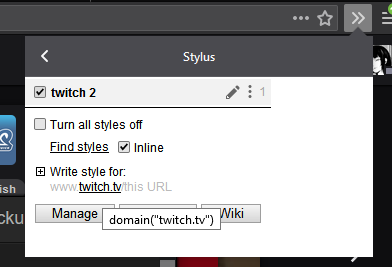
There's no custom css injecting feature in bttv (#730), so you'll need another extension to do it
The normal one people use is now https://add0n.com/stylus.html
You would then just create a new style with that code and it should work fine
Scrxtchy
on 21 Aug 2020
You can inject these styles in order to alter the line height for chat, a plugin such as Stylus will do this
span[data-a-target="chat-message-text"] {
  line-height: 2 !important;
}
Despite reading your message twice, I didn't see/understand the Stylus bit. I've now got it working, thank you very much for the help! It's working fantastic now with no overlapping.
While I've got you, do you know how I can reduce the highlight when someone @'s me?

Blootrix
on 21 Aug 2020
.mention-fragment--recipient {
    padding: .2rem .4rem !important;
}
these are the defaults, you'd want to lower the .2rem
Scrxtchy
on 21 Aug 2020
.mention-fragment--recipient {
    padding: .2rem .4rem !important;
}
these are the defaults, you'd want to lower the
.2rem
Thanks for getting back to me so quickly.
So I've tried reducing the .2rem but it doesn't seem to do much. It does a little something, but not much. How would I make it a negative to really start reducing the size of the highlight, as ".-1rem" and "-1rem" doesn't work and ".0rem" doesn't really change things more than maybe 2-4 pixels on the top and bottom.
Blootrix
on 21 Aug 2020
Ahh, there's a bunch of other units you can use, maybe it's a lot more noticable when you are using smaller text.
ems will work too, but you can also use pixel values by using px
There's a whole document on them here
https://developer.mozilla.org/en-US/docs/Learn/CSS/Building_blocks/Values_and_units
Scrxtchy
on 21 Aug 2020
Unfortunately em & px won't allow negative values as well and setting both to either 0 or 0.1 don't reduce the padding much more than the picture I pasted above. Adding to those numbers definitely works, but just not a negative.
I had a look at that value and units page and I'm not too sure what to look, coding isn't something I'm really familiar with. Any idea what else I can try to reduce the padding? A way to make it a negative? Or is 0px/em/rem as low as it goes?
Blootrix
on 21 Aug 2020
I'm wondering if it's maybe the "-" symbol that's breaking things?
Blootrix
on 21 Aug 2020
Yea, testing this out, adding a "-" before ANYTHING immediately breaks the command.
10% will increase things. 0% will reduce it, but "-10% does nothing...
Is it maybe something to do with the font? Maybe I need to reduce something there?
Blootrix
on 21 Aug 2020
Ahh, there's a bunch of other units you can use, maybe it's a lot more noticable when you are using smaller text.
ems will work too, but you can also use pixel values by usingpx
There's a whole document on them here
https://developer.mozilla.org/en-US/docs/Learn/CSS/Building_blocks/Values_and_units
I've tried putting a "-" before em, ex, ch, rem, vw, vh, vmin and vmax. No joy with any of them... I'm guessing I need to reduce something to do with the font height which I'm assuming would reduce the the size of the padding around the font... But I've no idea, lol.
Blootrix
on 21 Aug 2020
Well, it's not possible to give it a negative padding without a lot more complicated techniques that go over my head. Maybe we could tackle this from another angle. Would changing the colour of the mention block be much use? We can also give it some level of transparency to not be much of an intrusion on previous lines.
In this example, I have altered the mention name colour back to black, but have changed the black background to a green colour

.mention-fragment--recipient {
    background-color: #0aff0257 !important;
    color: #000 !important;
    padding: .2rem .4rem !important;
}
Mozilla have a useful colour picker tool with a transparency slider if you want to pick your own
https://developer.mozilla.org/en-US/docs/Web/CSS/CSS_Colors/Color_picker_tool
When you have a colour you like, you can press this button to copy the value and paste it over where the background-color value is

Scrxtchy
on 21 Aug 2020
That's worked really well!! Thank you again for the help!
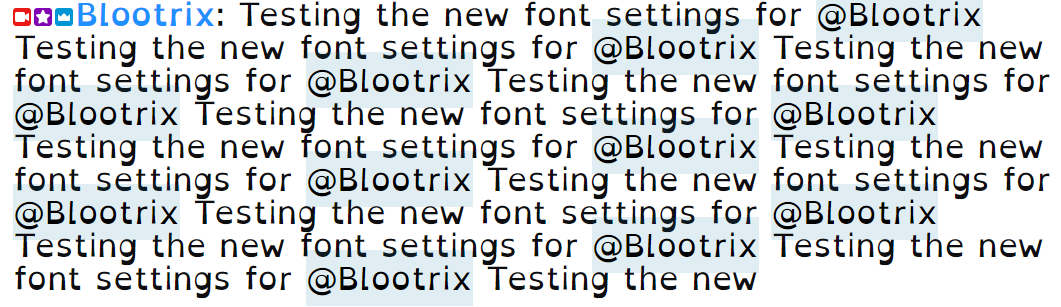
For anyone wanting this info for the future, here are my final settings.
Font: OpenDyslexic
Size: 32
Code 1:
span[data-a-target="chat-message-text"] {
line-height: 1.05 !important;
}
Code 2: .mention-fragment--recipient {
background-color: rgba(3, 108, 157, 0.12) !important;
color: #000 !important;
padding: .0rem .0rem !important;
}
Blootrix
on 21 Aug 2020
Related issues
 xzPr
·
5Comments
xzPr
·
5Comments
 kavisherlock
·
3Comments
kavisherlock
·
3Comments
 pokeguyboss
·
3Comments
pokeguyboss
·
3Comments
 KoopaTheTurtle-zz
·
5Comments
KoopaTheTurtle-zz
·
5Comments
 jt415gz
·
3Comments
jt415gz
·
3Comments