Betaflight-configurator: Beta Flight API
Hey guys,
Is there a Betaflight API? I'd like to integrate into my clubs website where members can collaborate.
 rcpilotp51
All 26 comments
What kind of API are you looking for? To donate? If true, there are two links, one to paypal and the other one for patreon. You can find there in the top, at the sponsor button.
 McGiverGim
on 23 Oct 2020
McGiverGim
on 23 Oct 2020
I've donated :D
however I was interested in creating a chrome extension to interact with betaflight. For instance, our flight clubs have 3 locations, and there isnt always someone to help people setup their quads. I would like to create a chrome extension that will get the serial information from the user and feed it into betaflight and be able to help the remote user sort of like a "Remote Desktop" situation. My extension would simply be an interface over a web server that would feed into my local betaflight install.
Thanks
Keith
rcpilotp51
on 25 Oct 2020
It will be more difficult now that we have removed the chrome support... 🤔
McGiverGim
on 25 Oct 2020
Betaflight connects to any serial port of the computer, maybe something like this will work? https://freeremoteserialports.com/
McGiverGim
on 25 Oct 2020
@rcpilotp51: Betaflight configurator already does this. All you need to do is set up a facility on your flight club's web server that exposes the serial port that the flight controller is connected to on a TCP port. Once this is done the helping member will be able to connect to the flight controller like this:
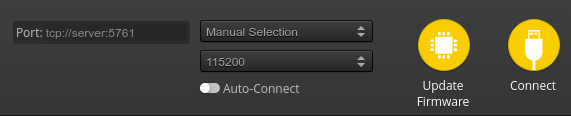
But maybe an even better idea is to use a remote desktop / remote help application (like Chrome Remote Desktop, LogMeIn, or TeamViewer) to do this - this way the pilot being helped can watch and learn from what the pilot rendering assistance is doing in configurator.
 mikeller
on 25 Oct 2020
mikeller
on 25 Oct 2020
@rcpilotp51: Betaflight configurator already does this. All you need to do is set up a facility on your flight club's web server that exposes the serial port that the flight controller is connected to on a TCP port. Once this is done the helping member will be able to connect to the flight controller like this:
But maybe an even better idea is to use a remote desktop / remote help application (like Chrome Remote Desktop, LogMeIn, or TeamViewer) to do this - this way the pilot being helped can watch and learn from what the pilot rendering assistance is doing in configurator.
The first suggestion is exactly what I was looking for... Do you know what has to be done or the format that betaflight is looking for ala a nodejs application... I guess my question is how do i expose the pilots connection on his computer to a port on the server. I would love more information about this!
rcpilotp51
on 26 Oct 2020
@rcpilotp51: All that is needed is just a raw serial data stream, no format involved. There are apps that can do that, like https://sourceforge.net/projects/tcpcom32/ (Windows), or built in tools for linux (https://superuser.com/questions/614494/redirect-serial-com-to-tcp-port).
mikeller
on 26 Oct 2020
You are not able to flash new firmware using this solution? I would prefer teamviewer or something, both parties will be able to see what's happening.
 haslinghuis
on 26 Oct 2020
haslinghuis
on 26 Oct 2020
You are not able to flash new firmware using this solution? I would prefer teamviewer or something, both parties will be able to see what's happening.
What is teamviewer? And why can’t you update the firmware if you have access to the serial port remotely? Thanks!
rcpilotp51
on 27 Oct 2020
Teamviewer is often used for remote support where both parties share display, keyboard and mouse. It's like sitting behind the remote computer using your own. See https://www.teamviewer.com. I use this kind of solutions since 1992 and works perfect.
Flashing uses another serial protocol and afaik is not available using network communication protocols. I guess if you need to use blheli(32) configurator then using a tcp connection (maybe using zerotier to avoid firewalll configuration) would be impossible too. Also knowing the exact port to use a tcp connection depends on the serial port configured as MSP (or VCP not sure). If using older boards this would be a CP210x serial connection.
haslinghuis
on 27 Oct 2020
Good point about flashing - I doubt that there will be an 'out of the box' solution for forwarding this, and I doubt that it is worth the effort to create one. I'd be with @haslinghuis and recommend the use of Teamviewer or similar - I see making it possible for the pilot seeking help to watch what the helper is doing as an important factor.
mikeller
on 27 Oct 2020
After playing around with a HAKRC f7230d - im really interested in setting up my own tcp server - I am able to get the flight controller connected using Chrome.serial, but im un able to start a data stream once connected
bitrate: 115200,
dataBits: "eight",
parityBit: "even",
stopBits: "one"
this gets me connected using chrome runtime (meaning i get a successful callback- i dont see any data)
can anyone help get the serial connection streaming to the tcp server?
I have a connection established - I just need to bridge the flight controller to the socket.io connection
do i have to parse the data? where is the data coming from? do i have to send a request to the FC to start the data? Do i need to use any of the MSP helper functions in Betaflight (doubt it)
End goal is to connect betaflight to my flight controller over any computer on my network using TCP
I have a chrome extension that connects somewhat to a serial port and I have a socket.io server running
the chrome extension can connect to the io server
The last step seems to escape me
Thanks for all your help!
rcpilotp51
on 28 Oct 2020
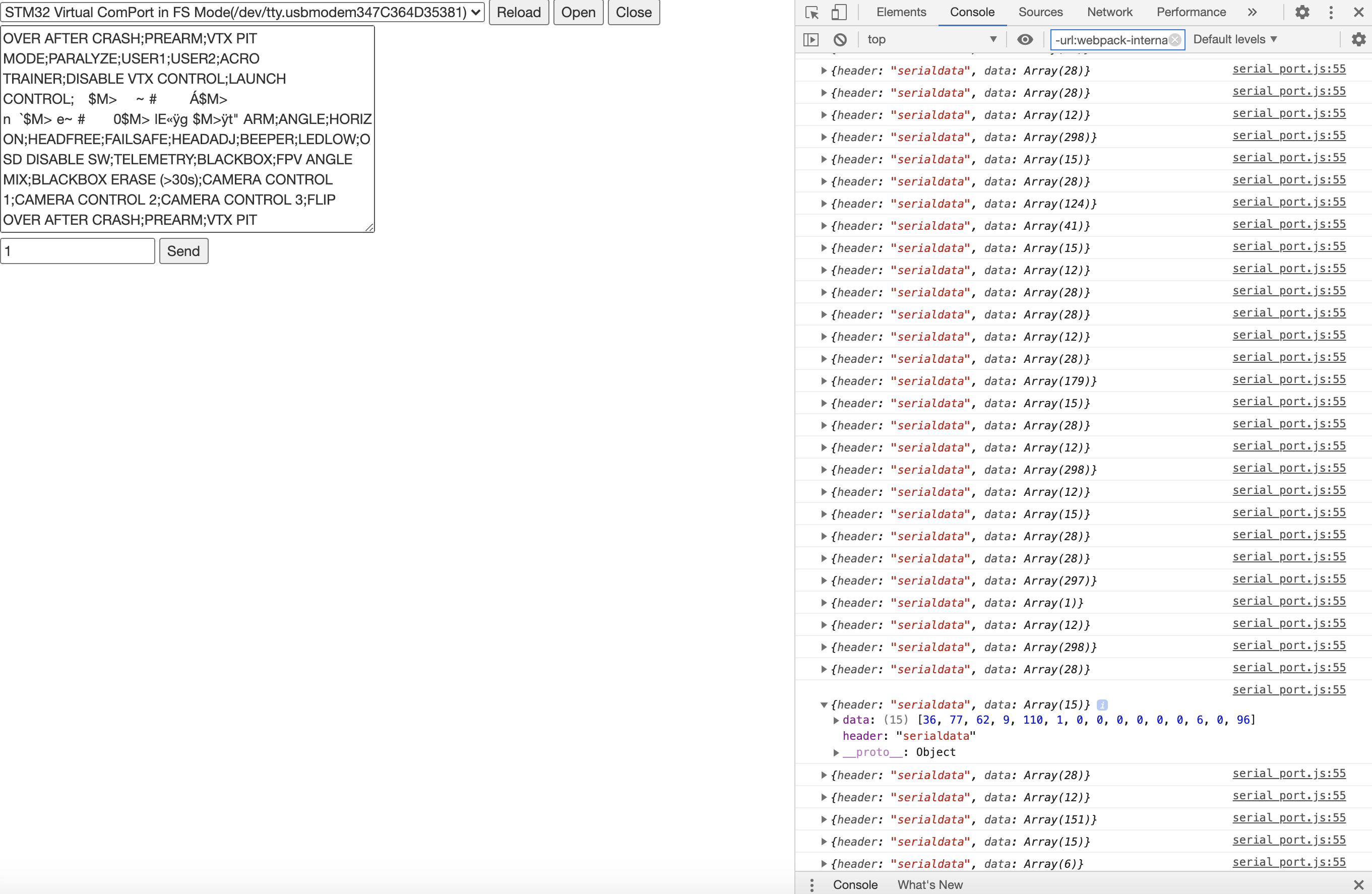
Seems like my app gets information if betaflight is connected... which is exciting! is betaflight polling the FC constantly for information using a Unit8Array? Do I have to do that or can i simply point betaflight to my tcp server using the manual option? I just wish I knew what that bridge was...
rcpilotp51
on 28 Oct 2020
@rcpilotp51: If your TCP server simply sends and receives data from / to the serial port that the flight controller is connected to, then all you need is to use the address as tcp://<your server name / address>:<port number> and click 'Connect'.
mikeller
on 28 Oct 2020
@rcpilotp51: If your TCP server simply sends and receives data from / to the serial port that the flight controller is connected to, then all you need is to use the address as
tcp://<your server name / address>:<port number>and click 'Connect'.
I don’t know what to expose from the serial connection to the tcp: that’s the small step I’m missing
rcpilotp51
on 28 Oct 2020
@rcpilotp51:
I don’t know what to expose from the serial connection to the tcp: that’s the small step I’m missing
The data stream. Wait until a client is bound, then send every byte you get from the serial port to the client, and send every byte you receive from the client to the serial port.
mikeller
on 28 Oct 2020
One small problem.
Using manual tcp connection configurator will hang when hitting save and reboot on different tabs.
CLI does not exit (save does change settings)
Have to restart Configurator and reconnect drone and sometimes even have to reconnect in serial mode before new tcp connection is accepted.
haslinghuis
on 28 Oct 2020
I understand the theory- I guess I’m missing the syntax
rcpilotp51
on 28 Oct 2020
One small problem.
Using manual tcp connection configurator will hang when hitting save and reboot on different tabs.
CLI does not exit (save does change settings)
Have to restart Configurator and reconnect drone and sometimes even have to reconnect in serial mode before new tcp connection is accepted.
If we are sending data from one point to the next in a stream why would it hang
rcpilotp51
on 28 Oct 2020
@rcpilotp51:
I understand the theory- I guess I’m missing the syntax
There is no syntax - it is just a raw byte stream.
If we are sending data from one point to the next in a stream why would it hang
This is just a shortcoming of the current configurator implementation - essentially with the TCP stream, the flight controller has got no way to let configurator know that it is rebooting.
@haslinghuis: The situation is similar to what we have for flight controllers without VCP, so it might be possible to make this work by re-using the logic used there.
mikeller
on 28 Oct 2020
Tested on Fedora 32/33 using 2 devices on local network using
$ socat TCP-LISTEN:5761,fork,reuseaddr FILE:/dev/ttyACM0,b115200,raw
Port 5761 is used for USB VCP.
I have no hardware using CP210x but afaik it requires a UART port with MSPenabled:
UART | PORT
-- | --
1 | 5761
2 | 5762
3 | 5763
4 | 5764
5 | 5765
6 | 5766
7 | 5767
8 | 5768
haslinghuis
on 29 Oct 2020
That’s interesting: how can you tell when each is required when opening the port?
rcpilotp51
on 29 Oct 2020
/dev/ttyUSB0 looks fishy for VCP - these ports are normally recognised as /dev/ttyACM<number> in linux - try this instead.
mikeller
on 29 Oct 2020
Fixed: Sorry copy pasta - in forgot to edit the port, in my case it is indeed
/dev/ttyACM0.
haslinghuis
on 29 Oct 2020
Really trying to solve the connection using tcp but it seams currently it only works when establishing a serial connection before atcp connection and have no clue why?
haslinghuis
on 30 Oct 2020
@rcpilotp51 most FC's have VCP so don't worry about the table.
I fixed some things to allow the reboot to not hang up the configurator, See the PR for details. It's not perfect but it works.
haslinghuis
on 2 Nov 2020
Related issues
 JyeSmith
·
5Comments
JyeSmith
·
5Comments
 Etruscian
·
10Comments
Etruscian
·
10Comments
 el-kwadro-fpv
·
8Comments
el-kwadro-fpv
·
8Comments
 spatzengr
·
7Comments
spatzengr
·
7Comments
 ss8688
·
4Comments
ss8688
·
4Comments
Most helpful comment
What kind of API are you looking for? To donate? If true, there are two links, one to paypal and the other one for patreon. You can find there in the top, at the sponsor button.