Betaflight-configurator: error can't open configurator
error can't open configurator
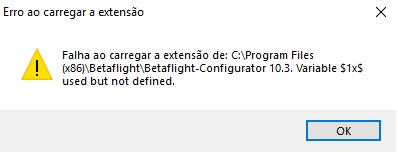
thanks in advance for the great work.
 PIRATES3D
All 16 comments
I have same problem
 samuelrettore
on 23 Jun 2018
samuelrettore
on 23 Jun 2018
I have the same error here :(
 arierep60
on 23 Jun 2018
arierep60
on 23 Jun 2018
@PIRATES3D, @samuelrettore, @arierep60: A mention of what operating system and version you are using would be real helpful.
 mikeller
on 24 Jun 2018
mikeller
on 24 Jun 2018
Windows 10 Home 64 bits
arierep60
on 24 Jun 2018
Seems to be a lingo issue. Seen other reports, hinting it could be a Spanish or/and Portuguese xlat problem. My English Win10 installation worked flawlessly. Or maybe it worked because I had earlier versions installed, i.e. update works but new installs fail. Just an idea...
 AndersHoglund
on 24 Jun 2018
AndersHoglund
on 24 Jun 2018
@mikeller : thanks for the fast answer. I have windows 10 PRO 64bit (Portuguese language) with all the updates installed.
Error message translated: Error loading the extension. Fail at loading the extension from: C:\Program Filles........
Thanks again.
PIRATES3D
on 24 Jun 2018
@AndersHoglund: Good catch, could be an illegal placeholder (or a character sequence being interpreted as one) in one or more of the language files.
@PIRATES3D, @samuelrettore, @arierep60: Can you please also post what language you are using? For now, the workaround seems to be to switch to English.
mikeller
on 24 Jun 2018
@mikeller @samuelrettore @arierep60 @AndersHoglund: Yes, it's a language problem. For now, just go to the installation directory, open the paste '_locales' and remove everything except the 'en' paste.
PIRATES3D
on 24 Jun 2018
By the error, it seems this phrase Invalid image size; expected $1×$2 instead of $3×$4 but I'm out of a computer until Tuesday to debug it.
 McGiverGim
on 24 Jun 2018
McGiverGim
on 24 Jun 2018
duplicates #1074
 binlan
on 24 Jun 2018
binlan
on 24 Jun 2018
Ok, I think I've fixed it (I cannot reproduce it). Please try the configurator builds from https://drive.google.com/drive/folders/1b48TjU2cXBPWrNFA44rOzS3z--txlsw0?usp=sharing, and provide feedback.
mikeller
on 24 Jun 2018
@mikeller does it mean, the workaround with spaces is not needed anymore? (as mentioned in #1074 )
binlan
on 24 Jun 2018
Since the strings in question are not used anywhere: No.
mikeller
on 24 Jun 2018
@PIRATES3D did that and now it works fine, thanks man ;)
arierep60
on 24 Jun 2018
Would this fix lead to a 10.3.x_maint branch? And a 10.3.1 release? Or should we stay on the "one-track" policy and fix this in the next 10.4.0 release?
AndersHoglund
on 24 Jun 2018
@AndersHoglund: Yes, I think this will best be fixed / released as 10.3.1 from a maintenance branch, the same way we are doing patch releases for the firmware.
There is also #1075 that stems from a change in the MSP format being forgotten to be included in 10.3.0, so that should go in there as well.
mikeller
on 24 Jun 2018
Related issues
 richard-scott
·
3Comments
richard-scott
·
3Comments
 cusglider
·
9Comments
cusglider
·
9Comments
 uberjay2
·
7Comments
uberjay2
·
7Comments
 ss8688
·
4Comments
ss8688
·
4Comments
 JyeSmith
·
5Comments
JyeSmith
·
5Comments
Most helpful comment
@mikeller @samuelrettore @arierep60 @AndersHoglund: Yes, it's a language problem. For now, just go to the installation directory, open the paste '_locales' and remove everything except the 'en' paste.