Bert-as-service: Run bert-as-service on google colab
Prerequisites
Please fill in by replacing
[ ]with[x].
- [x] Are you running the latest
bert-as-service? - [x] Did you follow the installation and the usage instructions in
README.md? - [x] Did you check the FAQ list in
README.md? - [x] Did you perform a cursory search on existing issues?
System information
Some of this information can be collected via this script.
- OS Platform and Distribution (e.g., Linux Ubuntu 16.04): Linux Ubuntu 16.04
- TensorFlow installed from (source or binary): source
- TensorFlow version: 1.14.0-rc1
- Python version: 3.6.7
bert-as-serviceversion: 1.9.1- GPU model and memory: Google Colab (Tesla K80)
- CPU model and memory:
I'm trying to run bert-as-service on google colab jupyter notebook, the server runs perfectly. the only problem is client serving which need gpu ip address.
is there any way to run it on google colab ?
...
 ctrboundary
All 41 comments
I have found a way to get it working in colab:
Install the server using this command (instead of the standard, may have to reset the runtime if the standard server is already installed) to enable http:
!pip install -U bert-serving-server[http]
Start the server with this code in the notebook (replacing the model directory with your own):
get_ipython().system_raw(
    'bert-serving-start -model_dir=./cased_L-24_H-1024_A-16 -http_port 3333 &'
)
Define this function:
import json
import requests
def get_embeddings(texts):
    headers = {
        'content-type':'application/json'
    }
    data = {
        "id":123,
        "texts":texts,
        "is_tokenized": False
    }
    data = json.dumps(data)
    r = requests.post("http://localhost:3333/encode", data=data, headers=headers).json()
    return r['result']
You can now get the embeddings like so (you may have to wait a couple of minutes for the server to start up first):
text_embeddings = get_embeddings(text_list)
 geoffreyp7
on 29 Jun 2019
geoffreyp7
on 29 Jun 2019
Got it to work, but I had to run
!pip install --upgrade ipykernel
first, otherwise I couldn't reconnect to runtime (would stay on 'Busy').
 rjadr
on 3 Sep 2019
rjadr
on 3 Sep 2019
@geoffreyp7 - Can you please tell what output are you getting after, running this piece of code
get_ipython().system_raw(
'bert-serving-start -model_dir=./cased_L-24_H-1024_A-16 -http_port 3333 &'
)
I am getting error following your methodology.
After calling , text_embeddings = get_embeddings(my_input_list), I am getting this error -
HTTPConnectionPool(host='localhost', port=3333): Max retries exceeded with url: /encode (Caused by NewConnectionError('
Can you tell why it's not being connected to server. I followed exactly what you said.
Please help, Thanks in advance.
 AshwatKumar
on 7 Nov 2019
AshwatKumar
on 7 Nov 2019
@AshwatKumar I got a same error. I resolve the issue by changing port number.
This is what I did to get embeddings. I just followed @geoffreyp7 's procedure :)
Install a module
!pip install -U bert-serving-server[http]Download pre-trained model and unzip it
!wget https://storage.googleapis.com/bert_models/2018_10_18/uncased_L-12_H-768_A-12.zip
!unzip uncased_L-12_H-768_A-12.zipSet port number
port_num='3399'Start the server in the notebook
get_ipython().system_raw(
    'bert-serving-start -model_dir=./uncased_L-12_H-768_A-12 -http_port ' + port_num + ' &'
)
- Define this function:
import json
import requests
def get_embeddings(texts):
    headers = {
        'content-type':'application/json'
    }
    data = {
        "id":123,
        "texts":texts,
        "is_tokenized": False
    }
    data = json.dumps(data)
    r = requests.post("http://localhost:" + port_num + "/encode", data=data, headers=headers).json()
    return r['result']
- Get embeddings
text_list1=['This is a test sentence.']
text_embeddings1 = get_embeddings(text_list1)
 dstaka
on 12 Nov 2019
dstaka
on 12 Nov 2019
Hi
I get also the connection refused Error, Changing the port number has no effect. I started successfully Flask Servers with different ports before, but Bert Service fails to start
 DHOFM
on 2 Dec 2019
DHOFM
on 2 Dec 2019
Got it running using Bert Client and nohup - here is how it worked for me:
!pip install bert-serving-client
!pip install -U bert-serving-server[http]
!wget https://storage.googleapis.com/bert_models/2018_10_18/uncased_L-12_H-768_A-12.zip
!unzip uncased_L-12_H-768_A-12.zip
!nohup bert-serving-start -model_dir=./uncased_L-12_H-768_A-12 > out.file 2>&1 &
from bert_serving.client import BertClient
bc = BertClient()
print (bc.encode(['First do it', 'then do it right', 'then do it better']))
DHOFM
on 2 Dec 2019
Got it running using Bert Client and nohup - here is how it worked for me:
!pip install bert-serving-client
!pip install -U bert-serving-server[http]!wget https://storage.googleapis.com/bert_models/2018_10_18/uncased_L-12_H-768_A-12.zip
!unzip uncased_L-12_H-768_A-12.zip
!nohup bert-serving-start -model_dir=./uncased_L-12_H-768_A-12 > out.file 2>&1 &from bert_serving.client import BertClient
bc = BertClient()
print (bc.encode(['First do it', 'then do it right', 'then do it better']))
it worked for me as well , thank you!
 RohanSaxena14
on 12 Dec 2019
RohanSaxena14
on 12 Dec 2019
DHOFM's answer also worked for me, but make sure Colab is using Tensorflow 1.x, because bert-serving-start doesn't currently work with TF 2.1 and nohup hides the output of the command failing.
 karlhayek
on 23 Jan 2020
karlhayek
on 23 Jan 2020
For me all works from DHOFM's answer before line "bc = BertClient()"
In this part a block loading infinite time without warning throwing or else info.
Someone in the know about this?
 DaniilRoman
on 26 Feb 2020
DaniilRoman
on 26 Feb 2020
For me all works from DHOFM's answer before line "bc = BertClient()"
In this part a block loading infinite time without warning throwing or else info.
Someone in the know about this?
Changing Tensorflow version to 1 worked for me
 AshikSaibabu
on 24 Apr 2020
AshikSaibabu
on 24 Apr 2020
Got it running using Bert Client and nohup - here is how it worked for me:
!pip install bert-serving-client
!pip install -U bert-serving-server[HTTP]
!wget https://storage.googleapis.com/bert_models/2018_10_18/uncased_L-12_H-768_A-12.zip
!unzip uncased_L-12_H-768_A-12.zip
!nohup bert-serving-start -model_dir=./uncased_L-12_H-768_A-12 > out.file 2>&1 &
from bert_serving.client import BertClient
bc = BertClient()
print (bc.encode(['First do it', 'then do it right', 'then do it better']))
@DHOFM This isn't working anymore. When I run the following code, it goes into infinite loop and does not executes. Changing to Tf version 1.x also does not work.
bc = BertClient()
 iknoorjobs
on 29 Apr 2020
iknoorjobs
on 29 Apr 2020
iknoorjobs, please look for the spaces and directory address in '!nohup bert-serving-start -model_dir=./uncased_L-12_H-768_A-12 > out.file 2>&1 &'
It was initially not running for me but it started working for me after I fixed the issues with spaces and directory path.
 GaneshGS
on 5 May 2020
GaneshGS
on 5 May 2020
iknoorjobs, please look for the spaces and directory address in '!nohup bert-serving-start -model_dir=./uncased_L-12_H-768_A-12 > out.file 2>&1 &'
It was initially not running for me but it started working for me after I fixed the issues with spaces and directory path.
Can you help me please , i have the same problem , i fixed the spaces but dosen't worked for me

 SlimenBouras
on 5 May 2020
SlimenBouras
on 5 May 2020
I have the same problem here with bc=BertClient()

SlimenBouras
on 5 May 2020
Hi,
Please follow the instructions.
- uninstall 'tensorflow-gpu==1.12.0' and install 'tensorflow==1.15.0'
replace the !nohup command in your code 6 with the one below
'!nohup bert-serving-start -model_dir=./uncased_L-12_H-768_A-12out.file2>&1&'
type !ls and check the directory whether you can see unzipped 'uncased_L-
12_H-768_A-12' file in the directory or not.
Now, you run it and get back to me.
On Tue, May 5, 2020 at 11:22 AM SlimenBouras notifications@github.com
wrote:
I have the same problem here with bc=BertClient()
[image: image]
https://user-images.githubusercontent.com/55366848/81083543-9fa46a80-8eec-11ea-944a-f2a07d58c7e1.png—
You are receiving this because you commented.
Reply to this email directly, view it on GitHub
https://github.com/hanxiao/bert-as-service/issues/380#issuecomment-624120929,
or unsubscribe
https://github.com/notifications/unsubscribe-auth/AHEJQJX4CBCFQXLSMAQJTG3RQAVNDANCNFSM4HX4JNLQ
.
--
Dr. Ganesh Sinisetty
NLP Developer and Research Scientist
Prologue AI
Montreal, Quebec, Canada
GaneshGS
on 5 May 2020
Hi, Please follow the instructions. 1. uninstall 'tensorflow-gpu==1.12.0' and install 'tensorflow==1.15.0' 2. replace the !nohup command in your code 6 with the one below '!nohup bert-serving-start -model_dir=./uncased_L-12_H-768_A-12
out.file2>&1&'
- type !ls and check the directory whether you can see unzipped 'uncased_L- 12_H-768_A-12' file in the directory or not. Now, you run it and get back to me.
…
On Tue, May 5, 2020 at 11:22 AM SlimenBouras @.*> wrote: I have the same problem here with bc=BertClient() [image: image] https://user-images.githubusercontent.com/55366848/81083543-9fa46a80-8eec-11ea-944a-f2a07d58c7e1.png — You are receiving this because you commented. Reply to this email directly, view it on GitHub <#380 (comment)>, or unsubscribe https://github.com/notifications/unsubscribe-auth/AHEJQJX4CBCFQXLSMAQJTG3RQAVNDANCNFSM4HX4JNLQ .
-- Dr. Ganesh Sinisetty NLP Developer and Research Scientist Prologue AI Montreal, Quebec, Canada
thank you for answering me, i applied your instructions, how long should i wait?

SlimenBouras
on 5 May 2020
for first two lines, you used 'pip', change it to '!pip'
On Tue, May 5, 2020 at 12:32 PM SlimenBouras notifications@github.com
wrote:
Hi, Please follow the instructions. 1. uninstall 'tensorflow-gpu==1.12.0'
and install 'tensorflow==1.15.0' 2. replace the !nohup command in your code
6 with the one below '!nohup bert-serving-start
-model_dir=./uncased_L-12_H-768_A-12
out.file2>&1&'
- type !ls and check the directory whether you can see unzipped
'uncased_L- 12_H-768_A-12' file in the directory or not. Now, you run it
and get back to me.
… <#m_8545851393258997135_>
On Tue, May 5, 2020 at 11:22 AM SlimenBouras @.*> wrote: I have the
same problem here with bc=BertClient() [image: image]
https://user-images.githubusercontent.com/55366848/81083543-9fa46a80-8eec-11ea-944a-f2a07d58c7e1.png
— You are receiving this because you commented. Reply to this email
directly, view it on GitHub <#380 (comment)
https://github.com/hanxiao/bert-as-service/issues/380#issuecomment-624120929>,
or unsubscribe
https://github.com/notifications/unsubscribe-auth/AHEJQJX4CBCFQXLSMAQJTG3RQAVNDANCNFSM4HX4JNLQ
.
-- Dr. Ganesh Sinisetty NLP Developer and Research Scientist Prologue AI
Montreal, Quebec, Canadathank you for answering me, i applied your instructions, how long should i
wait?
[image: image]
https://user-images.githubusercontent.com/55366848/81090892-535e2800-8ef6-11ea-8cab-ed0832abb6d6.png—
You are receiving this because you commented.
Reply to this email directly, view it on GitHub
https://github.com/hanxiao/bert-as-service/issues/380#issuecomment-624160983,
or unsubscribe
https://github.com/notifications/unsubscribe-auth/AHEJQJVBHQPNF2SKA336D33RQA5RXANCNFSM4HX4JNLQ
.
--
Dr. Ganesh Sinisetty
NLP Developer and Research Scientist
Prologue AI
Montreal, Quebec, Canada
GaneshGS
on 5 May 2020
for first two lines, you used 'pip', change it to '!pip' On Tue, May 5, 2020 at 12:32 PM SlimenBouras notifications@github.com wrote:
…
Hi, Please follow the instructions. 1. uninstall 'tensorflow-gpu==1.12.0' and install 'tensorflow==1.15.0' 2. replace the !nohup command in your code 6 with the one below '!nohup bert-serving-start -model_dir=./uncased_L-12_H-768_A-12 out.file2>&1&' 3. type !ls and check the directory whether you can see unzipped 'uncased_L- 12_H-768_A-12' file in the directory or not. Now, you run it and get back to me. … <#m_8545851393258997135_> On Tue, May 5, 2020 at 11:22 AM SlimenBouras @.*> wrote: I have the same problem here with bc=BertClient() [image: image] https://user-images.githubusercontent.com/55366848/81083543-9fa46a80-8eec-11ea-944a-f2a07d58c7e1.png — You are receiving this because you commented. Reply to this email directly, view it on GitHub <#380 (comment) <#380 (comment)>>, or unsubscribe https://github.com/notifications/unsubscribe-auth/AHEJQJX4CBCFQXLSMAQJTG3RQAVNDANCNFSM4HX4JNLQ . -- Dr. Ganesh Sinisetty NLP Developer and Research Scientist Prologue AI Montreal, Quebec, Canada thank you for answering me, i applied your instructions, how long should i wait? [image: image] https://user-images.githubusercontent.com/55366848/81090892-535e2800-8ef6-11ea-8cab-ed0832abb6d6.png — You are receiving this because you commented. Reply to this email directly, view it on GitHub <#380 (comment)>, or unsubscribe https://github.com/notifications/unsubscribe-auth/AHEJQJVBHQPNF2SKA336D33RQA5RXANCNFSM4HX4JNLQ .
-- Dr. Ganesh Sinisetty NLP Developer and Research Scientist Prologue AI Montreal, Quebec, Canada
thanks again
can i have your mail ?
SlimenBouras
on 5 May 2020
for first two lines, you used 'pip', change it to '!pip' On Tue, May 5, 2020 at 12:32 PM SlimenBouras [email protected] wrote:
…
Hi, Please follow the instructions. 1. uninstall 'tensorflow-gpu==1.12.0' and install 'tensorflow==1.15.0' 2. replace the !nohup command in your code 6 with the one below '!nohup bert-serving-start -model_dir=./uncased_L-12_H-768_A-12 out.file2>&1&' 3. type !ls and check the directory whether you can see unzipped 'uncased_L- 12_H-768_A-12' file in the directory or not. Now, you run it and get back to me. … <#m_8545851393258997135_> On Tue, May 5, 2020 at 11:22 AM SlimenBouras _@_.*> wrote: I have the same problem here with bc=BertClient() [image: image] https://user-images.githubusercontent.com/55366848/81083543-9fa46a80-8eec-11ea-944a-f2a07d58c7e1.png — You are receiving this because you commented. Reply to this email directly, view it on GitHub <#380 (comment) <#380 (comment)>>, or unsubscribe https://github.com/notifications/unsubscribe-auth/AHEJQJX4CBCFQXLSMAQJTG3RQAVNDANCNFSM4HX4JNLQ . -- Dr. Ganesh Sinisetty NLP Developer and Research Scientist Prologue AI Montreal, Quebec, Canada thank you for answering me, i applied your instructions, how long should i wait? [image: image] https://user-images.githubusercontent.com/55366848/81090892-535e2800-8ef6-11ea-8cab-ed0832abb6d6.png — You are receiving this because you commented. Reply to this email directly, view it on GitHub <#380 (comment)>, or unsubscribe https://github.com/notifications/unsubscribe-auth/AHEJQJVBHQPNF2SKA336D33RQA5RXANCNFSM4HX4JNLQ .
-- Dr. Ganesh Sinisetty NLP Developer and Research Scientist Prologue AI Montreal, Quebec, Canadathanks again
can i have your mail ?
SlimenBouras, please find my e-mail: gane.[email protected]
GaneshGS
on 5 May 2020
SilmenBouras,
Is the problem solved? Is the BertClient() working???
On Tue, May 5, 2020 at 1:07 PM SlimenBouras notifications@github.com
wrote:
for first two lines, you used 'pip', change it to '!pip' On Tue, May 5,
2020 at 12:32 PM SlimenBouras [email protected] wrote:
… <#m_-5811634594184665497_>
Hi, Please follow the instructions. 1. uninstall 'tensorflow-gpu==1.12.0'
and install 'tensorflow==1.15.0' 2. replace the !nohup command in your code
6 with the one below '!nohup bert-serving-start
-model_dir=./uncased_L-12_H-768_A-12 out.file2>&1&' 3. type !ls and check
the directory whether you can see unzipped 'uncased_L- 12_H-768_A-12' file
in the directory or not. Now, you run it and get back to me. …
<#m_8545851393258997135_> On Tue, May 5, 2020 at 11:22 AM SlimenBouras @.*>
wrote: I have the same problem here with bc=BertClient() [image: image]
https://user-images.githubusercontent.com/55366848/81083543-9fa46a80-8eec-11ea-944a-f2a07d58c7e1.png
— You are receiving this because you commented. Reply to this email
directly, view it on GitHub <#380
https://github.com/hanxiao/bert-as-service/issues/380 (comment) <#380
(comment)
https://github.com/hanxiao/bert-as-service/issues/380#issuecomment-624120929>>,
or unsubscribe
https://github.com/notifications/unsubscribe-auth/AHEJQJX4CBCFQXLSMAQJTG3RQAVNDANCNFSM4HX4JNLQ
. -- Dr. Ganesh Sinisetty NLP Developer and Research Scientist Prologue AI
Montreal, Quebec, Canada thank you for answering me, i applied your
instructions, how long should i wait? [image: image]
https://user-images.githubusercontent.com/55366848/81090892-535e2800-8ef6-11ea-8cab-ed0832abb6d6.png
— You are receiving this because you commented. Reply to this email
directly, view it on GitHub <#380 (comment)
https://github.com/hanxiao/bert-as-service/issues/380#issuecomment-624160983>,
or unsubscribe
https://github.com/notifications/unsubscribe-auth/AHEJQJVBHQPNF2SKA336D33RQA5RXANCNFSM4HX4JNLQ
.
-- Dr. Ganesh Sinisetty NLP Developer and Research Scientist Prologue AI
Montreal, Quebec, Canadathanks again
can i have your mail ?—
You are receiving this because you commented.
Reply to this email directly, view it on GitHub
https://github.com/hanxiao/bert-as-service/issues/380#issuecomment-624182650,
or unsubscribe
https://github.com/notifications/unsubscribe-auth/AHEJQJVJXWGI443LIOIAPWLRQBBULANCNFSM4HX4JNLQ
.
--
Dr. Ganesh Sinisetty
NLP Developer and Research Scientist
Prologue AI
Montreal, Quebec, Canada
GaneshGS
on 5 May 2020
SilmenBouras, Is the problem solved? Is the BertClient() working??? On Tue, May 5, 2020 at 1:07 PM SlimenBouras notifications@github.com wrote:
…
for first two lines, you used 'pip', change it to '!pip' On Tue, May 5, 2020 at 12:32 PM SlimenBouras @.* wrote: … <#m_-5811634594184665497_> Hi, Please follow the instructions. 1. uninstall 'tensorflow-gpu==1.12.0' and install 'tensorflow==1.15.0' 2. replace the !nohup command in your code 6 with the one below '!nohup bert-serving-start -model_dir=./uncased_L-12_H-768_A-12 out.file2>&1&' 3. type !ls and check the directory whether you can see unzipped 'uncased_L- 12_H-768_A-12' file in the directory or not. Now, you run it and get back to me. … <#m_8545851393258997135_> On Tue, May 5, 2020 at 11:22 AM SlimenBouras @.*> wrote: I have the same problem here with bc=BertClient() [image: image] https://user-images.githubusercontent.com/55366848/81083543-9fa46a80-8eec-11ea-944a-f2a07d58c7e1.png — You are receiving this because you commented. Reply to this email directly, view it on GitHub <#380 <#380> (comment) <#380 (comment) <#380 (comment)>>>, or unsubscribe https://github.com/notifications/unsubscribe-auth/AHEJQJX4CBCFQXLSMAQJTG3RQAVNDANCNFSM4HX4JNLQ . -- Dr. Ganesh Sinisetty NLP Developer and Research Scientist Prologue AI Montreal, Quebec, Canada thank you for answering me, i applied your instructions, how long should i wait? [image: image] https://user-images.githubusercontent.com/55366848/81090892-535e2800-8ef6-11ea-8cab-ed0832abb6d6.png — You are receiving this because you commented. Reply to this email directly, view it on GitHub <#380 (comment) <#380 (comment)>>, or unsubscribe https://github.com/notifications/unsubscribe-auth/AHEJQJVBHQPNF2SKA336D33RQA5RXANCNFSM4HX4JNLQ . -- Dr. Ganesh Sinisetty NLP Developer and Research Scientist Prologue AI Montreal, Quebec, Canada thanks again can i have your mail ? — You are receiving this because you commented. Reply to this email directly, view it on GitHub <#380 (comment)>, or unsubscribe https://github.com/notifications/unsubscribe-auth/AHEJQJVJXWGI443LIOIAPWLRQBBULANCNFSM4HX4JNLQ .
-- Dr. Ganesh Sinisetty NLP Developer and Research Scientist Prologue AI Montreal, Quebec, Canada
Still the same problem , i sent you an e-mail
SlimenBouras
on 5 May 2020
Hello, did the problem solved eventually. I have followed the steps above. Client is still not starting. Any help is appreciated.
 prateek0489
on 11 May 2020
prateek0489
on 11 May 2020
same issue here bert client is not starting, the execution kept running but no results
 Samery00
on 11 May 2020
Samery00
on 11 May 2020
iknoorjobs, please look for the spaces and directory address in '!nohup bert-serving-start -model_dir=./uncased_L-12_H-768_A-12 > out.file 2>&1 &'
It was initially not running for me but it started working for me after I fixed the issues with spaces and directory path.
Hi @GaneshGS @DHOFM
It is still not working and I am not sure what you are trying to say. I have checked the directories and all seem to be okay. Why don't you share your colab notebook if it's working for you? It'll be helpful to all.
Thanks.
iknoorjobs
on 14 May 2020
@iknoorjobs i have a lot of other stuff in that notebook so I can't share. I would need to create a clean new one. But first let me try to help you. So a few questions:
Does it work to you without nohup? You can't interact then in the notebook but you see the log messages
Are you running tensorflow 1.x?
Are you on a GPU instance?
Kind regads,
Dirk
DHOFM
on 14 May 2020
Still the same problem for me !
SlimenBouras
on 15 May 2020
@iknoorjobs i have a lot of other stuff in that notebook so I can't share. I would need to create a clean new one. But first let me try to help you. So a few questions:
- Does it work to you without nohup? You can't interact then in the notebook but you see the log messages
- Are you running tensorflow 1.x?
- Are you on a GPU instance?
Kind regads,
Dirk
@DHOFM Finally got the problem. GPU instance. XD
Thanks man. :)
Regards,
Iknoor
iknoorjobs
on 15 May 2020
Still the same problem for me !
@SlimenBouras Make sure to change run type to GPU before running any command.
Regards,
Iknoor
iknoorjobs
on 15 May 2020
Still the same problem for me !
@SlimenBouras Make sure to change run type to GPU before running any command.
Regards,
Iknoor
yeah i change it look

SlimenBouras
on 15 May 2020
Thank you everyone. I was finally able to fix this issue. I used this GPU and this command to change my tensorflow version.
%tensorflow_version 1.x
prateek0489
on 15 May 2020
It didn't work to me even without nohup. I have changed to tensorflow 1.x by
%tensorflow_version 1.x
and I am on a GPU instance.
But when I run the server, it just throws
zmq.error.ZMQError: Function not implemented
as #543 does.
By the way, I only have this problem on colab, but works well on Windows.
Has anyone met the same problem and worked it out? Appreciate a lot!
 wunianjian
on 17 May 2020
wunianjian
on 17 May 2020
Thank you everyone. I was finally able to fix this issue. I used this GPU and this command to change my tensorflow version.
%tensorflow_version 1.x
Can u share for us your code please
SlimenBouras
on 19 May 2020
@SlimenBouras Hi, I am also getting infinite runtime for bc = BertClient().
My code is following:
GPU instance
%tensorflow_version 1.x
!pip install bert-serving-client
!pip install -U bert-serving-server[http]
!wget https://storage.googleapis.com/bert_models/2018_10_18/uncased_L-12_H-768_A-12.zip
!unzip uncased_L-12_H-768_A-12.zip
!nohup bert-serving-start -model_dir=./uncased_L-12_H-768_A-12 out.file2>&1&
from bert_serving.client import BertClient
bs = BertClient()
Kindly help!!
 sajit9285
on 19 May 2020
sajit9285
on 19 May 2020
@SlimenBouras Hi, I am also getting infinite runtime for bc = BertClient().
My code is following:
GPU instance
%tensorflow_version 1.x
!pip install bert-serving-client
!pip install -U bert-serving-server[http]
!wget https://storage.googleapis.com/bert_models/2018_10_18/uncased_L-12_H-768_A-12.zip
!unzip uncased_L-12_H-768_A-12.zip
!nohup bert-serving-start -model_dir=./uncased_L-12_H-768_A-12 out.file2>&1&
from bert_serving.client import BertClient
bs = BertClient()
Kindly help!!
Same problem for me bro
SlimenBouras
on 20 May 2020
@SlimenBouras This code is working for me
%tensorflow_version 1.x
!pip install bert-serving-client
!pip install -U bert-serving-server[http]
Download the zip file
!wget https://storage.googleapis.com/bert_models/2018_10_18/uncased_L-12_H-768_A-12.zip
unzip that file
!unzip uncased_L-12_H-768_A-12.zip
!nohup bert-serving-start -model_dir=./uncased_L-12_H-768_A-12 out.file2>&1&
from bert_serving.client import BertClient
get_ipython().system_raw(
'bert-serving-start -model_dir=./uncased_L-12_H-768_A-12 -http_port 3333 &'
)
import json
import requests
def get_embeddings(texts):
headers = {
'content-type':'application/json'
}
data = {
"id":123,
"texts":texts,
"is_tokenized": False
}
data = json.dumps(data)
r = requests.post("http://localhost:3333/encode", data=data, headers=headers).json()
return r['result']
embedd = get_embeddings(['Hi, How are you doing?'])
sajit9285
on 20 May 2020
@SlimenBouras This code is working for me
%tensorflow_version 1.x
!pip install bert-serving-client
!pip install -U bert-serving-server[http]Download the zip file
!wget https://storage.googleapis.com/bert_models/2018_10_18/uncased_L-12_H-768_A-12.zip
unzip that file
!unzip uncased_L-12_H-768_A-12.zip
!nohup bert-serving-start -model_dir=./uncased_L-12_H-768_A-12 out.file2>&1&
from bert_serving.client import BertClient
get_ipython().system_raw(
'bert-serving-start -model_dir=./uncased_L-12_H-768_A-12 -http_port 3333 &'
)
import json
import requests
def get_embeddings(texts):
headers = {
'content-type':'application/json'
}
data = {
"id":123,
"texts":texts,
"is_tokenized": False
}
data = json.dumps(data)
r = requests.post("http://localhost:3333/encode", data=data, headers=headers).json()
return r['result']
embedd = get_embeddings(['Hi, How are you doing?'])
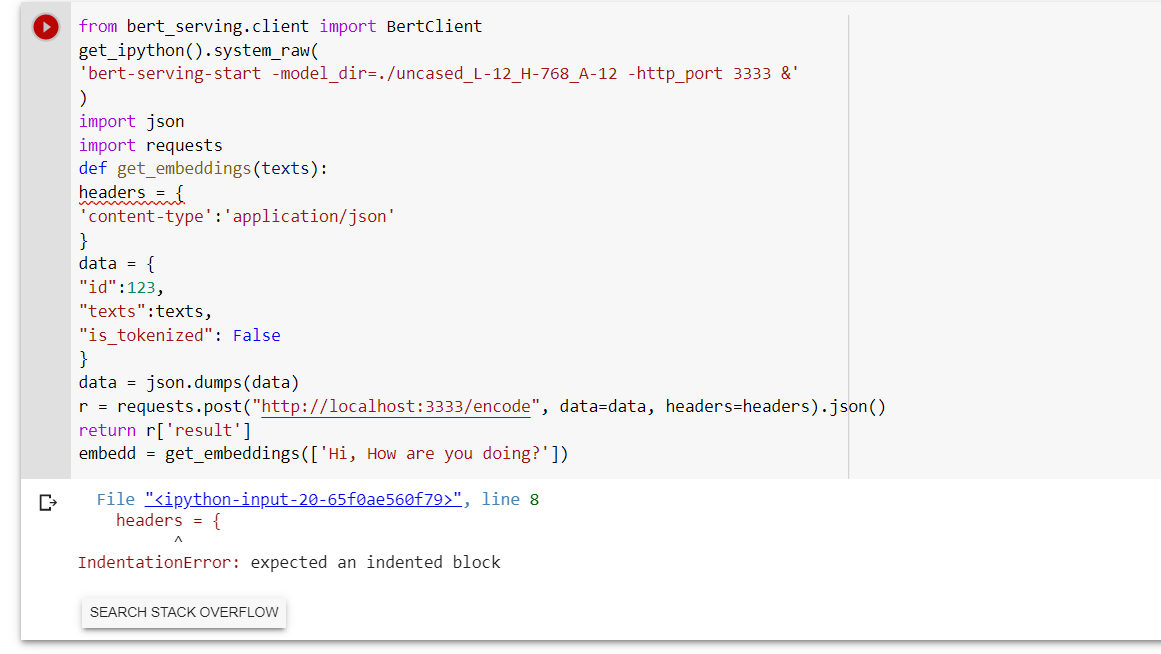
Thanx bro but i have an error
SlimenBouras
on 20 May 2020
@SlimenBouras select from headers to return and press the tab key. It should be inside the function get_embeddings.
sajit9285
on 20 May 2020
This works for me, so do it line by line. Be careful about the filename you wanna get from github or any other sources.
!pip install bert-serving-client
!pip install -U bert-serving-server[http]
!wget https://storage.googleapis.com/bert_models/2018_10_18/uncased_L-12_H-768_A-12.zip
!unzip uncased_L-12_H-768_A-12.zip
%tensorflow_version 1.x
!nohup bert-serving-start -model_dir=./uncased_L-12_H-768_A-12 > out.file 2>&1 &
from bert_serving.client import BertClient
bc = BertClient()
print (bc.encode(['First do it', 'then do it right', 'then do it better']))
 pourya-farzi
on 24 Aug 2020
pourya-farzi
on 24 Aug 2020
Got it running using Bert Client and nohup - here is how it worked for me:
!pip install bert-serving-client
!pip install -U bert-serving-server[http]!wget https://storage.googleapis.com/bert_models/2018_10_18/uncased_L-12_H-768_A-12.zip
!unzip uncased_L-12_H-768_A-12.zip
!nohup bert-serving-start -model_dir=./uncased_L-12_H-768_A-12 > out.file 2>&1 &from bert_serving.client import BertClient
bc = BertClient()
print (bc.encode(['First do it', 'then do it right', 'then do it better']))
Thanks, it works for me :hearts:
 Alymostafa
on 28 Aug 2020
Alymostafa
on 28 Aug 2020
I tried it a lot and finally this worked. (Worked date: Dec 4, 2020)
%tensorflow_version 1.x

!pip install bert-serving-client
!pip install -U bert-serving-server[http]

!wget https://storage.googleapis.com/bert_models/2018_10_18/uncased_L-12_H-768_A-12.zip
!unzip uncased_L-12_H-768_A-12.zip
!nohup bert-serving-start -model_dir=./uncased_L-12_H-768_A-12 > out.file 2>&1 &


!ls  # you should see uncased_something_.zip


from bert_serving.client import BertClient
bc = BertClient()

list_text = ['you need to use tensorflow 1', 'tf2 does not work']
embedded_text = bc.encode(list_text)

print(embedded_text)

this gives
[[-0.32885492 -0.39915255 -0.3393307  ... -0.27655432 -0.13769765
   0.39554596]
 [ 0.03333598 -0.6914621   0.0800274  ... -0.46210474 -0.06833883
   0.30134943]]
 bhishanpdl
on 4 Dec 2020
bhishanpdl
on 4 Dec 2020
Can we run bert-as-a-service with tensorflow 2.x?
 Akila-Ayanthi
on 13 Apr 2021
Akila-Ayanthi
on 13 Apr 2021
Related issues
 babai3693
·
3Comments
babai3693
·
3Comments
 astariul
·
7Comments
astariul
·
7Comments
 kapilkd13
·
4Comments
kapilkd13
·
4Comments
 JulianGerhard21
·
4Comments
JulianGerhard21
·
4Comments
 shashi-netra
·
3Comments
shashi-netra
·
3Comments
Most helpful comment
For me all works from DHOFM's answer before line "bc = BertClient()"
In this part a block loading infinite time without warning throwing or else info.
Someone in the know about this?