Bert-as-service: Recommended settings for AWS p2 instance
Prerequisites
Please fill in by replacing
[ ]with[x].
- [x] Are you running the latest
bert-as-service? - [x] Did you follow the installation and the usage instructions in
README.md? - [x] Did you check the FAQ list in
README.md? - [x] Did you perform a cursory search on existing issues?
System information
Linux 4.4.0-1074-aws #84-Ubuntu SMP Thu Dec 6 08:57:58 UTC 2018 x86_64 x86_64 x86_64 GNU/Linux
tf.VERSION = 1.12.0
== nvidia-smi ===================================================
Fri Jan 25 20:47:59 2019
+-----------------------------------------------------------------------------+
| NVIDIA-SMI 396.44 Driver Version: 396.44 |
|-------------------------------+----------------------+----------------------+
| GPU Name Persistence-M| Bus-Id Disp.A | Volatile Uncorr. ECC |
| Fan Temp Perf Pwr:Usage/Cap| Memory-Usage | GPU-Util Compute M. |
| 0 Tesla K80 On | 00000000:00:1E.0 Off | 0 |
| N/A 32C P8 30W / 149W | 0MiB / 11441MiB | 0% Default |
+-------------------------------+----------------------+----------------------+
Description
Started server:
usage: /usr/local/bin/bert-serving-start -model_dir=/home/ubuntu/bert/models/cased_L-12_H-768_A-12 -max_seq_len=40 -http_port 8125
ARG VALUE
       ckpt_name = bert_model.ckpt
     config_name = bert_config.json
            cors = *
             cpu = False
      device_map = []
            fp16 = False
gpu_memory_fraction = 0.5
graph_tmp_dir = None
http_max_connect = 10
http_port = 8125
mask_cls_sep = False
max_batch_size = 256
max_seq_len = 40
model_dir = /home/ubuntu/bert/models/cased_L-12_H-768_A-12
num_worker = 1
pooling_layer = [-2]
pooling_strategy = REDUCE_MEAN
port = 5555
port_out = 5556
prefetch_size = 10
priority_batch_size = 16
tuned_model_dir = None
verbose = False
xla = False
I am connecting to it using BERT Client over IP not using http as in:
bc = BertClient(ip='xxx.xxx.xxx.xxx')
bc.encode(list_of_1000_sentences)
The issue is that I am able to get embeddings at a rate of about 10/sec where as benchmarks I think are indicating it should be on the order of hundreds? Any idea how to tweak the parameters to improve the performance on AWS p2 instance?
...
 xpact
xpact
All 5 comments
hmm, 10/sec is too slow and seems like a speed on CPU only. could you copy paste the server log before the first actual request? Something like this:
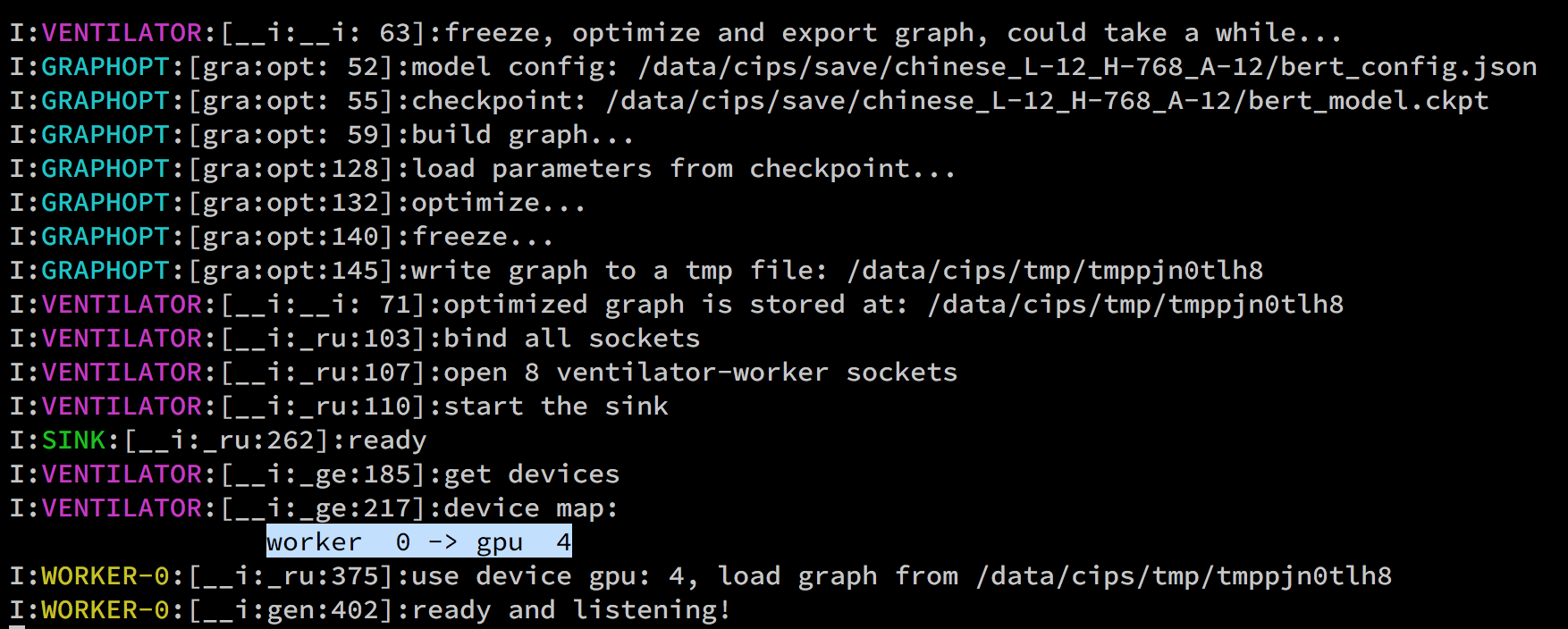
This indicates that a worker has been successfully assigned with a GPU.
 hanxiao
on 28 Jan 2019
hanxiao
on 28 Jan 2019
usage: /usr/local/bin/bert-serving-start -model_dir=/home/ubuntu/bert/models/cased_L-12_H-768_A-12 -max_seq_len=25
ARG VALUE
       ckpt_name = bert_model.ckpt
     config_name = bert_config.json
            cors = *
             cpu = False
      device_map = []
            fp16 = False
gpu_memory_fraction = 0.5
graph_tmp_dir = None
http_max_connect = 10
http_port = None
mask_cls_sep = False
max_batch_size = 256
max_seq_len = 25
model_dir = /home/ubuntu/bert/models/cased_L-12_H-768_A-12
num_worker = 1
pooling_layer = [-2]
pooling_strategy = REDUCE_MEAN
port = 5555
port_out = 5556
prefetch_size = 10
priority_batch_size = 16
tuned_model_dir = None
verbose = False
xla = False
I:VENTILATOR:[__i:__i: 63]:freeze, optimize and export graph, could take a while...
I:GRAPHOPT:[gra:opt: 52]:model config: /home/ubuntu/bert/models/cased_L-12_H-768_A-12/bert_config.json
I:GRAPHOPT:[gra:opt: 55]:checkpoint: /home/ubuntu/bert/models/cased_L-12_H-768_A-12/bert_model.ckpt
I:GRAPHOPT:[gra:opt: 59]:build graph...
I:GRAPHOPT:[gra:opt:128]:load parameters from checkpoint...
I:GRAPHOPT:[gra:opt:132]:optimize...
I:GRAPHOPT:[gra:opt:140]:freeze...
I:GRAPHOPT:[gra:opt:145]:write graph to a tmp file: /tmp/tmp3fig1p1_
I:VENTILATOR:[__i:__i: 71]:optimized graph is stored at: /tmp/tmp3fig1p1_
I:VENTILATOR:[__i:_ru:103]:bind all sockets
I:VENTILATOR:[__i:_ru:107]:open 8 ventilator-worker sockets
I:VENTILATOR:[__i:_ru:110]:start the sink
I:SINK:[__i:_ru:262]:ready
I:VENTILATOR:[__i:_ge:185]:get devices
I:VENTILATOR:[__i:_ge:217]:device map:
worker 0 -> gpu 0
I:WORKER-0:[__i:_ru:375]:use device gpu: 0, load graph from /tmp/tmp3fig1p1_
I:WORKER-0:[__i:gen:402]:ready and listening!
Turned off the http proxy and went back to 25 max length - it is marginally faster at 10.7 records/sec
xpact
on 28 Jan 2019
You probably need to switch to AWS provided conda environment, see the server hello when using Deep Learning AMI.
It's probably just running source activate tensorflow_p36 then installing pip and bert-as-service
 ofirnk
on 30 Jan 2019
ofirnk
on 30 Jan 2019
In essence, what @ofirnk was the problem. When bert service was installed, it was done prior to doing the source activate tensorflow_p36. Even though the bert service was saying that it was using GPU, in fact it was not.
Doing the install after doing source activate tensorflow_p36 on a brand new instance shows orders of magnitude speed up, as expected, when using GPU so I consider this closed. Thanks
xpact
on 30 Jan 2019
Thanks @ofirnk Your solution worked like a charm! Maybe this needs to be reopened since it gives an impression that gpu is being utilized
 ajkl
on 30 Jan 2019
ajkl
on 30 Jan 2019
Related issues
 k-oul
·
7Comments
k-oul
·
7Comments
 calliwen
·
7Comments
calliwen
·
7Comments
 astariul
·
7Comments
astariul
·
7Comments
 shashi-netra
·
3Comments
shashi-netra
·
3Comments
 lucyboll
·
8Comments
lucyboll
·
8Comments
Most helpful comment
You probably need to switch to AWS provided conda environment, see the server hello when using
Deep Learning AMI.It's probably just running
source activate tensorflow_p36then installing pip and bert-as-service