Bert-as-service: "no available GPU thus back-off to CPU". How to support it?
"no available GPU thus back-off to CPU". How to support it?
 aitsc
aitsc
All 8 comments
no extra config needed. it supports CPU out-of-box
 hanxiao
on 3 Dec 2018
hanxiao
on 3 Dec 2018
My GPU is in use. I can't make it use the CPU automatically.
aitsc
on 3 Dec 2018
i think you are using pretty old master. checkout the latest master and retry.
hanxiao
on 5 Dec 2018
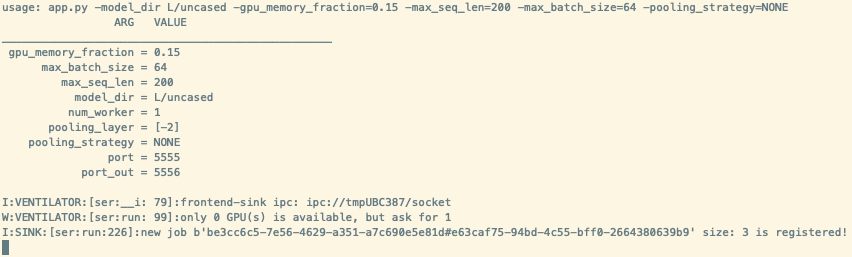
It stays here and can't go on.
aitsc
on 5 Dec 2018
ok i will reopen this issue as somebody else also encounter this on cpu-only machine
hanxiao
on 5 Dec 2018
90 is closed as the reason has been found, maybe you can refer to it?
hanxiao
on 5 Dec 2018
I found the reason. Because I used "tensorflow-gpu" instead of "tensorflow".
I created a new environment with conda to solve this problem.
aitsc
on 5 Dec 2018
if you encounter such problem on a CPU-only machine, please try the latest version 1.5.0 by
pip install -U bert-serving-server bert-serving-client
When start the server side, remember to add a -cpu flag, e.g.
bert-serving-start -model_dir /your/model/path -cpu
For better performance on CPU, please give a smaller max_batch_size, e.g. 16, 32 as suggested in https://github.com/hanxiao/bert-as-service#q-can-i-run-the-server-side-on-cpu-only-machine
Finally, #111 was the PR for fixing this issue.
hanxiao
on 10 Dec 2018
Related issues
 kapilkd13
·
4Comments
kapilkd13
·
4Comments
 loretoparisi
·
6Comments
loretoparisi
·
6Comments
 boxabirds
·
4Comments
boxabirds
·
4Comments
 un-lock-me
·
3Comments
un-lock-me
·
3Comments
 babai3693
·
3Comments
babai3693
·
3Comments
Most helpful comment
i think you are using pretty old master. checkout the latest master and retry.