Berry: [Bug] YN0041: Invalid authentication after logging in with `yarn npm login`
- [ ] I'd be willing to implement a fix
Describe the bug
I attempted to publish my package via yarn npm login and yarn npm publish, but yarn failed with an unexpected error
To Reproduce
Using yarn from sources in this repo: https://github.com/justjake/quickjs-emscripten
- Clone https://github.com/justjake/quickjs-emscripten
- Try to
yarn npm login - Try to
yarn npm publish
Screenshots
If applicable, add screenshots to help explain your problem.

Environment if relevant (please complete the following information):
- OS: macOS 10.14.6 (18G103)
- Node version: v10.21.0
- Yarn version: 2.1.1-git.20200720.906e9472
 justjake
All 17 comments
Tried yarn npm login --help:

Tried yarn npm login --publish; did not change the result of yarn npm publish
justjake
on 29 Jul 2020
That's curious - what do you get with yarn npm whoami? 🤔
 arcanis
on 29 Jul 2020
arcanis
on 29 Jul 2020
@arcanis it returns jitl, as expected
justjake
on 29 Jul 2020
Hm. Any chance it was a temporary registry issue? I published packages this afternoon and it seemed to work, and the message you reported indicate the registry returned a 401 or 403
arcanis
on 29 Jul 2020
@arcanis I looked at my ~/.yarnrn.yml, is this supposed to be https://registry.yarnpkg.com? Or should it be configured for something with www.npmjs.com in the URL.
justjake
on 30 Jul 2020
I just tried again after doing yarn set version from sources, same error
justjake
on 30 Jul 2020
Yep, both registries are the same (the Yarn endpoint is a cname to npm). I'll try tomorrow to publish your package under a test name to see if I can repro. Are you using OTP?
arcanis
on 30 Jul 2020
No, I am not.
After running yarn npm logout, attempts to log in now fail as so:
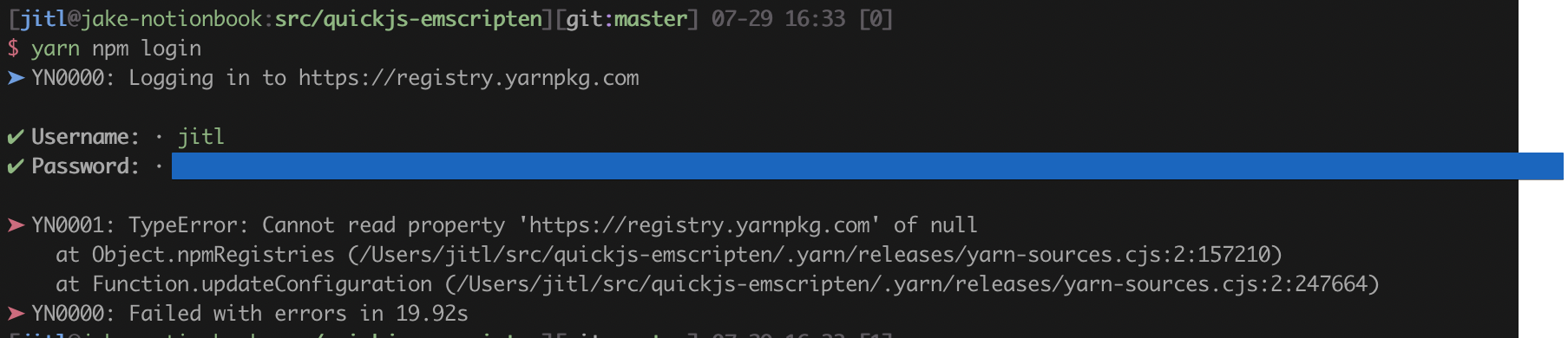
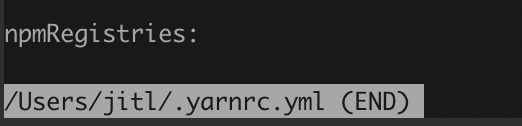
I believe this is because this is the state of ~/.yarnrc.yml after yarn npm logout
justjake
on 30 Jul 2020
What does the --publish flag mean for yarn npm login?
justjake
on 30 Jul 2020
created issue https://github.com/yarnpkg/berry/issues/1663 to track the yarn npm login; yarn npm login bug
justjake
on 2 Aug 2020
I have same issue =(
yarn npm login successfully logged in, but yarn npm publish is Invalid authentication (as undefined)
Here my .yarnrc.yml
nodeLinker: node-modules

plugins:
  - path: .yarn/plugins/@yarnpkg/plugin-workspace-tools.cjs
    spec: "@yarnpkg/plugin-workspace-tools"
  - path: .yarn/plugins/@yarnpkg/plugin-version.cjs
    spec: "@yarnpkg/plugin-version"

yarnPath: .yarn/releases/yarn-2.2.0.cjs

npmRegistryServer: "https://jfrog.space307.tech/api/npm/space307-frontend-local/"

npmPublishRegistry: "https://jfrog.space307.tech/api/npm/space307-frontend-local/"
 inomdzhon
on 29 Aug 2020
inomdzhon
on 29 Aug 2020
Ohhh, I forgot to bump version of package and tried to publish existed version on npm 🤦♂️ 🤦♂️ 🤦♂️
Issue is closed for me.
@justjake maybe you have same case?
Anyway log by yarn is very uninformative – Invalid authentication (as undefined) say me nothing about real issue =(
inomdzhon
on 3 Sep 2020
Anyway log by yarn is very uninformative –
Invalid authentication (as undefined)say me nothing about real issue =(
Yep, @paul-soporan investigated a bit and it seems that any 403 (which is what the server answers) are reported as Invalid authentication - plus a missing option in one of the calls that caused the as undefined. We'll fix both issues!
arcanis
on 3 Sep 2020
Thanks for the reminder @arcanis! I've almost forgotten about this. Will open a PR later today. 👍
 paul-soporan
on 3 Sep 2020
paul-soporan
on 3 Sep 2020
Just opened #1809. You can try it out by doing yarn set version from sources --branch 1809 and report back what the actual error message is. If it's confirmed that the remaining problems aren't on our side, we can close this issue.
paul-soporan
on 6 Sep 2020
Due to the lack of feedback i'll close this under the assumption that what is actually happening is that you're trying to publish an already existing version, which V2.3 will show better error messages for thanks to https://github.com/yarnpkg/berry/pull/1809
 merceyz
on 24 Sep 2020
merceyz
on 24 Sep 2020
Oh, sorry :(
I forget for check, because I downgraded to yarn v1
I checked fix in my branch with yarn v2 and saw next errors
If I try publish without auth
➤ YN0033: No authentication configured for request
➤ YN0000: Failed with errors in 24s 296ms
If I try publish exist version
➤ YN0035: forbidden
➤ YN0000: Failed with errors in 1s 233ms
Looks good than before 👍
inomdzhon
on 28 Sep 2020
Related issues
 wojtekmaj
·
3Comments
wojtekmaj
·
3Comments
 thealjey
·
4Comments
thealjey
·
4Comments
 dzintars
·
3Comments
dzintars
·
3Comments
 joshmeads
·
4Comments
joshmeads
·
4Comments
 kiprasmel
·
3Comments
kiprasmel
·
3Comments