Berry: [Bug] yarn scripts leaves the shell in bad state after ^c
Describe the bug
After running a yarn script (yarn start) and pressing ^c the shell is left in a bad state, e.g., pressing the up arrow prints ^[[A instead bringing the last ran command.
To Reproduce
Run the following commands:
$ git clone https://github.com/vieira/yarn-issue-ctrl-c
$ cd yarn-issue-ctrl-c
$ yarn install
$ yarn start # and then press ctrl + c after which try using, e.g. the up arrow.
Screenshots
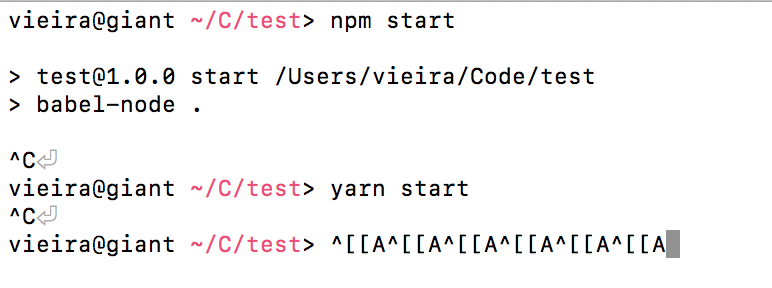
Environment if relevant (please complete the following information):
- OS: macOS Mojave (10.14.6)
- Node version: v12.14.1 (does not happen with 10.x, also happens with 13.x)
- Yarn version: 2.0.0-rc.27
Additional context
Issue not present with npm.
 vieira
All 8 comments
Hm that's strange - I think I can reproduce it from time to time, but very rarely. Is it consistent for you? Do you have an idea what might cause this? We don't call setRawMode() so I don't know why the terminal would enter this state 🤔
 arcanis
on 26 Jan 2020
arcanis
on 26 Jan 2020
@arcanis Yes, with the repo above I can consistently reproduce the issue every time, in different shells (bash, zsh, fish).
I have no idea what might be causing this, but I found out that it does not happen with node 10.x, but it does with node 12 and 13.
vieira
on 26 Jan 2020
I see this as well quite often
 larixer
on 26 Jan 2020
larixer
on 26 Jan 2020
I can reproduce it on the repo - it seems it appeared with Node 12.7, I don't have the problem with 12.6. Investigating 🤔
arcanis
on 26 Jan 2020
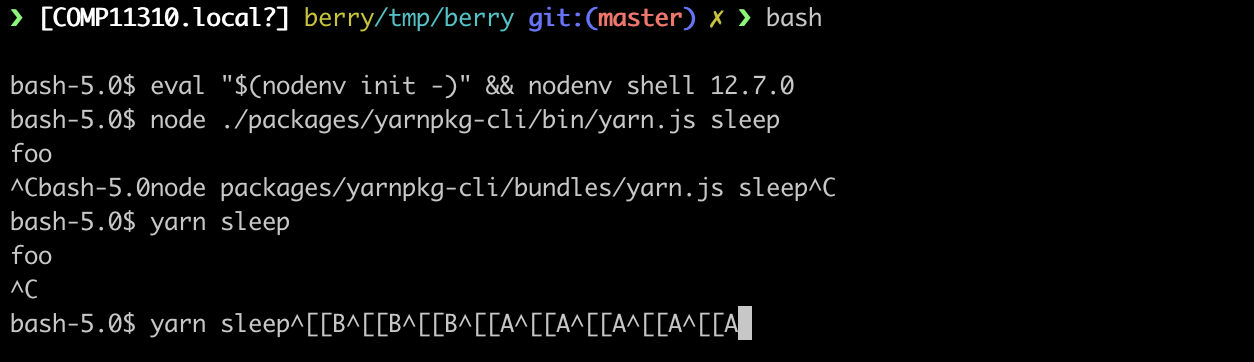
It sounds like the problem comes from 1.x, not 2.x 😞 :
arcanis
on 26 Jan 2020
I think I might be seeing this too. I'm running gatsby via yarn (unrelated to this, I'm trying to configure it to compile TypeScript with webpack) and when it fails and hangs I kill it with ctrl+c , but it leaves behind a process running at 100%. I have to manually kill the processes that build up.
 bradleyayers
on 27 Jan 2020
bradleyayers
on 27 Jan 2020
Should I open a ticket in yarnpkg/yarn?
vieira
on 6 Feb 2020
Hi! 👋
This issue looks stale, and doesn't feature the reproducible label - which implies that you didn't provide a working reproduction using Sherlock. As a result, it'll be closed in a few days unless a maintainer explicitly vouches for it or you edit your first post to include a formal reproduction (you can use the playground for that).
Note that we require Sherlock reproductions for long-lived issues (rather than standalone git repositories or similar) because we're a small team. Sherlock gives us the ability to check which bugs are still affecting the master branch at any given point, and decreases the amount of code we need to run on our own machines (thus leading to faster bug resolution faster). It helps us help you! 😃
If you absolutely cannot reproduce a bug on Sherlock (for example because it's a Windows-only issue), a maintainer will have to manually add the upholded label.
 yarnbot
on 9 Jun 2020
yarnbot
on 9 Jun 2020
Related issues
 milichev
·
3Comments
milichev
·
3Comments
 Bessonov
·
4Comments
Bessonov
·
4Comments
 benwainwright
·
3Comments
benwainwright
·
3Comments
 dzintars
·
3Comments
dzintars
·
3Comments
 danreg
·
3Comments
danreg
·
3Comments
Most helpful comment
It sounds like the problem comes from 1.x, not 2.x 😞 :