So, Im trying to install Beets on windows. I already installed Python on my computer but I just don't get how to proceed from now on. Maybe someone can explain to me what I have to do in a step-by-step guide? And yes, Im a complete newbie to Python
 ItsKonix
All 4 comments
Hello! Maybe you can start by describing what wasn't clear about our existing guide for installing on Windows?
http://docs.beets.io/en/v1.4.6/guides/main.html#installing-on-windows
 sampsyo
on 3 Jan 2018
sampsyo
on 3 Jan 2018
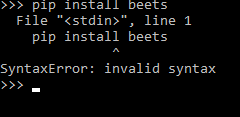
This is the error I get every time. The console I'm using is the Python3.6(32-bit).exe
and I also installed pip double-clicking the get-pip.py file
ItsKonix
on 4 Jan 2018
I believe you need to launch pip from the base line command prompt, not from the python command line. Try opening a cmd.exe window then running pip install beets
 Vesnyx
on 4 Jan 2018
Vesnyx
on 4 Jan 2018
Yea, thank you!
ItsKonix
on 4 Jan 2018
Related issues
 hashhar
·
3Comments
hashhar
·
3Comments
 mikeacameron
·
4Comments
mikeacameron
·
4Comments
 Freso
·
5Comments
Freso
·
5Comments
 udiboy1209
·
3Comments
Freso
·
4Comments
udiboy1209
·
3Comments
Freso
·
4Comments
Most helpful comment
I believe you need to launch pip from the base line command prompt, not from the python command line. Try opening a cmd.exe window then running
pip install beets