Beats: Beats management failed security error not displaying due to thrown error
- Version: 6.6.0 BC1
- Operating System: darwin_x86_64
Steps to Reproduce:
Please note I am on trial license
- Click on beats management page under management in Kibana UI
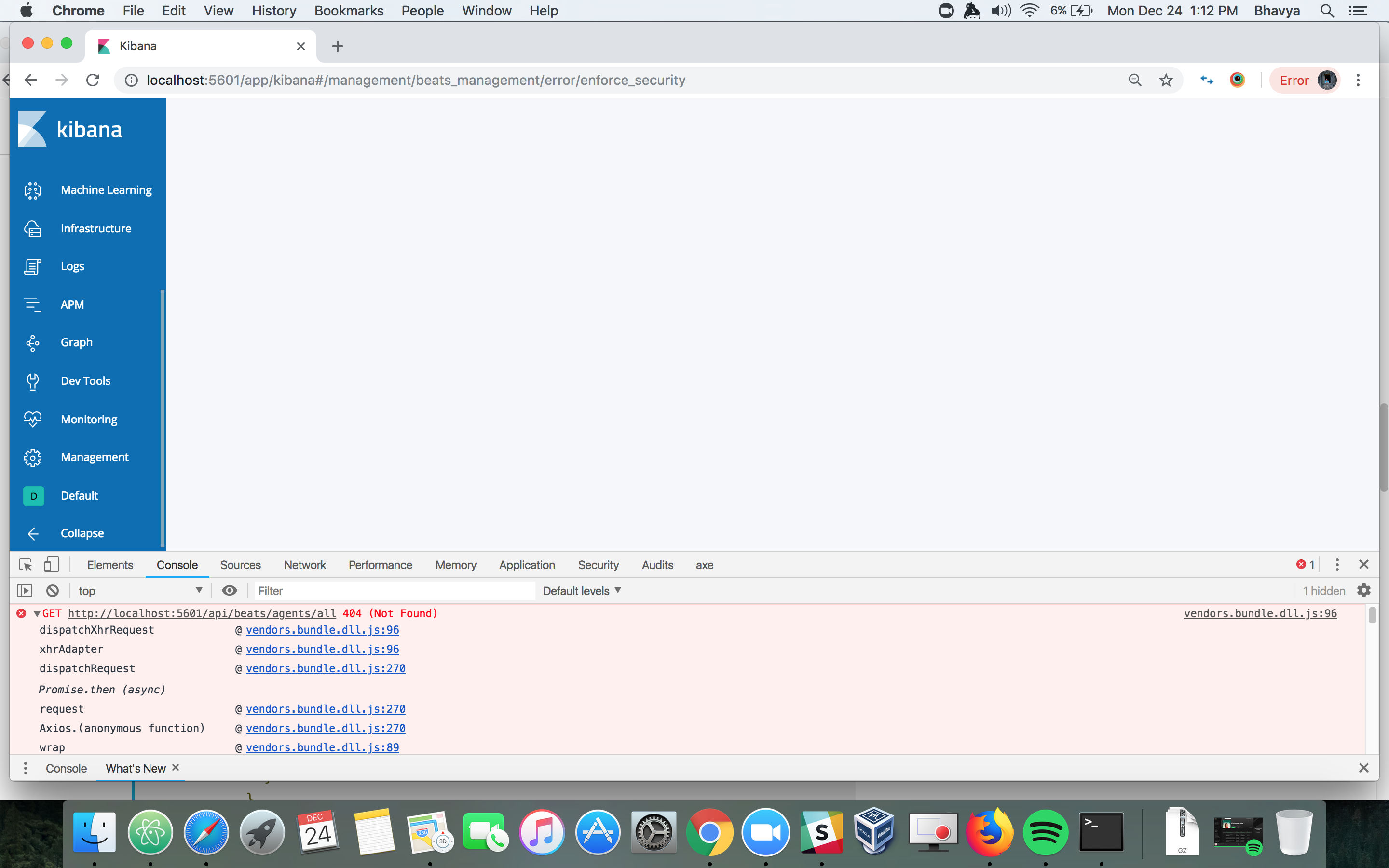
- Empty page loads with this error in console:
vendors.bundle.dll.js:96 GET http://localhost:5601/api/beats/agents/all 404 (Not Found)
dispatchXhrRequest @ vendors.bundle.dll.js:96
xhrAdapter @ vendors.bundle.dll.js:96
dispatchRequest @ vendors.bundle.dll.js:270
Promise.then (async)
request @ vendors.bundle.dll.js:270
Axios.(anonymous function) @ vendors.bundle.dll.js:270
wrap @ vendors.bundle.dll.js:89
_callee$ @ kibana.bundle.js:2
tryCatch @ vendors.bundle.dll.js:490
invoke @ vendors.bundle.dll.js:490
prototype.(anonymous function) @ vendors.bundle.dll.js:490
step @ kibana.bundle.js:2
(anonymous) @ kibana.bundle.js:2
(anonymous) @ kibana.bundle.js:2
get @ kibana.bundle.js:2
_callee3$ @ kibana.bundle.js:2
tryCatch @ vendors.bundle.dll.js:490
invoke @ vendors.bundle.dll.js:490
prototype.(anonymous function) @ vendors.bundle.dll.js:490
step @ kibana.bundle.js:2
(anonymous) @ kibana.bundle.js:2
(anonymous) @ kibana.bundle.js:2
getAll @ kibana.bundle.js:2
_callee3$ @ kibana.bundle.js:2
tryCatch @ vendors.bundle.dll.js:490
invoke @ vendors.bundle.dll.js:490
prototype.(anonymous function) @ vendors.bundle.dll.js:490
step @ kibana.bundle.js:2
(anonymous) @ kibana.bundle.js:2
(anonymous) @ kibana.bundle.js:2
(anonymous) @ kibana.bundle.js:2
_callee2$ @ kibana.bundle.js:2
tryCatch @ vendors.bundle.dll.js:490
invoke @ vendors.bundle.dll.js:490
prototype.(anonymous function) @ vendors.bundle.dll.js:490
step @ kibana.bundle.js:2
(anonymous) @ kibana.bundle.js:2
(anonymous) @ kibana.bundle.js:2
(anonymous) @ kibana.bundle.js:2
_callee$ @ kibana.bundle.js:2
tryCatch @ vendors.bundle.dll.js:490
invoke @ vendors.bundle.dll.js:490
prototype.(anonymous function) @ vendors.bundle.dll.js:490
step @ kibana.bundle.js:2
(anonymous) @ kibana.bundle.js:2
(anonymous) @ kibana.bundle.js:2
componentWillMount @ kibana.bundle.js:2
mountClassInstance @ vendors.bundle.dll.js:212
beginWork @ vendors.bundle.dll.js:212
e @ vendors.bundle.dll.js:212
f @ vendors.bundle.dll.js:212
G @ vendors.bundle.dll.js:212
x @ vendors.bundle.dll.js:212
n @ vendors.bundle.dll.js:212
B @ vendors.bundle.dll.js:212
v @ vendors.bundle.dll.js:212
b @ vendors.bundle.dll.js:212
updateContainer @ vendors.bundle.dll.js:212
sg.render @ vendors.bundle.dll.js:212
(anonymous) @ vendors.bundle.dll.js:212
unbatchedUpdates @ vendors.bundle.dll.js:212
Eg @ vendors.bundle.dll.js:212
render @ vendors.bundle.dll.js:212
(anonymous) @ kibana.bundle.js:2
$digest @ vendors.bundle.dll.js:434
(anonymous) @ vendors.bundle.dll.js:434
(anonymous) @ vendors.bundle.dll.js:434
forEach @ vendors.bundle.dll.js:434
fireStateOrUrlChange @ vendors.bundle.dll.js:434
cacheStateAndFireUrlChange @ vendors.bundle.dll.js:434
dispatch @ vendors.bundle.dll.js:149
elemData.handle @ vendors.bundle.dll.js:149
 bhavyarm
All 6 comments
This is a known issue @mattapperson Can give you more details concerning the plan to fix this.
 ph
on 24 Dec 2018
ph
on 24 Dec 2018
That might not be the same issue I was describing.
@bhavyarm if you reload does the CM page appears or never appear?
ph
on 24 Dec 2018
@ph - it never appears even after reload.
bhavyarm
on 27 Dec 2018
@bhavyarm I am not able to replicate this. As that endpoint should be there and not returning a 404, is there any log output on the server that you are seeing?
 mattapperson
on 27 Dec 2018
mattapperson
on 27 Dec 2018
@bhavyarm hmm I just noticed the URL in the screenshot is the enforce_security endpoint. OK, that gave me something to work from and I was able to re-create your issue. I will work on a fix, however it is worth noting that even once fixed, you will just see an error. Your test cluster does not have security fully enabled with TLS
mattapperson
on 27 Dec 2018
PR up with a fix, waiting for CI, review then back port
mattapperson
on 27 Dec 2018
Related issues
 JalehD
·
3Comments
JalehD
·
3Comments
 MorrieAtElastic
·
3Comments
MorrieAtElastic
·
3Comments
 TomaszKlosinski
·
3Comments
TomaszKlosinski
·
3Comments
 nicpenning
·
3Comments
nicpenning
·
3Comments
 feelan03
·
3Comments
feelan03
·
3Comments
Most helpful comment
@bhavyarm hmm I just noticed the URL in the screenshot is the enforce_security endpoint. OK, that gave me something to work from and I was able to re-create your issue. I will work on a fix, however it is worth noting that even once fixed, you will just see an error. Your test cluster does not have security fully enabled with TLS