Beaker: Discussion: UX of the local syncing folder (workspaces replacement) & dat-to-dat publishing
I wanted to bring in the feedback for the new workflow into one place. There's a short video explainer to get you up to speed, and you can read about the change in detail at #954.
In addition to an auto-syncing folder, there's going to be a dat->dat publishing flow. In that flow, you'll have a "draft dat" and a "publish dat" and you'll merge between them. We're still figuring out that should work, so thoughts are appreciated.
Some feedback from @paul90 in #954:
Don't reveal the draft dat
For a draft dat the user should be able to set a "publication target", any linking back from the "published" dat to a "draft" must be private. When we get multi-writer support this provides a hint on where we look for changes that need reflecting back into our draft, via the diffing UI.
Give UI indications when you're on a draft dat
Having metadata to indicate a draft dat, together with something in the UI to help prevent it being inadvertently shared would be nice. That is not to say, with multi-writer support, that having the draft on multiple devices should not be possible.
Allow differing .datignores on the draft/publish dat
It would be desirable to support having a more restrictive .datignore on the published dat. An example might be to prevent sharing notes, or files associated with an editing/development environment, that we want to keep with the "draft" dat.
There's some risk of accidentally publishing sensitive data
From @pmario in https://github.com/beakerbrowser/beaker/issues/955. How can we offset this risk?
Note: we will eventually be updating the history-retention models of beaker to enable deleted/overwritten files to be "forgotten." This will mean that the history log will retain metadata about the file but none of the content. (We will eventually have explicit version checkpoints, so you can say "this is v1.0.0" etc, and I suspect we'll configure version retention so that it only keeps the historic data for those checkpoints.)
 pfrazee
All 32 comments
@pmario asked whether this new approach will actually reduce complexity. I believe it will, for the following reasons:
- One less protocol. This removes the
workspace://URLs, which created an entirely new location concept with its own rules. For instance, they could not be shared -- which especially sucked because sometimes you want to share your draft, and that may become really common when multiwriter shows up (draft collaboration). - API complexity. Once it became clear that apps would need to read/write the workspaces, then basically the
DatArchivewas moving toward having two possible targets, adat://and aworkspace://. The API would have to come up with behaviors for both kinds of targets. It wasn't impossible to accomplish, but when I stepped back and imagined how a long-lasting Web API should be designed, I could not imagine theworkspace://being part of it. It didn't feel elegant enough. - App complexity. This removes workspaces as a potential concept for apps. Sometimes, apps want to write to the draft (eg Enoki). Other times, they want to write to the published dat (eg Fritter). Having workspaces made the latter too complex, but the former needs a draft. So we basically needed the potential for the draft->published workflow, but it needed to only happen when really required.
Is 'app complexity' actually solved?
We're talking about still having a "draft dat" and a "publish dat," which is basically similar to workspaces. So how does this improve things?
Workspaces by nature had to combine the folder<->dat sync with the concept of having a draft area. There are cases (eg with Fritter profiles) where you might want the files of your dat to write to a folder, but you might not want the draft->publish workflow.
This new solution separates folder sync from the draft->publish workflow. That stops us from creating needless "draft" versions which fall out of sync with the "publish" versions. (This is the bigger win.)
In the case where there is a draft-dat and a publish-dat, the good news is that they're both dats! Things stay conceptually simpler as a result. (This is a smaller win, but still good.)
pfrazee
on 18 Apr 2018
Finally had a moment to look over all of this. Just wanted to say; appears totally on point. Wish I had more feedback beyond that, but it’s clear you’re both on the right track with this. Looking forward to it being available in the pre-release!
 jondashkyle
on 21 Apr 2018
jondashkyle
on 21 Apr 2018
Alright, so here's my wishlist right now:
- My current opinion is that you should only have one draft per archive, similar to how workspaces function now. (_update_: see my comment below on the multi-draft use case)
- To create a draft site you would go to any site's "library view" and then click something along the lines of a "create draft" button .
- This would lead you to the "library view" of the newly created draft site.
- By default the draft dat should be "private" in the sense that the files shouldn't be synced over the network. If Beaker ever introduces a formal concept of "public/private" sites, this could just be the default state and you could toggle the site as public.
- This view would look about the same as your normal site view, but would have clear indicators that its a draft site and would have prompts to view changes and publish to the public site.
- Although it's a bit awkward I think the user should have the option to assign a syncing folder for both the public site and the draft site
- IMO, the draft should _not_ be displayed in the library as a normal archive. Instead there would be a "View Draft" button on the archive that the draft was created for.
After thinking through this, my main take-away is that as long as we remove the "specialness" of workspaces and introduce the concept of synced folders, the draft process could be implemented in user-land. It's not too hard to imagine a site that takes two dats and copies the files from one to the other with some form of conflict resolution. Also, lets not forget git. For sites that have a team of developers behind them, dat would most likely just become a deploy target and the majority of this will be handled by developer tools.
This will be especially important to keep in mind when multi-writer lands as I can imagine that will put a demand on Beaker to implement some form of conflict resolution for drafts. IMO this draft process should try to hit the majority use-case, and let the more complicated scenarios be handled in user-land. We can always expand past the MVP later.
 webdesserts
on 23 Apr 2018
webdesserts
on 23 Apr 2018
As a reminder:
Quoting from #954 Replace workspaces with a bidirectional syncing folder
We stepped back and decided to write out our requirements:
- Users need a draft version to do their development
- Users need to control what's in the final "published" version
- Apps sometimes need to write/read the draft version
- Apps sometimes need to ignore the draft version and write directly to the "published" version. (Related: sometimes a draft version isnt needed.)
- Users sometimes want automatic bidirectional sync of dats to a folder, whether they're working on it or just saving/viewing their data.
- Users sometimes want to share their draft versions with other users
All of the above is exactly to the point. ... And many "non developer" users want it all and over time, at the same time.
 pmario
on 23 Apr 2018
pmario
on 23 Apr 2018
Lets think about a workflow that is "textually" simple but not trivial: A/B testing
The basics.
- Anton controls a Reference App
- The app is published at a DAT hosting provider
- Anton is a BDFL
- A peer: "A-B-Peer" provides some permanent storage for A/B testing
- Berta (a non technical user) wants to contribute to the Documentation.
That's simple if you write it down, but a bit more complicated, if you draw it:
To be clear: I __do not__ what, that beaker implements a workflow for this usecase. I want that beaker provides the basic primitives to be able to use a workflow like this. And then step out of the way!
To implement the use-case is a "user-space app"
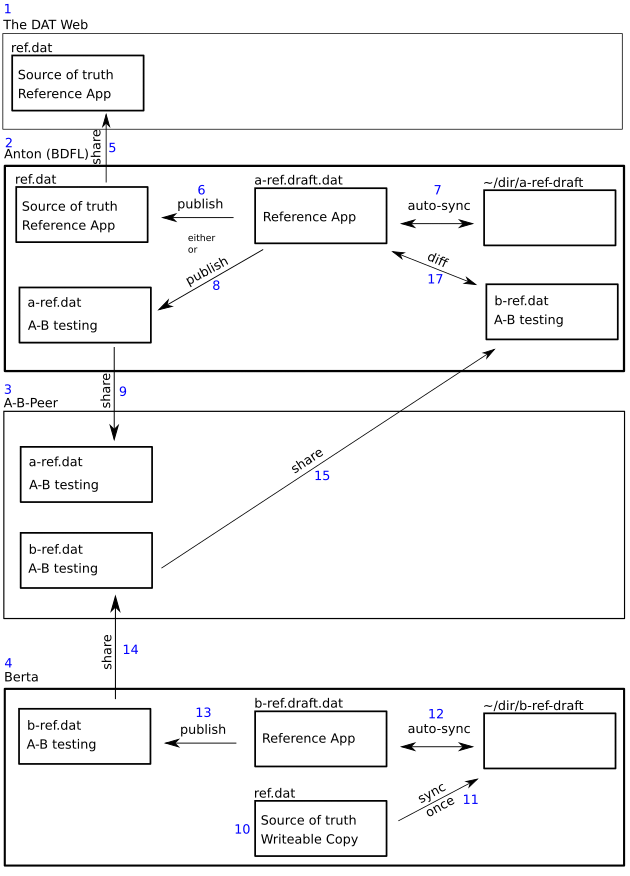
pmario
on 23 Apr 2018
The above drawings can be found at: https://www.dropbox.com/sh/z0e5ed7fq5nfo3j/AAADwsSratiAqu2zwr8BWZAka?dl=0
pmario
on 23 Apr 2018
Elements 1, 2, 3, 4 work out of the box. We have a public hosting service and as long as the source PCs are active the different DAT archives can be globally accessed.
pmario
on 23 Apr 2018
... So what do I expect to be able to get from the beaker UI ....
Info will follow here. ... this is a placeholder atm ... please bear with me
pmario
on 23 Apr 2018
Good observations all. @webdesserts we'll think through all of that while we work on the UI. @pmario I think we're getting close to what you're asking for. The folder-sync is a relatively unopinionated piece. The question becomes the UI for merges & diffs between dats. That'll take time, and it'll probably start with a common use-case and then get more sophisticated.
pfrazee
on 23 Apr 2018
In the new design, how can one make changes to a _draft_ dat? If through folder sync, what about the case when we have an application that autosaves, wouldn't this create many needless versions?
I.e., won't workspace concept still be needed even with having draft dats?
 hossameldeen
on 26 Apr 2018
hossameldeen
on 26 Apr 2018
@hossameldeen yeah, the draft dats are going to have noisy histories. There are protocol updates coming that will make that relatively low-cost though.
pfrazee
on 26 Apr 2018
Dat->dat publishing is indeed nice, but I think a reason we may be feeling inclined to include it in Beaker & not have it in userland code is that we don't feel syncing folder gives the same level of control on dat publishing that workspaces gave.
I also liked workspaces because they gave me a mental model of a dat: a folder with Beaker seeding it & keeping its history. Actually, I was even perplexed when I found setting a workspace directory optional, and now syncing folder will exist in only some dats!
Seems like the intended mental model of a dat is that it's something controlled by Beaker.
So, to convey that mental model to the user and to regain the same level of control workspaces gave, I think we'll eventually need to provide and emphasize all dat operations in Beaker's UI: adding, updating, and removing files -- basically what the filesystem provided for us. I think that's the implication of removing workspaces.
And beside that UI, as a helper, a user can choose to set a syncing folder if they want. And having dat->dat publishing in Beaker or userland is now a question of UX, but before that I think it was also out of necessity to some degree.
But of course, deciding to add dat operations in the UI may be more complicated, development & UX-wise, than it may seem :(. But my main point is this: what is the user's mental model of dat in the new design, and what is the main direct way that exposes all dat operations in Beaker? ... Previously, it was workspaces.
[During writing this, I'm kind-of reaching the conclusion that draft & dat->dat are enough, unless someone suggests a design that provides all dat operations in a nice way. I've been going in thinking loops for 4 hours now...]
hossameldeen
on 28 Apr 2018
I've thought about the use-case of needing multiple drafts a bit more over the week and I'd like to update my thoughts here. I personally prefer the "single draft" concept because I believe it caters to new users. It actively shows new users the "copy from one archive to another" pattern while leaning on a concept they're familiar with. As soon as you start to maintain an interface for multiple drafts the UI quickly gets complex.
Something that should be pointed out is that at its core a draft is just that: a way to copy files from one site to another. You could "technically" solve the draft problem with a Copy from... action that lets you select another archive and view a _one-time_ diff between the two sites. By making it a one-time action, you can avoid trying to match the visual workflow of the user and let them chain archives together however they want.
If we need to, I think this is something that can be done _in addition to_ the single-draft workflow. We go ahead and have drafts for those that want to maintain a draft site and are constantly pushing updates. If someone really needs multiple drafts or some other form of branching, they can use "Copy from...". It's not as elegant, but it doesn't throw their use-case out the window.
webdesserts
on 28 Apr 2018
@hossameldeen I think most of us enjoyed the UX of Workspaces, but Workspaces had some fatal flaws. Here's some of the main ones off the top of my head:
- With Workspaces, users were required to click "publish" on every site change. For site development, this works great, but for the simple "dropbox" use-case, this became painful. I know that I personally forgot to publish multiple times only to find those changes pending a few days later.
- Workspace URLs were problematic. See this discussion for more info. The main issues are that the urls _looked sharable_ (but aren't) and sometimes people _actually want to share_ their drafts.
- The biggest problem though is that since Workspaces aren't real archives, you couldn't manipulate them with the
DatArchiveAPI. So for self-mutating dat sites, this was a huge roadblock. There were talks of adding an additionalWorkspaceAPI, but this would be more work, and have the affect of making Dat feel more complex and harder to learn.
Technically, the current Workspaces UI could be very closely replicated with syncing folders & dat-to-dat drafts. You could just hide it as an implementation detail. This would give you 2 & 3, but would still leave 1 out in the open. However, I think that 1 is important, even for site creators. In my mind, the progression for a new user would look something like this:
- Use other sites to create your own site/social feed/blog etc... No coding required.
- Decide you want to customize your website.
- Poke around in the library and find out you can change the files by assigning a syncing-folder.
- Change the background-color and proudly show it off to your friends.
- "Oh god my site's getting popular, I don't want all my friends to see my site breaking, let's start creating drafts"
Something worth thinking about based on your feedback... The biggest hurdle for the above would be step 3. The main way you could make that smoother is by automatically assigning a "syncing-folder" in some cases, just like we did with the old "Staging" areas. My understanding is that one of the main reasons we moved away from this is because Staging Areas & Workspaces came with a performance penalty (don't remember why specifically). @pfrazee I think you said somewhere about "syncing-folders" avoiding this performance penalty? If so, it might make sense to move back to automatically creating syncing-folders for certain user-created sites (like drafts for example).
webdesserts
on 28 Apr 2018
@webdesserts performance is better, so it's possible, but I also didn't like the feeling that dat-site folders were accumulating behind the scenes. It felt a little too cluttered. The explicit assignment lets me control whether a folder is created, and gives me a moment to see where that folder is.
pfrazee
on 28 Apr 2018
@pfrazee What if we included the option to choose a "syncing-folder" during site creation? For example, when DatArchive.create() is called we would display the following:
- Here's the site title
- Here's the site description
- [x] I want to sync this site to a folder
- Here's the folder I want to sync it to with a default location
webdesserts
on 28 Apr 2018
@webdesserts Yeah we can probably make that happen
pfrazee
on 28 Apr 2018
@webdesserts I was just reaching a similar conclusion: that we could keep workspace-like UI while making the draft another dat with syncing folder. But still, if syncing-folder draft is not initially set, what is a dat initially? Especially that there's another possible user progression: users going directly to making their own sites & finding out they can only use syncing-folder. And if a syncing-folder is initially set, how can a user control what they publish?
Ummm... I think I've found a solution. My current vision:
- In any dat's library view, there'll be a "Draft dat: [insert dat url here]".
- In any dat's library view, there'll be a checkbox with "Automatically sync with this folder: [insert folder path]".
- When a dat is created (call it X), another dat is created for it (call it Y). Y's url will be in X's "Draft dat". "Sync-folder checkbox" will be unchecked in X & checked in Y with some default path.
- When a change is made to Y, the same UI like the current one in workspaces will show up.
- Y is an absolutely normal dat, perhaps only with some metadata that it's intended to be a draft. We could make its UI have an indicator about it being a draft.
Wait a second ... now I can see what you were suggesting, @pfrazee . It's pretty much this except making _publish target_/"Draft dat" an optional extra step not the default & instead making the default dat editing through syncing-folder, if I understood you correctly.
hossameldeen
on 28 Apr 2018
@hossameldeen yeah that's sounding about right
pfrazee
on 28 Apr 2018
The more I think about the structure I did draw in the earlier post, the less functionality I actually want from beaker. ..
At the moment there's only 3 API elements left. 2 of them are very little UI extensions too.
1) Allow me to create Snapshots from one dat and push it to any target dat
2) Allow me to lock a dat archive, so it's not accidentally shared.
3) Allow me to assign colors to the library listed elements. (This color code is local only)
If I can lock and color-code a dat, I can use it as my local draft. It will be noisy, but that's not a problem since it's locked and only I will see it. ...
If I can create a snapshot from the locked dat, that is pushed to any other dat archive that's the perfect publishing mechanism. It's basically a 1-way sync from a draft to a "shared" dat. There is no need for a 2 way sync, since "locked dats" are drafts and they are thrown away at any time. User space apps can create them and throw them away at will. ...
IMO there is no need for "draft-special-handling" in beaker.
Learning form the past: Workspaces and "the staging" area, both got removed. ... So there is a very high chance, that "draft special handling" will get removed too.
Screenshots will follow, what I mean with "color coding" and "locking"
pmario
on 30 Apr 2018
@webdesserts wrote
Something that should be pointed out is that at its core a draft is just that: a way to copy files from one site to another. You could "technically" solve the draft problem with a Copy from... action that lets you select another archive and view a one-time diff between the two sites. By making it a one-time action, you can avoid trying to match the visual workflow of the user and let them chain archives together however they want.
IMO that's very similar to my "snapshot" term. "Copy from" may be a simpler workflow! ... I like the idea.
pmario
on 30 Apr 2018
The "copy from" workflow would really make the whole thing much, much easier.
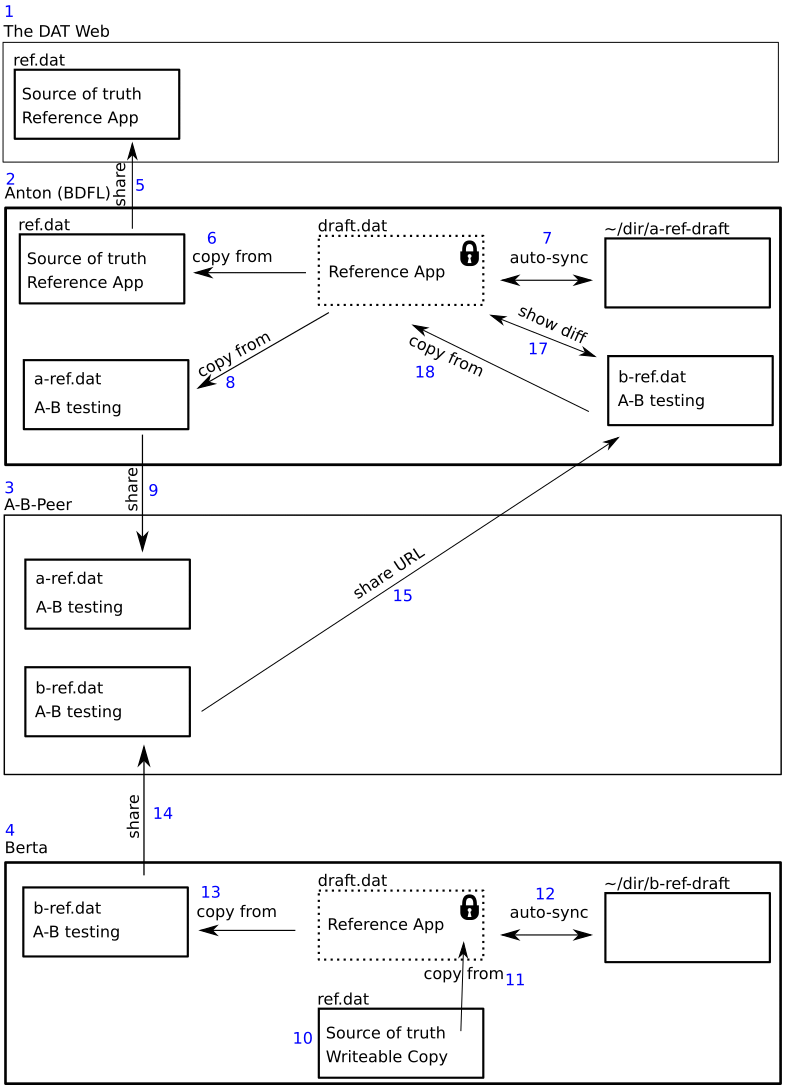
pmario
on 30 Apr 2018
The above drawings can be found at: https://www.dropbox.com/sh/z0e5ed7fq5nfo3j/AAADwsSratiAqu2zwr8BWZAka?dl=0
pmario
on 30 Apr 2018
Hi Folks,
I have discovered this thread only after downloading new beaker and noticing workspace: was gone. I'd like to share few of my thoughts on this matter:
I never really liked workspaces, I had several occasions where I really wanted to share my current progress on thing with specific person without publishing changes where everyone could see them. With that I really wished beaker better supported a way to share my work-in-progress version separate from more stable version.
As far as I understand from this thread draft + publish dat imposes very constrained workflow (better than workspaces) but still very limiting IMO.
I would propose to adopt some good ideas from git (by no means I suggesting that git has great UX). Specifically I find that branches provide a very flexible workflow. It can be used for a simple one like draft + publish branches where you occasionally revision draft to publish (squash merge in git jargon) and far more complex workflows, where you can have number of branches. I propose beaker to adopt something like git "branches" (fused with remotes I suppose) by which I mean that each branch will map to different dat archive. And have something like publish button that would squash merge from branch to branch (draft to publish).
This flexibility would allow users to have multiple publishing channels "alpha", "beta", "stable". It also would take advantage of multiwriter-dat as you could have say "incoming" branch to get changes from collaborators you gave write access to and uplift them after editors had chance to review.
Downside is it does starts to feel like version control system and I am not sure if that could cause some potential tension.
 Gozala
on 4 Jun 2018
Gozala
on 4 Jun 2018
I think that a "branches" feature should be implemented using a Dat-based application instead of Beaker itself.
That would be useful for more types of collaboration and would allow iteration and new functionality without having to rely on beaker browser upgrades. Plus with all the buzz about Github being bought, it could be a great start for a conversation about truly decentralized collaboration.
One of the main issues with having "branches" is that unlike Git, Dat works with entire files, AFAIK it doesn't have support for updating just the lines that have changed. This will make conflict resolution a lot harder to do and could lead to needless large updates in the history.
 RangerMauve
on 4 Jun 2018
RangerMauve
on 4 Jun 2018
One of the main issues with having "branches" is that unlike Git, Dat works with entire files, AFAIK it doesn't have support for updating just the lines that have changed. This will make conflict resolution a lot harder to do and could lead to needless large updates in the history.
I believe Dat used merkle trees so it should not need to update whole files. That not to say it's a good fit for the code version tracking or conflict resolutions.
Putting it differently I think rather than settling on draft + publish branch / channel / namespaces (or whatever you call it) it would be far more flexible to allow arbitrary number of them and allow uplifting from to other.
I think that a "branches" feature should be implemented using a Dat-based application instead of Beaker itself.
Yeah that's one of the areas where it's difficult for me to tell what I'd rather do in the app space and what at the interface space. There are pros and cons both ways. That got me thinking what if linking dat archives was exposed at the API level instead that would allow apps to automate merges as needed but also allow user to perform those manually.
Gozala
on 4 Jun 2018
I believe Dat used merkle trees so it should not need to update whole files
From what I've heard, it's _possible_ to use the merkle trees to detect changes, but I don't think it's been implemented in hypercore or hyperdrive yet.
linking dat archives was exposed at the API level
What sort of API were you thinking of?
RangerMauve
on 4 Jun 2018
What sort of API were you thinking of?
I don't know yet, have to think about it more.
Gozala
on 4 Jun 2018
Do consider building the API in user-land while you think about it. It'd be a great way to play around with ideas for branching and would prove the utility in order to add it to beaker at a core level.
RangerMauve
on 4 Jun 2018
If you _do_ go with implementing it, check out #975 with the new experimental API for manipulating the library directly.
RangerMauve
on 4 Jun 2018
Yeah we'll think about the general branching idea. We're aiming at users of all skill-levels, and so it's true we have to avoid overly complex tools or terminology.
Dat uses a merkle tree to create append-only logs, read more here. We could use deltas but have chosen not to (yet) for simplicity of implementation.
It's true that a lot of this can be done with a userland app, but I suspect we'll want to solve this in the core toolset.
pfrazee
on 5 Jun 2018
Yeah we'll think about the general branching idea. We're aiming at users of all skill-levels, and so it's true we have to avoid overly complex tools or terminology.
One thing that I have being thinking on somewhat related subject is what if browser maintained local naming registry of human-meaningful -> public key hex. That could potentially address two things
- Allow user to actually type urls into address-bar
- Provide an opportunity of informing user what are the consequences of sharing actual dat url.
This might also provide opportunity to make draft -> publish flow somewhat intuitive by providing a checkpoint to publish dat. I image UX flow similar to share buttons on collaborative documents where you can generate read-only, read-write link or expand advanced section to add specific people (multi-writer hook ?)
I hope I don't derail conversation too much here.
Gozala
on 5 Jun 2018
Related issues
 dasanchez
·
3Comments
pfrazee
·
4Comments
dasanchez
·
3Comments
pfrazee
·
4Comments
 aaronshaf
·
4Comments
aaronshaf
·
4Comments
 ShalokShalom
·
4Comments
pmario
·
4Comments
ShalokShalom
·
4Comments
pmario
·
4Comments
Most helpful comment
@hossameldeen I think most of us enjoyed the UX of Workspaces, but Workspaces had some fatal flaws. Here's some of the main ones off the top of my head:
DatArchiveAPI. So for self-mutating dat sites, this was a huge roadblock. There were talks of adding an additionalWorkspaceAPI, but this would be more work, and have the affect of making Dat feel more complex and harder to learn.Technically, the current Workspaces UI could be very closely replicated with syncing folders & dat-to-dat drafts. You could just hide it as an implementation detail. This would give you 2 & 3, but would still leave 1 out in the open. However, I think that 1 is important, even for site creators. In my mind, the progression for a new user would look something like this:
Something worth thinking about based on your feedback... The biggest hurdle for the above would be step 3. The main way you could make that smoother is by automatically assigning a "syncing-folder" in some cases, just like we did with the old "Staging" areas. My understanding is that one of the main reasons we moved away from this is because Staging Areas & Workspaces came with a performance penalty (don't remember why specifically). @pfrazee I think you said somewhere about "syncing-folders" avoiding this performance penalty? If so, it might make sense to move back to automatically creating syncing-folders for certain user-created sites (like drafts for example).