Bazarr: Bazarr disk scanning wrong filename
Using .8.1 for Windows with Python 2.7.16.
When I do a manual scan for subtitles in a folder I know contains subtitles, Bazarr fails to find them. The reason, from looking at the command line output, is that Bazarr is scanning for the scene name and not the actual filename.
For example, instead of searching for "R:\Movies\War for the Planet of the Apes (2017)\War for the Planet of the Apes (2017).mkv" to check for a subtitle, Bazarr has saved the scene name - "War.For.The.Planet.Of.The.Apes.2017.2160p.UHD.BluRay.x265-EMERALD" - as both an alternate title (which it isn't) and the only title it searches for.
If Bazarr searched for the blue title in the screenshot, it would find the subtitle, but it searches under the other, non-existent title for some reason and then errors out.

 mobamoba
All 26 comments
Please provide a debug log (empty it before reproducing the issue).
 morpheus65535
on 27 Sep 2019
morpheus65535
on 27 Sep 2019
Restart it cleared the issue. So does this mean that Bazarr is grabbing the scene names from Sonarr and Radarr and then not replacing those names with the actual filenames until a Bazarr restart?
mobamoba
on 27 Sep 2019
It shouldn't. Even if it use scenename, it should be saved with the video filename, not the scenename.
morpheus65535
on 27 Sep 2019
Okay if I spot this error again, I'll do a debug log before restarting and upload here so you can see what's going on.
mobamoba
on 28 Sep 2019
Thanks!
morpheus65535
on 28 Sep 2019
It did it again. Here's debug log output: bazarr.log
mobamoba
on 6 Oct 2019
I still cannot reproduce it. Send me your bazarr.db and I'll to see what's going wrong.
morpheus65535
on 6 Oct 2019
It's now unable to index external subtitles and went ahead and re-downloaded hundreds of subtitles that already exist. Where should I upload the DB so you can see what's going on? Thanks.
Log is filled with this:
07/10/2019 00:12:58|ERROR |root |BAZARR unable to index external subtitles.|'Traceback (most recent call last):\n File "c:\bazarr\bazarr\bazarr\list_subtitles.py", line 161, in store_subtitles_movie\n only_one=settings.general.getboolean(\'single_language\'))\n File "c:\bazarr\bazarr\bazarr\../libs/subliminal_patch\core.py", line 672, in search_external_subtitles\n only_one=only_one, match_strictness=match_strictness))\n File "c:\bazarr\bazarr\bazarr\../libs/subliminal_patch\core.py", line 615, in _search_external_subtitles\n language_code = p_root.rsplit(".", 1)[1].replace(\'_\', \'-\')\nIndexError: list index out of range'|
mobamoba
on 7 Oct 2019
In private on Discord.
morpheus65535
on 7 Oct 2019
I’ve pushed a fix to dev branch. You can test it?
morpheus65535
on 7 Oct 2019
It's partially working. I'm not getting that error. However it's also not detecting existing subtitles on all shows and movies. I can see the srt files in the directories and Bazarr is still showing a number of them as "missing subtitles".
mobamoba
on 7 Oct 2019
Can you update dev branch and test again? I've pushed a lot of fix today.
morpheus65535
on 7 Oct 2019
It's better but it's still not detecting a subtitle that's in the directory and is also trying to download a subtitle for a movie that was deleted months ago.
mobamoba
on 7 Oct 2019
Did you ever think about backing up your database and restart with a brand new one?
morpheus65535
on 7 Oct 2019
Actually this is. Maybe a few months ago Bazarr stopped auto-updating (I think it was a known issue but I can't remember exactly). Once that was fixed, I wiped everything and rebuilt from scratch so this DB really isn't that old.
mobamoba
on 7 Oct 2019
The symptoms you are mentioning here lead me to a corrupt/out of sync DB. I feel like if we are working to fix issues tied to something else we already fixed...
morpheus65535
on 7 Oct 2019
Ok. Can i just delete the db then restart bazarr and have it scan the disk and it will build a new db?
mobamoba
on 8 Oct 2019
Yes but you need to select enabled languages on first run.
morpheus65535
on 8 Oct 2019
So I did that - updated dev branch from git, deleted DB, restarted and picked language then ran through the scan process a few times. It's still failing to detect an existing subtitle on one show and is not detecting a missing subtitle on one movie.
mobamoba
on 8 Oct 2019
This issue is happening only for one show and one movie? Which ones?
morpheus65535
on 8 Oct 2019

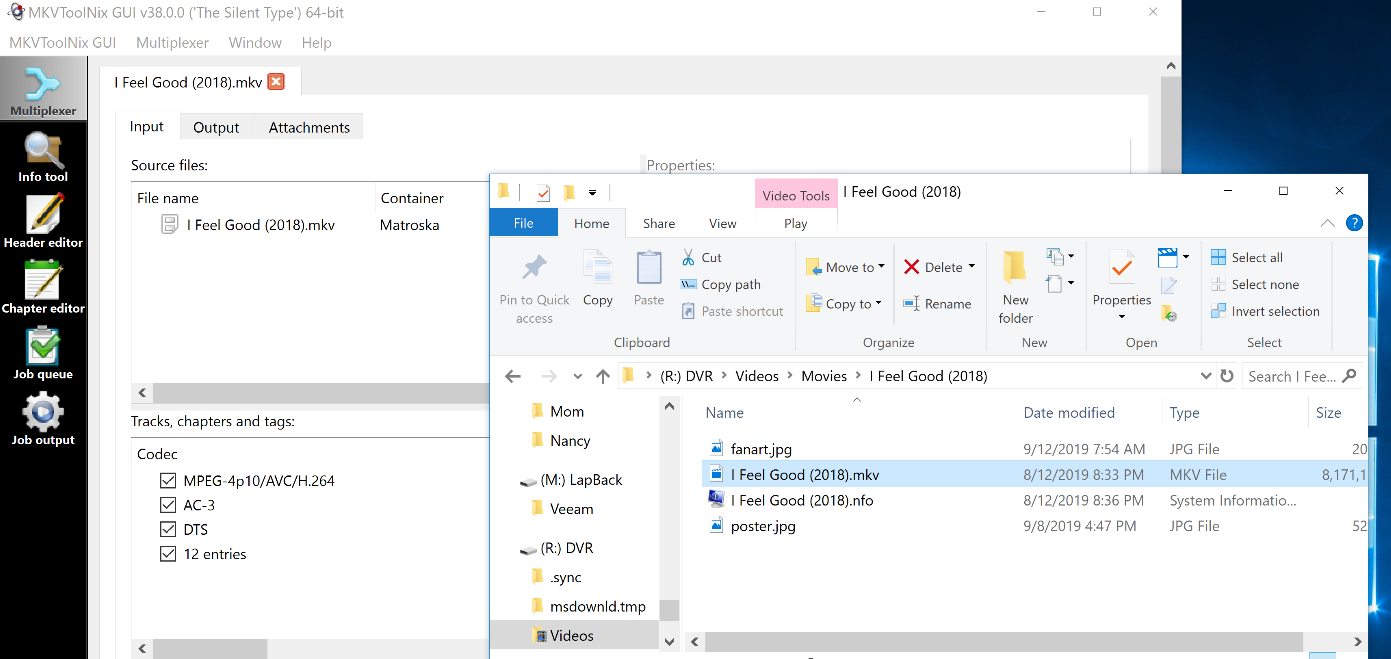
mobamoba
on 8 Oct 2019
Please provide a debug log again. Thanks.
morpheus65535
on 8 Oct 2019
Here you go:
bazarr.log
mobamoba
on 8 Oct 2019
You have plenty of error in your log. I We are having a lot of issue with 0.8.2.x... I'm working hard to fix everything but I suggest you wait a couple of days and restart from scratch.
morpheus65535
on 9 Oct 2019
still an issue ?
 halali
on 19 Oct 2019
halali
on 19 Oct 2019
Not sure as haven't done a ton of sub downloads recently. If you want close, that's fine - I'll reopen if I see the problem occur again.
mobamoba
on 20 Oct 2019
Related issues
 hawkash
·
7Comments
hawkash
·
7Comments
 rickytin
·
6Comments
rickytin
·
6Comments
 hergonoway
·
4Comments
hergonoway
·
4Comments
 claym
·
3Comments
claym
·
3Comments
 Jorman
·
7Comments
Jorman
·
7Comments