Bazarr: Current version is 0.6.9.1 but there is a new one v0.7.0.3
My Current version is 0.6.9.1 but if I go to system/releases the latest one is v0.7.0.3.
My branch is master, maybe v0.7.0.3 is only for for development.
Everything work perfect but sometime I try to go to system and it doesn't show anything only loading so I have to close python and then restart Bazarr and then it works again.
Thanks for Bazarr
 rickytin
All 24 comments
We've had problem with the automatic update task. You can kick start it from system-->tasks--> update from github. Keep in mind that since 0.7, gevent Python module is required to be installed by the user. You can take a look at the wiki for instruction on how to install it (running from source).
 morpheus65535
on 24 Jan 2019
morpheus65535
on 24 Jan 2019
@morpheus65535 where is this task, I don't have such. I have only "Update release info"?
Right now, I am running 0.7.0.3, there is 0.7.0.4, which is not current, and have no such task. Could it be because of permissions or etc.
Bazarr is run on docker, with set of PGID and PUID
 dimitrov-adrian
on 24 Jan 2019
dimitrov-adrian
on 24 Jan 2019
Oh I wasn’t aware your are running in Docker. Update is disabled in Docker images to prevent container alteration. You need to pull new image and recreate (or use Watchtower to do it automatically).
morpheus65535
on 24 Jan 2019
I update Python from 2.7.12 to 2.7.15 then install gevent Python module and restart and then try system-->tasks--> update from github but I am still in version is 0.6.9.1 .
rickytin
on 24 Jan 2019
Go in bazarr directory and run git pull
morpheus65535
on 24 Jan 2019
@morpheus65535 thanks for the explanation, yeah, running on docker on synology, watchtower is not an option, i will do it manually on major updates.
Thanks.
dimitrov-adrian
on 24 Jan 2019
Thanks Morpheus, I am at the office I will try when I get home.
rickytin
on 24 Jan 2019
I didn't find "git pull and I still having trouble, it wont update.
To be sure I will include two screenshot that shows "current version" in green but there are newer version and also in status "Bazarr version 0.6.9.1"
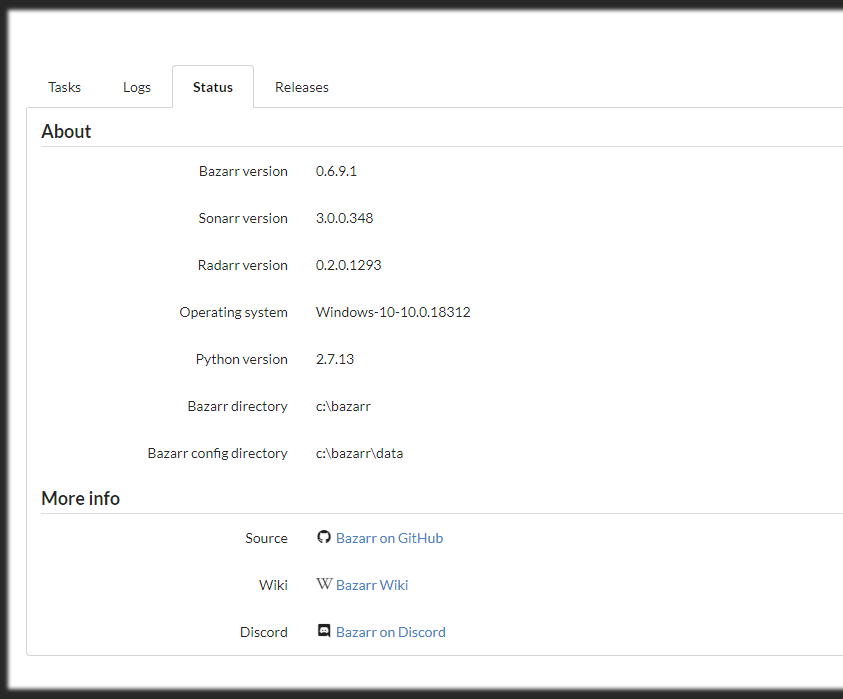
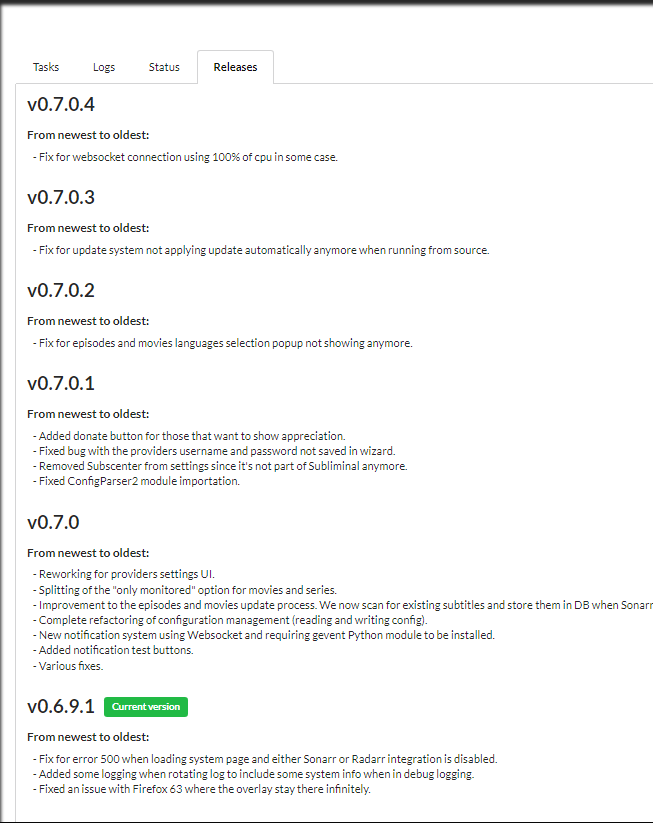
Please help me, Ricky Dominguez
rickytin
on 25 Jan 2019
Git pull is command... So you have open cmd go to radarr folder and put command git pull
 halali
on 25 Jan 2019
halali
on 25 Jan 2019
Thanks Halali for the help. Sorry but I do not understand what do you want me to do.
Fist of all I Install gevent Python module using pip install gevent but I am not sure if I did it the right way and maybe thats why is not updating so how do I know if I installed or not.
rickytin
on 25 Jan 2019
How did you install your bazarr?
halali
on 25 Jan 2019
With running from Source explanation in wiki.
Run git clone https://github.com/morpheus65535/bazarr.git.
rickytin
on 25 Jan 2019
Ok make it same. But not run git clone, instead it run git pull inside your bazarr directory
halali
on 25 Jan 2019
Ok I did it and I restart Bazarr and still show in status that it's Bazarr version 0.6.9.1 and not the latest v0.7.0.4.
rickytin
on 25 Jan 2019
What is the output of git pull? Can you provide a copy of your bazarr.log file?
morpheus65535
on 25 Jan 2019
rickytin
on 25 Jan 2019
Sorry I don't know what you mean "What is the output of git pull?"
Thanks morpheus65535 and halali for the help.
rickytin
on 25 Jan 2019
From your log it seems something have change in your Bazarr directory. I suggest you make a copy of your C:\bazarr\data directory, delete the entire bazarr directory and recreate it using the git clone command. When completed, put back your data directory from the previous backup and run bazarr again.
morpheus65535
on 25 Jan 2019
Thanks Morpheus and Halali, now I am with the latest version.
rickytin
on 25 Jan 2019
also trying to update, stuck on 0.6.9.1, getting this error :
C:\bazarr>git pull https://github.com/morpheus65535/bazarr.git
From https://github.com/morpheus65535/bazarr
 * branch            HEAD       -> FETCH_HEAD
error: The following untracked working tree files would be overwritten by merge:
        .gitattributes
        .github/ISSUE_TEMPLATE/bug_report.md
        .github/ISSUE_TEMPLATE/feature_request.md
        .gitignore
        LICENSE
        README.md
        ___init__.py
        bazarr.py
        bazarr/check_update.py
        bazarr/create_db.sql
        bazarr/get_argv.py
        bazarr/get_episodes.py
        bazarr/get_languages.py
        bazarr/get_movies.py
        bazarr/get_providers.py
        bazarr/get_series.py
        bazarr/get_subtitle.py
        bazarr/init.py
        bazarr/list_subtitles.py
        bazarr/logger.py
        bazarr/main.py
        bazarr/notifier.py
        bazarr/scheduler.py
        bazarr/update_db.py
        bazarr/utils.py
        data/cache/.gitignore
        data/config/.gitignore
        data/db/.gitignore
        data/log/.gitignore
        libs/apprise/Apprise.py
        libs/apprise/AppriseAsset.py
        libs/apprise/__init__.py
        libs/apprise/assets/NotifyXML-1.0.xsd
        libs/apprise/assets/themes/default/apprise-failure-128x128.ico
        libs/apprise/assets/themes/default/apprise-failure-128x128.png
        libs/apprise/assets/themes/default/apprise-failure-256x256.png
        libs/apprise/assets/themes/default/apprise-failure-32x32.png
        libs/apprise/assets/themes/default/apprise-failure-72x72.png
        libs/apprise/assets/themes/default/apprise-info-128x128.ico
        libs/apprise/assets/themes/default/apprise-info-128x128.png
        libs/apprise/assets/themes/default/apprise-info-256x256.png
        libs/apprise/assets/themes/default/apprise-info-32x32.png
        libs/apprise/assets/themes/default/apprise-info-72x72.png
        libs/apprise/assets/themes/default/apprise-logo.png
        libs/apprise/assets/themes/default/apprise-success-128x128.ico
        libs/apprise/assets/themes/default/apprise-success-128x128.png
        libs/apprise/assets/themes/default/apprise-success-256x256.png
        libs/apprise/assets/themes/default/apprise-success-32x32.png
        libs/apprise/assets/themes/default/apprise-success-72x72.png
        libs/apprise/assets/themes/default/apprise-warning-128x128.ico
        libs/apprise/assets/themes/default/apprise-warning-128x128.png
        libs/apprise/assets/themes/default/apprise-warning-256x256.png
        libs/apprise/assets/themes/default/apprise-warning-32x32.png
        libs/apprise/assets/themes/default/apprise-warning-72x72.png
        libs/apprise/cli.py
        libs/apprise/common.py
        libs/apprise/plugins/NotifyBase.py
        libs/apprise/plugins/NotifyBoxcar.py
        libs/apprise/plugins/NotifyDiscord.py
        libs/apprise/plugins/NotifyEmail.py
        libs/apprise/plugins/NotifyEmby.py
        libs/apprise/plugins/NotifyFaast.py
        libs/apprise/plugins/NotifyGrowl/NotifyGrowl.py
        libs/apprise/plugins/NotifyGrowl/__init__.py
        libs/apprise/plugins/NotifyGrowl/gntp/__init__.py
        libs/apprise/plugins/NotifyGrowl/gntp/cli.py
        libs/apprise/plugins/NotifyGrowl/gntp/config.py
        libs/apprise/plugins/NotifyGrowl/gntp/core.py
        libs/apprise/plugins/NotifyGrowl/gntp/errors.py
        libs/apprise/plugins/NotifyGrowl/gntp/notifier.py
        libs/apprise/plugins/NotifyGrowl/gntp/shim.py
        libs/apprise/plugins/NotifyGrowl/gntp/version.py
        libs/apprise/plugins/NotifyIFTTT.py
        libs/apprise/plugins/NotifyJSON.py
        libs/apprise/plugins/NotifyJoin.py
        libs/apprise/plugins/NotifyMatterMost.py
        libs/apprise/plugins/NotifyProwl.py
        libs/apprise/plugins/NotifyPushBullet.py
        libs/apprise/plugins/NotifyPushalot.py
        libs/apprise/plugins/NotifyPushjet/NotifyPushjet.py
        libs/apprise/plugins/NotifyPushjet/__init__.py
        libs/apprise/plugins/NotifyPushjet/pushjet/__init__.py
        libs/apprise/plugins/NotifyPushjet/pushjet/errors.py
        libs/apprise/plugins/NotifyPushjet/pushjet/pushjet.py
        libs/apprise/plugins/NotifyPushjet/pushjet/utilities.py
        libs/apprise/plugins/NotifyPushover.py
        libs/apprise/plugins/NotifyRocketChat.py
        libs/apprise/plugins/NotifySlack.py
        libs/apprise/plugins/NotifyStride.py
        libs/apprise/plugins/NotifyTelegram.py
        libs/apprise/plugins/NotifyToasty.py
        libs/apprise/plugins/NotifyTwitter/NotifyTwitter.py
        libs/apprise/plugins/NotifyTwitter/__init__.py
        libs/apprise/plugins/NotifyTwitter/tweepy/__init__.py
        libs/apprise/plugins/NotifyTwitter/tweepy/api.py
        libs/apprise/plugins/NotifyTwitter/tweepy/auth.py
        libs/apprise/plugins/NotifyTwitter/tweepy/binder.py
        libs/apprise/plugins/NotifyTwitter/tweepy/cache.py
        libs/apprise/plugins/NotifyTwitter/tweepy/cursor.p
Aborting

C:\bazarr>
Ant the automatic task also errors out :
2019-01-29 12:59:22,441 - apscheduler.executors.default (13f0) : ERROR (base:131) - Job "Update bazarr from source on Github (trigger: interval[6:00:00], next run at: 2019-01-29 18:59:19 CET)" raised an exception
 Zixim
on 29 Jan 2019
Zixim
on 29 Jan 2019
Run git reset --hard. Just to be sure git pull. Restart Bazarr. In the future Bazarr should update by himself if you enable auto-update in settings.
morpheus65535
on 29 Jan 2019
no joy :
C:\bazarr>git reset --hard

C:\bazarr>git pull
There is no tracking information for the current branch.
Please specify which branch you want to merge with.
See git-pull(1) for details.

    git pull <remote> <branch>

If you wish to set tracking information for this branch you can do so with:

    git branch --set-upstream-to=<remote>/<branch> master


C:\bazarr>git pull https://github.com/morpheus65535/bazarr.git
From https://github.com/morpheus65535/bazarr
 * branch            HEAD       -> FETCH_HEAD
error: The following untracked working tree files would be overwritten by merge:
        .gitattributes
        .github/ISSUE_TEMPLATE/bug_report.md
        .github/ISSUE_TEMPLATE/feature_request.md
        .gitignore
        LICENSE
        README.md
        ___init__.py
        bazarr.py
        bazarr/check_update.py
        bazarr/create_db.sql
        bazarr/get_argv.py
        bazarr/get_episodes.py
        bazarr/get_languages.py
        bazarr/get_movies.py
        bazarr/get_providers.py
        bazarr/get_series.py
        bazarr/get_subtitle.py
        bazarr/init.py
        bazarr/list_subtitles.py
        bazarr/logger.py
        bazarr/main.py
        bazarr/notifier.py
        bazarr/scheduler.py
        bazarr/update_db.py
        bazarr/utils.py
        data/cache/.gitignore
        data/config/.gitignore
        data/db/.gitignore
        data/log/.gitignore
        libs/apprise/Apprise.py
        libs/apprise/AppriseAsset.py
        libs/apprise/__init__.py
        libs/apprise/assets/NotifyXML-1.0.xsd
        libs/apprise/assets/themes/default/apprise-failure-128x128.ico
        libs/apprise/assets/themes/default/apprise-failure-128x128.png
        libs/apprise/assets/themes/default/apprise-failure-256x256.png
        libs/apprise/assets/themes/default/apprise-failure-32x32.png
        libs/apprise/assets/themes/default/apprise-failure-72x72.png
        libs/apprise/assets/themes/default/apprise-info-128x128.ico
        libs/apprise/assets/themes/default/apprise-info-128x128.png
        libs/apprise/assets/themes/default/apprise-info-256x256.png
        libs/apprise/assets/themes/default/apprise-info-32x32.png
        libs/apprise/assets/themes/default/apprise-info-72x72.png
        libs/apprise/assets/themes/default/apprise-logo.png
        libs/apprise/assets/themes/default/apprise-success-128x128.ico
        libs/apprise/assets/themes/default/apprise-success-128x128.png
        libs/apprise/assets/themes/default/apprise-success-256x256.png
        libs/apprise/assets/themes/default/apprise-success-32x32.png
        libs/apprise/assets/themes/default/apprise-success-72x72.png
        libs/apprise/assets/themes/default/apprise-warning-128x128.ico
        libs/apprise/assets/themes/default/apprise-warning-128x128.png
        libs/apprise/assets/themes/default/apprise-warning-256x256.png
        libs/apprise/assets/themes/default/apprise-warning-32x32.png
        libs/apprise/assets/themes/default/apprise-warning-72x72.png
        libs/apprise/cli.py
        libs/apprise/common.py
        libs/apprise/plugins/NotifyBase.py
        libs/apprise/plugins/NotifyBoxcar.py
        libs/apprise/plugins/NotifyDiscord.py
        libs/apprise/plugins/NotifyEmail.py
        libs/apprise/plugins/NotifyEmby.py
        libs/apprise/plugins/NotifyFaast.py
        libs/apprise/plugins/NotifyGrowl/NotifyGrowl.py
        libs/apprise/plugins/NotifyGrowl/__init__.py
        libs/apprise/plugins/NotifyGrowl/gntp/__init__.py
        libs/apprise/plugins/NotifyGrowl/gntp/cli.py
        libs/apprise/plugins/NotifyGrowl/gntp/config.py
        libs/apprise/plugins/NotifyGrowl/gntp/core.py
        libs/apprise/plugins/NotifyGrowl/gntp/errors.py
        libs/apprise/plugins/NotifyGrowl/gntp/notifier.py
        libs/apprise/plugins/NotifyGrowl/gntp/shim.py
        libs/apprise/plugins/NotifyGrowl/gntp/version.py
        libs/apprise/plugins/NotifyIFTTT.py
        libs/apprise/plugins/NotifyJSON.py
        libs/apprise/plugins/NotifyJoin.py
        libs/apprise/plugins/NotifyMatterMost.py
        libs/apprise/plugins/NotifyProwl.py
        libs/apprise/plugins/NotifyPushBullet.py
        libs/apprise/plugins/NotifyPushalot.py
        libs/apprise/plugins/NotifyPushjet/NotifyPushjet.py
        libs/apprise/plugins/NotifyPushjet/__init__.py
        libs/apprise/plugins/NotifyPushjet/pushjet/__init__.py
        libs/apprise/plugins/NotifyPushjet/pushjet/errors.py
        libs/apprise/plugins/NotifyPushjet/pushjet/pushjet.py
        libs/apprise/plugins/NotifyPushjet/pushjet/utilities.py
        libs/apprise/plugins/NotifyPushover.py
        libs/apprise/plugins/NotifyRocketChat.py
        libs/apprise/plugins/NotifySlack.py
        libs/apprise/plugins/NotifyStride.py
        libs/apprise/plugins/NotifyTelegram.py
        libs/apprise/plugins/NotifyToasty.py
        libs/apprise/plugins/NotifyTwitter/NotifyTwitter.py
        libs/apprise/plugins/NotifyTwitter/__init__.py
        libs/apprise/plugins/NotifyTwitter/tweepy/__init__.py
        libs/apprise/plugins/NotifyTwitter/tweepy/api.py
        libs/apprise/plugins/NotifyTwitter/tweepy/auth.py
        libs/apprise/plugins/NotifyTwitter/tweepy/binder.py
        libs/apprise/plugins/NotifyTwitter/tweepy/cache.py
        libs/apprise/plugins/NotifyTwitter/tweepy/cursor.p
Aborting

C:\bazarr>
Something is wrong with your installation. Please reinstall from source but keep your data directory.
morpheus65535
on 29 Jan 2019
I think perhaps I misunderstood the wiki instruction :
Open up CMD and go to the folder you want to install bazarr. Do not use C:\Program Files or C:\Program Files (x86) as you could run into strange issues. Something like C:\bazarr is a better choice.
In the previous install, i created c:\bazarr, went into that folder and did git clone
Now i understand I should have gone into root ( C:\), do git clone.
Zixim
on 29 Jan 2019
Related issues
 zandadoum
·
6Comments
zandadoum
·
6Comments
 Fgruntjes
·
5Comments
Fgruntjes
·
5Comments
 dtroncy
·
8Comments
dtroncy
·
8Comments
 Dr0bac
·
6Comments
Dr0bac
·
6Comments
 Jorman
·
7Comments
Jorman
·
7Comments