bat not detecting syntax automatically for some files
What version of bat are you using?
[bat 0.15.3]
Describe the bug you encountered:
bat does not seem to be detecting and/or performing syntax highlighting by default on some languages. cat manage.py | bat does not have any colors, but cat manage.py | bat -l python does.
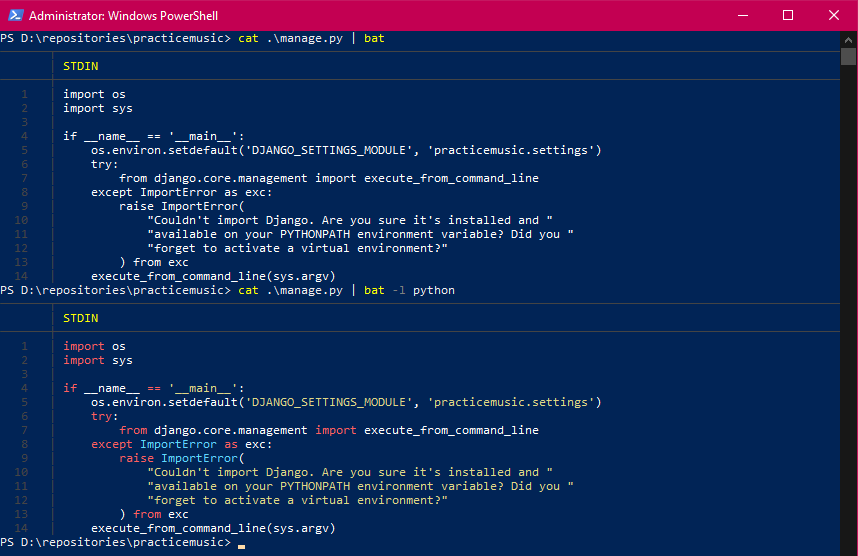
I've tested for the following files:
Works: *sh, *.rb,
Does Not Work: *.py, *.md, *.org, *.ps1, *.cpp
Describe what you expected to happen?
syntax highlighting on the input from STDIN.
How did you install bat?
choco install bat
My OS is Windows with the following specs:
Edition: Windows 10 Pro
Version: 1909
OS build: 18363.836
 yum-feng
All 3 comments
How should it correctly detect the syntax? It's not clear/unambiguous from the first line of stdin - ideally your python files would have a shebang line at the top, for example, though I guess such things aren't as useful on Windows...
 keith-hall
on 27 May 2020
keith-hall
on 27 May 2020
The README.md says that it reads the stdin and determines the syntax automatically, I made a few guesses at how it could do so. Maybe perform an analysis over a certain number of characters in an attempt to match a language ?
Anyhow, I didn't know that it relied on shebangs. There isn't any indication of this either on the main page, but I can try to add some details if it's welcomed.
yum-feng
on 28 May 2020
Anyhow, I didn't know that it relied on shebangs.
It does not. Other patterns can be used to identify files as well. Something like <?php which is unlikely to lead to false assignments.
The reason that this detection is restricted to the first line is twofold:
- this is how Sublime Text syntaxes work. They have "first line" patterns. There is no other, more sophisticated mechanism.
- In order to be a drop-in replacement for POSIX
cat,batoperates on a line-by-line streaming basis. We need to print the syntax highlighted first line after it has been read. We are not allowed to "look ahead".
The documentation on this can certainly be improved. Contributions are - as always - welcome!
 sharkdp
on 28 May 2020
sharkdp
on 28 May 2020
Related issues
 niedzielski
·
3Comments
niedzielski
·
3Comments
 rien333
·
3Comments
rien333
·
3Comments
 samuelcolvin
·
3Comments
samuelcolvin
·
3Comments
 scalp42
·
3Comments
scalp42
·
3Comments
 tomgoren
·
3Comments
tomgoren
·
3Comments
Most helpful comment
How should it correctly detect the syntax? It's not clear/unambiguous from the first line of stdin - ideally your python files would have a shebang line at the top, for example, though I guess such things aren't as useful on Windows...