Bat: --show-all should still highlight syntax
Awesome stuff!
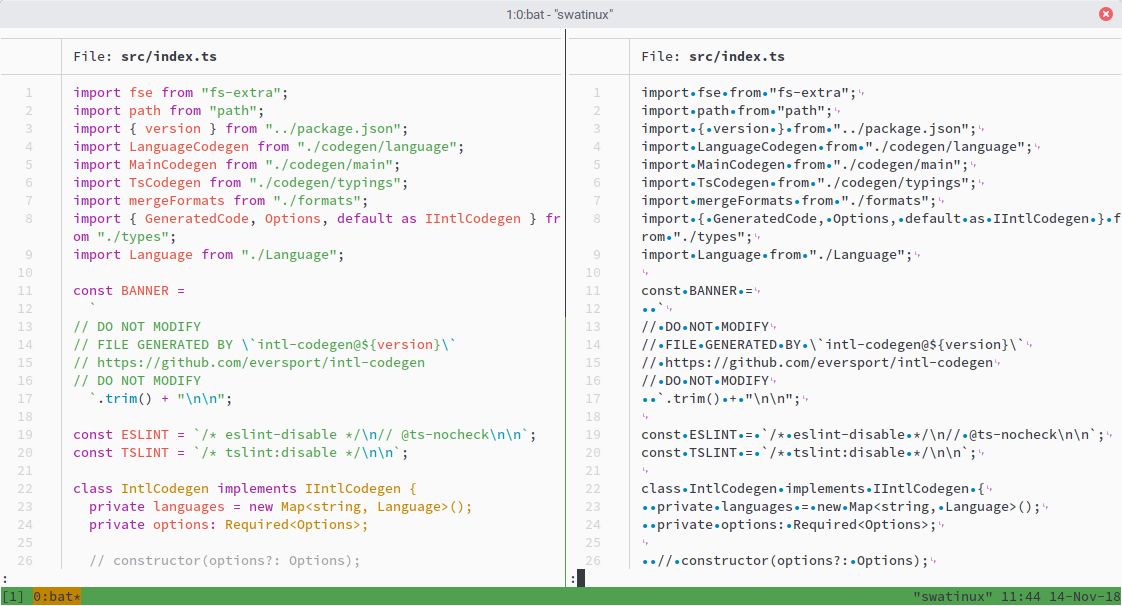
However, it would be nice if --show-all would still keep the syntax highlighting.
Currently you can’t use both.
 Swatinem
All 9 comments
Thank you for the feedback.
This was a deliberate choice. I wanted the special characters to stand out from the rest of the text. Otherwise, you would hardly see the control- and whitespace characters.
In addition, it would be impossible to implement with the way this is currently done (a special highlighting syntax for --show-all). It could, however, certainly be implemented if the whole --show-all functionality would be completely rewritten.
 sharkdp
on 14 Nov 2018
sharkdp
on 14 Nov 2018
@Swatinem Any update on this?
sharkdp
on 26 Nov 2018
Oh sorry, I wasn’t aware you were waiting for feedback.
It is definitely a nice-to-have, since it is the way I (and probably some other people as well) have also set up their editor/IDE, to always display invisible characters with syntax highlighting.
But it is definitely not a high priority for me. Like you said, implementing it is probably a lot of work?
Swatinem
on 26 Nov 2018
Yes. This is definitely a lot of work and would require a complete overhaul of the way we show non-printable characters.
I am closing this for now, as I am most likely never going to work on this, but if somebody wants to pick this up, please let me know so I can reopen this ticket. Even if we decide to implement this, I would probably vote for this being opt-in via an additional command line flag.
sharkdp
on 14 Dec 2018
Would it be possible to, as a quick hack, add this into the individual syntax highlighters? For example, if I just want to show tabs and spaces for C and C++ files, could I modify those syntax definitions to do that there?
And if that would be possible, can you give me a pointer on where I need to start? I had a quick look into the assets/syntaxes directory, but didn't see something for C/C++ there.
Just for my own personal use; I don't expect you to write or support such a hacky solution :)
 DrMcCoy
on 14 Jan 2019
DrMcCoy
on 14 Jan 2019
Would it be possible to, as a quick hack, add this into the individual syntax highlighters? For example, if I just want to show tabs and spaces for C and C++ files, could I modify those syntax definitions to do that there?
I think so, yes.
And if that would be possible, can you give me a pointer on where I need to start? I had a quick look into the assets/syntaxes directory, but didn't see something for C/C++ there.
Make sure you clone the bat repository recursively (or make sure that all submodules are correctly checked out). Then, you should find the C++ syntax under assets/syntaxes/Packages/C++.
Next, copy the C++.sublime-syntax file to ~/.config/bat/syntaxes (or bats config folder on your OS), modify it, and don't forget to always call bat cache --init if you modify that file.
sharkdp
on 14 Jan 2019
Yes. This is definitely a lot of work and would require a complete overhaul of the way we show non-printable characters.
Is it still the case? It would be lovely to have
--show-allandsyntax highlightingat the same time.
 mikcza
on 21 Aug 2020
mikcza
on 21 Aug 2020
Yes, this is still the case.
sharkdp
on 7 Sep 2020
Theoretically, there's nothing stopping us from doing two passes over each line to get both syntax and unprintable highlighting.
Technically however, bat wasn't designed with that in mind and would need a fair amount of refactoring. Due to extra branching being required, it would also probably hurt performance even when the feature isn't used.
 eth-p
on 9 Sep 2020
eth-p
on 9 Sep 2020
Related issues
 tbsvttr
·
3Comments
tbsvttr
·
3Comments
 lilyball
·
3Comments
lilyball
·
3Comments
 adamtabrams
·
3Comments
adamtabrams
·
3Comments
 yum-feng
·
3Comments
yum-feng
·
3Comments
 HakubJozak
·
3Comments
HakubJozak
·
3Comments