Bat: Wrapping doesn't work properly with tabs.
When implementing the wrapping, I failed to account for files that use tabs for indentation and/or alignment.
Image
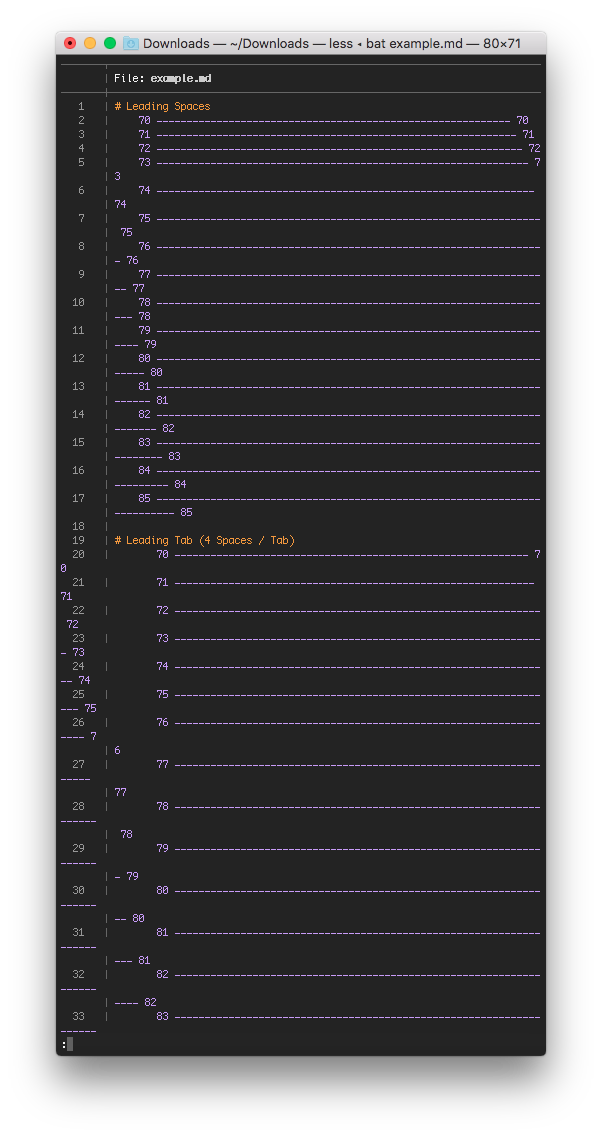
Test File
# Leading Spaces
    70 ----------------------------------------------------------- 70
    71 ------------------------------------------------------------ 71
    72 ------------------------------------------------------------- 72
    73 -------------------------------------------------------------- 73
    74 --------------------------------------------------------------- 74
    75 ---------------------------------------------------------------- 75
    76 ----------------------------------------------------------------- 76
    77 ------------------------------------------------------------------ 77
    78 ------------------------------------------------------------------- 78
    79 -------------------------------------------------------------------- 79
    80 --------------------------------------------------------------------- 80
    81 ---------------------------------------------------------------------- 81
    82 ----------------------------------------------------------------------- 82
    83 ------------------------------------------------------------------------ 83
    84 ------------------------------------------------------------------------- 84
    85 -------------------------------------------------------------------------- 85

# Leading Tab (4 or 8 Spaces / Tab)
    70 ----------------------------------------------------------- 70
    71 ------------------------------------------------------------ 71
    72 ------------------------------------------------------------- 72
    73 -------------------------------------------------------------- 73
    74 --------------------------------------------------------------- 74
    75 ---------------------------------------------------------------- 75
    76 ----------------------------------------------------------------- 76
    77 ------------------------------------------------------------------ 77
    78 ------------------------------------------------------------------- 78
    79 -------------------------------------------------------------------- 79
    80 --------------------------------------------------------------------- 80
    81 ---------------------------------------------------------------------- 81
    82 ----------------------------------------------------------------------- 82
    83 ------------------------------------------------------------------------ 83
    84 ------------------------------------------------------------------------- 84
    85 -------------------------------------------------------------------------- 85

# Alignment
1   1
22  2
333 3
4444    4
55555   5
666666  6
7777777 7
88888888    8
Solutions
There are a couple of solutions that I think might solve this issue:
A. Replace \t with 4 or 8 spaces.
Pros:
- Easy to implement.
- Configurable for user's choice of either 4 or 8 characters.
Cons:
- Output is different from source file (maybe only do it if wrapping and styling is enabled?)
- Breaks tab alignment:
1   2
34   5
B. Replace \t with n spaces, aligning to a 4 or 8 character boundary.
Pros:
- Correct tab alignment.
- Configurable for user's choice of either 4 or 8 characters.
Cons:
- Output is different from source file (maybe only do it if wrapping and styling is enabled?)
C. Interpret \t and add n characters to the width counter variable.
Pros:
- Output is the same as source file.
Cons:
- More difficult to implement.
- Different terminal emulators align tabs differently (e.g. 4/8 characters)
- Breaks tab alignment:
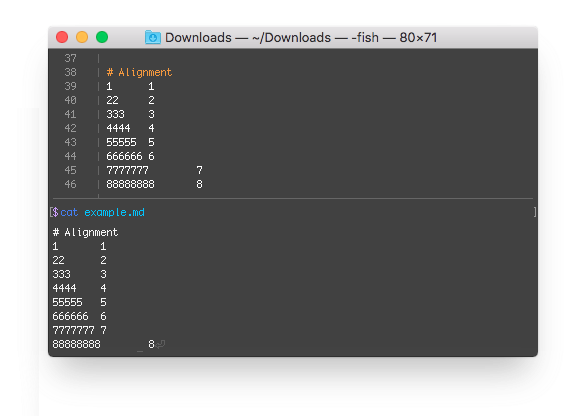
If I were to say, I think solution B would be the best way to handle it. It avoids the issue with terminal emulators having different sizes for the tab character (and it could be a configuration option), and it won't run into alignment or wrapping issues like solutions A and C.
 eth-p
eth-p
All 9 comments
Thank you for the bug report and the detailed analysis.
I think I would tend towards option "C" because the output is the same as the source file and people will be able to copy&paste (single lines). I personally almost never use tabs, so I'd be okay if the alignment would break in option "C".
The default side-panel has a width of 9 characters. If we could shrink that down to 8, we would also have a correct alignment in the "C" case. Another option could be to explicitly set the tab alignment (https://unix.stackexchange.com/a/46377/229308), although I have never heard of this before.
Why do you think that C would be more difficult to implement? Granted, I'm not sure what we would have to do if we have 3 characters left and we encounter a tab... but I guess this will a more difficult case in B as well? We would have to make an assumption about the tab display-width, that's for sure.
That being said, option B also sounds okay for me.
 sharkdp
on 3 Jun 2018
sharkdp
on 3 Jun 2018
Sorry about the late reply, I've been out of the country for a little while.
Explicitly setting the tab alignment seems like it would be the best solution, having none of the drawbacks of the others. I'll look into how it works, and I'll see what I can do.
eth-p
on 16 Jun 2018
After some experimenting, the ANSI tab alignment setting solution seems to be out of the question. less appears to be automatically replacing tabs with spaces by itself, breaking things anyways.
I think we might have to go for solution B (but only when output is a tty). A simple way to implement it would be to run the input through expand -t[n] to offload that problem to a standard *nix tool, before parsing it in bat.
eth-p
on 5 Jul 2018
One thing to keep in mind: Using a pre-processing step to expand the tabs could be problematic for languages with a syntax that distinguishes between tabs and spaces (i.e. Makefile).
sharkdp
on 19 Aug 2018
I'd love to see a flag to specify tab width. Because sane people don't use a tab width of 8. Using tabs 4 doesn't affect bat either. :(
 ghost
on 26 Aug 2018
ghost
on 26 Aug 2018
@sharkdp I've been thinking about this issue further, and I think using expand would be the way to go. The sidebar breaks cat compatibility and less (at least on macOS) appears to be converting tabs to spaces anyways, so we might as well just process the tabs through expand and fix this issue.
If it's a non-interactive tty though, it definitely shouldn't be doing any tab processing.
eth-p
on 7 Sep 2018
@sharkdp I've been thinking about this issue further, and I think using expand would be the way to go. The sidebar breaks cat compatibility and less (at least on macOS) appears to be converting tabs to spaces anyways, so we might as well just process the tabs through expand and fix this issue.
What about my comment above, though? (Using a pre-processing step to expand the tabs could be problematic for languages with a syntax that distinguishes between tabs and spaces)
If it's a non-interactive tty though, it definitely shouldn't be doing any tab processing.
In this case, bat anyway just uses the SimplePrinter and just passes every byte through as-is.
sharkdp
on 7 Sep 2018
@sharkdp I ended up fixing this by creating a small line preprocessing function that expands tabs in the same way that expand(1) does (#302). It's only used inside InteractivePrinter.print_line, so it should remain compatible with cat.
As for not breaking languages that distinguish between spaces and tabs:
There are a couple requirements for someone to perfectly copy a cat'ed source file from a terminal's scrollback buffer:
- The terminal supports it (i.e. doesn't expand tabs by itself).
- The pager isn't expanding tabs on its own (
lessdoes this). - Decorations are disabled.
To account for that, tabs won't be expanded unless any of the following are true:
- A pager is being used.
- Decorations are being used.
--tabsis set.BAT_TABSis set.
eth-p
on 11 Sep 2018
Released in v0.7.0.
sharkdp
on 12 Sep 2018
Related issues
sharkdp
·
3Comments
 issmirnov
·
3Comments
issmirnov
·
3Comments
 gwpl
·
3Comments
gwpl
·
3Comments
 lilyball
·
3Comments
lilyball
·
3Comments
 samuelcolvin
·
3Comments
samuelcolvin
·
3Comments