Barrier: Not working in MacOS Catalina
After updating do MacOS Catalina the application stopped to work.
 luizfilho00
All 14 comments
Can you please provide further information? We have an issue template _precisely_ for that purpose. Your bug report is very sparse, and just saying "it does't work" provides us with no information about what your issue is. I'm going to mark this issue as invalid and close it within 48 hours if we don't hear back from you. In future, please do fill out the template...
 shymega
on 21 Oct 2019
shymega
on 21 Oct 2019
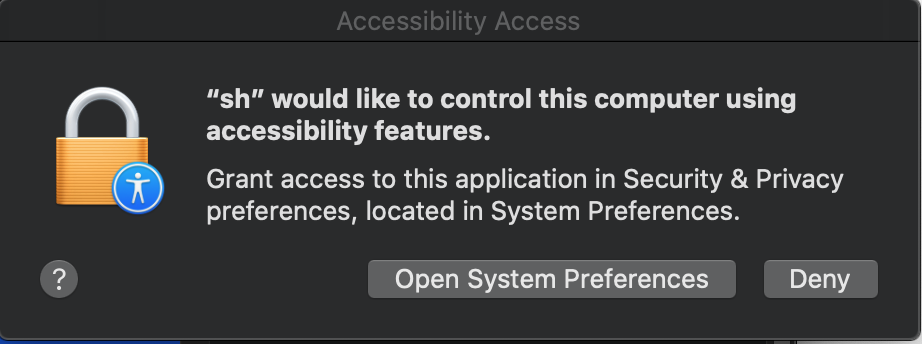
I believe I have the same issue as this user. It seems like barrier requires the sh application to control the computer.

 mandusm
on 21 Oct 2019
mandusm
on 21 Oct 2019
@mandusm The thing is, this user has provided _zero_ information as to what their issue is. You may well have the same issue, but I would urge caution at this time - let's keep the two issues separate until we have further information. Thank you for opening #475.
shymega
on 21 Oct 2019
Problem was solved adding "sh" to accessibility permissions!
luizfilho00
on 24 Oct 2019
If the problem was solved, why was the issue re-opened?
 AdrianKoshka
on 24 Oct 2019
AdrianKoshka
on 24 Oct 2019
@luizfilho00 Did you mean to reopen this issue? If you didn't, please close the issue, or you can leave it, and I'll close it later on this week. Cheers.
shymega
on 26 Oct 2019
Can anyone confirm Barrier KVM working in macOS Catalina; even anecdotally?
(While it would be best to know Barrier works with Catalina for everyone, it would still be helpful to know if it's working for anyone.)
 loren-osborn
on 15 Jan 2020
loren-osborn
on 15 Jan 2020
@loren-osborn I can confirm that Barrier KVM is running on Mac OS Catalina (Server and Client) with Windows 10 Build 1909
However, performing the installation was a bit strange, the software did not want to connect at the beginning but when restarting both systems they connected.
 jpdante
on 11 Feb 2020
jpdante
on 11 Feb 2020
It did work for me for a while but has recently stopped working.
The client (OS X) and server (Windows 10) connect to each other just fine but no mouse inputs seem to make it across to OS X. Keyboard inputs do seem to be working OK though. I've added many things to my accessibility whitelist. sh, barrier, barriers, barrier.sh, barrierc, Barrier.app etc but it doesn't seem to help. Even running as root has no effect.
In the client log there are warnings about "cursor may not be visible" but nothing that suggests why it might not be.
 public
on 23 Mar 2020
public
on 23 Mar 2020
I confirm is not working for me since Catalina got released, I am using it from Catalina to Catalina, mouse works fine (with the normal limitations for gestures) but keyboard is not working.
 donrudo
on 31 Mar 2020
donrudo
on 31 Mar 2020
I can confirm that I was able to get Barrier to work in server mode with a Windows client attached by doing the following on the Mac server:
- opening "Security and Privacy" and navigating to "Privacy"
- selecting "Accessibility" from on the left
- in a Finder window navigating to the directory /bin by using cmd-shift-G and typing
/bin - selecting
shand dragging it into the "Security and Privacy" apps section and ensuring it remains checked
After performing these steps, barrier is working and allowing me to share my keyboard and mouse as normal
 azemute
on 5 May 2020
azemute
on 5 May 2020
using #648 you can build an up to date release that has updated fixes for this that have it show up as Barrier instead of sh
Or if you trust people https://github.com/simons-public/barrier/releases/tag/use-macdeployqt has a release already built
 plessbd
on 5 May 2020
plessbd
on 5 May 2020
As @plessbd mentioned this has been fixed. Pull request #487. @azemute It’s pretty unsafe to give sh accessibility privileges, I don’t think it’s a good idea to recommend that as a fix for this issue. Maybe the devs can post a new release for all the Catalina users.
 simons-public
on 5 May 2020
simons-public
on 5 May 2020
Tried the @plessbd proposal by reinstalled barrier and once the privileges were set reinstalled the official build; the process worked for a few minutes and then the keyboard stop working again.
The current accessibility privileges in both computers show _barrier, barriers, barrier.sh, barrierc and sh_ enabled while testing, I agree with @simons-public allowing _sh_ is really unsafe and should be done only to test if the issue is a privilege issue.
donrudo
on 6 May 2020
Related issues
 ElnuDev
·
18Comments
ElnuDev
·
18Comments
 jwulf
·
18Comments
jwulf
·
18Comments
 TafThorne
·
21Comments
TafThorne
·
21Comments
 kloetzl
·
50Comments
kloetzl
·
50Comments
 exodist
·
25Comments
exodist
·
25Comments