Barrier: MACOS serious config file errors - hotkeys totally broken
Server: MACOS 10.13.6
Client: Windows 10 Pro
UPDATED:
Solved that issue by removing switchDoubleTap = 250.
To clarify, the only issue I'm unable to get past now is getting hotkeys to work at all. None of them will do anything, seemingly no matter the config.
If anyone has some advice for how to approach this, please pipe in.
UPDATE:
Now have hotkeys working on client side only. All hotkeys on server side are ignored by Barrier.
Additional info:
All hotkeys using modifiers (CTRL, ALT, SHIFT etc) are ignored and do not register as an input in Barrier.
All single-key hotkeys (, E, 5 etc) are effective to change the active screen from client to server ONLY.
All other uses of hotkeys are ignored by Barrier.
 WreckWren
All 18 comments
No default config file location given
To my knowledge, except on linux, there is none. If you specify a path where a config is, barrier will use it, otherwise, it'll generate it's own.
So not only is the file location nonsense
Not a macOS user, and we don't really have a macOS dev to my knowledge. So I can't really comment.
but the "unknown screen name" is a totally invented one that I've never seen before on ANY of my machines.
I think barrier tries to assign a screen name automatically based on hostname. You can change this screen name by going to Barrier -> Change Settings.
but why Barrier has invented this incorrect config file and hid it on my system is beyond me.
It's hidden because you seem to have selected that the configuration is interactively done instead of pointing barrier to a pre-written config file.
FATAL: unknown screen name `WW-MBP'
I'd guess this would only happen if you haven't configured the server properly. Going to assume you've configured your setup:
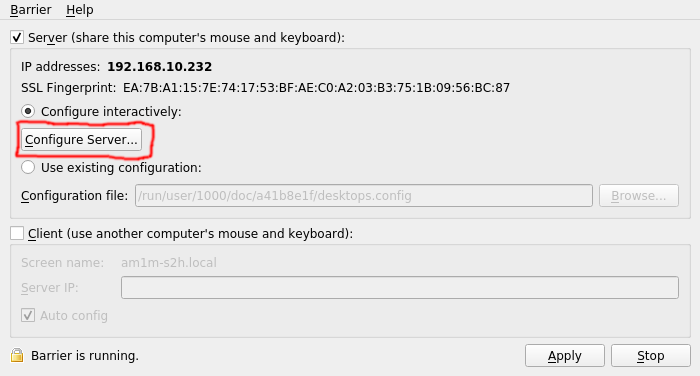

NO information on default directories in Barrier
I can agree with this, documentation is lacking in general. I guess I expect most users to come from synergy (I'm not the main barrier dev).
NO information on correct config file formatting and commands
NOTHING in the way of examples
I'd be surprised if there isn't documentation by symless for this.
Of course, with absolutely no documentation whatsoever
The stuff doesn't write itself, also a lot of existing documentation that applies to synergy 1.9.x applies to barrier.
 AdrianKoshka
on 20 Jan 2019
AdrianKoshka
on 20 Jan 2019
I moved over from Synergy 1.1, so all of this is extremely familiar to me. Set up exactly the same way, which is the only thing I can do with the total lack of documentation relating to Barrier, it does not function.
Of course, since there is no example config file, Barrier rejects any and all config files with Synergy formatting and no-one can tell me where the interactive-generated file is, this app is totally useless to me.
With Synergy default, there IS a default config file that is created through the interactive config, though I'm not sure as to its location on OSX, you can find it in Appdata on Windows.
You can't make a fork of something where things don't work the same way, release no documentation and expect people not to experience issues.
Saying it doesn't write itself doesn't write it. The last full release was in May 2018, what have you done in the 9 months or so since then? Has a word of it been written?
We're ultimately talking about something that NEEDS to be at least a couple of pages long, showing examples of how the app can be set up. If you can't make a couple pages of generalised examples, I can help you. We're talking a day or two here to make it all professional-like, not 9 months.
TO BE CLEAR: I can solve this problem and those of others if I have:
*example config files
*exact temporary file locations for Barrier
*config options from Synergy that don't work in Barrier
But there is not a single resource detailing any of this whatsoever. As a result, I can't even help myself.
WreckWren
on 20 Jan 2019
This is the config I have and use daily.
section: screens
    am1m-s2h.ccbp.online:
        halfDuplexCapsLock = false
        halfDuplexNumLock = false
        halfDuplexScrollLock = false
        xtestIsXineramaUnaware = false
        switchCorners = none
        switchCornerSize = 0
    acer:
        halfDuplexCapsLock = false
        halfDuplexNumLock = false
        halfDuplexScrollLock = false
        xtestIsXineramaUnaware = false
        switchCorners = none
        switchCornerSize = 0
end

section: aliases
end

section: links
    am1m-s2h.ccbp.online:
        left = acer
    acer:
        right = am1m-s2h.ccbp.online
end

section: options
    relativeMouseMoves = false
    screenSaverSync = true
    win32KeepForeground = false
    clipboardSharing = true
    switchCorners = none
    switchCornerSize = 0
end
No luck with that either sadly, even weirder still I'm getting the same errors with this that I was with the interactive config system.
I can only guess that Barrier is loading from its own config rather than the one I give it, all the time. Perhaps there's a lower-level config for Barrier that is stopping it from accepting any config files?
WreckWren
on 20 Jan 2019
Perhaps there's a lower-level config for Barrier that is stopping it from accepting any config files?
Nope...not to my knowledge
AdrianKoshka
on 20 Jan 2019
OK since then I have got Barrier to at least read a config file on OSX, now to set about getting hotkeys to work.
Is there any documentation for how Barrier wants hotkeys to be formatted in the config file? Still trying to see if we can get this working.
WreckWren
on 20 Jan 2019
This is what I have:
keystroke(3) = switchToScreen(WWGDT18)
keystroke(4) = switchToScreen(WWMBP18)
This should make the 3 key switch to the above, and the 4 key switch to the below, correct?
Instead, all hotkeys are ignored. Have tried combinations with CTRL, ALT etc.
WreckWren
on 20 Jan 2019
Is there any documentation for how Barrier wants hotkeys to be formatted in the config file?
Same as synergy did?
AdrianKoshka
on 20 Jan 2019
Sadly, no. Just porting in the hotkeys results in them being ignored by Barrier.
Something is definitely happening, as the chosen key stops responding - but it does not switch displays or do any other chosen function.
WreckWren
on 20 Jan 2019
Idk how it's done then, I never used them on synergy, and if I was going to, I'd do it through the GUI I guess. Sorry.
AdrianKoshka
on 20 Jan 2019
Sadly, having done them through the GUI and then exported the settings, then pasted those back into the custom config file, they do not work either.
WreckWren
on 20 Jan 2019
Now getting this:
2019-01-20 15:37:06.357 barriers[1851:60693] pid(1851)/euid(501) is calling TIS/TSM in non-main thread environment, ERROR : This is NOT allowed. Please call TIS/TSM in main thread!!!
WreckWren
on 20 Jan 2019
Oh my, another user reported having this issue..
AdrianKoshka
on 20 Jan 2019
Is the issue I'm talking about #212
AdrianKoshka
on 20 Jan 2019
Solved that issue by removing switchDoubleTap = 250.
To clarify, the only issue I'm unable to get past now is getting hotkeys to work at all. None of them will do anything, seemingly no matter the config.
If anyone has some advice for how to approach this, please pipe in.
UPDATE:
Now have hotkeys working on client side only. All hotkeys on server side are ignored by Barrier.
Additional info:
All hotkeys using modifiers (CTRL, ALT, SHIFT etc) are ignored and do not register as an input in Barrier.
All single-key hotkeys (\, E, 5 etc) are effective to change the active screen from client to server ONLY.
All other uses of hotkeys are ignored by Barrier.
WreckWren
on 20 Jan 2019
Should this issue be renamed, now that it's a hotkey issue?
AdrianKoshka
on 20 Jan 2019
Should this issue be renamed, now that it's a hotkey issue?
Yes mate, I'll do that now. At least it's moving quickly!
Or was, anyway.
WreckWren
on 20 Jan 2019
Im having the same hotkey issues on Linux
 campbebj
on 18 Mar 2019
campbebj
on 18 Mar 2019
Related issues
 Hokwang
·
17Comments
Hokwang
·
17Comments
 decarlo-cliff
·
16Comments
AdrianKoshka
·
22Comments
decarlo-cliff
·
16Comments
AdrianKoshka
·
22Comments
 blizarazu
·
39Comments
blizarazu
·
39Comments
 exodist
·
25Comments
exodist
·
25Comments
Most helpful comment
This is the config I have and use daily.