Barba: Keyboard/Popstate events break the running transition
The problem
When a transition tweening if I change the page (previous or next buttons for example) the page reload stopping the transition (because all DOM reloaded)
Description
I use GSAP and a basic Barba config (no router)
Details
When the transition ended I can change page and a transition will be played, but if a transitions acting, all breaks and the transition don't end but the enter transition (or "once" transition) is played instead.
Expected behaviour
If I want to change the page during a page transition : the transition need to be reversed or the element need to erase itself proper on the screen.
Actual behaviour
The transition is stopped and the "once" or "enter" transition is played instead.
Relevant Links
A pretty minimal reproduction repository.
Our interesting file (with Barba.JS <3 ) is here.
You can easily run it using npm install; npm run dev
Environment
- Barba version that exhibits the issue: 2.9.7
- Build used:
- [x] module (esm/)
- [ ] browser (dist/)
- [ ] main (lib/)
- Browser OS/version used:
- Google Chrome Version 81.0.4044.122 (Official Build) (64-bit).
- User-Agent :
Mozilla/5.0 (Windows NT 10.0; Win64; x64) AppleWebKit/537.36 (KHTML, like Gecko) Chrome/81.0.4044.122 Safari/537.36.
 pierredarrieutort
All 9 comments
Hi @pierredarrieutort,
This is the default behavior of Barba... until you set the preventRunning option to true, as specified in the documentation: https://barba.js.org/docs/advanced/strategies/#preventRunning.
You can also programmatically check if a transition is running using
barba.transitions.isRunningwhenever you want in your code.
Closing the issue :wink:
 xavierfoucrier
on 24 Apr 2020
xavierfoucrier
on 24 Apr 2020
Hi @xavierfoucrier
Thanks for your time, but for me this issue isn't resolved, I still with the same problem even after implemented what's you and the documentation precognize.
The documentation say : "_Tells Barba to prevent page “force reload” when the user clicks on an eligible link during a transition is running._" - The problem is possibly due to the fact of the user don't click on a link but on the navigation buttons outside the window or by keyboard shortcut ?
What I've tried :
barba.init({
    preventRunning: true,
    transitions: [{
        enter: ({ next  }) => {
            console.log('1', barba.transitions.isRunning)
            transition(next.container)
        },
        leave: ({ current }) => {
            console.log('2', barba.transitions.isRunning)
            transition(current.container, true)
        },
        once: ({ next  }) => {
            console.log('3', barba.transitions.isRunning)
            transition(next.container)
        }
    }]
})
I've updated it in my minimal usable repository. But even after tried with an alternative method : Check if barba.transitions.isRunning and prevent transition if equal to true. I've watched what's the console returns to me and it's always true (I think it's due to the placement but it's the only place I can place it).
pierredarrieutort
on 24 Apr 2020
Hi @pierredarrieutort,
Using barba.transitions.isRunning inside transition hooks will/should probably always return true, because transition hooks run within a transition.
I will look into your repo as soon as possible next week and give a feedback. :wink:
xavierfoucrier
on 25 Apr 2020
Hi @pierredarrieutort!
In order to reverse you animation when the user interact with another link during a transition, you need to use the prevent property of Barba to properly "intercept" the user event:
// init barba library
barba.init({
  transitions: [
    ...
  ],
  prevent: ({ el, event }) => {
    if (event.type === 'click') {
      if (barba.transitions.isRunning) {
        event.preventDefault();
        event.stopPropagation();

        // here you can:
        // - pause the animation (using gsap)
        // - play the animation backward (using gsap)
        // - do stuff regarding the window.location.href

        return true;
      }
    }
  }
});
Depending on when the event happen, you will probably need to change/update the browser URL, take a look at Barba utils.
Thanks for the feedback :wink:
xavierfoucrier
on 27 Apr 2020
Hi @xavierfoucrier,
Here is my update :
prevent: ( { event } ) => {
    console.log(event)
    if ( barba.transitions.isRunning ) {
        event.preventDefault()
        event.stopPropagation()

        // transition(document.querySelector('main:first-of-type'), true)
        return true;
    }
}
The problem persisting, with your example you cover only the mouse interactions, but when you using the previous and next page buttons, you need to trigger popstate like events. As a corollary i've logged the event and every time I use back/forward buttons it returns undefined.
I think so this prevent event is unecessary in this case and this good logic will be to use preventRunning.
However as we've observed in this case the preventRunning don't do his job. I think understand why, It should have solved this problem from the start if it listen to back/forward page events. (Because from the start the page continues to reload itself if a transition is running).
What do you think ? Does preventRunning already supports this type of event ?
_EDIT : If you want I can share a gif of the page behavior if it could help you_
pierredarrieutort
on 27 Apr 2020
As specified in the documentation, preventRunning do the job, no more and no less than:
Prevent page “force reload” when the user clicks on an eligible link during a transition is running.
But... it seems like the preventRunning option doesn't work when using backward and forward buttons :thinking:
Need to investigate more in order to properly target the issue.
PS: GIF are always welcome here :wink:
xavierfoucrier
on 27 Apr 2020
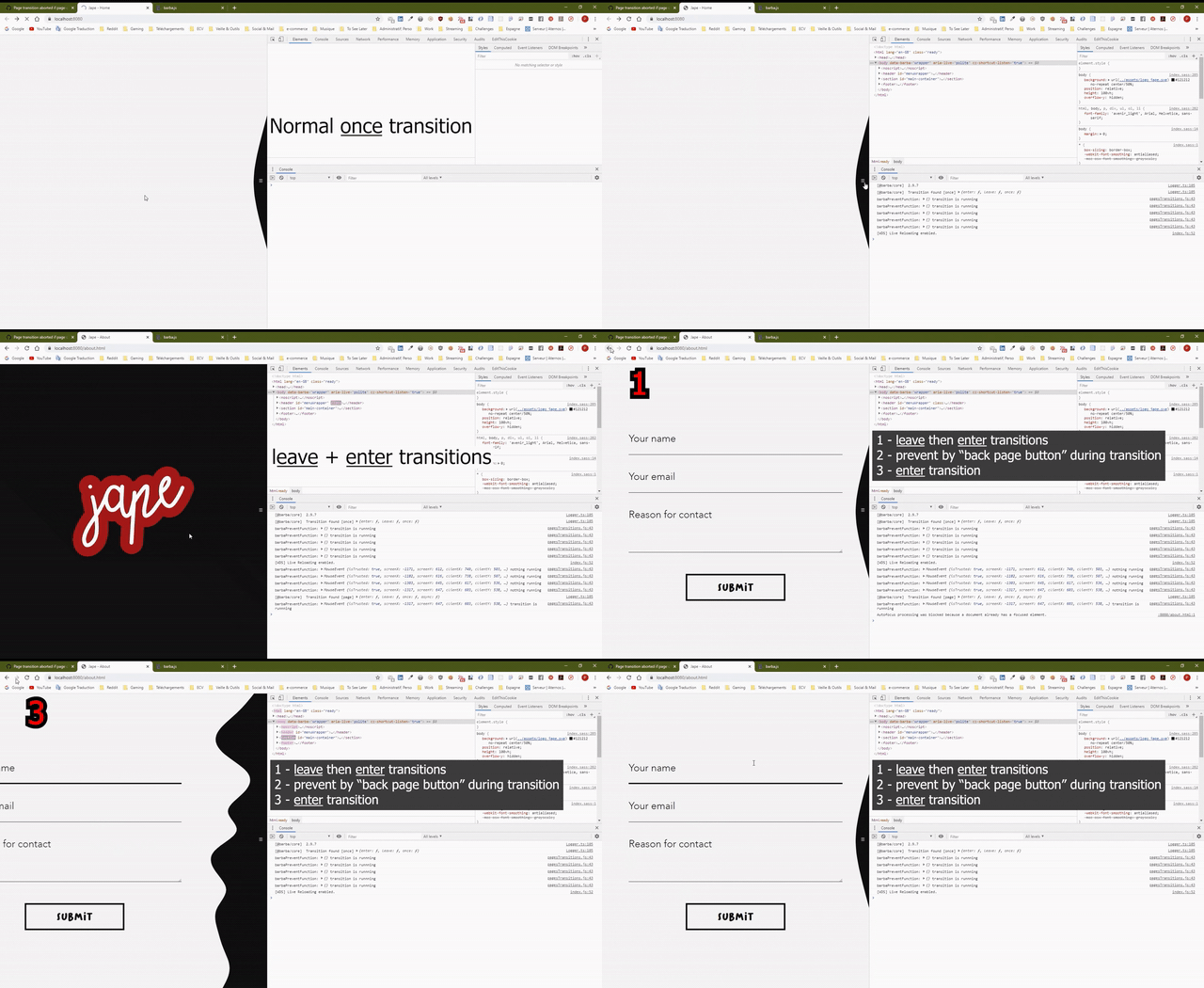
The behavior of the page transition is in parts which are explained on the top right of the video and logged in the console on the bottom right.
You can watch it in 1080p to see the log in HD :
https://youtu.be/ZPzFxm7DA7A
Need to investigate more in order to properly target the issue.
Do you need something else 😀 ?
pierredarrieutort
on 27 Apr 2020
Hi @pierredarrieutort,
I took the time to clone and test your project on localhost :ok_hand:
As you underlined, the backward and forward buttons doesn't prevent page "force reload" when a transition is running.
The preventRunning option should add support for keyboard or popstate events in order to prevent the browser to break the current running transition.
I am reopening the issue in order to fix it in a future release.
Thanks for the catch! :wink:
xavierfoucrier
on 28 Apr 2020
Hi @pierredarrieutort,
Sorry for the late reply.
For now, as discussed with Thierry, we haven't found an easy way to implement this feature without adding some complexity in the transition workflow and history. It sounds like unnatural regarding the user browser usage to override the Keyboard/Popstate events to prevent running transition to be broke.
Anyway, we will probably work on adding an implementation of "hook cancellation" to easily manage transition Promise cancellation in order to "catch" the user input and deal with that.
Thanks again for highlighting this!
I am closing the issue.
xavierfoucrier
on 26 Jun 2020
Related issues
 bobbyballard
·
3Comments
pierredarrieutort
·
3Comments
bobbyballard
·
3Comments
pierredarrieutort
·
3Comments
 ershad989
·
4Comments
ershad989
·
4Comments
 gitgudcameron
·
3Comments
gitgudcameron
·
3Comments
 shanewmurphy
·
3Comments
shanewmurphy
·
3Comments