Ballerina-lang: Error installing ballerina plugin for vs code
Description:
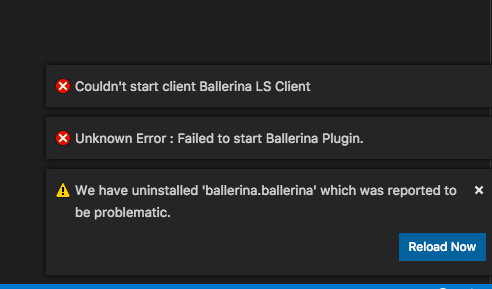
Trying to install ballerina plugin on VS Code fails
Steps to reproduce:
Affected Versions:
VS Code: 1.29.1 (1.29.1)
Ballerina VS Code plugin: 0.983.0
OS, DB, other environment details and versions:
Mac OS X (10.12.6)
This is what pops up
 christian-posta
All 38 comments
https://groups.google.com/forum/#!topic/ballerina-dev/cBPV0cw2pRY
 xlight05
on 28 Nov 2018
xlight05
on 28 Nov 2018
Awesome thanks!
On Tue, Nov 27, 2018 at 9:44 PM Anjana Supun notifications@github.com
wrote:
https://groups.google.com/forum/#!topic/ballerina-dev/cBPV0cw2pRY
—
You are receiving this because you authored the thread.
Reply to this email directly, view it on GitHub
https://github.com/ballerina-platform/ballerina-lang/issues/11958#issuecomment-442318023,
or mute the thread
https://github.com/notifications/unsubscribe-auth/AADP0d14rT9aj2YRcY5ArMEdVe2S9y1jks5uzhSrgaJpZM4Y2uVW
.>
Christian Posta
twitter: @christianposta
http://blog.christianposta.com http://www.christianposta.com/blog
christian-posta
on 28 Nov 2018
So I'm still seeing errors:
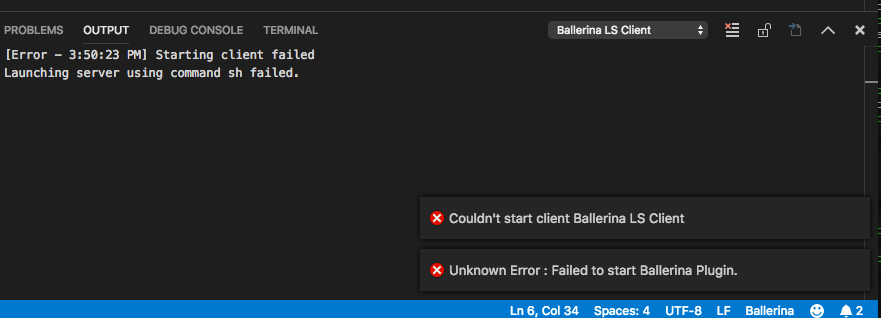
And I get no autocomplete or "intellisense"
The plugin stays installed this time though; it doesn't get kicked out on restart.
VSCode version: 1.29.1
Ballerina VSCode plugin version: 0.983.1
christian-posta
on 28 Nov 2018
I am getting similar errors to christian
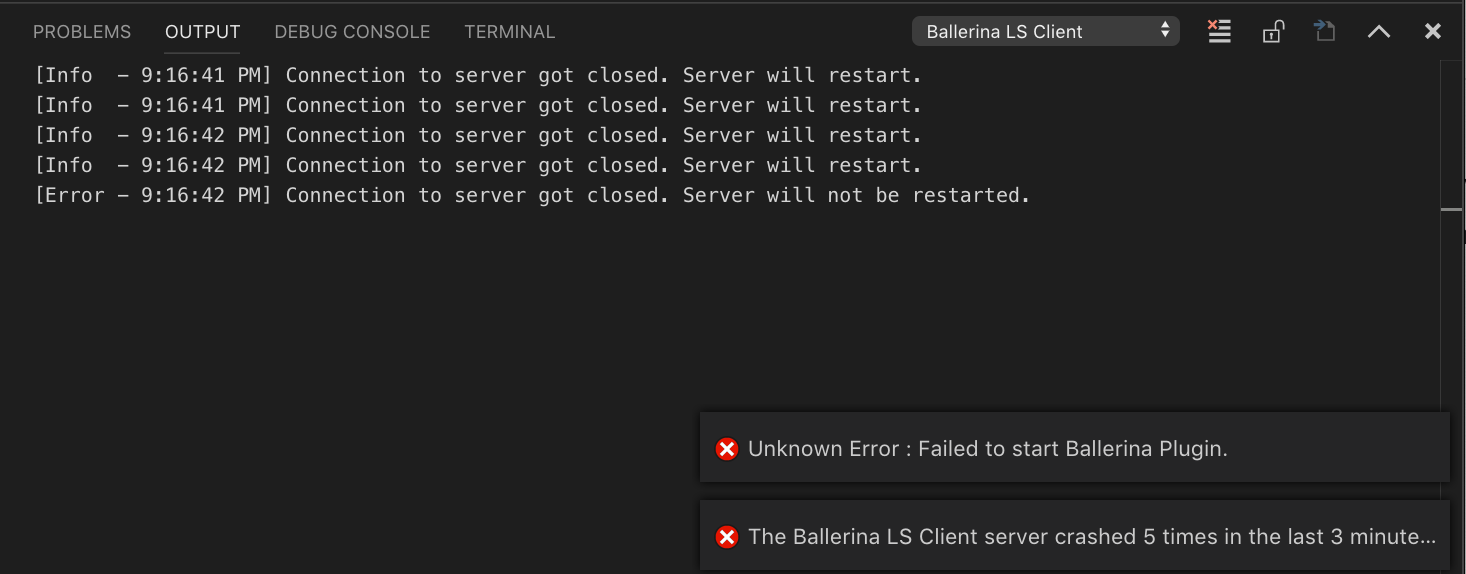
VSCode Version: 1.29.1
Ballerina VSCode Version: 0.983.1
OSX: 10.14.1
 cartyc
on 29 Nov 2018
cartyc
on 29 Nov 2018
Can you specify the ballerina version you are using?
 nadeeshaan
on 29 Nov 2018
nadeeshaan
on 29 Nov 2018
Ballerina 0.983.0
cartyc
on 29 Nov 2018
Can you try with the vscode plugin version 0.983.0?
nadeeshaan
on 29 Nov 2018
I will attempt a downgrade. That version was giving me the same issues the other day.
cartyc
on 29 Nov 2018
Also, try to remove other ballerina plugin versions from the extensions directory
nadeeshaan
on 29 Nov 2018
Hadn't thought to do that. Gave it a try uninstalled and deleted the folders in the extensions dir. Same result, tried with both 0.983.1 and 0.983.0.
cartyc
on 29 Nov 2018
0.983.0 doesn’t even stay installed on my end, gets removed when VS code
restarts
On Wed, Nov 28, 2018 at 7:39 PM Chris Carty notifications@github.com
wrote:
Hadn't thought to do that. Gave it a try uninstalled and deleted the
folders in the extensions dir. Same result, tried with both 0.983.1 and
0.983.0.—
You are receiving this because you authored the thread.
Reply to this email directly, view it on GitHub
https://github.com/ballerina-platform/ballerina-lang/issues/11958#issuecomment-442684997,
or mute the thread
https://github.com/notifications/unsubscribe-auth/AADP0V9ZVxKtT35jrUuEzKmz9sP-Nqfeks5uz0jRgaJpZM4Y2uVW
.>
Christian Posta
twitter: @christianposta
http://blog.christianposta.com http://www.christianposta.com/blog
christian-posta
on 29 Nov 2018
@christian-posta yesterday there was a security-related concern in vscode market lace and due to that reason, they have automatically removed the extensions. Now they have corrected the issue.
[1] https://groups.google.com/forum/#!searchin/ballerina-dev/Ballerina$20VSCode$20plugin$20was$20unpublished$20from$20marketplace%7Csort:date/ballerina-dev/cBPV0cw2pRY/WYf203sECwAJ
nadeeshaan
on 29 Nov 2018
yes but i still get errors in the plugin. It's not all that useful at the
moment if it doesn't work
On Wed, Nov 28, 2018 at 8:22 PM Nadeeshaan Gunasinghe <
[email protected]> wrote:
@christian-posta https://github.com/christian-posta yesterday there was
a security-related concern in vscode market lace and due to that reason,
they have automatically removed the extensions. Now they have corrected the
issue.[1]
https://groups.google.com/forum/#!searchin/ballerina-dev/Ballerina$20VSCode$20plugin$20was$20unpublished$20from$20marketplace%7Csort:date/ballerina-dev/cBPV0cw2pRY/WYf203sECwAJ—
You are receiving this because you were mentioned.
Reply to this email directly, view it on GitHub
https://github.com/ballerina-platform/ballerina-lang/issues/11958#issuecomment-442692490,
or mute the thread
https://github.com/notifications/unsubscribe-auth/AADP0dv-k4cEaJBzJ7OScPHDhAY8EI_fks5uz1L3gaJpZM4Y2uVW
.
--
Christian Posta
twitter: @christianposta
http://blog.christianposta.com http://www.christianposta.com/blog
christian-posta
on 29 Nov 2018
@christian-posta can you provide the following information?
- You have installed the ballerina v0983.0
- You have installed the ballerina vscode plugin version 0.983.1
- If you have set ballerina.home in vscode settings.json, please remove it
- You have installed VSCode 1.26.0 or higher.
- Also, can you provide us the output you get for
$BALLERINA_HOME? - If you are getting further errors what are the errors you are seeing?
nadeeshaan
on 29 Nov 2018
I am not seeing this issue with plugin version 0.983.1 too.
 kaviththiranga
on 29 Nov 2018
kaviththiranga
on 29 Nov 2018
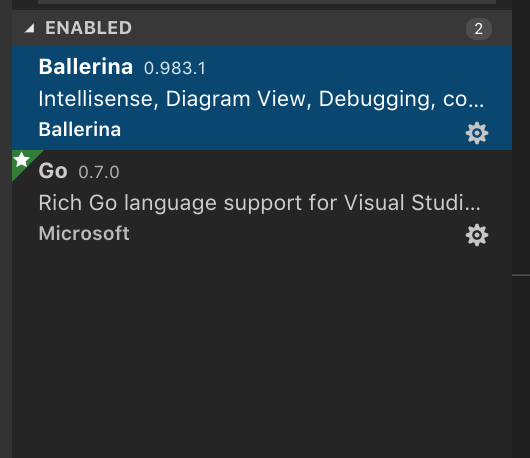
@christian-posta, @cartyc can you open the extensions tab and see whether there are two Ballerina extensions are listed as installed. One with the id ballerina.ballerina and another one with ballerina.ballerina-temp, both versioned as 0.983.1.
One with the id suffix "-temp" was shared in the thread as a workaround for those who were blocked and needed an immediate fix - as we were not sure about the time it takes to get the extension republished in market place.
If this is the case, please uninstall the one with id "ballerina.ballerina-temp" and see.
kaviththiranga
on 30 Nov 2018
@kaviththiranga I only have the one listed.
cartyc
on 30 Nov 2018
@kaviththiranga Is there anything else I can provide to help?
cartyc
on 30 Nov 2018
Can you please provide some details for the points mentioned in this comment?
https://github.com/ballerina-platform/ballerina-lang/issues/11958#issuecomment-442907471
Specially the 3rd point and the last two points as you have provided details on other points....
 NipunaMarcus
on 30 Nov 2018
NipunaMarcus
on 30 Nov 2018
You have installed the ballerina vscode plugin version 0.983.1
Yes I have. The previous version 0.981.1 worked with no issue.If you have set ballerina.home in vscode settings.json, please remove it
This is the current setting in vscode "ballerina.home": ""Also, can you provide us the output you get for $BALLERINA_HOME?
echoing $BALLERINA_HOME returns nothing.If you are getting further errors what are the errors you are seeing?
I haven't gotten any other errors aside from what I've outlined already. I will share if I do.
cartyc
on 30 Nov 2018
@cartyc Please remove below entry from the settings.json. I can reproduce the same issue when having below entry.
"ballerina.home": ""
Also If you have installed ballerina using homebrew there's a known issue https://github.com/ballerina-platform/ballerina-lang/issues/9724. You need to set "ballerina.home": "/usr/local/Cellar/ballerina/0.983.0/libexec" specifically.
 rasika
on 30 Nov 2018
rasika
on 30 Nov 2018
Hi, today I'am getting similar error
Unknown Error : Failed to start Ballerina Plugin
My environment
Ballerina 0.983.0
VSCode version: 1.29.1
Ballerina VSCode plugin version: 0.983.1 (from marketplace)
OS: Windows
In the output window I found the exception:
java.lang.UnsupportedClassVersionError: org/ballerinalang/langserver/launchers/stdio/Main : Unsupported major.minor version 52.0
    at java.lang.ClassLoader.defineClass1(Native Method)
    at java.lang.ClassLoader.defineClass(ClassLoader.java:791)
    at java.security.SecureClassLoader.defineClass(SecureClassLoader.java:142)
    at java.net.URLClassLoader.defineClass(URLClassLoader.java:449)
    at java.net.URLClassLoader.access$100(URLClassLoader.java:71)
    at java.net.URLClassLoader$1.run(URLClassLoader.java:361)
    at java.net.URLClassLoader$1.run(URLClassLoader.java:355)
    at java.security.AccessController.doPrivileged(Native Method)
    at java.net.URLClassLoader.findClass(URLClassLoader.java:354)
    at java.lang.ClassLoader.loadClass(ClassLoader.java:423)
    at sun.misc.Launcher$AppClassLoader.loadClass(Launcher.java:308)
    at java.lang.ClassLoader.loadClass(ClassLoader.java:356)
    at sun.launcher.LauncherHelper.checkAndLoadMain(LauncherHelper.java:482)
Exception in thread "main" [Info  - 2:51:43 PM] Connection to server got closed. Server will restart.
After some retry with failure:
Exception in thread "main" [Error - 2:51:54 PM] Connection to server got closed. Server will not be restarted.
 ponsilva
on 30 Nov 2018
ponsilva
on 30 Nov 2018
Hi @ponsilva No, that's a different issue.
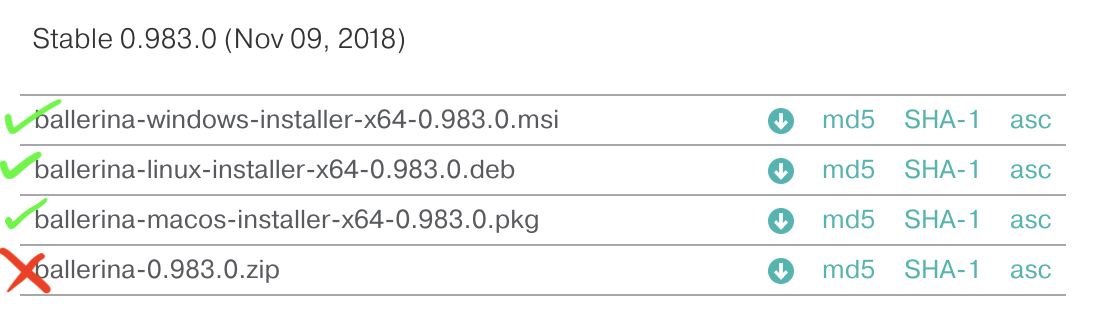
Unsupported major.minor version 52.0 means you are running ballerina on-top of an older JRE(less than JRE8).
By any means did you download zip distribution? I recommend you to download platform-specific distribution to make things straight forward.
rasika
on 30 Nov 2018
I installed Ballerina using ballerina-windows-installer-x64-0.983.0.msi
I check again my env variables, thanks
ponsilva
on 30 Nov 2018
It has been removed, my settings.json now looks like.
{
"window.zoomLevel": -1,
"extensions.autoUpdate": false,
}
Same error. I did not install using the homebrew install rather through the macOS package from ballerina.io. I had installed a previous version of Ballerina through homebrew but uninstalled it a while ago, maybe there is something hanging on.
cartyc
on 1 Dec 2018
@cartyc , @christian-posta, Sorry for the trouble with the plugin. We tried diffrent cases but still couldn’t figure out the cause for the issue. Can you please try the following to help us to find the root cause.
- Verify if the Ballerina version detected by the plugin is correct.
In settings, set “ballerina.debugLog” to true and restart VSCode. Next, open Ballerina output channel in VScode output window. You should be able to see the Ballerina installation that the plugin is using as shown below. Please verify whether it matches v0.983.0 installation dir in your machine.

- Check if languageserver script is working properly.
Under the hood, plugin is using a shell script to start language-server. It is located at <ballerina.home>/lib/tools/lang-server/launchers/language-server-launcher.bat (for osx and linux, there is a sh file). Can you try starting that sh/bat file directly. It should start without displaying any error and you should see no output if it starts correctly, the process will just hang on.
- Try with manually setting ballerina.home.
Alternatively, you can manually set the “ballerina.home” directory path in VSCode settings. If you set ballerina.home in settings plugin will pick that without trying to autodetect ballerina home and plugin should work normally.
 hevayo
on 1 Dec 2018
hevayo
on 1 Dec 2018
@hevayo Thanks for taking the time to help troubleshoot this
I ran the language server and I got the following output:
sh /Library/Ballerina/ballerina-0.983.0/lib/tools/lang-server/launcher/language-server-launcher.sh
Error: Ballerina is supported only on JDK 1.8
So I checked which java version:
java -version
java version "9.0.1"
Java(TM) SE Runtime Environment (build 9.0.1+11)
Java HotSpot(TM) 64-Bit Server VM (build 9.0.1+11, mixed mode)
Looks like that might be the issue?
cartyc
on 1 Dec 2018
@cartyc, thanks for the info. Yes, this seems to be the issue. Ideally it should be using the JRE provided by Ballerina installer, but seems this is a bug in the script. We will fix this for the next release and meanwhile provide you a script with the fix, soon.
kaviththiranga
on 2 Dec 2018
Thanks that sounds great. Looking forward to the fix 😊
cartyc
on 2 Dec 2018
@cartyc fix is merged and will be available with next release.
https://github.com/ballerina-platform/ballerina-lang/pull/12226
Please apply the diff to script in your local installation dir. Uploading shell scripts is not allowed on github, hence I am unable to provide it here.
Thanks.
kaviththiranga
on 2 Dec 2018
I just gave the new script a test and it works!
Thanks so much @kaviththiranga
cartyc
on 2 Dec 2018
In Windows, I had to set JAVA_HOME as
C:\Programmi\Ballerina\ballerina-0.983.0\bre\lib\jre1.8.0_172
before running VS Code and then it works.
ponsilva
on 3 Dec 2018
JAVA_HOME in my environment is set by default to
C:\Programmi\Java\jdk1.7.0_21
ponsilva
on 3 Dec 2018
@ponsilva, thanks for the information. We will investigate the lang-server script for Windows and get back to you. Initially we could find the issue only in sh file, hence the fix only addressed it.
kaviththiranga
on 4 Dec 2018
@ponsilva - Thanks. We were able to reproduce the issue. We'll fix it and give an update.
 jeradrutnam
on 4 Dec 2018
jeradrutnam
on 4 Dec 2018
@ponsilva - Fixed issue in #12316 and it will be available in the next release.
For the time being please apply the diff to the script in your local installation directory (e.g. C:\Program Files\Ballerina\ballerina-0.983.1\lib\tools\lang-server\launcher\language-server-launcher.bat). Uploading shell scripts is not allowed on GitHub, hence I am unable to provide it here.
Thanks.
jeradrutnam
on 4 Dec 2018
Using the updated language-server-launcher.bat VS Code starts Ballerina Plugin without errors.
Thanks @jeradrutnam
ponsilva
on 4 Dec 2018
Closing since all the issues are resolved. Please reopen if you think otherwise.
hevayo
on 6 Dec 2018
Related issues
 daneshk
·
5Comments
daneshk
·
5Comments
 SupunS
·
4Comments
SupunS
·
4Comments
 MaryamZi
·
4Comments
MaryamZi
·
4Comments
 ldclakmal
·
6Comments
ldclakmal
·
6Comments
 anuruddhal
·
4Comments
anuruddhal
·
4Comments
Most helpful comment
@christian-posta can you provide the following information?
$BALLERINA_HOME?