Ballerina-lang: [Quick Start] Setting up ballerina.home should be mentioned in the doc
Description:
Setting up ballerina.home should be mentioned in the doc
- After the step in below image, it should be appended. Note that after the user navigates to VScode, it will anyway notify the user configure ballerina.home. Better include in doc too.

 kavithasub
All 6 comments
Tried this out and it worked for me without setting up ballerina.home. Did you restart VS Code?
 samgnaniah
on 2 May 2018
samgnaniah
on 2 May 2018
@samgnaniah , it was a warning notification for me to set ballerina home config when I open project folder as below.
If this is working fine without set ballerina.home manually, we can resolve this issue.
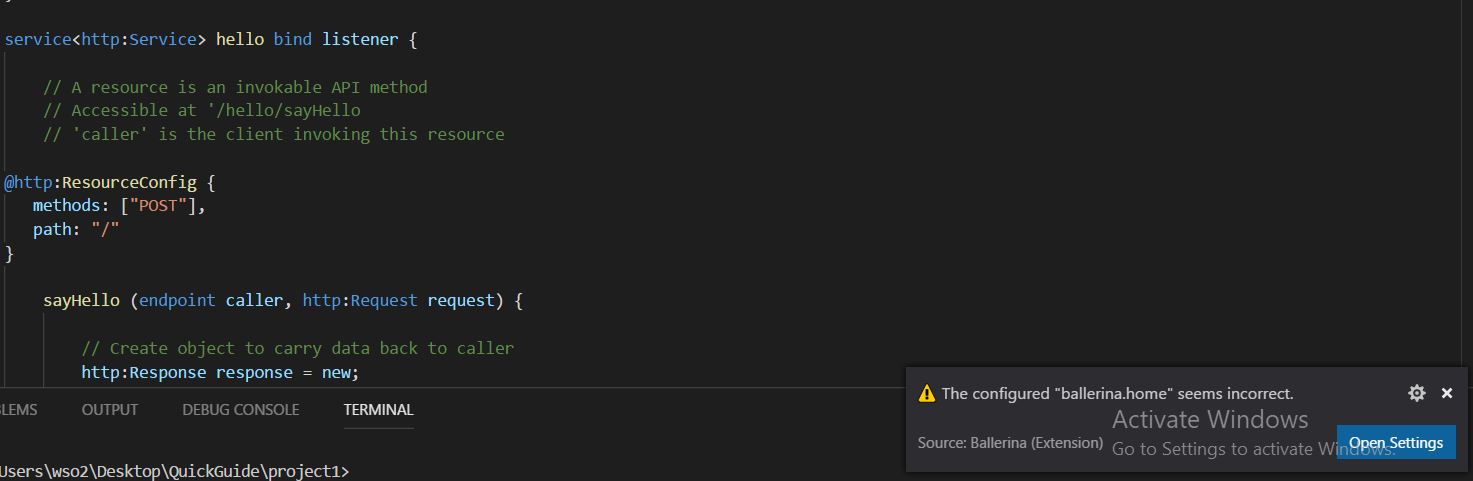
(Windows 10 )
kavithasub
on 2 May 2018
Created https://github.com/ballerina-platform/ballerina-www/issues/881 to track this. Hence closing.
 anupama-pathirage
on 11 Jun 2018
anupama-pathirage
on 11 Jun 2018
@samgnaniah Did not work out for me even after restarting VS Code. How to set ballerina.home ?
 ShanikaEdiriweera
on 1 Jul 2018
ShanikaEdiriweera
on 1 Jul 2018
Ran into the same problem and I troubleshooted it like this. I use Linux Ubuntu with the default .deb installation of Ballerina.
ballerina bash command lies in /usr/bin/ballerina. However, it is linked to /usr/lib/ballerina/ballerina-XXXX/bin/ballerina bash script (XXXX denotes your ballerina version). Thus, the original script which runs is the latter.
Open that script and see this particular line:
# set BALLERINA_HOME
BALLERINA_HOME=`cd "$PRGDIR/.." ; pwd`
There you have it! Just put up a echo $BALLERINA_HOME in that script (After the
BALLERINA_HOME=`cd "$PRGDIR/.." ; pwd`
command), and run ballerina in your terminal - you'll get the location of ballerina.home inside your terminal (In my case, it is /usr/lib/ballerina/ballerina-0.981.0). Just copy it and paste it in VSCode settings, and restart VSCode.
 dasunpubudumal
on 29 Aug 2018
dasunpubudumal
on 29 Aug 2018
Thanks @dasunpubudumal
I had that message : The configured "ballerina.home" seems incorrect.
I can confirm the $BALLERINA_HOME is the parent folder of the dereferenced symlink
And it fixes the error
Going further,
For future releases the installer should abstract away the version number with some kind of latest symlink (or similar)
So we won't need to update our vscode settings along with ballerina upgrade...
I tried this pattern manually :
$ ls -la /usr/lib/ballerina/
total 12
drwxr-xr-x   3 root root 4096 Sep 11 23:16 .
drwxr-xr-x 161 root root 4096 Sep 11 22:57 ..
drwxr-xr-x   7 root root 4096 Sep 11 22:57 ballerina-0.981.1
lrwxrwxrwx   1 root root   36 Sep 11 23:16 latest -> /usr/lib/ballerina/ballerina-0.981.1
And updated my settings accordingly :
{
    "ballerina.home": "/usr/lib/ballerina/latest"
}
But then got the following error :
Version of ballerina found inside the configured "ballerina.home" does not match with this plugin's version. Some features may not work properly.
The extension should then be updated not to retrieve the ballerina version from its path...
 frntn
on 11 Sep 2018
frntn
on 11 Sep 2018
Related issues
 MaryamZi
·
4Comments
MaryamZi
·
4Comments
 shalithasuranga
·
3Comments
shalithasuranga
·
3Comments
 kdsuneraavinash
·
4Comments
kdsuneraavinash
·
4Comments
 mgabalins
·
3Comments
mgabalins
·
3Comments
 hemikak
·
5Comments
hemikak
·
5Comments
Most helpful comment
Ran into the same problem and I troubleshooted it like this. I use Linux Ubuntu with the default
.debinstallation of Ballerina.ballerinabash command lies in/usr/bin/ballerina. However, it is linked to/usr/lib/ballerina/ballerina-XXXX/bin/ballerinabash script (XXXX denotes your ballerina version). Thus, the original script which runs is the latter.Open that script and see this particular line:
There you have it! Just put up a
echo $BALLERINA_HOMEin that script (After thecommand), and run
ballerinain your terminal - you'll get the location ofballerina.homeinside your terminal (In my case, it is/usr/lib/ballerina/ballerina-0.981.0). Just copy it and paste it in VSCode settings, and restart VSCode.