Versions
PHP version: 7.2.0
Laravel version: 6.18.1
So I am trying to use the bagisto APIs in another application but I am facing this problem.
When I set the token to true (when logging in) "http://127.0.0.1:8000/api/customer/login?token=true" I was able to get the token and every thing went like it should but now I am trying to use other APIs like getting the costumer information or making an order I get this error:
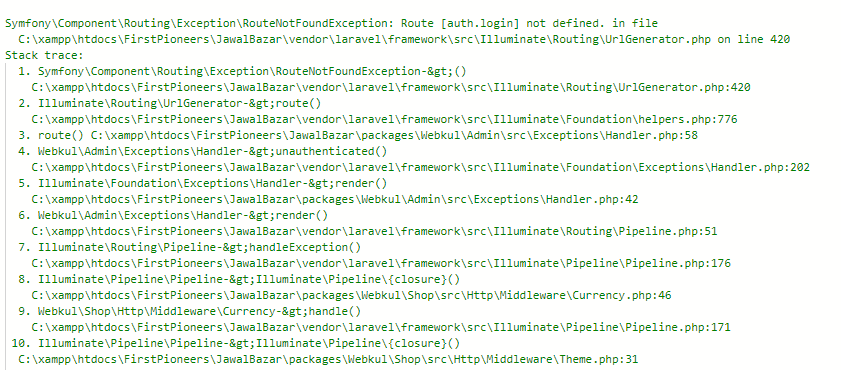
So I think that the problem I am facing is in using the auth token I tried putting it in the header under the Authorization key and making it start with the order Bearer in case it uses the auth like the passport way but I still got the same error.
I tried reading a lot about this problem and I always found this link https://forums.bagisto.com/topic/149/i-need-to-deliver-the-api-token-from-the-json-response-not-the-header/5, But I couldn't understand properly I mean the user here is using nuxt.js and I just need to use the Api in the android app.
Could you please help me, and tell me how to use the token?
Thank you in advance
 mhd-yasser-haddad
All 4 comments
Hi @mhd-yasser-haddad ,
First you need to do login from api/customer/login,
after that you got the authorised token in the response after that you are able to access those api from token.
 shivam-webkul
on 19 May 2020
shivam-webkul
on 19 May 2020
@shivam-webkul
Thank you for your response, but you didn't add anything to the things I just said
I mean as I stated I was able to get the token, but I was unable to use it in other APIs as I said earlier.
What I am trying to do is to use the token in other APIs without it being stored in the cookies (not like the web).
mhd-yasser-haddad
on 19 May 2020
please check your token is generated or not if not then you need to generate the token from the following cmd:
php artisan key:generate
php artisan jwt:secret
run after then token generated
php artisan cache:clear
php artisan config:clear
ref - https://github.com/tymondesigns/jwt-auth/issues/1729
i hope you issue will be resolved.
Thanks
shivam-webkul
on 3 Jun 2020
And just to add, There is the Accept header it have to be added to the request:
Accept: application/json
mhd-yasser-haddad
on 3 Jun 2020
Related issues
 AkashWeybee
·
3Comments
AkashWeybee
·
3Comments
 MostafaAttia
·
4Comments
MostafaAttia
·
4Comments
 alkhachatryan
·
7Comments
alkhachatryan
·
7Comments
 rajexact
·
3Comments
rajexact
·
3Comments
 accountmine
·
7Comments
accountmine
·
7Comments