Badger: question: space reclamation with entry TTL
What version of Go are you using (go version)?
$ go version
go version go1.12.4 linux/amd64
What version of Badger are you using?
v1.6.0
Does this issue reproduce with the latest master?
What are the hardware specifications of the machine (RAM, OS, Disk)?
Linux Mint 19.1, 8GB RAM, SSD
What did you do?
- Create several million entries with a TTL of ~30 minutes (most with a 48 byte key and 120 byte value)
- Let the system run for a while with a normal "GC every 5 min" loop
- Close the DB
(also tried flatten, and the badger cli)
What did you expect to see?
Most disk space reclaimed
What did you see instead?
168MB spread across vlog and sst files
-rw-r--r-- 1 jonathan jonathan 73102195 Aug  8 19:46 000004.vlog
-rw-r--r-- 1 jonathan jonathan 26679639 Aug  8 15:01 000010.sst
-rw-r--r-- 1 jonathan jonathan  1331967 Aug  8 15:03 000013.sst
-rw-r--r-- 1 jonathan jonathan 69905123 Aug  8 19:19 000015.sst
-rw-r--r-- 1 jonathan jonathan  4917732 Aug  8 19:19 000016.sst
-rw-r--r-- 1 jonathan jonathan        6 Aug  8 20:03 LOCK
-rw-r--r-- 1 jonathan jonathan      816 Aug  8 20:03 MANIFEST
If I count the keys, I get zero.
If I look for internal keys:
$ badger info --dir . --show-keys --show-internal | wc -l
badger 2019/08/08 20:10:01 INFO: All 4 tables opened in 424ms
badger 2019/08/08 20:10:01 INFO: Replaying file id: 4 at offset: 73102195
badger 2019/08/08 20:10:01 INFO: Replay took: 13.211µs
163975
Where all are prefixed with !badger!move.
I noticed in the code that valueLog.deleteMoveKeysFor is not called if there is only one vlog file. Not sure if that is relevant.
Thanks for any help!
 kung-foo
All 15 comments
@kung-foo Can you show the meta value of the move keys? The info tool shows the meta for each key.
I see only one value log file. The value log GC wouldn't do anything if you have only one value log file. GC needs at least 2 files to work.
See https://github.com/dgraph-io/badger/blob/31395c2c16b393536f9e1d7a83fa9f58525d646a/value.go#L1138-L1141
 jarifibrahim
on 17 Aug 2019
jarifibrahim
on 17 Aug 2019
example key: Key: 21626164676572216d6f766570642f416c6c546167732f32303139303831362f37312f302f30303030303030303030303562623435 version: 4028 size: 118 meta: b0000
kung-foo
on 19 Aug 2019
@kung-foo The badger info tool doesn't show all keys (which include deleted or expired) by default. Can you check once again if badger has any keys by badger info --history --show-keys
jarifibrahim
on 19 Aug 2019
badger info --history --show-keys --dir . | wc -l
badger 2019/08/19 12:39:39 INFO: All 4 tables opened in 474ms
badger 2019/08/19 12:39:39 INFO: Replaying file id: 7 at offset: 52598753
badger 2019/08/19 12:39:39 INFO: Replay took: 22.85µs
badger 2019/08/19 12:39:39 DEBUG: Value Log Discard stats: map[0:38452014]
badger 2019/08/19 12:39:51 ERROR: writeRequests: Unable to write to value log file: "./000007.vlog": write ./000007.vlog: bad file descriptor
4130249
Example key: Key: 70642f416c6c546167732f32303139303831362f37312f302f30303030303030303030303662663465 version: 4740 size: 105 meta: b0000 {deleted}
note, the cli output above is from a _different_ db than in the original post. but the behavior is still the same.
kung-foo
on 19 Aug 2019
Hey @kung-foo, the results you're seeing are as expected.
You have deleted entries in your DB which will be removed on compactions.
You have move keys in your DB which will be marked for deletion when the log file they're in (I guess its 0004.vlog) is garbage collected and the move keys will actually be removed from badger when they're compacted.
jarifibrahim
on 19 Aug 2019
When should compaction occur? I GC every 5 minutes, and have tried closing and flattening multiple times.
kung-foo
on 19 Aug 2019
The compactions are triggered with a random delay and each compactor picks up a level to compact based on a priority
https://github.com/dgraph-io/badger/blob/7a7dd17559ae0262a8ce9ec0bc1ce91d6f7ec942/levels.go#L389-L392
GC would clean up the value log only if you have more than one vlog file and it finds some data to GC
https://github.com/dgraph-io/badger/blob/7a7dd17559ae0262a8ce9ec0bc1ce91d6f7ec942/value.go#L1236-L1264
Flattening should remove the entries marked for deletion but it won't remove the move keys entries. The move key entries are not marked for deletion until the value log file they're pointing to is deleted.
Closing the DB compacts only level 0 (unless you've changed the default options)
jarifibrahim
on 19 Aug 2019
I've made a test harness that partially replicates the behavior I see in our real code.
https://gist.github.com/kung-foo/66317e4b274ec456a92270e32d692ff7
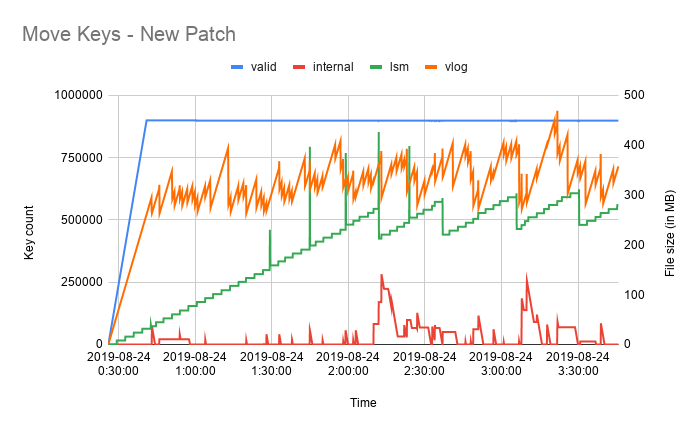
Summary: write 1000 keys per second with a 256 byte value. GC every minute. Set an absolute TTL of 5 minutes on every key (each block of 1000 keys expires at the exact same time).
Measurements:
valid = number of _my_ keys I see
internal = number of !badger! keys
lsm = size of all sst files
vlog = size of all vlog files
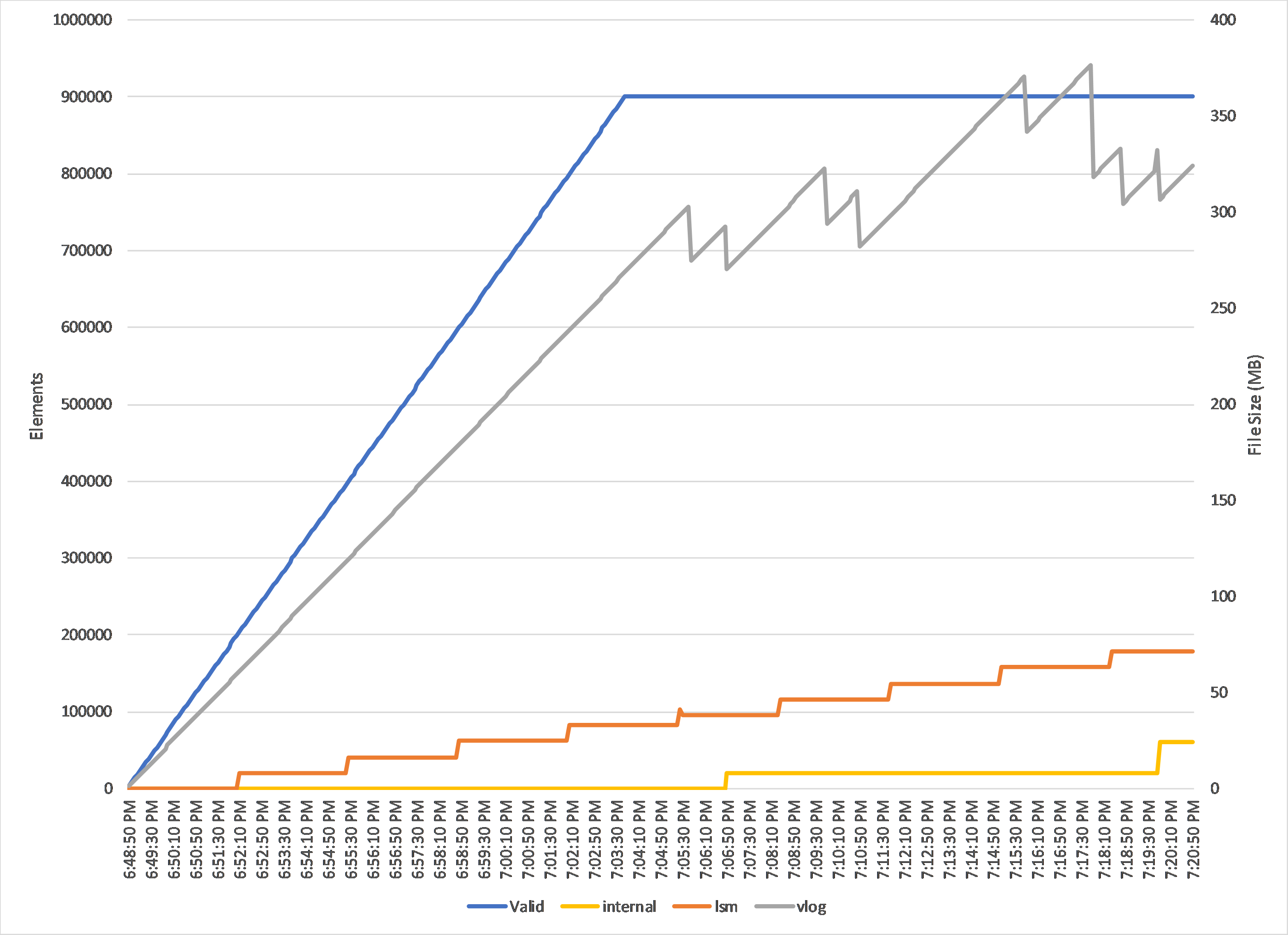
So I see a couple of things:
1) The vlog is definitely is being GC'd. But I am not convinced it is staying stable. Would need to run for several hours.
2) The SSTs seem to grow without bound
3) When I stopped the test, there were 60k movekey keys. There seem to be "jumps" in orphaned (?) movekeys.
4) flattening the db has no effect
5) closing and re-opening had little effect
kung-foo
on 19 Aug 2019
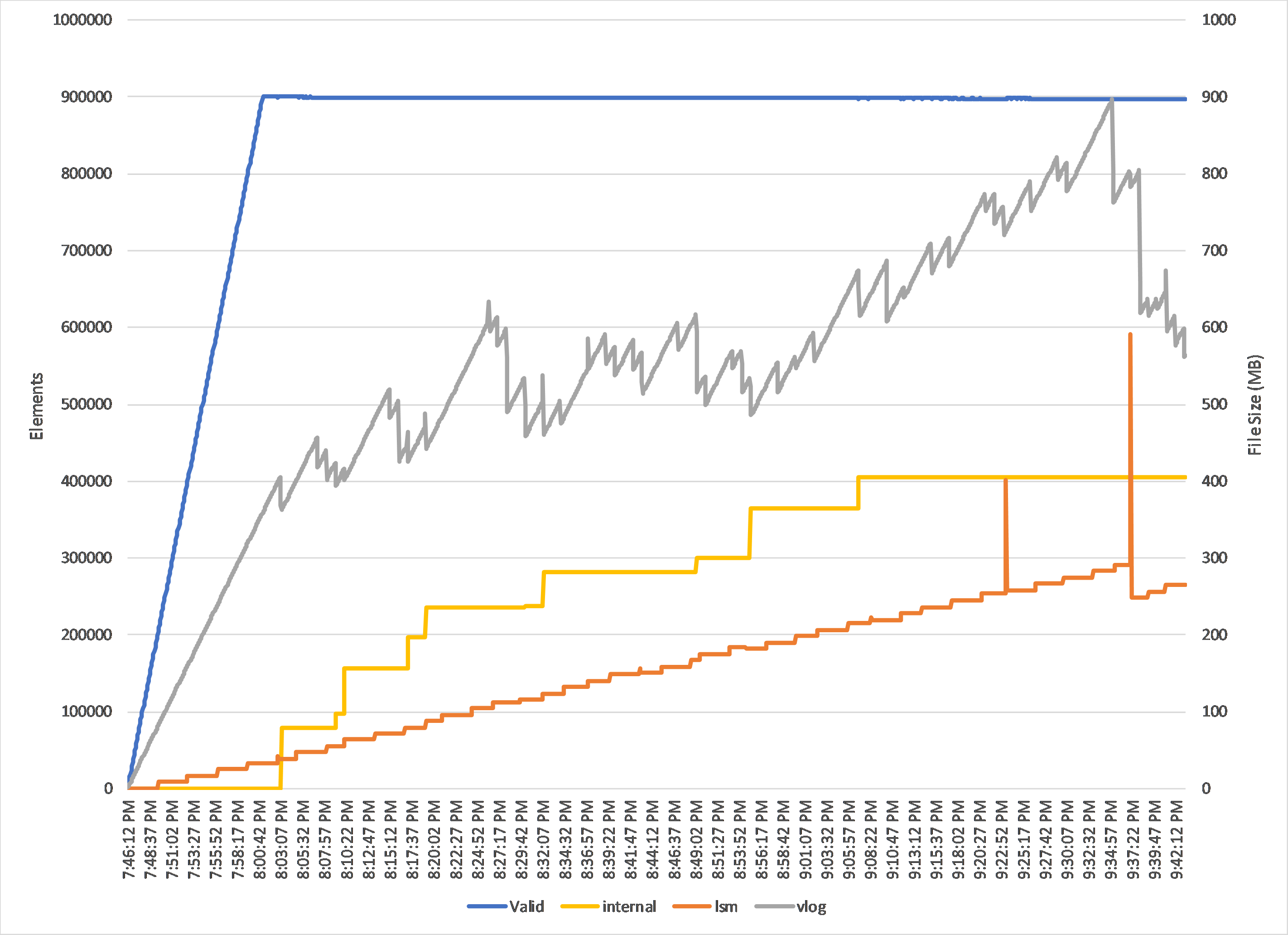
Letting it run for two hours (and with key size bump up to ~100 bytes):
kung-foo
on 19 Aug 2019
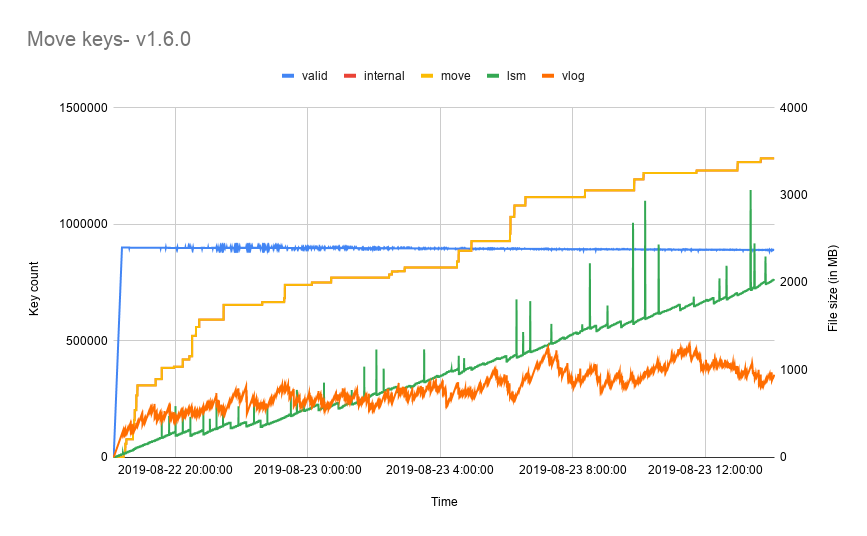
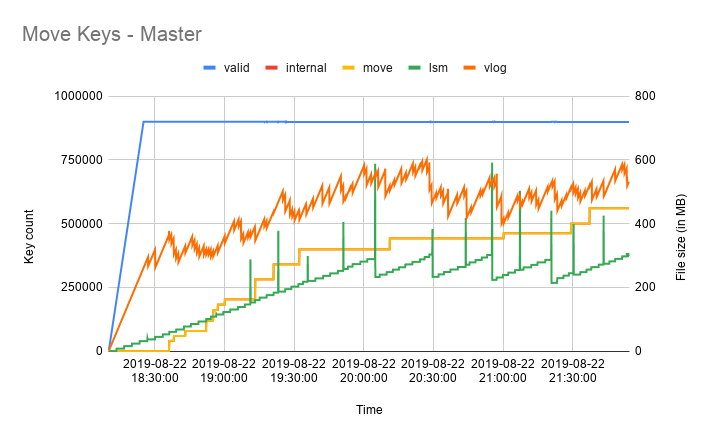
@kung-foo I ran your script for about 18 hours and I see that the move keys are not being removed. I'll try to figure out why that's happening. I see the same behaviour on v1.6.0 and master
jarifibrahim
on 23 Aug 2019
Is the vlog+lsm file size really that different between 1.6.0 and master? Or is that more due to the move key leak?
kung-foo
on 23 Aug 2019
We have made some changes to the latest version of badger which should reduce the DB size.
Or is that more due to the move key leak?
Move keys leak would also add to the size of LSM since they're just like any other key in badger.
jarifibrahim
on 23 Aug 2019
@kung-foo I've raised https://github.com/dgraph-io/badger/pull/1006 to fix this. With the PR, I see move keys being removed.
jarifibrahim
on 24 Aug 2019
Hi @jarifibrahim, two questions:
1) Will this be cherry picked in 1.6?
2) Is there a recommended way of cleaning up the broken keys in a production system?
kung-foo
on 3 Sep 2019
@kung-foo Apologies for the late reply. Github doesn't send me notifications for closed issues.
This change will be added to v1.6.1 (we'll be releasing next week).
Is there a recommended way of cleaning up the broken keys in a production system?
I can't think of a way right now. Those keys are move keys which means they're internal to badger and you cannot access them. Even if you were to figure out which are those keys, you'd have to reinsert the keys into the DB marking them as deleted. This would mean you are inserting one key to drop another one, so you're not really reclaiming any space.
jarifibrahim
on 18 Mar 2020
Related issues
 Stebalien
·
5Comments
Stebalien
·
5Comments
 jackmiller334
·
7Comments
jackmiller334
·
7Comments
 dc0d
·
3Comments
dc0d
·
3Comments
 ty2
·
7Comments
ty2
·
7Comments
 whyrusleeping
·
8Comments
whyrusleeping
·
8Comments
Most helpful comment
@kung-foo I ran your script for about 18 hours and I see that the move keys are not being removed. I'll try to figure out why that's happening. I see the same behaviour on v1.6.0 and master

