Badger: [Windows] potential directory sync API misuse
On Windows, I have an SMB share mounted as Z:.
Using it as the target directory results in an error
func main() {
    opts := badger.DefaultOptions
    path := `Z:\db`

    opts.Dir = path
    opts.ValueDir = path
    db, err := badger.Open(opts)
    if err != nil {
        log.Fatal(err)
    }
    db.Close()
}
badger 2019/01/28 23:02:09 INFO: All 0 tables opened in 0s
badger 2019/01/28 23:02:09 INFO: Replaying file id: 0 at offset: 0
badger 2019/01/28 23:02:09 INFO: Replay took: 0s
badger 2019/01/28 23:02:09 WARNING: While forcing compaction on level 0: Unable to fill tables
badger 2019/01/28 23:02:09 INFO: All 0 tables opened in 0s
2019/01/28 23:02:09 While syncing directory: Z:\bd.: sync Z:\bd: Incorrect function.
exit status 1
The source of the error seems to be returned from the FlushFileBuffers syscall here:
https://github.com/golang/go/blob/66065c3115861c73b8804037a6d9d5986ffa9913/src/syscall/zsyscall_windows.go#L970
which is called as a result of bader.syncDir -> os.File.Fsync
While investigating this, I found it strange that this call does not return an error for local drives, but does for network drives.
MSDN states that the handle passed in should either be a handle to a file, or to a volume, but says nothing about directories.
https://docs.microsoft.com/en-us/windows/desktop/api/FileAPI/nf-fileapi-flushfilebuffers
And FlushFileBuffers is not listed as a function that accepts directory handles
https://docs.microsoft.com/en-us/windows/desktop/fileio/obtaining-a-handle-to-a-directory
I could be wrong but I believe this is an invalid/ineffectual argument to pass to this function on this platform. Or at the very least, not API defined, and thus not guaranteed to succeed.
So even for local disks where this currently returns without an error, files should probably be synced individually by their opened handles anyway.
And while this function accepts volumes, I don't think triggering a full disk sync is likely desirable.
In the SMB case you can't retrieve a handle to the volume through the same methods either, but syncing individual files appears to be valid. (it should trigger an SMB FLUSH request which should force the transmit buffer to flush at least to the network).
For some additional context, (while not safe) commenting out err = f.Sync() under syncDir() allowed me to run an instance of go-ipfs using badger as the datastore (hosted on the SMB share) without any obvious issues. Although testing was not extensive.
To avoid the possibility that this was a Go related issue, I probed around on my systems using a small C program. I listed the various results for the given arguments in the comments.
Test environment was W10 connecting to a remote share on a Solaris system, a remote share on a W10 system, and W10 connecting to a share it itself is hosting (local loop with full access).
All had the same output.
#include <stdio.h>
#include <stdlib.h>
#include <windows.h>

int main(void) {
    // (if exists) Does not fail but behaviour for this is not defined
    //LPCWSTR target = L"C:\\Users\\Dominic Della Valle\\AppData\\Local\\Temp";

    // (if exists) Flush fails with appropriate error value ERROR_INVALID_FUNCTION
    //LPCWSTR target = L"Z:\\smb-test";

    // Succeeds; triggers full disk/volume sync
    //LPCWSTR target = L"C:";

    // CreateFile fails with ERROR_ACCESS_DENIED; Returned even with full domain access on local domain
    // (Windows usually returns ERROR_ACCESS_DENIED as a generic failure)
    //LPCWSTR target = L"Z:";
    // Flush would likely succeed if you could retrieve a handle to the network volume (is this possible?)

    // (if exists) Succeeds on file target
    LPCWSTR target = L"Z:\\smb-test\\file";

    HANDLE remoteFile = CreateFileW(target, GENERIC_READ|GENERIC_WRITE, FILE_SHARE_READ|FILE_SHARE_WRITE, NULL, OPEN_EXISTING, FILE_FLAG_BACKUP_SEMANTICS, NULL);
    if (remoteFile == INVALID_HANDLE_VALUE) {
        printf("Invalid handle: %lu", GetLastError());
        return EXIT_FAILURE;
    }

    if (!FlushFileBuffers(remoteFile)) {
        printf("Flush failed: %lu", GetLastError());
        return EXIT_FAILURE;
    }

    if (!CloseHandle(remoteFile)) {
        printf("Close failed: %lu", GetLastError());
        return EXIT_FAILURE;
    }
    return EXIT_SUCCESS;
}
 djdv
djdv
All 7 comments
Thanks for the report and sorry for the delay, @djdv
Is this issue still occurring on master? What version are you using?
 campoy
on 29 May 2019
campoy
on 29 May 2019
I spent some time today looking into this failure but couldn't find anything relevant. The issue is with how windows deals with sync on volumes.
To flush all open files on a volume, call FlushFileBuffers with a handle to the volume. The caller must have administrative privileges. For more information, see Running with Special Privileges.
From https://docs.microsoft.com/en-us/windows/desktop/api/fileapi/nf-fileapi-flushfilebuffers#remarks
This means we might have to flush all the files individually. It might also require administrator privileges which might not be feasible every time.
 jarifibrahim
on 18 Jun 2019
jarifibrahim
on 18 Jun 2019
Spent some more time digging into the failure and it's easily reproducible using the following script
func main() {
    dir := "Z:\\smb-test" // Path to network mapped drive
    f, err := openDir(dir)
    if err != nil {
        log.Fatal(err)
    }
    // Works fine if the path is located on a local disk but
    // fails if the directory is on a network mapped drive
    if err := f.Sync(); err != nil {
        log.Fatal(err)
    }
    if err := f.Close(); err != nil {
        log.Fatal(err)
    }
}

func openDir(path string) (*os.File, error) {
    fd, err := openDirWin(path)
    if err != nil {
        return nil, err
    }
    return os.NewFile(uintptr(fd), path), nil
}

func openDirWin(path string) (fd syscall.Handle, err error) {
    pathp, err := syscall.UTF16PtrFromString(path)
    if err != nil {
        return syscall.InvalidHandle, err
    }
    access := uint32(syscall.GENERIC_READ | syscall.GENERIC_WRITE)
    sharemode := uint32(syscall.FILE_SHARE_READ | syscall.FILE_SHARE_WRITE)
    createmode := uint32(syscall.OPEN_EXISTING)
    fl := uint32(syscall.FILE_FLAG_BACKUP_SEMANTICS)
    return syscall.CreateFile(pathp, access, sharemode, nil, createmode, fl, 0)
}
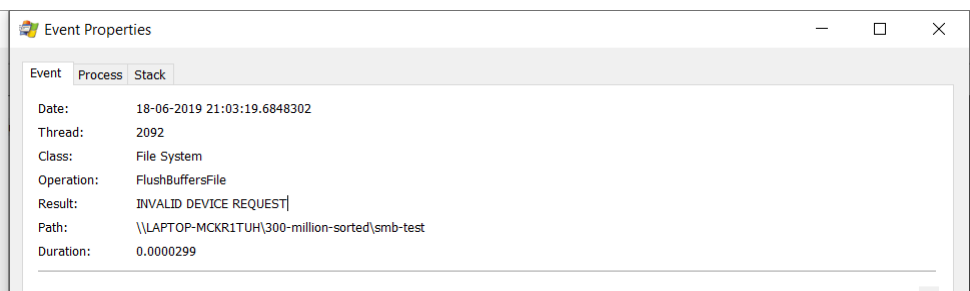
f.Sync() internally uses FlushFileBuffers system call which seems to fail with INVALID DEVICE REQUEST but works perfectly fine for a directory on the local disk.
jarifibrahim
on 18 Jun 2019
This is now the last "actual" issue in the v2.0.0 milestone 🎉
Let me know if you need someone with Windows expertise to look into this, happy to see who can help.
campoy
on 18 Jun 2019
@campoy It would be great if someone with windows expertise can have a look at this issue.
According to https://docs.microsoft.com/en-us/windows/desktop/fileio/directory-management-functions there isn't a way to synchronize a directory. I'd suggest we add a no-op SyncDir method for windows.
I also raised https://social.msdn.microsoft.com/Forums/Windowsdesktop/en-US/847a735b-f21a-4be2-880b-12660e5b98b4/flushfilebuffers-system-call-fails-on-network-mapped-drive?forum=windowsgeneraldevelopmentissues to figure out the way to do but it looks like we cannot call FlushFileBuffers on directories across the network.
jarifibrahim
on 19 Jun 2019
It seems like this will be harder to fix than initially expected and is definitely not a release blocker.
Dropping it from v2.0.0 and moving it into v2.1.0 just in case we can get it fixed by then.
Thanks for all the investigation work, @jarifibrahim!
campoy
on 19 Jun 2019
From Syncing Network Mapped Directory MSDN ticket and Syncing Local Directories MSDN ticket I understand that there's no way to sync directories on windows.
Anyway, instead of FlushFileBuffers, the recommended action is to open any files with the FILE_FLAG_NO_BUFFERING and the FILE_FLAG_WRITETHROUGH options. The no buffering option has some requirements though. These options are recommended over constantly calling FlushFileBuffers because of performance reasons. FlushFileBuffers is a really heavy operation and results in poor performance.
From the same tickets, I found out that instead of flushing files on windows we should open them using FILE_FLAG_NO_BUFFERING and FILE_FLAG_WRITETHROUGH (see docs) which would ensure we sync files to the disk and it also performs better than FlushFileBuffers system call.
jarifibrahim
on 20 Jun 2019
Related issues
 Stebalien
·
5Comments
Stebalien
·
5Comments
 zaibon
·
5Comments
zaibon
·
5Comments
 godeater
·
3Comments
godeater
·
3Comments
 rebootcode
·
7Comments
rebootcode
·
7Comments
 tonyalaribe
·
8Comments
tonyalaribe
·
8Comments