Badger: Improve GC strategy to reclaim multiple logs
Hello,
let's take the following scenario:
- open a database
- insert 1M key/values in badgers, with distinct keys
- delete all the key values
- run PurgeOlderVersions()
- run RunValueLogGC(0.5)
- close the database
Then the db directory has still a large size. It looks like disk space was not reclaimed.
Am i doing something wrong ?
Moreover, when i iterate over the now empty database, iteration time is still quite long, but no result is returned of course.
Thanks,
Stephane
 stephane-martin
All 22 comments
RunValueLogGC will reclaim disk space from at most one value log. With 1M key values, there may be many different value log files (depending on the size of the values). To reclaim all of the space, you have to call RunValueLogGC multiple times.
 peterstace
on 12 Dec 2017
peterstace
on 12 Dec 2017
@stephane-martin :
DB.PurgeOlderVersions()will mark the entries as deleted, in the LSM tree, but will not actually delete the entries in value log.- Like @peterstace mentioned
RunValueLogGC(), as it is currently designed picks a single value log file and runs the GC on it. It keeps track of statistics from previous runs ofRunValueLogGC()to pick something that will yield the best possible reclamation. So runningRunValueLogGC()multiple times should help do better cleanup. We are working on adding some features to make this more deterministic.
Regarding iterate, what are the settings you are using for iterate?
 deepakjois
on 13 Dec 2017
deepakjois
on 13 Dec 2017
Let's add a change by which we can reclaim multiple log file in a single GC, now that we have the information to do so.
 manishrjain
on 13 Dec 2017
manishrjain
on 13 Dec 2017
@stephane-martin if you still have your code to populate the DB, could you try with the changes in #357 and see if you get better results?
If the code is in a form you can share with us, we can run it ourselves and take a look
deepakjois
on 13 Dec 2017
I committed changes in #357 in 362eb5f8bbff71b23d2eb92ebaff9b2ab0c41b14
Closing this for now. Please re-open if you encounter issues.
deepakjois
on 13 Dec 2017
Hi,
I still experience the same problem. I tried to add 1M key/value pairs into the badger instance and then delete all of them in the same function. Data directory was still too large after running GC but the badger instance had no key/value pairs at that time.
I ran the same code many times and data directory grows constantly. I share my code. I wonder that what I'm doing wrong?
Thanks.
 buraksezer
on 17 Dec 2017
buraksezer
on 17 Dec 2017
Are you calling Purge function?
Sent from Nexus 6P
On Dec 17, 2017 4:34 PM, "Burak Sezer" notifications@github.com wrote:
Hi,
I still experience the same problem. I tried to add 1M key/value pairs
into the badger instance and then delete all of them in the same function.
Data directory was still too large after running GC but the badger instance
had no key/value pairs at that time.I ran the same code many times and data directory grows constantly. I
share my code
https://gist.github.com/buraksezer/b5ae4ff1a68c7343d56df4c3fe919040.
What I'm doing wrong?Thanks.
—
You are receiving this because you commented.
Reply to this email directly, view it on GitHub
https://github.com/dgraph-io/badger/issues/354#issuecomment-352247726,
or mute the thread
https://github.com/notifications/unsubscribe-auth/ABsyNAfa8bE__HJAKb55QzEo9Jd5p26Gks5tBPU_gaJpZM4Q-_Na
.
manishrjain
on 17 Dec 2017
Yes, I call the following sequence at the end:
db.PurgeOlderVersions()
err = db.RunValueLogGC(0.5)
if err != nil {
        fmt.Println("GC returned error:", err)
}
This is my test code: https://gist.github.com/buraksezer/b5ae4ff1a68c7343d56df4c3fe919040
Thanks.
buraksezer
on 17 Dec 2017
@buraksezer: In your case the amount of data you are writing is less than 1gb,(default value log file size), there won't be any GC unless you have more than one value log file.
 janardhan1993
on 18 Dec 2017
janardhan1993
on 18 Dec 2017
@janardhan1993 It seems undocumented. I set 20MB to ValueLogFileSize without changing rest of the code and the data directory still grows constantly even though some of the .vlog files are removed by GC function. All of the *.vlog files are around 20MB.
Total size of the data directory is 1.2GB without any key/value pair. I tried to iterate over the keys with using a new transaction after deleting all the keys and committing, it found nothing in the store, of course.
buraksezer
on 18 Dec 2017
@buraksezer: We will document the gc behaviour.
Deleting a key and committing doesn't make older versions of the key eligible for gc collection. You need to call purgeolderversions.
If you still face any issues after that, please share your code.
janardhan1993
on 19 Dec 2017
@janardhan1993 please note that buraksezer's gist does include a call to PurgeOlderVersions(): https://gist.github.com/buraksezer/b5ae4ff1a68c7343d56df4c3fe919040#file-badger-test-go-L70
stephane-martin
on 19 Dec 2017
@buraksezer @stephane-martin , can you please try using master now.
janardhan1993
on 19 Dec 2017
Hi,
I ran my test code with the most up-to-date code. It looks better but the data-dir still grows constantly without any valuable data. The code is the same with _opts.ValueLogFileSize = 20971520_
I think the problem is *.sst files this time. Is there any configuration option to handle them before growing?
Thanks.
burak@turing:~$ time go run badger.go

real    0m52.625s
user    0m34.205s
sys 0m1.029s
burak@turing:~$ ls badger-data/ -lah
total 122M
drwx------   2 burak burak 4.0K Dec 19 13:50 .
drwxr-xr-x 101 burak burak  12K Dec 19 13:49 ..
-rw-r--r--   1 burak burak  39M Dec 19 13:49 000001.sst
-rw-r--r--   1 burak burak  32M Dec 19 13:49 000002.sst
-rw-r--r--   1 burak burak  17M Dec 19 13:50 000003.sst
-rw-r--r--   1 burak burak  21M Dec 19 13:49 000005.vlog
-rw-r--r--   1 burak burak  16M Dec 19 13:50 000006.vlog
-rw-r--r--   1 burak burak   52 Dec 19 13:50 MANIFEST
burak@turing:~$ time go run badger.go

real    1m8.700s
user    0m41.358s
sys 0m1.519s
burak@turing:~$ ls badger-data/ -lah
total 151M
drwx------   2 burak burak 4.0K Dec 19 13:52 .
drwxr-xr-x 101 burak burak  12K Dec 19 13:49 ..
-rw-r--r--   1 burak burak  70M Dec 19 13:51 000006.sst
-rw-r--r--   1 burak burak  35M Dec 19 13:51 000007.sst
-rw-r--r--   1 burak burak  17M Dec 19 13:52 000008.sst
-rw-r--r--   1 burak burak  21M Dec 19 13:51 000012.vlog
-rw-r--r--   1 burak burak  11M Dec 19 13:52 000013.vlog
-rw-r--r--   1 burak burak  138 Dec 19 13:52 MANIFEST
burak@turing:~$ time go run badger.go

real    1m27.756s
user    1m1.106s
sys 0m1.614s
burak@turing:~$ ls badger-data/ -lah
total 233M
drwx------   2 burak burak 4.0K Dec 19 13:53 .
drwxr-xr-x 101 burak burak  12K Dec 19 13:49 ..
-rw-r--r--   1 burak burak  70M Dec 19 13:51 000006.sst
-rw-r--r--   1 burak burak  35M Dec 19 13:51 000007.sst
-rw-r--r--   1 burak burak  17M Dec 19 13:52 000008.sst
-rw-r--r--   1 burak burak  39M Dec 19 13:52 000009.sst
-rw-r--r--   1 burak burak  32M Dec 19 13:52 000010.sst
-rw-r--r--   1 burak burak  17M Dec 19 13:53 000011.sst
-rw-r--r--   1 burak burak  21M Dec 19 13:52 000019.vlog
-rw-r--r--   1 burak burak 6.3M Dec 19 13:53 000020.vlog
-rw-r--r--   1 burak burak  174 Dec 19 13:53 MANIFEST
@buraksezer: As i said one vlog would always be there, i will check why the other vlog is still there.
The tombstones are not removed from sst and hence the size keeps on increasing.
@deepakjois might know whether we have a tool/function to remove it from sst.
janardhan1993
on 19 Dec 2017
We don’t have a tool yet, but #299 is tracking that. We are aiming to get that done soon.
deepakjois
on 19 Dec 2017
Honestly, I think the data size is so small, that Badger might not do much. Note that Badger is designed to deal with huge workloads, so it's actions with megabytes worth data can't be linearly extrapolated to what it would do with tens or hundreds of gigabytes, or terabytes.
manishrjain
on 19 Dec 2017
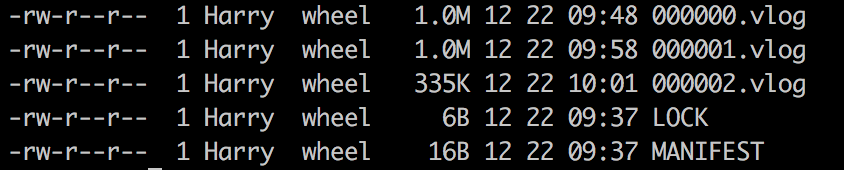
PurgeOlderVersions() and RunValueLogGC() does not seem to work...
I am using it on an embedded device, so I'm very concerned about the size of the vlog file...
 umbrellary
on 22 Dec 2017
umbrellary
on 22 Dec 2017
@umbrellary: This might be due to the check in code that a file in GC'ed if atleast 10mb(minimum threshold) can be discarded. Have you set the value log file size to 1m in options?
We will change the min threshold based on value log file size.
janardhan1993
on 22 Dec 2017
@janardhan1993 Yes, i have set the value log file size to 1m in options, as you said, the min threshold should based on the value log file size 😄
umbrellary
on 22 Dec 2017
i have problem with delete too, https://gist.github.com/spx/8a1f3cc290f9c50b4fbd57dcb6a437c9 before delete i have ~250mb of .vlog and after delete i got 350mb of .vlog. i trie variuos params ValueThreshold ValueLogFileSize. am i doing it wrong?
 blinkinglight
on 15 Jan 2018
blinkinglight
on 15 Jan 2018
@spx deleting a key doesn't make the value eligible for gc. Badger stores all versions of a key, so when you delete a key, it would be stored as another version. You need to call purgeOlderVersions and then call RunValueLogGC
janardhan1993
on 15 Jan 2018
Related issues
 jackmiller334
·
7Comments
jackmiller334
·
7Comments
 zaibon
·
5Comments
zaibon
·
5Comments
 dwoske
·
7Comments
dwoske
·
7Comments
 godeater
·
3Comments
godeater
·
3Comments
 ty2
·
7Comments
ty2
·
7Comments
Most helpful comment
Let's add a change by which we can reclaim multiple log file in a single GC, now that we have the information to do so.