Babel: Migrate to babel 7: Requires Babel "^7.0.0-0", but was loaded with "6.26.3"
Bug Report
Current Behavior
I've tried to move to Babel 7 on existing simple project.
When I've finished migration I've got the error:
  throw Object.assign(err, {
  ^
Error: Requires Babel "^7.0.0-0", but was loaded with "6.26.3". If you are sure you have a compatible version of @babel/core, it is likely that something in your build process is loading the wrong version. Inspect the stack trace of this error to look for the first entry that doesn't mention "@babel/core" or "babel-core" to see what is calling Babel.
Babel config for transformation the app is in /config/babelLoaderConfig.js
Here is link for the repository
Environment
- Babel version(s): v7.0.0-beta.51
- Node/npm version: Node 10.4./npm 6
- OS: Windows 7
- Monorepo yes
- How you are using Babel:
loader
 budarin
All 34 comments
Hey @budarin! We really appreciate you taking the time to report an issue. The collaborators
on this project attempt to help as many people as possible, but we're a limited number of volunteers,
so it's possible this won't be addressed swiftly.
If you need any help, or just have general Babel or JavaScript questions, we have a vibrant Slack
community that typically always has someone willing to help. You can sign-up here
for an invite.
 babel-bot
on 21 Jun 2018
babel-bot
on 21 Jun 2018
I think that you're loading a plugin that uses Babel 6 which is not compatible with Babel 7.
 xtuc
on 21 Jun 2018
xtuc
on 21 Jun 2018
@xtuc
What is the solution?
Move back?
budarin
on 21 Jun 2018
@budarin try installing [email protected] alongside @babel/core and then adding this to your package.json --
"resolutions": {
    "babel-core": "7.0.0-bridge.0"
}
 ajliv
on 21 Jun 2018
ajliv
on 21 Jun 2018
@ajliv
I've tried but with the same error :(
budarin
on 21 Jun 2018
As mentioned in the error itself, the stack trace is the important part here to diagnose the issue. Please include that.
 loganfsmyth
on 21 Jun 2018
loganfsmyth
on 21 Jun 2018
Here is full log:
d:\Projects\react-bootstrap-project\node_modules\babel-core\lib\transformation\file\options\option-manager.js:180
          throw new ReferenceError(messages.get("pluginUnknown", plugin, loc, i, dirname));
          ^

ReferenceError: Unknown plugin "@babel/plugin-syntax-dynamic-import" specified in "d:\\Projects\\react-bootstrap-project\\.babelrc" at 0, attempted to resolve relative to "d:\\Projects\\react-bootstrap-project"
    at d:\Projects\react-bootstrap-project\node_modules\babel-core\lib\transformation\file\options\option-manager.js:180:17
    at Array.map (<anonymous>)
    at Function.normalisePlugins (d:\Projects\react-bootstrap-project\node_modules\babel-core\lib\transformation\file\options\option-manager.js:158:20)
    at OptionManager.mergeOptions (d:\Projects\react-bootstrap-project\node_modules\babel-core\lib\transformation\file\options\option-manager.js:234:36)
    at OptionManager.init (d:\Projects\react-bootstrap-project\node_modules\babel-core\lib\transformation\file\options\option-manager.js:368:12)
    at compile (d:\Projects\react-bootstrap-project\node_modules\babel-register\lib\node.js:103:45)
    at loader (d:\Projects\react-bootstrap-project\node_modules\babel-register\lib\node.js:144:14)
    at Object.require.extensions.(anonymous function) [as .js] (d:\Projects\react-bootstrap-project\node_modules\babel-register\lib\node.js:154:7)
    at Module.load (internal/modules/cjs/loader.js:612:32)
    at tryModuleLoad (internal/modules/cjs/loader.js:551:12)
Repo is changed (I have undo babel7 modifications to Babel 6), but you cold do checkout the head to reproduce the error
git checkout 957fc9df5dc6807c22f59ea0f65a4247532f0e70
Yeah, so you have babel-register which is Babel 6. It would be @babel/register for Babel 7.
loganfsmyth
on 21 Jun 2018
@loganfsmyth
I have not babel-register in package.json!
    "devDependencies": {
        "@babel/cli": "^7.0.0-beta.51",
        "@babel/core": "^7.0.0-beta.51",
        "@babel/plugin-proposal-class-properties": "^7.0.0-beta.51",
        "@babel/plugin-proposal-object-rest-spread": "^7.0.0-beta.51",
        "@babel/plugin-syntax-dynamic-import": "^7.0.0-beta.51",
        "@babel/plugin-transform-react-constant-elements": "^7.0.0-beta.51",
        "@babel/plugin-transform-react-inline-elements": "^7.0.0-beta.51",
        "@babel/plugin-transform-react-jsx-self": "^7.0.0-beta.51",
        "@babel/plugin-transform-react-jsx-source": "^7.0.0-beta.51",
        "@babel/preset-env": "^7.0.0-beta.51",
        "@babel/preset-react": "^7.0.0-beta.51",
        "babel-core": "^7.0.0-bridge.0",
        "babel-jest": "^23.0.1",
        "babel-loader": "^7.1.4",
        "babel-minify-webpack-plugin": "^0.3.1",
        "babel-plugin-external-helpers": "^6.22.0",
        "babel-plugin-lodash": "^3.3.4",
        "copy-webpack-plugin": "^4.5.1",
        "css-loader": "^0.28.11",
        "enzyme": "^3.3.0",
@budarin you have babel-core twice with different values. Try deleting the line:
"babel-core": "^6.26.3",
 jsg2021
on 21 Jun 2018
jsg2021
on 21 Jun 2018
@budarin Since you're using a webpack.config.babel.js file, Webpack loads babel-register/@babel/register automatically, but since you don't have it in you deps you're basically accidentally relying on npm to flatten your dependencies and you're getting one by chance.
loganfsmyth
on 21 Jun 2018
@jsg2021
I have no "babel-core": "^6.26.3", - it's error while copy from commit log - not remove removed line
budarin
on 21 Jun 2018
@loganfsmyth
Should I manually install @babel/register to resolve the problem?
budarin
on 21 Jun 2018
Yep!
loganfsmyth
on 21 Jun 2018
@loganfsmyth
It's little bit better :)
But it does not support syntax in webpack.config.babel.js:
> Executing task: npm run start <


> [email protected] start d:\Projects\react-bootstrap-project
> webpack-dev-server --mode development --config ./config/webpack.config.babel.js

@babel/preset-env: `DEBUG` option

Using targets:
{
  "node": "10.4.1"
}

Using modules transform: false

Using plugins:
  proposal-async-generator-functions { "node":"10.4.1" }
  syntax-object-rest-spread { "node":"10.4.1" }
  proposal-unicode-property-regex { "node":"10.4.1" }

Using polyfills: No polyfills were added, since the `useBuiltIns` option was not set.
d:\Projects\react-bootstrap-project\config\webpack.config.babel.js:1
(function (exports, require, module, __filename, __dirname) { import fs from 'fs';
                                                                     ^^

SyntaxError: Unexpected identifier
    at new Script (vm.js:74:7)
    at createScript (vm.js:246:10)
    at Object.runInThisContext (vm.js:298:10)
    at Module._compile (internal/modules/cjs/loader.js:670:28)
    at Module._compile (d:\Projects\react-bootstrap-project\node_modules\pirates\lib\index.js:91:24)
    at Module._extensions..js (internal/modules/cjs/loader.js:713:10)
    at Object.newLoader [as .js] (d:\Projects\react-bootstrap-project\node_modules\pirates\lib\index.js:96:7)
    at Module.load (internal/modules/cjs/loader.js:612:32)
    at tryModuleLoad (internal/modules/cjs/loader.js:551:12)
    at Function.Module._load (internal/modules/cjs/loader.js:543:3)
Above error was due to env's config for node - I've removed lines:
                 "modules": false,
                "useBuiltIns": false
and webpack.config.babel.js is compiled
Thanks a lot!
budarin
on 21 Jun 2018
please help me to resolve compatibilty issue.
"dependencies": {
"@babel/core": "^7.0.0-beta.55",
"@babel/preset-env": "^7.0.0-beta.55",
"@babel/preset-react": "^7.0.0-beta.55",
"native-base": "^2.6.1",
"react": "^16.4.1",
"react-native": "^0.55.4",
"react-native-code-push": "^5.4.1",
"react-native-vector-icons": "^4.6.0",
},
"devDependencies": {
"babel-eslint": "^6.1.2",
"babel-jest": "^23.4.2",
"babel-preset-react-native": "^4.0.0",
"chai": "^3.5.0",
"eslint": "^3.5.0",
"eslint-config-airbnb": "^11.1.0",
"eslint-plugin-import": "^1.14.0",
"eslint-plugin-jsx-a11y": "^2.2.1",
"eslint-plugin-react": "^6.2.0",
"eslint-plugin-react-native": "^2.0.0",
"jest": "17.0.0",
"jest-react-native": "17.0.0",
"mocha": "^2.5.3",
},
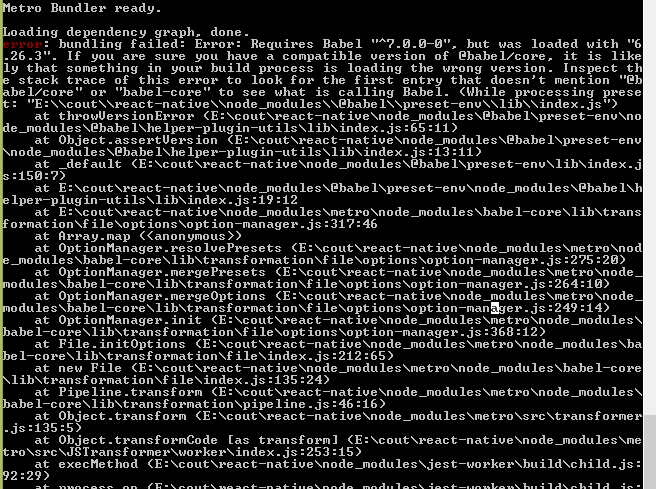
 gogulanareshkw
on 1 Aug 2018
gogulanareshkw
on 1 Aug 2018
npm install babel-loader babel-core@^7.0.0-bridge @babel/core --save-dev
Worked like a charm
 rohan0793
on 9 Sep 2018
rohan0793
on 9 Sep 2018
like @rohan0793 this fixed my issues without killing my builds elsewhere.
 vincro
on 21 Sep 2018
vincro
on 21 Sep 2018
for packages required babel 6 just install babel-core@^7.0.0-bridge
budarin
on 21 Sep 2018
None of this appears to be working for me. The state of my dependencies:
"dependencies": {
    "@babel/plugin-transform-react-jsx-source": "^7.0.0",
    "@expo/vector-icons": "^6.3.1",
    "@shoutem/ui": "^0.23.4",
    "email-validator": "^1.1.1",
    "expo": "^31.0.0",
    "firebase": "^4.9.1",
    "lodash": "^4.17.10",
    "moment": "^2.22.2",
    "prop-types": "^15.6.2",
    "qs": "^6.5.1",
    "react": "16.6.3",
    "react-native": "^0.55.2",
    "react-native-dropdownalert": "^3.4.0",
    "react-native-elements": "^0.19.1",
    "react-native-extended-stylesheet": "^0.8.1",
    "react-native-fit-image": "^1.5.4",
    "react-native-fs": "^2.10.14",
    "react-native-gifted-chat": "^0.4.3",
    "react-native-iphone-x-helper": "^1.0.2",
    "react-native-keyboard-aware-scroll-view": "^0.7.0",
    "react-native-local-storage": "^1.5.2",
    "react-native-material-dropdown": "^0.11.1",
    "react-native-modal": "^6.1.0",
    "react-native-qrcode": "^0.2.6",
    "react-native-router-flux": "^4.0.6",
    "react-native-snap-carousel": "^3.7.5",
  },
  "devDependencies": {
    "@babel/cli": "^7.0.0",
    "@babel/core": "^7.1.6",
    "@babel/plugin-proposal-decorators": "^7.1.6",
    "babel-core": "^7.0.0-bridge.0",
    "babel-eslint": "^9.0.0",
    "babel-loader": "^8.0.4",
    "babel-preset-react-app": "^6.1.0",
    "eslint": "^4.19.1",
    "eslint-config-airbnb": "^16.1.0",
    "eslint-config-react-app": "^2.1.0",
    "eslint-plugin-flowtype": "2.39.1",
    "eslint-plugin-import": "^2.12.0",
    "eslint-plugin-jsx-a11y": "^5.1.1",
    "eslint-plugin-react": "^7.9.1",
    "react-test-renderer": "16.6.0-alpha.8af6728"
  },
 nickjuntilla
on 26 Nov 2018
nickjuntilla
on 26 Nov 2018
I solved this by starting a new project and copying over the dependencies. Notably "babel-preset-expo": "^5.0.0", was not in my old project dependencies.
nickjuntilla
on 27 Nov 2018
For me, adding
"resolutions": {
        "babel-core": "^7.0.0-bridge"
    }
solved this issue.
 jkalina
on 6 Dec 2018
jkalina
on 6 Dec 2018
I have same issues like that and I already follow some methods on this conversions, but still get error like the first issues Budarin said
 harmnot
on 22 Feb 2019
harmnot
on 22 Feb 2019
Same issue here!
 seyaobey
on 1 Mar 2019
seyaobey
on 1 Mar 2019
Just add "babel-core": "^7.0.0-bridge.0", to your dependencies in packaje.json!
budarin
on 1 Mar 2019
it solved by adding this .babelrc
{
  "presets": [
    "@babel/preset-env"
  ]
}
and then on package json ,
"start": "nodemon --exec babel-node index.js",
and don't forget to add new babel
harmnot
on 4 Mar 2019
Same issue here:
my babel.rc
{
  "presets": [
    "node8",
    "@babel/preset-env"
  ],
  "plugins": [
    [
    "@babel/plugin-transform-react-jsx",
    ]
  ],
  "ignore": [
    "**/dist",
    "**/build1",
    "**/node_modules"
  ]
}
my package.json
{
  "name": "rexpack",
  "version": "1.0.0",
  "description": "Expack is the bare-bones Express and Webpack boilerplate with ES6+ babel transpilation, ESLint linting, Hot Module Reloading, and Jest test framework enabled.",
  "main": "index.js",
  "devtool": "eval-source-map",
  "scripts": {
    "test": "jest",
    "coverage": "jest --coverage",
    "build": "babel . --out-dir dist --source-maps --ignore **/node_modules",
    "postbuild": "deploy.bat",
    "buildDev": "del /S /Q .\\dist\\server.js & webpack --mode development --config webpack.server.config.js",
    "buildDevLnx": "rm -rf ./dist/server.js & webpack --mode development --config webpack.server.config.js",
    "buildProd": "del /S /Q dist && webpack --mode production --config webpack.server.config.js",
    "buildProdLnx": "rm -rf dist && webpack --mode production --config webpack.server.config.js",
    "start": "node ./dist/server.js",
    "startDev": "set NODE_ENV=development && node ./starter.js"
  },
  "repository": "https://github.com/bengrunfeld/rexpack",
  "keywords": [],
  "author": "",
  "license": "ISC",
  "dependencies": {
    "@babel/core": "^7.4.4",
    "@babel/register": "^7.4.4",
    "@google/maps": "^0.5.5",
    "babel-plugin-transform-runtime": "^7.0.0-beta.3",
    "babel-polyfill": "^7.0.0-beta.3",
    "body-parser": "^1.19.0",
    "cors": "^2.8.5",
    "csv-parse": "^4.4.1",
    "dotenv": "^8.0.0",
    "ejs": "^2.6.1",
    "express": "^5.0.0-alpha.7",
    "express-fileupload": "^1.1.4",
    "express-graphql": "^0.8.0",
    "express-jwt": "^5.3.1",
    "express-session": "^1.16.1",
    "fb": "^2.0.0",
    "graphql": "^14.3.0",
    "graphql-compose": "^7.0.1",
    "graphql-compose-connection": "^6.0.2",
    "graphql-compose-mongoose": "^7.0.1",
    "graphql-tag": "^2.10.1",
    "jsonwebtoken": "^8.5.1",
    "mongoose": "^5.5.7",
    "passport": "^0.4.0",
    "passport-facebook": "^3.0.0",
    "path": "^0.12.7",
    "q": "^1.5.1",
    "react": "^16.7.0",
    "react-dom": "^16.7.0",
    "sharp": "^0.22.1",
    "source-map-support": "^0.5.12",
    "stripe": "^6.34.0"
  },
  "engines": {
    "node": ">=4.3.2"
  },
  "jest": {
    "moduleNameMapper": {
      "\\.(css|less)$": "<rootDir>/__mocks__/styleMock.js",
      "\\.(gif|ttf|eot|svg)$": "<rootDir>/__mocks__/fileMock.js"
    }
  },
  "babel": {
    "presets": [
      "node8",
      "@babel/preset-env"
    ]
  },
  "devDependencies": {
    "@babel/plugin-transform-react-jsx": "^7.3.0",
    "babel-cli": "^7.0.0-beta.3",
    "babel-eslint": "^11.0.0-beta.0",
    "babel-loader": "^8.0.5",
    "babel-preset-env": "^1.7.0",
    "babel-preset-node8": "^1.2.0",
    "babel-preset-react": "^7.0.0-beta.3",
    "css-loader": "^2.1.1",
    "enzyme": "^3.9.0",
    "enzyme-adapter-react-16": "^1.12.1",
    "eslint": "^6.0.0-alpha.0",
    "eslint-loader": "^2.1.2",
    "eslint-plugin-react": "^7.13.0",
    "file-loader": "^3.0.1",
    "html-loader": "^1.0.0-alpha.0",
    "html-webpack-plugin": "^4.0.0-beta.5",
    "jest": "^24.8.0",
    "mini-css-extract-plugin": "^0.6.0",
    "optimize-css-assets-webpack-plugin": "^5.0.1",
    "style-loader": "^0.23.1",
    "uglifyjs-webpack-plugin": "^2.1.2",
    "url-loader": "^1.1.2",
    "webpack": "^4.31.0",
    "webpack-cli": "^3.3.2",
    "webpack-dev-middleware": "^3.6.2",
    "webpack-hot-middleware": "^2.24.4",
    "webpack-node-externals": "^1.7.2"
  }
}
Error: Requires Babel "^7.0.0-0", but was loaded with "6.26.3". If you are sure you have a compatible version of @babel/core, it is likely that something in your build process is loading the wrong version. Inspect the
stack trace of this error to look for the first entry that doesn't mention "@babel/core" or "babel-core" to see what is calling Babel.
    at throwVersionError (D:\work\weally\server\node_modules\@babel\helper-plugin-utils\lib\index.js:65:11)
    at Object.assertVersion (D:\work\weally\server\node_modules\@babel\helper-plugin-utils\lib\index.js:13:11)
    at _default (D:\work\weally\server\node_modules\@babel\plugin-transform-react-jsx\lib\index.js:51:7)
    at D:\work\weally\server\node_modules\@babel\helper-plugin-utils\lib\index.js:19:12
    at Function.memoisePluginContainer (D:\work\weally\node_modules\babel-core\lib\transformation\file\options\option-manager.js:113:13)
    at Function.normalisePlugin (D:\work\weally\node_modules\babel-core\lib\transformation\file\options\option-manager.js:146:32)
    at D:\work\weally\node_modules\babel-core\lib\transformation\file\options\option-manager.js:184:30
    at Array.map (<anonymous>)
    at Function.normalisePlugins (D:\work\weally\node_modules\babel-core\lib\transformation\file\options\option-manager.js:158:20)
    at OptionManager.mergeOptions (D:\work\weally\node_modules\babel-core\lib\transformation\file\options\option-manager.js:234:36)
    at OptionManager.init (D:\work\weally\node_modules\babel-core\lib\transformation\file\options\option-manager.js:368:12)
    at compile (D:\work\weally\node_modules\babel-register\lib\node.js:103:45)
    at loader (D:\work\weally\node_modules\babel-register\lib\node.js:144:14)
    at Object.require.extensions.(anonymous function) [as .js] (D:\work\weally\node_modules\babel-register\lib\node.js:154:7)
    at Module.load (internal/modules/cjs/loader.js:600:32)
    at tryModuleLoad (internal/modules/cjs/loader.js:539:12)
    at Function.Module._load (internal/modules/cjs/loader.js:531:3)
    at Module.require (internal/modules/cjs/loader.js:637:17)
    at require (internal/modules/cjs/helpers.js:22:18)
    at Object.<anonymous> (D:\work\weally\server\starter.js:7:18)
    at Module._compile (internal/modules/cjs/loader.js:701:30)
    at Object.Module._extensions..js (internal/modules/cjs/loader.js:712:10)
    at Module.load (internal/modules/cjs/loader.js:600:32)
    at tryModuleLoad (internal/modules/cjs/loader.js:539:12)
    at Function.Module._load (internal/modules/cjs/loader.js:531:3)
npm ERR! code ELIFECYCLE
npm ERR! errno 1
npm ERR! [email protected] startDev: `set NODE_ENV=development && node ./starter.js`
npm ERR! Exit status 1
npm ERR!
npm ERR! Failed at the [email protected] startDev script.
npm ERR! This is probably not a problem with npm. There is likely additional logging output above.

npm ERR! A complete log of this run can be found in:
npm ERR!     C:\Users\Emna\AppData\Roaming\npm-cache\_logs\2019-05-10T04_55_55_182Z-debug.log
 ziedHamdi
on 10 May 2019
ziedHamdi
on 10 May 2019
You need to add:
"babel-core": "^7.0.0-bridge.0",
to your dev dependencies.
vincro
on 10 May 2019
In my case, I read the stack trace to find babel-register in the global directory was called, and the global one's version was low so I met this issue.
Then I installed @babel/register in the project directory and that worked.
 qwertyhoge
on 17 May 2019
qwertyhoge
on 17 May 2019
npm WARN [email protected] No repository field.
getting this error
 Samiys
on 13 Jun 2019
Samiys
on 13 Jun 2019
maybe you could install global babel-cli, you can try command : npm uninstall -g babel-cli babel-node.you need install @babel/cli and @babel/node.
OR
you can uninstall node and remove npm file in C:\Users\Administrator\AppData\Roaming
i hope i can help you.good luck
 GavinMoreYoung
on 13 Jul 2019
GavinMoreYoung
on 13 Jul 2019
It worked for me.
npm uninstall -g babel-cli babel-node
then running
npm install -g @babel/cli @babel/node
It asked to install peer dependencies which was in my case "@babel/core: ^7.0.0 ". I installed it also globally.
 aamurtaza
on 21 Jul 2019
aamurtaza
on 21 Jul 2019
Related issues
 amereii
·
44Comments
amereii
·
44Comments
 xuchenchenBoy
·
48Comments
xuchenchenBoy
·
48Comments
 vvo
·
33Comments
loganfsmyth
·
73Comments
vvo
·
33Comments
loganfsmyth
·
73Comments
 KnisterPeter
·
32Comments
KnisterPeter
·
32Comments
Most helpful comment
@budarin try installing [email protected] alongside @babel/core and then adding this to your package.json --