Babel-eslint: TypeError: Cannot read property 'range' of null from template-curly-spacing
With this .eslintrc config:
{
  "root": true,
  "parser": "babel-eslint",
  "extends": [
    "eslint:recommended",
    "semistandard"
  ],
  "env": {
    "browser": true,
    "commonjs": true,
    "es6": true,
    "mocha": true,
    "node": true
  },
  "plugins": [
    "babel"
  ],
  "rules": {
    "arrow-parens": 0,
    "no-class-assign": 0,
    "space-before-function-paren": [2, "never"]
  }
}
And these dependencies:
  "dependencies": {
    "babel-runtime": "6.26.0",
  },
  "devDependencies": {
    "babel-cli": "6.26.0",
    "babel-core": "6.26.0",
    "babel-eslint": "8.0.1",
    "babel-plugin-transform-runtime": "6.23.0",
    "babel-preset-latest": "6.24.1",
    "babel-preset-stage-0": "6.24.1",
    "chai": "4.1.2",
    "dotenv": "4.0.0",
    "eslint": "4.9.0",
    "eslint-config-semistandard": "11.0.0",
    "eslint-config-standard": "10.2.1",
    "eslint-plugin-babel": "4.1.2",
    "eslint-plugin-import": "2.7.0",
    "eslint-plugin-node": "5.2.0",
    "eslint-plugin-promise": "3.6.0",
    "eslint-plugin-standard": "3.0.1",
    "mocha": "4.0.1"
  }
this code snippet:
export default class SomeClass {
  someMethod(params) {
    const test = 'test';
    return `${test}`; // Seems to have to do with this template. Returning `test` directly is fine.
  }
}
results in this error when running eslint:
Cannot read property 'range' of null
TypeError: Cannot read property 'range' of null
    at SourceCode.getTokenBefore (/Users/jason/my-project/node_modules/eslint/lib/token-store/index.js:303:17)
    at checkSpacingBefore (/Users/jason/my-project/node_modules/eslint/lib/rules/template-curly-spacing.js:51:42)
    at TemplateElement (/Users/jason/my-project/node_modules/eslint/lib/rules/template-curly-spacing.js:116:17)
    at listeners.(anonymous function).forEach.listener (/Users/jason/my-project/node_modules/eslint/lib/util/safe-emitter.js:47:58)
    at Array.forEach (native)
    at Object.emit (/Users/jason/my-project/node_modules/eslint/lib/util/safe-emitter.js:47:38)
    at NodeEventGenerator.applySelector (/Users/jason/my-project/node_modules/eslint/lib/util/node-event-generator.js:251:26)
    at NodeEventGenerator.applySelectors (/Users/jason/my-project/node_modules/eslint/lib/util/node-event-generator.js:280:22)
    at NodeEventGenerator.enterNode (/Users/jason/my-project/node_modules/eslint/lib/util/node-event-generator.js:294:14)
    at CodePathAnalyzer.enterNode (/Users/jason/my-project/node_modules/eslint/lib/code-path-analysis/code-path-analyzer.js:606:23)
If I remove "parser": "babel-eslint" the problem goes away, so I _think_ it has to do with babel-eslint. The error also goes away if I pin babel-eslint to 7.2.3.
Happy to provide any other information if necessary!
 jasonblanchard
All 133 comments
Weird.. 🤔 it works fine with just
  "dependencies": {
    "babel-eslint": "^8.0.1",
    "eslint": "^4.10.0"
  },
Also just FYI, babel-preset-latest has been deprecated?
Can you recreate a repo that produces this error (and with the minimal dependencies/config). I don't think the other eslint plugins/configs should matter.
Also can you try v8.0.2? Seems like npm/yarn aren't resolving beta versions correctly
 hzoo
on 6 Nov 2017
hzoo
on 6 Nov 2017
https://github.com/ant-design/ant-design/commit/d1568c959ceb4082a8795a167456c4412c38a5ed
Locking to 8.0.1 seems to be ok.
 afc163
on 11 Dec 2017
afc163
on 11 Dec 2017
8.0.2 works fine too.
afc163
on 11 Dec 2017
afc163
on 26 Dec 2017
After a few hours digging, I found the root problem. There are multiple copies of @babel/types in our node_modules.
[1] % npm list @babel/types
├─┬ [email protected]
│ ├─┬ @babel/[email protected]
│ │ ├─┬ @babel/[email protected]
│ │ │ ├─┬ @babel/[email protected]
│ │ │ │ └── @babel/[email protected]
│ │ │ ├─┬ @babel/[email protected]
│ │ │ │ └── @babel/[email protected]
│ │ │ └── @babel/[email protected]
│ │ └── @babel/[email protected]
│ └── @babel/[email protected]
└─┬ [email protected]
  └─┬ @babel/[email protected]
    └── @babel/[email protected]
@babel/[email protected] is lifted to the root, so that babel-eslint and @babel/traverse both have a copy of @babel/types in their own node_modules. The monkey patch for MethodDefinition not effect the version of @babel/traverse's @babel/types
 yesmeck
on 28 Dec 2017
yesmeck
on 28 Dec 2017
babel-eslint should upgrade @babel-traverse to 7.0.0-beta.36 https://github.com/babel/babel-eslint/pull/550.
@hzoo Why not move babel-eslint to mono-repo?
yesmeck
on 28 Dec 2017
how to fix this ? Anybody know ?
 delch
on 6 Feb 2018
delch
on 6 Feb 2018
@delch Install @babel/[email protected] as your project's dependent.
yesmeck
on 6 Feb 2018
I have same issue. The most annoying thing is that it doesn't bubbles for old peaces of code with template literals, but only for fresh once. Can't figure out why. It does creeps me out a lot.
ERROR in ./src/components/common/input-combobox.js
Module build failed: TypeError: Cannot read property 'range' of null
    at SourceCode.getTokenBefore (/media/projects/sites/taximow-static/node_modules/eslint/lib/token-store/index.js:303:18)
    at checkSpacingBefore (/media/projects/sites/taximow-static/node_modules/eslint/lib/rules/template-curly-spacing.js:52:42)
    at TemplateElement (/media/projects/sites/taximow-static/node_modules/eslint/lib/rules/template-curly-spacing.js:117:17)
    at listeners.(anonymous function).forEach.listener (/media/projects/sites/taximow-static/node_modules/eslint/lib/util/safe-emitter.js:47:58)
    at Array.forEach (<anonymous>)
    at Object.emit (/media/projects/sites/taximow-static/node_modules/eslint/lib/util/safe-emitter.js:47:38)
    at NodeEventGenerator.applySelector (/media/projects/sites/taximow-static/node_modules/eslint/lib/util/node-event-generator.js:251:26)
    at NodeEventGenerator.applySelectors (/media/projects/sites/taximow-static/node_modules/eslint/lib/util/node-event-generator.js:280:22)
    at NodeEventGenerator.enterNode (/media/projects/sites/taximow-static/node_modules/eslint/lib/util/node-event-generator.js:294:14)
    at CodePathAnalyzer.enterNode (/media/projects/sites/taximow-static/node_modules/eslint/lib/code-path-analysis/code-path-analyzer.js:608:23)
    at Traverser.enter [as _enter] (/media/projects/sites/taximow-static/node_modules/eslint/lib/linter.js:1006:32)
    at Traverser._traverse (/media/projects/sites/taximow-static/node_modules/eslint/lib/util/traverser.js:132:14)
    at Traverser._traverse (/media/projects/sites/taximow-static/node_modules/eslint/lib/util/traverser.js:144:34)
    at Traverser._traverse (/media/projects/sites/taximow-static/node_modules/eslint/lib/util/traverser.js:147:30)
    at Traverser._traverse (/media/projects/sites/taximow-static/node_modules/eslint/lib/util/traverser.js:147:30)
    at Traverser._traverse (/media/projects/sites/taximow-static/node_modules/es
 JustFly1984
on 22 Feb 2018
JustFly1984
on 22 Feb 2018
ps I have "@babel/types": "7.0.0-beta.39" in my devDependencies
JustFly1984
on 22 Feb 2018
In case anyone is in a similar situation - this problem occurred for me when I bumped my Node version from 6.11.1 to 8.9.4. I took two steps to resolve this -
- As recommended by @jasonblanchard, I set my version of babel-eslint to
7.2.3 - I also manually included @babel/types": "7.0.0-beta.40 in my deps as recommended by @yesmeck, though I'm not certain that this had any effect as it was not enough to resolve the problem on its own.
 darrenklein
on 5 Mar 2018
darrenklein
on 5 Mar 2018
In my case upgrading to [email protected] has solved the problem.
 arty-name
on 19 Mar 2018
arty-name
on 19 Mar 2018
@jasonblanchard confirmed pin pin babel-eslint to 7.2.3. solved the issue!
its good to resolve the issue since that means newer version of this plugin really is nobody using it.. lol
 adamchenwei
on 24 Mar 2018
adamchenwei
on 24 Mar 2018
I've missed this error for a while, but today I had edited like 20 files using template literals, and I had this error again. Weirdest thing that error appeared in 10 of edited files, and there was no errors for other part of the files. All 20 files are React components, and all 20 fixes had similar pattern. I looked at babel-eslint version, and I had 8.2.2
I've downgraded it to 7.2.3 and errors disappeared.
JustFly1984
on 29 Mar 2018
I tried all suggested fixes from above but I still get the error. The error came out of nowhere after switching branches and coming back to my initial branch. Nothing in package.json had changed. I just removed node_modules and re-installed all with yarn install. I also tried eslint 5.0.0.alpha and different babel-eslint versions. Frustrating, the error is:
[Error - 17:33:23] TypeError: Cannot read property 'range' of null
    at SourceCode.getTokenBefore (/Users/user/Documents/_Projects/project/node_modules/eslint/lib/token-store/index.js:303:17)
    at checkSpacingBefore (/Users/user/Documents/_Projects/project/node_modules/eslint/lib/rules/template-curly-spacing.js:52:42)
    at TemplateElement (/Users/user/Documents/_Projects/project/node_modules/eslint/lib/rules/template-curly-spacing.js:117:17)
    at listeners.(anonymous function).forEach.listener (/Users/user/Documents/_Projects/project/node_modules/eslint/lib/util/safe-emitter.js:47:58)
    at Array.forEach (native)
    at Object.emit (/Users/user/Documents/_Projects/project/node_modules/eslint/lib/util/safe-emitter.js:47:38)
    at NodeEventGenerator.applySelector (/Users/user/Documents/_Projects/project/node_modules/eslint/lib/util/node-event-generator.js:251:26)
    at NodeEventGenerator.applySelectors (/Users/user/Documents/_Projects/project/node_modules/eslint/lib/util/node-event-generator.js:280:22)
    at NodeEventGenerator.enterNode (/Users/user/Documents/_Projects/project/node_modules/eslint/lib/util/node-event-generator.js:294:14)
    at CodePathAnalyzer.enterNode (/Users/user/Documents/_Projects/project/node_modules/eslint/lib/code-path-analysis/code-path-analyzer.js:608:23)
    at Traverser.enter [as _enter] (/Users/user/Documents/_Projects/project/node_modules/eslint/lib/linter.js:865:28)
I'm on node 9.5.0
 kkarkos
on 5 Apr 2018
kkarkos
on 5 Apr 2018
Same error, if I remove the intent rule it's fine.
"rules": {
  "indent": [2, 2]
}
 chhuang
on 5 Apr 2018
chhuang
on 5 Apr 2018
Why is babel-eslint 8.x picking a beta build of @babel/types in the first place? And a very specific, non-bug-fixable version?? https://github.com/babel/babel-eslint/blob/master/package.json#L16 Seems like downgrading to 7.2.3 is definitely a safer option, and downgrading fixed our Jenkins build.
 matthew-dean
on 24 Apr 2018
matthew-dean
on 24 Apr 2018
I managed to fix this problem for myself; our company's internal ESLint config defined "parser": "babel-eslint", but that line also existed in each project's .eslintrc.
Removing the line "parser": "babel-eslint" from each project caused ESLint to rely on the version installed from our config, and fixed the issue. I know npm flattens the dependency tree, so I can't explain _why_ this works; I'm just happy it _does_ work.
 ryaninvents
on 1 May 2018
ryaninvents
on 1 May 2018
@ryaninvents Worked for me too. Thank you!
 music2code
on 20 May 2018
music2code
on 20 May 2018
@ryaninvents What do you mean with company's internal ESLint config?
I've tried adding and removing "parser": "babel-eslint" from .eslintrc to no avail.
Are we still supposed to downgrade to a specific version to get this working?
Edit:
Fixed the problem for me now by setting specific older version: npm install --save-dev [email protected]
 karlmacklin
on 21 May 2018
karlmacklin
on 21 May 2018
have the same issue. Can't downgrade to [email protected] as I encounter another issue https://github.com/eslint/eslint/issues/9767. To solve it, I have to update to ^8.2.0 .
eslint version v4.19.1
 vitalii
on 30 May 2018
vitalii
on 30 May 2018
still happens on newest version. also got eslint/eslint#9767 when downgraded to 7.2.3
but reverting to 8.2.0 and 4.19.1 didnt work
 vzaidman
on 31 May 2018
vzaidman
on 31 May 2018
catch 22 :/
vitalii
on 31 May 2018
Work fine for me with this..
"babel-eslint": "8.0.1",
"eslint": "4.13.1",
 Cerberus
on 9 Jun 2018
Cerberus
on 9 Jun 2018
For me works with
"babel-eslint": "7.2.3",
"eslint": "^4.19.1",
module.exports = {
    "parser": "babel-eslint",
    ...
 dachinat
on 12 Jun 2018
dachinat
on 12 Jun 2018
Tried many of the above solutions and they don't seem to work for me.
Cannot downgrade eslint below 4.14.0 or babel-eslint below 7.2.3 due to https://github.com/eslint/eslint/issues/9767
Trying with any of the current babel-eslint versions (8.0.1, 8.1.0, 8.2.3) with eslint (4.18.0 or 4.19.1) will result with this error.
Removing "parser": "babel-eslint" got rid of this error, so I believe its this module thats the issue.
I also do not have the "indent" rule...
 jnrepo
on 13 Jun 2018
jnrepo
on 13 Jun 2018
"babel-eslint": "7.2.3", did work for me aswell.
 monsieurnebo
on 14 Jun 2018
monsieurnebo
on 14 Jun 2018
Argh... On another project, I'm encountering the same situation as @vitalii & @jnrepo :
Downgrading to [email protected] fixes the bug discussed in the current issue, but it's causing the https://github.com/eslint/eslint/issues/9767 issue.
😠 🔫
monsieurnebo
on 14 Jun 2018
it' weird. In out company's project, one JS file causes this error in these versions:
"babel-eslint": "^8.2.3",
"eslint": "^4.19.1"
but other files also use the same grammar ( template string ), they don't cause the problem.
we must turn off both two rules then it can work:
rules:
  indent: 0
  template-curly-spacing: 0
But when moving this file into a new folder and install the same versions and the folder is like this:
├─ node_modules
├─ .eslintrc.yml
├─ action.js
├─ package-lock.json
└─ package.json
without any operations, and don't need turn off the two rules, it also works!
finally, make "babel-eslint": "8.0.1" to solve this problem.
now another problem arise. When change into babel-eslint v8.0.1, the rule no-unused-vars causes can read property 'type' of null.
I haveto turn off indent and tempalte-curly-spacing and use the lastest version temporarily.
 fnknzzz
on 15 Jun 2018
fnknzzz
on 15 Jun 2018
@fnknzzz turning off both rules worked for me, thanks!
jnrepo
on 15 Jun 2018
 kaicataldo
on 15 Jun 2018
kaicataldo
on 15 Jun 2018
@yesmeck already identified the root cause https://github.com/babel/babel-eslint/issues/530#issuecomment-354242702
 Pyrolistical
on 18 Jun 2018
Pyrolistical
on 18 Jun 2018
I think the reason why upgrading to the latest 8.x works for some people and not other is because we have a beta dependency in the tree. It works when it was released, but not when the beta changes.
The only reliable workaround right now is to downgrade to 7.2.3 which does not have the beta dependency
Pyrolistical
on 18 Jun 2018
When it should be fixed? I'm really missing out of updating babel-eslint to
latest version in my project.
2018-06-19 2:07 GMT+08:00 Pyrolistical notifications@github.com:
I think the reason why upgrading to the latest 8.x works for some people
and not other is because we have a beta dependency in the tree. It works
when it was released, but not when the beta changes.—
You are receiving this because you commented.
Reply to this email directly, view it on GitHub
https://github.com/babel/babel-eslint/issues/530#issuecomment-398144393,
or mute the thread
https://github.com/notifications/unsubscribe-auth/ACJseYK2EbVKsfRhhJ06HLzNDPppEJFHks5t9-xZgaJpZM4P6xj3
.
JustFly1984
on 19 Jun 2018
downgrading to 7.2.3 not working for me :/
 delikat
on 22 Jun 2018
delikat
on 22 Jun 2018
Stumbled into this issue too.
Eslint 5.0.1
babel-eslint 8.2.5
The error message is really not helpful, but after a little bit of digging, this is where the issue occurs for me:
const test = {
  image: `${dir}/test.png`
}
The fix is to move the template literal out:
const testPath = `${dir}/test.png`
const test = {
  image: testPath
}
Eslint no longer errors for me.
 njbmartin
on 26 Jun 2018
njbmartin
on 26 Jun 2018
Same error, but I'm stuck.. if I downgrade babel-eslint I have this other error with my decorators
Cannot read property 'type' of undefined
😭
Edit: On MacOSX
 yvele
on 27 Jun 2018
yvele
on 27 Jun 2018
FWIW this appears to be architecture-specific. On my Linux (Arch) box, I do not encounter this problem using [email protected] and [email protected], however my co-worker did when using the same combination on Mac. For him downgrading to [email protected] worked.
 tquetano-r7
on 27 Jun 2018
tquetano-r7
on 27 Jun 2018
These versions seem to work for me: https://github.com/babel/babel-eslint/issues/566#issuecomment-375563065
babel-eslint 8.2.2
eslint 4.19.0
 psychobolt
on 28 Jun 2018
psychobolt
on 28 Jun 2018
Downgrading to these versions fixed the issue for me:
"babel-eslint": "8.0.1", "eslint": "4.19.0",
 ryderdonahue
on 3 Jul 2018
ryderdonahue
on 3 Jul 2018
@vitalii Did you manage to make it work? I tried different combinations and none of them seem to be good. Versions older than 8.1.1 cannot work because of Flow-related bug 9767 and versions newer than 8.1.1 don't work because of this range thing.
 denisftw
on 4 Jul 2018
denisftw
on 4 Jul 2018
@denisftw try https://github.com/babel/babel-eslint/issues/530#issuecomment-397495131
jnrepo
on 9 Jul 2018
Using [email protected] doesn't fixes this
If I disable template-curly-spacing rule, I get the same error on ident rule.
My workaround id to temporarily disable both rules
  // TODO: Remove when is https://github.com/babel/babel-eslint/issues/530 fixed
  rules : {
    "template-curly-spacing" : "off",
    indent : "off"
  }
Why is this issue still labelled with needs investigation ?

yvele
on 13 Jul 2018
Please please please fix this issue! I'm stuck with 7.2.3 for all my projects since who knows how long, cos any time I try to update to latest versions, my build fails.
JustFly1984
on 20 Jul 2018
Any idea when this will be fixed?
 padcom
on 6 Aug 2018
padcom
on 6 Aug 2018
I'm also having problems with the indent rule, I can't commit anything...
These are all the eslint related packages' versions I'm using.
    "eslint": "4.19.1",
    "eslint-config-airbnb": "16.1.0",
    "eslint-config-airbnb-base": "12.1.0",
    "eslint-config-prettier": "2.9.0",
    "eslint-import-resolver-webpack": "0.10.0",
    "eslint-plugin-import": "2.12.0",
    "eslint-plugin-jsx-a11y": "6.0.3",
    "eslint-plugin-prettier": "2.6.0",
    "eslint-plugin-react": "7.9.1",
    "eslint-plugin-redux-saga": "0.9.0",
    "babel-eslint": "8.2.1",
Is this going to be fixed anytime soon?
 SelaO
on 14 Aug 2018
SelaO
on 14 Aug 2018
I've never had problems after I found a setting that worked for me time ago. It'd be better if I could use newer versions now, so please it'd be greatly appreciated if somebody'd take care of this issue.
dachinat
on 14 Aug 2018
hi, i as well have this problem when i merge my project(with webpack@4, named A) to another(with webpack@3, named B), but the eslint and babel settings are the same.
It is weird that my eslint ran well in project A, however in project B throws Cannot read property 'range' of null when having a template string as a object's value:
 (eslint broke when there is a template string in object's value)
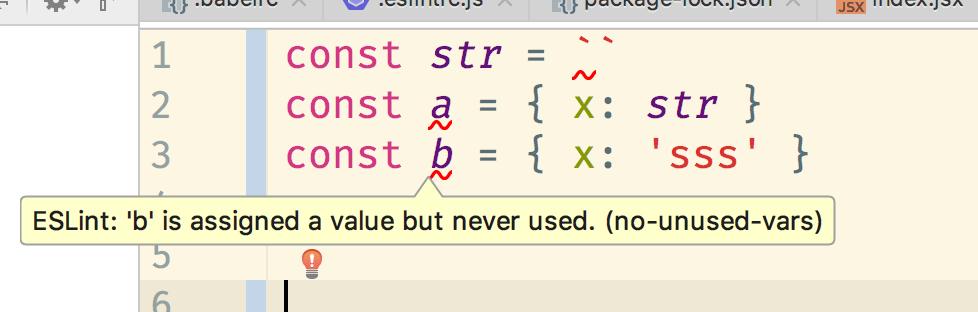 (works well in the other conditions)
and when i remove both template-curly-spacing & indent rules it works fine
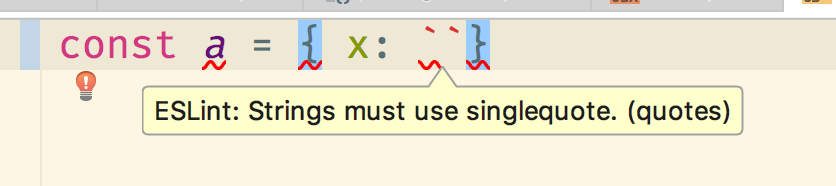 (works fine when i remove both
 template-curly-spacing & indent)
it's more likly a babel-eslint problem because when i remove parser: babel-eslint it works fine without some es6 parsers cannot be recognized such as decorators
and i have tried lots of version of babel-eslint, all of them crashed
here are my devDependencies
"devDependencies": {
    "@babel/types": "^7.0.0-beta.44",
    "autoprefixer": "^8.5.0",
    "babel-core": "^6.26.3",
    "babel-eslint": "^8.2.6",
    "babel-jest": "^22.4.3",
    "babel-loader": "^7.1.4",
    "babel-plugin-import": "^1.7.0",
    "babel-plugin-module-resolver": "^3.1.1",
    "babel-plugin-react-html-attrs": "^2.1.0",
    "babel-plugin-transform-decorators-legacy": "^1.3.4",
    "babel-plugin-transform-es2015-template-literals": "^6.22.0",
    "babel-plugin-transform-react-remove-prop-types": "^0.4.13",
    "babel-plugin-transform-runtime": "^6.23.0",
    "babel-preset-env": "^1.7.0",
    "babel-preset-react": "^6.24.1",
    "babel-preset-stage-1": "^6.24.1",
    "babel-register": "^6.26.0",
    "eslint": "^4.19.0",
    "eslint-config-standard": "^11.0.0",
    "eslint-config-standard-react": "^6.0.0",
    "eslint-friendly-formatter": "^4.0.1",
    "eslint-loader": "^2.0.0",
    "eslint-plugin-babel": "^5.1.0",
    "eslint-plugin-import": "^2.11.0",
    "eslint-plugin-jest": "^21.15.1",
    "eslint-plugin-node": "^6.0.1",
    "eslint-plugin-promise": "^3.7.0",
    "eslint-plugin-react": "^7.8.2",
    "eslint-plugin-standard": "^3.1.0",
    "file-loader": "^1.1.11",
    "koa": "^2.4.1",
    "koa-router": "^7.2.1",
    "node-sass": "^4.9.2",
    "nodemon": "^1.12.1",
    "postcss-calc": "^6.0.1",
    "postcss-flexbugs-fixes": "^4.1.0",
    "postcss-loader": "^2.1.5",
    "postcss-mixins": "^6.2.0",
    "postcss-pxtorem": "^4.0.1",
    "react-hot-loader": "^4.3.4",
    "sass-loader": "^7.1.0",
    "style-loader": "^0.22.1",
    "url-loader": "^1.0.1",
    "webpack": "^3.12.0",
    "webpack-dev-server": "^2.11.2"
  }
and my babel settings
{
  "presets": [
    ["env", { "modules": false }],
    "stage-1",
    "react"
  ],
  "plugins": [
    "transform-runtime",
    "react-html-attrs",
    "transform-decorators-legacy",
    ["import", { "libraryName": "antd-mobile", "style": true }]
  ],
  "env": {
    "production": {
      "plugins": [
        ["transform-react-remove-prop-types", {"removeImport": true, "ignoreFilenames": ["node_modules"]}]
      ]
    },
    "development": {
      "plugins": ["react-hot-loader/babel"]
    },
}
and here are my eslint settings. it's a bit long so i update it as a file
eslintrc.txt
 Jemair
on 15 Aug 2018
Jemair
on 15 Aug 2018
I found that adding the following to my package.json
"devDependencies": {
    "@babel/traverse": "7.0.0-beta.52",
}
e.g. to version match the dependency stated here
appears to have fixed my issue using latest babel-eslint
 seankoji
on 20 Aug 2018
seankoji
on 20 Aug 2018
Holy crap, @seankoji ! This worked for me =D Thanks!
 bolaum
on 20 Aug 2018
bolaum
on 20 Aug 2018
@seankoji this worked for me as well thanks!
Jemair
on 21 Aug 2018
@seankoji worked for me also! 🎉
"dependencies": {
  "@babel/core": "7.0.0-rc.1",
  "@babel/node": "7.0.0-rc.1",
  "@babel/traverse": "^7.0.0-rc.1",
  "eslint": "^5.4.0",
},
"devDependencies": {
  "babel-eslint": "^8.2.6"
}
 schoenwaldnils
on 21 Aug 2018
schoenwaldnils
on 21 Aug 2018
Yes ... this has been called out as working, so long as you are always on the correct version that eslint is using under the hood. Once those subdepenencies change, this resurfaces. This was referenced way up in the discussion.
Ideally there would be _persistent_ solution, although there may not be until babel 7 goes stable.
tquetano-r7
on 22 Aug 2018
"dependencies": {
    "@babel/traverse": "^7.1.0"
  }
"devDependencies": {
  "babel-eslint": "^8.2.6",
  "eslint": "4.19.1"
}
it worked for me @seankoji thanks
 stanye
on 18 Sep 2018
stanye
on 18 Sep 2018
This is depressing, babel 7 is now stable, I updated to babel-eslint 10.0.0 and now I get this in function-paren-newline
Cannot read property 'range' of null
TypeError: Cannot read property 'range' of null
    at SourceCode.getTokenAfter (./node_modules/eslint/lib/token-store/index.js:320:18)
    at getParenTokens (./node_modules/eslint/lib/rules/function-paren-newline.js:178:38)
    at validateNode (./node_modules/eslint/lib/rules/function-paren-newline.js:209:28)
    at listeners.(anonymous function).forEach.listener (./node_modules/eslint/lib/util/safe-emitter.js:45:58)
    at Array.forEach (<anonymous>)
    at Object.emit (./node_modules/eslint/lib/util/safe-emitter.js:45:38)
    at NodeEventGenerator.applySelector (./node_modules/eslint/lib/util/node-event-generator.js:251:26)
    at NodeEventGenerator.applySelectors (./node_modules/eslint/lib/util/node-event-generator.js:280:22)
    at NodeEventGenerator.enterNode (./node_modules/eslint/lib/util/node-event-generator.js:294:14)
    at CodePathAnalyzer.enterNode (./node_modules/eslint/lib/code-path-analysis/code-path-analyzer.js:632:23)
 piuccio
on 27 Sep 2018
piuccio
on 27 Sep 2018
@piuccio that error is unrelated to this issue report as that was in 2017 and we just released 10.0 yesterday. You're issue is most likely https://github.com/babel/babel-eslint/issues/695. I would also advise you not need to add commentary like "this is depressing" to your comments. babel-eslint is a separate project that also happens to have the same maintainers as Babel and we make mistakes, might not understand what's going on, and are volunteers.
hzoo
on 27 Sep 2018
@hzoo I didn't mean to offend you or any Babel maintainers, I know you're doing a great job.
The stack trace is very cryptic and when I googled it, this is the only issue I could find and it looked remarkably similar despite being a year old. I'm spending days trying to upgrade dependencies (react-native, babel, ...) and I just needed to vent my frustration.
Thanks for your quick reply
piuccio
on 28 Sep 2018
I am also getting the same error which is silenced once I remove the line "indent": ["warn", 4]. Which someone else reported above. I updated to 10.0.1 today.
Same error, if I remove the
intentrule it's fine."rules": { "indent": [2, 2] }
 pjb493
on 28 Sep 2018
pjb493
on 28 Sep 2018
@piuccio try to this way
- npm install [email protected] -g
- delete node_modules
- yarn install (don't use "npm install")
this is my config:
"devDependencies": {
    "babel-eslint": "^10.0.0",
    "eslint": "^5.6.0",
    "eslint-config-airbnb": "^17.1.0",
    "eslint-plugin-import": "^2.14.0",
    "eslint-plugin-jsx-a11y": "^6.1.1",
    "eslint-plugin-react": "^7.11.1",
}
 wx1322
on 29 Sep 2018
wx1322
on 29 Sep 2018
ah i take it back, with fresh node_modules it works. Weird I had it yarn install earlier too.
 aonamrata
on 2 Oct 2018
aonamrata
on 2 Oct 2018
Fixed mine by pinning "babel-eslint": "7.2.3",, and adding @babel/traverse and @babel/types latest versions as of today. I'd advise anyone still on this issue to add traverse first, see if it's fixed, delete node_modules, see if it's fixed, then proceed to add the other stuff I added.
EDIT: not fixed. I have to disable eslint in this project unfortunately
 tcodes0
on 10 Oct 2018
tcodes0
on 10 Oct 2018
Quick fix:
"rules": {
  "_comment": "remove after https://github.com/babel/babel-eslint/issues/530 fix",
  "template-curly-spacing": "off",
  "indent": "off",
  ...
}
 avdeev
on 16 Oct 2018
avdeev
on 16 Oct 2018
I had to remove 'airbnb-base' meanwhile.
I tried with "indent": "off" and is still not working
 albertpb
on 25 Oct 2018
albertpb
on 25 Oct 2018
@albertpb indent:off seems to work for me. I'm using "babel-eslint": "^10.0.1",
 janzenz
on 26 Oct 2018
janzenz
on 26 Oct 2018
Did anyone come up with a fix for this? Using "babel-eslint": "^10.0.1" and "eslint": "^5.7.0"
 nijeeshk
on 26 Oct 2018
nijeeshk
on 26 Oct 2018
FWIW, I had this issue and was able to fix it by running yarn upgrade.
I seem to have had 2 different versions of the dependencies installed (@babel/traverse and @babel/types for example).
After running yarn upgrade, the linter just worked, without needing to disable rules.
"babel-eslint": "10.0.1",
"eslint": "5.8.0",
"xo": "0.23.0"
 sharkykh
on 29 Oct 2018
sharkykh
on 29 Oct 2018
ok, i update "babel-eslint": "^10.0.0" will be ok
 zsjun
on 2 Nov 2018
zsjun
on 2 Nov 2018
Babel-eslint 10.0.1 still doesn't work for me. Is this issue known to be fixed or is it still open?
 kheyse-oqton
on 9 Nov 2018
kheyse-oqton
on 9 Nov 2018
Not working, with latest versions at present in my project.
see:
"@babel/traverse": "^7.1.5",
"@babel/types": "^7.1.5",
"babel-eslint": "^10.0.1",
"eslint": "^5.9.0",
 aixfox
on 12 Nov 2018
aixfox
on 12 Nov 2018
I've got exactly the same error several times. After removing package-lock.json it starts working.
 modestfake
on 12 Nov 2018
modestfake
on 12 Nov 2018
- Upgraded to latest babel-eslint + eslint
- Remove
node_modules - Remove
yarn.lock - Run
yarn install.
🎊 All works again.
 samkelleher
on 14 Nov 2018
samkelleher
on 14 Nov 2018
So, everything is supposed to work now with up to date dependencies? 🤔
Edit: A fix has been released?
Edit2: Can this be closed then?
yvele
on 14 Nov 2018
This fix the problem for me too.
1. Upgraded to latest babel-eslint + eslint

2. Remove `node_modules`

3. Remove `yarn.lock`

4. Run `yarn install`.
confetti_ball All works again.
With this config
"babel-eslint": "^10.0.1",
"eslint": "^5.5.0",
"eslint-plugin-vue": "^4.5.0",
 Jerome1337
on 16 Nov 2018
Jerome1337
on 16 Nov 2018
I was able to fix this
using "babel-eslint": "10.0.1",
and then running
yarn install
yarn upgrade
that fixed me the issue
 Khadosh
on 16 Nov 2018
Khadosh
on 16 Nov 2018
This is finally resolved. Installing latest babel, babel-eslint with its latest dependencies work fine
dachinat
on 16 Nov 2018
even with the latest version of eslint/babel-eslint i could only fix this issue by:
- removing node_modules + package-lock.json
- running npm install
 bertrand-riviere
on 22 Nov 2018
bertrand-riviere
on 22 Nov 2018
The same error:
    "babel-eslint": "10.0.1",
    "eslint": "^5.9.0",
    "eslint-config-airbnb": "^17.1.0",
    "eslint-import-resolver-webpack": "^0.10.1",
    "eslint-plugin-import": "^2.14.0",
    "eslint-plugin-jsx-a11y": "^6.1.2",
    "eslint-plugin-react": "^7.11.1"
With "babel-eslint": "8.2.6" working.
 isacjunior
on 4 Dec 2018
isacjunior
on 4 Dec 2018
This is becoming chronic with a lot of tries and errors. I still can get it fixed with all been said here.
 orar
on 9 Dec 2018
orar
on 9 Dec 2018
even with the latest version of eslint/babel-eslint i could only fix this issue by:
* removing node_modules + package-lock.json

* running npm install
This work for me with that upgrade:
The same error:
    "babel-eslint": "10.0.1",
    "eslint": "^5.9.0",
    "eslint-config-airbnb": "^17.1.0",
    "eslint-import-resolver-webpack": "^0.10.1",
    "eslint-plugin-import": "^2.14.0",
    "eslint-plugin-jsx-a11y": "^6.1.2",
    "eslint-plugin-react": "^7.11.1"
With
"babel-eslint": "8.2.6"working.
orar
on 9 Dec 2018
Still an error for me:
    "babel-eslint": "10.0.1",
    "eslint": "5.10.0",
    "eslint-config-airbnb": "17.1.0",
    "eslint-plugin-import": "2.14.0",
    "eslint-plugin-jsx-a11y": "6.1.2",
    "eslint-plugin-react": "7.11.1"
please reopen the ticket
 KKrisu
on 12 Dec 2018
KKrisu
on 12 Dec 2018
Works for me, but it didn't work during many hours of trying things. This is where I ended up, but I suspect that there is some other interaction that I don't understand that was causing the problem.
    "@babel/core": "^7.2.0",
    ... (lots of Babel 7 lines  for plugins etc.) ...
    "babel-eslint": "^10.0.0",
    "babel-plugin-object-assign": "^1.2.1",
    "babelify": "^10.0.0",
    "browser-sync": "^2.26.3",
    "browserify": "^13.3.0",
    "eslint": "^5.10.0",
    "eslint-config-airbnb": "^17.1.0",
    "eslint-plugin-import": "^2.14.0",
    "eslint-plugin-jsx-a11y": "^6.1.2",
    "eslint-plugin-react": "^7.11.1",
 SailingSteve
on 12 Dec 2018
SailingSteve
on 12 Dec 2018
It sounds weird, but what helped to me was: removing node_modules AND package-lock.json and do the clean installation. My versions are:
    "babel-core": "6.26.3"
    "babel-eslint": "10.0.1",
    "eslint": "5.10.0",
    "eslint-config-airbnb": "17.1.0",
    "eslint-plugin-import": "2.14.0",
    "eslint-plugin-jsx-a11y": "6.1.2",
    "eslint-plugin-react": "7.11.1",
Apparently there was an issue with some locked version of package, but I'm not sure which one - fully clean installation helped.
KKrisu
on 13 Dec 2018
I fixed this by installing the latest @babel/types and @babel/traverse that met my requirements (^7.x.x), deduplicating the tree, and then removing them from my dependencies.
npm install --save-dev @babel/[email protected] @babel/[email protected]
npm dedupe
npm uninstall --save-dev @babel/types @babel/traverse
This allowed npm to install a newer version of both at the top of my node_modules tree, deduplicate the tree to remove older versions, and then remove them from my dependencies while leaving them in node_modules for nested dependencies.
 SpenserJ
on 15 Dec 2018
SpenserJ
on 15 Dec 2018
yarn upgrade fixed it for me without wiping yarn.lock or node_modules
 igl
on 18 Dec 2018
igl
on 18 Dec 2018
In my case, I was able to run eslint with ./node_modules/.bin/eslint --ext js,jsx src successfully but I was getting the Cannot read property 'range' of null from template-curly-spacing error from the vscode eslint plugin when I was trying to format the code with the vscode prettier plugin. Disabling/enabling the vscode eslint plugin solved it for me. 🤔
 MarkosKon
on 24 Dec 2018
MarkosKon
on 24 Dec 2018
In my case, I was able to run eslint with
./node_modules/.bin/eslint --ext js,jsx srcsuccessfully but I was getting theCannot read property 'range' of null from template-curly-spacingerror from the vscode eslint plugin when I was trying to format the code with the vscode prettier plugin. Disabling/enabling the vscode eslint plugin solved it for me. 🤔
I had a similar issue with atom, I was able to run eslint from the terminal just fine. I updated the "linter" package for atom to the latest and now I'm no longer getting this error.
 PrestonMe
on 31 Dec 2018
PrestonMe
on 31 Dec 2018
It works after I did
npm update
rm -rf node_modules
rm package-lock.json
npm install
Essentially update the modules & do a clean installation of node modules.
 danielnmai
on 11 Feb 2019
danielnmai
on 11 Feb 2019
I'm don't get why but @danielnmai's solution worked for me, too
 gonzofish
on 15 Feb 2019
gonzofish
on 15 Feb 2019
Because you updated the dependencies of your dependencies.
 sapkra
on 16 Feb 2019
sapkra
on 16 Feb 2019
I get this error whenever I used 'as' typecasting from typescript
 ntucker
on 17 Feb 2019
ntucker
on 17 Feb 2019
- removing node_modules + package-lock.json
- running npm install
this fixed the issue for me as well
 gerhat
on 23 Feb 2019
gerhat
on 23 Feb 2019
@ntucker Thanks for your comment -- I'm experiencing the same thing and you pointing out that issue helped me hunt down the solution: add eslint-config-prettier. In case it helps, I managed to isolate the issue to the rule "@typescript-eslint/indent": "error", which is included in the plugin:@typescript-eslint/recommended eslint config.
Examples of this troubleshooting can be found on the various branches here.
Hope this helps!
 ericbiewener
on 29 Mar 2019
ericbiewener
on 29 Mar 2019
Dug into my version of the error
    "@babel/plugin-proposal-class-properties": "^7.4.0",
    "@babel/plugin-proposal-decorators": "^7.4.0",
    "babel-eslint": "^10.0.1",
seems these rules, it is related to decorator usage like this @computed('first', 'last')


turning off these rules solved the problem
 billybonks
on 30 Mar 2019
billybonks
on 30 Mar 2019
- Upgraded to latest babel-eslint + eslint
- Remove
node_modules- Remove
yarn.lock- Run
yarn install.
This was a bit heavy handed for my tastes -- after all, I'm using a lock file for a reason. After some experimentation, I was able to land on the follow more targeted solution, based on npm 6.4.1:
npm ls @babel/typesnpm uninstallall of those top level packages- Confirm you typed/copied everything correctly:
npm ls @babel/typesshould now return no matching packages npm installthat same list of top level packages
And now everything works 🙌 For a reason I don't understand, different packages were grabbing different versions of @babel/types, ranging from 7.0.0 to latest (7.4.4 as of this writing). The above procedure gets all packages on the same version of @babel/types which then allows eslint to run.
 ZebraFlesh
on 8 Jun 2019
ZebraFlesh
on 8 Jun 2019
@ZebraFlesh's more refined approach didn't work for me, but the "blow away everything and reinstall without a lock" :boom: approach did the job.
 elyobo
on 21 Aug 2019
elyobo
on 21 Aug 2019
Fixed by upgrading babel-eslint from 8.2.6 to 10.0.3
 yash-tamakuwala
on 18 Sep 2019
yash-tamakuwala
on 18 Sep 2019
I was wrong, it's also fixed for me. (VSCode just cached old eslint version)
 stalkerg
on 19 Sep 2019
stalkerg
on 19 Sep 2019
I have the same problem babel-eslint 10.0.3 and eslint 6.5.0
TypeError: Cannot read property 'range' of null
Occurred while linting File.jsx:1
    at OffsetStorage.setDesiredOffset (project_dir_here\node_modules\eslint\lib\rules\indent.js:339:45)
    at TemplateLiteral.node.expressions.forEach (project_dir_here\node_modules\eslint\lib\rules\indent.js:1358:29)
    at Array.forEach (<anonymous>)
    at Object.TemplateLiteral [as listener] (project_dir_here\node_modules\eslint\lib\rules\indent.js:1350:34)
    at Program:exit.listenerCallQueue.filter.forEach.nodeInfo (project_dir_here\node_modules\eslint\lib\rules\indent.js:1585:55)
    at Array.forEach (<anonymous>)
    at Program:exit (project_dir_here\node_modules\eslint\lib\rules\indent.js:1585:26)
    at listeners.(anonymous function).forEach.listener (project_dir_here\node_modules\eslint\lib\linter\safe-emitter.js:45:58)
    at Array.forEach (<anonymous>)
    at Object.emit (project_dir_here\node_modules\eslint\lib\linter\safe-emitter.js:45:38)
Update:
Re-created package-lock.json (rm package-lock.json && rm -rf node_modules && npm install), that fixed it lol
 sryze
on 2 Oct 2019
sryze
on 2 Oct 2019
Haven't run into this problem for several weeks now. I'd say just update your dev dep, and do a yarn --force
Sent from my iPhone
On 2 Oct 2019, at 14:16, Sergey Zolotarev notifications@github.com wrote:
I have the same problem babel-eslint 10.0.3 and eslint 6.5.0
TypeError: Cannot read property 'range' of null
Occurred while linting File.jsx:1
at OffsetStorage.setDesiredOffset (project_dir_herenode_moduleseslint\lib\rulesindent.js:339:45)
at TemplateLiteral.node.expressions.forEach (project_dir_herenode_moduleseslint\lib\rulesindent.js:1358:29)
at Array.forEach ()
at Object.TemplateLiteral [as listener] (project_dir_herenode_moduleseslint\lib\rulesindent.js:1350:34)
at Program:exit.listenerCallQueue.filter.forEach.nodeInfo (project_dir_herenode_moduleseslint\lib\rulesindent.js:1585:55)
at Array.forEach ()
at Program:exit (project_dir_herenode_moduleseslint\lib\rulesindent.js:1585:26)
at listeners.(anonymous function).forEach.listener (project_dir_herenode_moduleseslint\lib\linter\safe-emitter.js:45:58)
at Array.forEach ()
at Object.emit (project_dir_herenode_moduleseslint\lib\linter\safe-emitter.js:45:38)
—
You are receiving this because you commented.
Reply to this email directly, view it on GitHub, or mute the thread.
tcodes0
on 2 Oct 2019
Blown away and reinstalled - on latest versions - still throws this error unless I a) turn off template-curly-spacing and b) exclude TemplateLiteral from indent :/
 abritinthebay
on 3 Oct 2019
abritinthebay
on 3 Oct 2019
Removing node_modules & package-lock.json before reinstalling all dependencies did the job.
Thanks!
monsieurnebo
on 9 Oct 2019
i tried everything about this is still an issue, can we re open this ?
 EsrefDurna
on 8 Nov 2019
EsrefDurna
on 8 Nov 2019
In my case this fixed it:
rm -f yarn.lock
rm -rf node_modules
yarn add $(npm outdated |awk '/eslint/ {print $1"@"$4}')
yarn
I guess it's bringing a big sledgehammer and could invite more consequences to your code-base than are welcome though (upgraded linting, subtle or not so subtle dependency changes).
 kvz
on 9 Dec 2019
kvz
on 9 Dec 2019
Some suggestions described in #681 worked for me in the end.
I initially tried the suggested method with removing yarn.lock and completely re-installing the modules, but the error persisted.
Defining a resolution for @babel/types, so that every package uses the same version, should work to resolve the issue.
package.json
  "devDependencies": {
    "babel-eslint": "10.0.3"
  }
  "resolutions": {
    "@babel/types": "7.7.4"
  }
If that still doesn't work, disable the rule that causes the crash in your eslintrc.json or whichever config file you use:
https://github.com/babel/babel-eslint/issues/681#issuecomment-451336031
... In my case at least the error is generated during handling of template literals within the
indentrule. I can live with not checking indentation for template literals, so I've fixed it for now using theignoredNodesoption for theindentrule, roughly as follows:"indent": ["error", 2, { "ignoredNodes": ["TemplateLiteral"] }]Not sure how else I can be of help, except maybe reiterate @ljqx's suggestion of trying to normalize the
@babel/typesdep acrossbabelandbabel-eslint. I can't tell if npm is doing something wrong here or if yarn's more deterministic algorithm is hiding a flaw in the code.
Interestingly, I removed the specific indent rule since, to see if the issue was fixed (resolution still in place). babel-eslint kept working without the rule, even though template literals were present.
 Excalibaard
on 9 Dec 2019
Excalibaard
on 9 Dec 2019
Justo to report, i had the same problem with "babel-eslint": "^10.0.3" and "eslint": "^5.16.0" on node 10.17.0 and npm 6.11.3. For me rm -rf node_modules && npm install solved the problem
 oggo
on 9 Dec 2019
oggo
on 9 Dec 2019
Still having this problem myself. On [email protected] and [email protected]. removing babel-eslint from the parser setting worked to quell the error, but then created a new error around assigning functions to class properties (a la foo = () => {...} in classes)
 dclowd9901
on 10 Dec 2019
dclowd9901
on 10 Dec 2019
I think the cause is as what I said here: https://github.com/babel/babel-eslint/issues/799#issuecomment-567598343
 yitomok
on 19 Dec 2019
yitomok
on 19 Dec 2019
This just started failing for me yesterday.
 KempfCreative
on 20 Dec 2019
KempfCreative
on 20 Dec 2019
Same for me, was resolved by:
"@babel/generator": "7.7.4"
 romandragan
on 26 Dec 2019
romandragan
on 26 Dec 2019
None of the above workarounds helped. The bug persists with the latest ESLINT, etc.
Should be reopened IMO.
 ivan-kleshnin
on 31 Dec 2019
ivan-kleshnin
on 31 Dec 2019
@ivan-kleshnin do yarn cache clean
Khadosh
on 31 Dec 2019
+1
 invainn
on 3 Jan 2020
invainn
on 3 Jan 2020
This works: https://github.com/babel/babel-eslint/issues/799#issuecomment-570790316
 hawkeye64
on 4 Jan 2020
hawkeye64
on 4 Jan 2020
@afc163 解决了, 谢谢
 qiqingfu
on 8 Jan 2020
qiqingfu
on 8 Jan 2020
The way that I fix this was running yarn audit to know which dependencies upgrade (babel), upgrade them, delete node_modules folder and file yarn.lock (package-lock.json for npm), then run yarn for install all the project dependencies.
 vemmkof
on 20 Jan 2020
vemmkof
on 20 Jan 2020
Adding a resolutions as outlined in https://github.com/babel/babel-eslint/issues/799#issuecomment-570790316 worked for me. However, I didn't want to add this to my package.json.
But what also worked for me was to yarn upgrade babel-eslint @babel/types.
 ksweetie
on 28 Jan 2020
ksweetie
on 28 Jan 2020
Most likely the issue is causing of wrong parsing.
import(`some_path/${variable}`) // issue exists
Fix
import("some_path" + variable) // issue fixed
 Artur93gev
on 4 Feb 2020
Artur93gev
on 4 Feb 2020
I confirm, it's broken for such code:
import(`../layouts/${this.name}.vue`)
(the code is from nice article)
Please, reopen the issue. yarn cache clean, rm yarn.lock, rm -rf node_modules, yarn audit don't help.
> yarn audit
yarn audit v1.21.1
0 vulnerabilities found - Packages audited: 24351
Done in 1.29s.

> yarn outdated
yarn outdated v1.21.1
Done in 1.09s.
 AlexWayfer
on 5 Feb 2020
AlexWayfer
on 5 Feb 2020
This is an ancient issue; please file a new one.
 ljharb
on 5 Feb 2020
ljharb
on 5 Feb 2020
This is an ancient issue; please file a new one.
OK, but I see open #608, #741, #799 and #815, which are pretty similar, so I'll just watch for them.
AlexWayfer
on 6 Feb 2020
fixed https://github.com/babel/babel-eslint/issues/815#issuecomment-594534738
 miladmeidanshahi
on 4 Mar 2020
miladmeidanshahi
on 4 Mar 2020
I have been able to resolve this issue by upgrading babel-eslint to 10.1.0.
 TomasBarry
on 12 Mar 2020
TomasBarry
on 12 Mar 2020
Still having it.
module.exports = {
  root: true,
  env: {
    node: true
  },
  extends: [
    'plugin:vue/essential',
    'plugin:vue/recommended',
    'eslint:recommended',
    'standard'
  ],
  "parser": "vue-eslint-parser",
  parserOptions: {
    "parser": "babel-eslint",
      "sourceType": "module"
  },
  rules: {},
}
"devDependencies": {
    "@vue/cli-plugin-babel": "~4.2.0",
    "@vue/cli-plugin-eslint": "~4.2.0",
    "@vue/cli-plugin-router": "~4.2.0",
    "@vue/cli-plugin-unit-jest": "~4.2.0",
    "@vue/cli-plugin-vuex": "~4.2.0",
    "@vue/cli-service": "~4.2.0",
    "@vue/eslint-config-standard": "^5.1.0",
    "@vue/test-utils": "1.0.0-beta.31",
    "babel-core": "7.0.0-bridge.0",
    "babel-eslint": "^10.0.1",
    "eslint": "6.8.0",
    "eslint-config-standard": "14.1.1",
    "eslint-plugin-import": "2.20.2",
    "eslint-plugin-node": "11.1.0",
    "eslint-plugin-promise": "4.2.1",
    "eslint-plugin-standard": "4.0.1",
    "eslint-plugin-vue": "6.2.2",
    "vue-eslint-parser": "7.0.0",
    "vue-template-compiler": "^2.5.17"
  }
 KarmaBlackshaw
on 30 Mar 2020
KarmaBlackshaw
on 30 Mar 2020
@KarmaBlackshaw, have you tried https://github.com/babel/babel-eslint/issues/530#issuecomment-598122608?
TomasBarry
on 30 Mar 2020
@TomasBarry yes, but to no avail.
KarmaBlackshaw
on 30 Mar 2020
I've run into these issues before with just the version of babel-eslint but now, I don't really know what to do. Changing babel-eslint version no longer works.
KarmaBlackshaw
on 30 Mar 2020
This only occurs on vue-router. Line 1 which is import Vue from 'vue'.
KarmaBlackshaw
on 30 Mar 2020
You’re still using babel 6?
ljharb
on 30 Mar 2020
@ljharb, These are the only babels I'm only using.
+-- [email protected]
+-- [email protected]
+-- @vue/[email protected]
Perhaps, they need to be matched?
KarmaBlackshaw
on 31 Mar 2020
babel-core bridge is only used to be able to use Babel 6, i thought.
ljharb
on 31 Mar 2020
I have updated it now to use the latest stable version which is 6.26.3. Still the same. I don't like turning off rules though, but for now, it seems that it is just appropriate. I believe this is just a hack.
indent: [
  'error', 2,
  { ignoredNodes: ['TemplateLiteral'] }
],
'template-curly-spacing': 'off'
Right, Babel 7+ is at @babel/core.
ljharb
on 31 Mar 2020
Downgrading to babel-eslint 8.x was the only way I was able to solve this after trying the other suggestions here.
 Irrelon
on 16 Jul 2020
Irrelon
on 16 Jul 2020
Related issues
 simlu
·
3Comments
simlu
·
3Comments
 prudolfs
·
6Comments
prudolfs
·
6Comments
 aladdin-add
·
3Comments
hzoo
·
3Comments
aladdin-add
·
3Comments
hzoo
·
3Comments
 acdlite
·
5Comments
acdlite
·
5Comments
Most helpful comment
I managed to fix this problem for myself; our company's internal ESLint config defined
"parser": "babel-eslint", but that line also existed in each project's.eslintrc.Removing the line
"parser": "babel-eslint"from each project caused ESLint to rely on the version installed from our config, and fixed the issue. I know npm flattens the dependency tree, so I can't explain _why_ this works; I'm just happy it _does_ work.