Azurestorageexplorer: Cannot directly open blobs with no file extension on Windows 10 1903
Storage Explorer Version: 1.9.0
Build Number: 20190701.8
Platform/OS: Windows 10 1903
Architecture: x64
Regression From: Regression from behavior on Windows 10 1809
Bug Description
When double clicking a blob to open it and the blob does not have a file extension (e.g. configuration), rather than showing the "Open file with" windows dialog, you instead receive an error dialog: e.g.:

Steps to Reproduce
- Navigate to a Storage Account -> Container that contains a blob without a file extension
- Double click the blob
Expected Experience
Expect to receive the standard Windows "How do you want to open this file" picker:
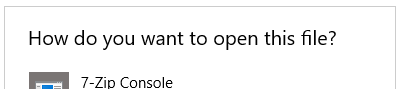
After picking an application from the list the file would be opened in the selected app.
Actual Experience
An error is received:
The file cannot be opened in an editor without downloading it explicitly.
Additional Context
The behavior is as expected on Windows 10 1803 and 1809, but shows the error on 1903.
 neilrees
All 15 comments
I have the same issue on 1903
Work around:
Right click on the blob | Download
Save.
Open Windows Explorer
Double click file
Choose a program to open file, e.g. notepad
or Optionally rename file to have .txt(?) extension
 OzBob
on 20 Aug 2019
OzBob
on 20 Aug 2019
@JasonYeMSFT , let's look into this while doing AzCopy open.
 MRayermannMSFT
on 7 Oct 2019
MRayermannMSFT
on 7 Oct 2019
Ok, I'm on 1809 and things are working as expected....I'm going to update to 1903 and see what happens...
MRayermannMSFT
on 8 Oct 2019
Yep, it regresses on upgrade. Unfortunately there doesn't seem to be anything we can do on our side for this. I'll need to file an electron bug tomorrow. Sorry y'all. 😰
MRayermannMSFT
on 11 Oct 2019
Filed Electron issue: https://github.com/electron/electron/issues/20543
We'll continue monitoring that.
MRayermannMSFT
on 11 Oct 2019
@MRayermannMSFT Electron have closed the bug - where does this go next?
neilrees
on 30 Oct 2019
They believe it is an issue in Windows. So we need to do some more investigation.
MRayermannMSFT
on 18 Nov 2019
I've now seen this issue in a number of electron based applications. Is there an upstream bug we can be tracking?
neilrees
on 19 May 2020
@MRayermannMSFT : do you have a windows issue for us to monitor?
OzBob
on 20 May 2020
@jinglouMSFT I've tried double clicking on a file and the same error is reported.
Storage Explorer Version: 1.13.1
Build Number: 18362.836
Platform/OS: Windows 10 1903
Architecture: x64
OzBob
on 28 May 2020
This is still repro with Storage Explorer 1.13.1 and Windows 10.1909. Will enter a bug on Windows.
 jinglouMSFT
on 28 May 2020
jinglouMSFT
on 28 May 2020
Reported the issue to Windows. It is Bug 26623267 in Windows 10 Feedback hub.
jinglouMSFT
on 28 May 2020
Reporting back on the Windows bug - There was a regression in the ShellExecute API in Windows 10 builds 190x. This issue has been fixed in Windows 10 build 2004. Build 2004 is currently being rolled out gradually. In terms of a workaround if you are on Windows 10 build 190x and if you are comfortable modifying your Windows registries, you can associate the file extension (no-extension) there. We don't recommend this if you don't normally modify the registries as the impact is system wide. Another workaround is to down load the file/blob to a local temp folder, and open it from Windows File Explorer. This is the default download experience in Storage Explorer. The association in the File Explorer works just fine.
jinglouMSFT
on 8 Jun 2020
Thanks @jinglouMSFT can confirm that upgrading to Windows 2004 has solved this 👍
neilrees
on 2 Jul 2020
That's great. Thanks much for letting us know.
jinglouMSFT
on 2 Jul 2020
Related issues
 euandekock
·
6Comments
euandekock
·
6Comments
 olgakorichkovskaya
·
4Comments
olgakorichkovskaya
·
4Comments
 ayon1911
·
5Comments
ayon1911
·
5Comments
 jorgklein
·
4Comments
jorgklein
·
4Comments
 kjoshi-rubikloud
·
3Comments
kjoshi-rubikloud
·
3Comments