Azurestorageexplorer: Fail to expand the Blob Containers node of local account even though the storage emulator has been started
Storage Explorer Version: 1.6.2/20190131.3
Platform/OS Version: Windows x64/Linux Ubuntu 16.04/MacOS High Sierra
Architecture: ia32
Commit: 25a1398e
Regression From: Not a regression
Steps to Reproduce:
- Make sure the storage emulator is started.
- Open Connect dialog -> Select 'Attach to a local emulator' and using the default port -> 'Connect'.
- Try to expand the attached local emulator from 'Local & Attached' ->‘Storage Accounts’ ->'Local -1(Key)' ->'Blob Containers'/'Queues'/Tables' node.
Expected Experience:
The 'Blob Containers'/'Queues'/Tables' node can be expanded successfully.
Actual Experience:
Fail to expand the 'Blob Containers'/'Queues'/Tables' node.

 v-xuanzh
All 13 comments
I am also facing the same issue.
 ASChat
on 31 Jan 2019
ASChat
on 31 Jan 2019
What emulator is being used? I've tried with both Azure Storage Emulator 5.9 and Azurite 2.7.0, and both appear to work just fine.
What else can you tell me about your environment? Do you have any proxy settings (system or Storage Explorer) set up?
@v-xuanzh, what version of Windows did you test on (Windows x64 is not a version)?
 craxal
on 1 Feb 2019
craxal
on 1 Feb 2019
Hi @craxal ,
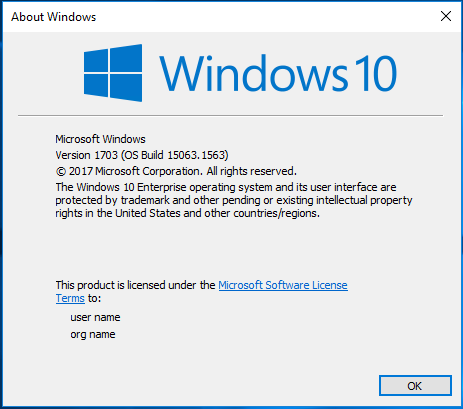
- Used the version of Azure Stroage Emulator 5.9 and the OS version 1703(OS Build 15063.1563),The issue reproduces.
- We tried this issue on another machine(OS Version is 1809)with the Azure Stroage Emulator 5.4. This issue also reproduces.
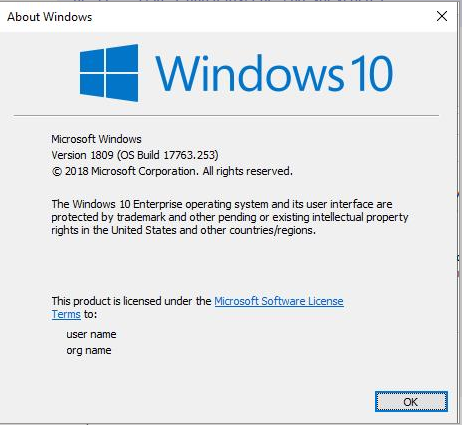
- After upgrading the Azure Stroage Emulator 5.4 -> 5.9 on OS version 1809 ,This issue doesn't reproduce.
Maybe this issue related to the version of OS and Azure Storage Emulator.
v-xuanzh
on 2 Feb 2019
@ASChat, please make sure you have the latest version of Storage Explorer and Storage Emulator installed, and your system is up-to-date, then give it another try. Currently the latest Storage Explorer is 1.6.2 and the latest Storage Emulator is 5.9.
craxal
on 4 Feb 2019
I am also experiencing this issue.
Storage Explorer Version: 1.6.2
Build Number: 20190108.2
Storage Emulator Version 5.9
 michaelm7456
on 13 Feb 2019
michaelm7456
on 13 Feb 2019
Can you verify which ports your emulator is configured to listen on? Again, do you have any proxy settings turned on?
craxal
on 13 Feb 2019
Moving this issue to 1.8.0. @michaelm7456 and @ASChat , can you confirm that your port settings are correct? As in, the ports you have set your emulators to listen on are either the default ports, or, that you added an emulator connection to Storage Explorer that uses the ports you chose?
 MRayermannMSFT
on 21 Feb 2019
MRayermannMSFT
on 21 Feb 2019
Apologies for the delay,
I've managed to now expand the 'Blob Containers'/'Queues'/'Tables' Nodes and add my desired Queues in 'Microsoft Azure Storage Explorer'.
I had to run the 'Microsoft Azure Storage Emulator' application first, in doing so allowed the 'Blob Containers'/'Queues'/'Tables' nodes to be expanded successfully in 'Microsoft Azure Storage Explorer' and also add entries to each respective node.
This issue has been fixed for myself, @ASChat & @v-xuanzh, hope this helps yourselves out in case you're facing a similar issue.
Thanks @MRayermannMSFT & @craxal for your assistance on this issue.
Regards,
michaelm7456
on 28 Feb 2019
I don't know if you want a new issue or not, but I've found that while using Storage Explorer 1.6.2 to connect to Azure Stack on prem, I have to toggle from No Proxy to Use proxy and then back to No proxy to connect. Let me know if you want a separate issue for this.
 btshowers
on 4 Mar 2019
btshowers
on 4 Mar 2019
@btshowers , yes 110% a separate issue. Please open something new. 😄
MRayermannMSFT
on 4 Mar 2019
@michaelm7456 , glad to know you're unblocked! Just to get some addl info though, were you expecting the emulator to auto start?
MRayermannMSFT
on 4 Mar 2019
Hi @MRayermannMSFT, yes I think on my earlier attempt I expected the emulator to start automatically before running into this issue.
After having gone and manually started the emulator this resolved the issue I was facing.
michaelm7456
on 6 Mar 2019
Fore future refeference, we provide useful information on connecting to emulators (local storage) on our Getting Started page.
craxal
on 7 Mar 2019
Related issues
 cbailiss
·
6Comments
cbailiss
·
6Comments
 OffColour
·
4Comments
OffColour
·
4Comments
 amtsha09
·
6Comments
amtsha09
·
6Comments
 fforcen
·
3Comments
fforcen
·
3Comments
 kjoshi-rubikloud
·
3Comments
kjoshi-rubikloud
·
3Comments