Azurestorageexplorer: Storage Explorer can't load the subscription list
Storage Explorer Version:
Platform/OS Version: windows 10
Architecture: x64
Regression From: it's not a version problem. it's problem of working with very specific account
Steps to Reproduce:
- login under account with 52 subscriptions and load the list of subscriptions
Expected Experience:
WIll work
Actual Experience:
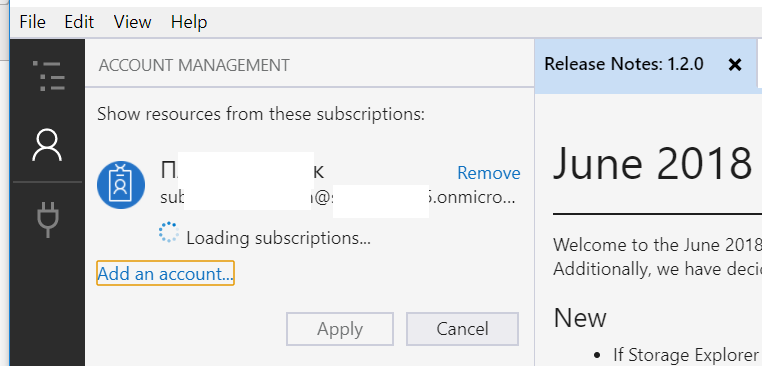
Infinite "loading loop"
Details:
I have an account which have access to 52 subscriptions in 1 tenant with totally 186 storage accounts (few classic, but mostly arm). RBAC roles are different from subscription to subscription, but mostly readers/user access manager, contributors, owner.
On my machine I can load Explorer, sign in under this account, but "Loading Subscription" could work forever, until I will cancel this process.
After "loading" was canceled once- I can't even start it again, because after authentication, storage explorer not showing me "Loading subscription" windows anymore.
If instead of canceling "loading subscription" - I will kill the process from process explorer - I will can't open Storage Explorer anymore under my local windows user. (I already try to uninstall/reinstall and cleaned %AppData%/StorageExplorer folder).
The problem reproducible under another local windows user(access to azure of course under azure account). (Looks like Explorer saved some corrupted data and after can't load it. But if I will drop "user" from c:/users/ folder- it start working as before).
I had try to investigate, what kind of files, Azure Storage explorer trying to read from disk, but process explorer shows me too much actions.
Could you advise me few thinks- where else Storage Explorer storing his settings outside of %AppData%/StorageExplorer folder?
What kind of traces you need to investigate this issue? (fiddler, process explorer, process monitor, some special tools). If necessary- I can provide any traces internally or even via skype for business share my desktop and execute any actions to debug it.
 SychevIgor
All 8 comments
 SychevIgor
on 12 Jun 2018
SychevIgor
on 12 Jun 2018
Can you provide some repro steps for setting up a subscription with RBAC roles? This will help us look further into your issue.
 craxal
on 12 Jun 2018
craxal
on 12 Jun 2018
@craxal in my case- you just need 52 subscriptions visible under you account.
My personal mix is - 4 owners, 5 account administrators, 43 readers.
Readers are in fact -> User Access Administrator
P.S. also we recently started using "Manager grous" feature and for almost all subscription I also have right "Owner" by Management group (Inherited)
SychevIgor
on 13 Jun 2018
I am experiencing the same thing, infinite "Loading subscription" on an org account and we are also using Management groups if it can help.
In my case 23 subscriptions, 250+ storage accounts
running windows 10 1803 w/ Storage Explorer:
Version: 1.3.1
Platform: Windows
Architecture: ia32
Build Number: 20180711.1
Commit: 9a954726
Support Id: 5b9c59d8-e50e-bb30-2cd0-51597b7fd354
 slapointe
on 1 Aug 2018
slapointe
on 1 Aug 2018
Any news? I am still facing this issue with release v1.5.0
slapointe
on 5 Nov 2018
no answers from Microsoft
SychevIgor
on 31 Aug 2019
@slapointe @SychevIgor The current version of Storage Explorer is 1.9.0. Please update to that and let us know if the problem persists.
@MRayermannMSFT I know our node tree supports loading chunks of data, but does the account/subscription panel support this as well? I know I have a fair number of subscriptions tied to my account, but it's nowhere near 52, so I'm not surprised we've never seen this before...
craxal
on 3 Sep 2019
I don't work on Microsoft for a 9 months an have no access to the same environment anymore. so I can't reproduce
SychevIgor
on 3 Sep 2019
Related issues
 timoklimmer
·
6Comments
timoklimmer
·
6Comments
 OffColour
·
4Comments
OffColour
·
4Comments
 ayon1911
·
5Comments
ayon1911
·
5Comments
 cbailiss
·
6Comments
cbailiss
·
6Comments
 kjoshi-rubikloud
·
3Comments
kjoshi-rubikloud
·
3Comments