Azurestorageexplorer: Respect regional settings when displaying dates, times and everything else

About Dialog:
[Window Title]
Microsoft Azure Storage Explorer
[Main Instruction]
Microsoft Azure Storage Explorer
[Content]
Version: 1.0.0
Platform: Windows
Architecture: ia32
Build Number: 20180415.2
Commit: 5d603052
Support Id: 40f0f373-1aa6-3490-a47a-9a7a8590095d
Copyright © 2018 Microsoft. All rights reserved.
[OK]
OS version: Win 10 Ent x64
 Bartolomeus-649
All 34 comments
That's odd. It should be doing that already. Do this for me, if you would:
- Open Storage Explorer and hit F12 to open the Developer Tools.
- Open the developer console (Console tab or drawer).
- Type
navigator.languageand hit Enter.
What output do you get?
 craxal
on 23 Apr 2018
craxal
on 23 Apr 2018
From the Developers tool console..
navigator.language
en-US
and from the C# interactive in VS...
Thread.CurrentThread.CurrentCulture
[sv-SE]
Thread.CurrentThread.CurrentUICulture
[en-US]
Bartolomeus-649
on 23 Apr 2018
Wait...why would CurrentUICulture be returning en-US? Unless the C# interactive is running in a poorly setup process...
Either way, it looks like this is problem with Electron (see electron/electron#2484 for an example). We'll continue to investigate. Hopefully we'll have a solution soon.
In the meantime, can you do navigator.language = "sv-SE" in the console? Does that do anything? It might only work for certain parts of the application at a time.
craxal
on 3 May 2018
CurrentUICultureis en-US, and CurrentCulture is sv-SE.
The display language in windows has nothing to do wither the culture settings in Windows. It is a common misconception that there is only one Culture setting, when in fact there are at least two.
Bartolomeus-649
on 3 May 2018
I suppose that makes sense. Storage Explorer isn't built on .NET, though. It's Electron/Node. Have you tried my suggestion? I'm curious to know if that has any effect at all.
craxal
on 3 May 2018
I also observe this issue. My Windows is set for English (United States) language, but all date/time formats are set to my liking (i.e. the ISO-based formats "yyyy-MM-dd" and "HH:mm").
The "navigator.language" states "en-US" (and I can't seem to be able to change it via console).
If Electron offers no way of using the actual user regional settings (and you want to stick to Electron), maybe you could consider adding regional preferences in the Azure Storage Explorer itself? Or at least allow the user to choose specific culture separately for application language and for application data formatting (like e.g. Azure Portal).
 hilari0n
on 11 May 2018
hilari0n
on 11 May 2018
didn't try setting navigator.language manually.
It has been well known for many decades that you can't have one setting for language.
Just a few examples...
- The display language of the app (menus, texts, messages and so on)
(Thread.CurrentThread.CurrentUICulture) - Settings for formatting date, time, currency, decimal sign, thousands separator and so on, also known as the culture settings for an application or OS. (Thread.CurrentThread.CurrentCulture)
- Content language, the language used for spelling and grammar checks.
So are be back to the problems before the early 90-ies?
Most OS has had support for this for many decades, so I can't see how this can be a problem,
If you have a platform that doesn't support functionality that has been around for many decades, then perhaps you should find another platform? Like c# and .net?
Especially now when the storage library used by AzCopy is available as open source in C#, not really productive to reinvent the wheel...
https://docs.microsoft.com/en-us/azure/storage/common/storage-use-data-movement-library
Bartolomeus-649
on 11 May 2018
@hilari0n That sounds like a good suggestion we can consider going forward.
craxal
on 12 May 2018
craxal
on 15 Oct 2018
You need to do this for not just date and time, but also for ll other regional settings, for example list separator might not always be a comma ( , ).
Also keep in mind that regional settings can change at ny time, even while a process is running. So for each operation, read the current region of the current thread, temporary store the culture in a local variable, and only use it for any culture operation for the current operation.
Also if you use CultureInfo.CurrentCulture you will manually need to clear cached data since it's not done automatically, that's why Microsoft recommend to always get the culture from the current thread instead from CultureInfo.CurrentCulture.
Information, such as the default culture and format patterns, is cached the first time it is requested. That information can change during the life of the AppDomain, for example, when the user modifies the regional and language options portion of Control Panel. However, the CultureInfo class does not automatically detect changes in the system settings.
– From: CultureInfo.ClearCachedData Method
Don't forget to listen for the .NET event SystemEvents.UserPreferenceChanged (WM_SETTINGCHANGE), so you know when the culture changes.
Here is the documentation on how localization should be done in Windows.
https://docs.microsoft.com/en-us/windows/desktop/intl/international-support
Bartolomeus-649
on 15 Oct 2018
@Bartolomeus-649, thank you for your suggestions. We are aware of the need to respect _all_ regional settings. Although the necessary fixes are not trivial, we will continue to make improvements going forward. Many of your suggestions are relevant to applications running in a .NET environment. However, Storage Explorer is not a .NET application. It is an Electron application. Therefore, we are using standard web technologies (since Electron is based on Chromium).
craxal
on 16 Oct 2018
so you are saying you can't develop a first class application because of the framework you have chosen to base you application on? Localization has been working fine in windows for decades...
Bartolomeus-649
on 16 Oct 2018
@craxal If I may ask, what's your vision here, are going to leave it broken until Electron is fixed?
 Leon99
on 16 Jan 2019
Leon99
on 16 Jan 2019
@craxal FYI - navigator.language = "en-AU" changed nothing for me. Literally:
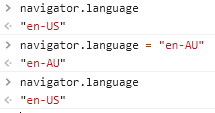
Leon99
on 16 Jan 2019
Electron has received a few updates lately. We just need to dedicate some time to investigate this issue further. Unfortunately, we have a lot of items on the backlog, so it's hard to say exactly when we can look into this further.
Just to be sure, was this working as expected in an earlier version of Storage Explorer?
craxal
on 18 Jan 2019
@craxal I have never known this to work. It's still an issue in the 1.7.0 Preview release. As a workaround could the date format at least be changed to a format that isn't so misleading for everyone outside the US.
For example instead of 1/2/2019 8:00:00 AM the Microsoft Teams team (also using electron) display this as 2nd Jan 2019 08:00:00.
 vjdw
on 14 Feb 2019
vjdw
on 14 Feb 2019
@vjdw What is your system's locale?
I've been investigating this issue, and I may now have a solution, but I need some help to verify whether this will fix things. Can you do the following for me?
- Open a File Explorer window (assuming you're on Windows) and navigate to C:\Program Files (x86)\Microsoft Azure Storage Explorer.
- Locate resources\app\out\app\index.js, open it in a text editor, and find the block of code starting on line 587.
js electron_1.app.on("ready", function () { finishSetup(); }); - Edit the code block so that it looks like this:
js electron_1.app.on("ready", function () { finishSetup(); console.log(">>>>> " + electron_1.app.getLocale()); }); - Open a command line prompt (PowerShell or cmd) and run Storage Explorer.
shell cd Program Files (x86)\Microsoft Azure Storage Explorer\ .\StorageExplorer.exe - The command line prompt should output something like the following right away. Does the output match your current system's locale?
>>>>> en-US - In Storage Explorer, press F12 to open the debug window, then select the Console tab.
- Type
navigator.languagethen press Enter. Does the output here also match your system's locale?
craxal
on 14 Feb 2019
@craxal GET-WinSystemLocale tells me I'm using en-GB. After your changes the command line showed en-US, and the same for navigator.language.
I've just realised that in Windows 10 "Settings", although my "Country or region" was set to United Kingdom, my "Windows display language" was somehow set to "English (United States)". My Windows date format, number and currency were all en-GB style so I didn't notice en-US was set as the display language.
So now I can see the same problem others have mentioned, that Storage Explorer is ignoring the user's regional settings and instead I guess it's using the default regional settings of the selected "Windows display language". By setting my "Windows display language" to "English (United Kingdom)" StorageExplorer now displays dates how I want them, but in general there's still the issue that it's ignoring user defined regional settings.
vjdw
on 18 Feb 2019
@vjdw Thank you for that info! I think that really helps clear up some of the confusion.
To summarize, there are two separate settings being discussed:
- The local machine's locale (region, language)
- The local machine's regional format (dates, times)
Sadly, this brings us back to my above statement. There's currently no way we can get the regional format (see here). As explained, Electron doesn't provide a cross-platform solution for that. We have to wait for Electron to implement something.
It sounds to me that if you make sure your regional format matches your machine's locale, your data formats should display correctly. I realize this isn't optimal for those of you who prefer custom regional formats. We'll keep an eye on things going forward.
craxal
on 19 Feb 2019
Or perhaps Microsoft should use platforms and frameworks that provide full access to all features of the underlying OS....like for example, Xamarin
Bartolomeus-649
on 19 Feb 2019
@craxal How about what I suggested before?
I.e. to introduce a set of preferences into the Storage Explorer, which would allow the user to define what formats to use for what, and which language to use? A default for those could be "based on system locale".
That way those, who are fine with current behaviour would retain it, and those - like me - who prefer to use custom formats, could just set up them in the app (e.g. to apply the same custom formats, which they've set in Windows settings).
Later, you could either wait for better support from Electron's side, to make the "based on system locale" work closer to what is expected on Windows, or try to incorporate something more system-specific in other ways. E.g. a quick Google search revealed, that you can use native Windows features in Electron applications, via e.g. Native Node Addons and there are readily available modules for WinRT APIs, including the globalization ones.
So the core challenge would probably be how to introduce those just for Windows installations, and/or what to use in place of those, on other platforms. This could probably even be solved by allowing plugins/extensions to Azure Storage Explorer handle this kind of stuff, allowing others to solve this for you.
hilari0n
on 19 Feb 2019
a quick Google search revealed, that you can use native Windows features in Electron applications
@hilari0n I guess folks at MS are prohibited from using Google search 😆
(sorry, couldn't resist given the Blocked status and excuse explanation behind it)
Leon99
on 19 Feb 2019
@hilari0n Thanks for the reminder. This sounds like a great solution! We'll make sure to add this to our discussion about settings.
craxal
on 19 Feb 2019
@craxal
GET-WinSystemLocaletells me I'm using en-GB.
Just as complete aside, that PowerShell cmdlet will give you the setting for the "Language for non-Unicode Program" (aka the System Locale), and not the User Locale.
 jefgen
on 8 Mar 2019
jefgen
on 8 Mar 2019
Hi. I'm a user based in Australia. I was using d/MM/yyyy format in my regional settings, and US English for my display language. I normally see dates in the correct format for all applications, however Storage Explorer was showing dates in USA format.
After reading this thread, I changed my display language to English (Australia) and Storage Explorer now displays dates in the correct format.
No big deal once I knew what to do, but surprising that this is the only application that required me to do it.
 davidc555
on 13 May 2019
davidc555
on 13 May 2019
Display language (UICulture) has nothing to do with how date, time or anything else regarding how any type of data should be displayed or interpenetrated.
To get this to work you need to take this issue serious and respect that regional settings around the world is VERY difficult, that's why there is a huge amount of APIs in windows to be able to manage this correctly.
You can't expect to get it to work with only a string like "en-us" as input.
Bellow here is a JSon serialization of CultureInfo (excluding Parent), and just about every single property/setting can be changed from its default value. Here you can see how I have changed the TextInfo.ListSeparator to ,because when it is set to it's default ; csv-files don't work very well since, for example, Excel uses TextInfo.ListSeparator, and since it is ; and most csv-files use ,, Excel think it is all just one row and one column and put it all in A1.
And since , is used for other things ( for example NumberFormat.NumberDecimalSeparator), I also need to change those to something else as well, so there's several changes from the default. And when Application just ignore these settings then things go bad all over the place.
This all worked fine till Windoes 8, since that it has been a problem, and it don't get better!
This is what the built in Alarm & Clock App in windows look like.
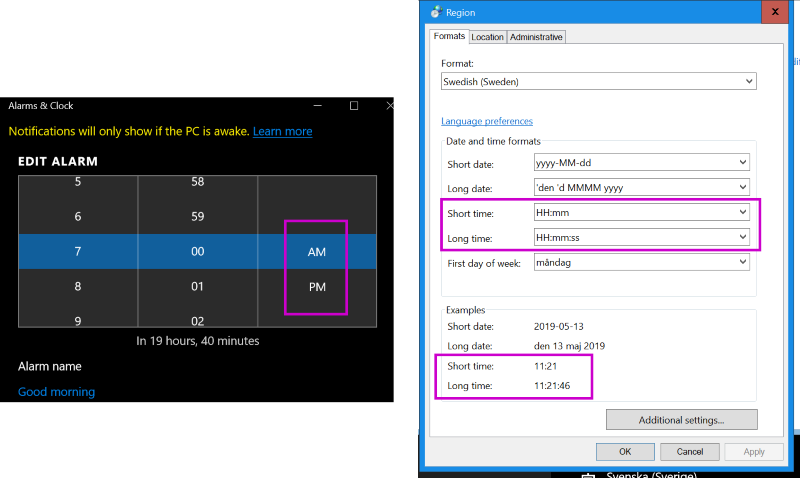
Microsoft can not even get their Built in Applications in Windows to work properly
{
    "LCID": 1053,
    "KeyboardLayoutId": 1053,
    "Name": "sv-SE",
    "IetfLanguageTag": "sv-SE",
    "DisplayName": "Swedish (Sweden)",
    "NativeName": "svenska (Sverige)",
    "EnglishName": "Swedish (Sweden)",
    "TwoLetterISOLanguageName": "sv",
    "ThreeLetterISOLanguageName": "swe",
    "ThreeLetterWindowsLanguageName": "SVE",
    "CompareInfo": {
        "Name": "sv-SE",
        "LCID": 1053,
        "Version": {
            "FullVersion": 393743,
            "SortId": "0000001a-57ee-1e5c-00b4-d0000bb1e11e"
        }
    },
    "TextInfo": {
        "ANSICodePage": 1252,
        "OEMCodePage": 850,
        "MacCodePage": 10000,
        "EBCDICCodePage": 20278,
        "LCID": 1053,
        "CultureName": "sv-SE",
        "IsReadOnly": false,
        "ListSeparator": ",",
        "IsRightToLeft": false
    },
    "IsNeutralCulture": false,
    "CultureTypes": 70,
    "NumberFormat": {
        "CurrencyDecimalDigits": 2,
        "CurrencyDecimalSeparator": ".",
        "IsReadOnly": false,
        "CurrencyGroupSizes": [3],
        "NumberGroupSizes": [3],
        "PercentGroupSizes": [3],
        "CurrencyGroupSeparator": " ",
        "CurrencySymbol": "kr",
        "NaNSymbol": "¤¤¤",
        "CurrencyNegativePattern": 8,
        "NumberNegativePattern": 1,
        "PercentPositivePattern": 0,
        "PercentNegativePattern": 0,
        "NegativeInfinitySymbol": "-∞",
        "NegativeSign": "-",
        "NumberDecimalDigits": 2,
        "NumberDecimalSeparator": ".",
        "NumberGroupSeparator": " ",
        "CurrencyPositivePattern": 3,
        "PositiveInfinitySymbol": "∞",
        "PositiveSign": "+",
        "PercentDecimalDigits": 2,
        "PercentDecimalSeparator": ".",
        "PercentGroupSeparator": " ",
        "PercentSymbol": "%",
        "PerMilleSymbol": "‰",
        "NativeDigits": ["0", "1", "2", "3", "4", "5", "6", "7", "8", "9"],
        "DigitSubstitution": 1
    },
    "DateTimeFormat": {
        "AMDesignator": "",
        "Calendar": {
            "MinSupportedDateTime": "\/Date(-62135596800000)\/",
            "MaxSupportedDateTime": "\/Date(253402297199999)\/",
            "AlgorithmType": 1,
            "CalendarType": 1,
            "Eras": "1",
            "TwoDigitYearMax": 2029,
            "IsReadOnly": false
        },
        "DateSeparator": "-",
        "FirstDayOfWeek": 1,
        "CalendarWeekRule": 2,
        "FullDateTimePattern": "\u0027den \u0027d MMMM yyyy HH:mm:ss",
        "LongDatePattern": "\u0027den \u0027d MMMM yyyy",
        "LongTimePattern": "HH:mm:ss",
        "MonthDayPattern": "\u0027den \u0027d MMMM",
        "PMDesignator": "",
        "RFC1123Pattern": "ddd, dd MMM yyyy HH\u0027:\u0027mm\u0027:\u0027ss \u0027GMT\u0027",
        "ShortDatePattern": "yyyy-MM-dd",
        "ShortTimePattern": "HH:mm",
        "SortableDateTimePattern": "yyyy\u0027-\u0027MM\u0027-\u0027dd\u0027T\u0027HH\u0027:\u0027mm\u0027:\u0027ss",
        "TimeSeparator": ":",
        "UniversalSortableDateTimePattern": "yyyy\u0027-\u0027MM\u0027-\u0027dd HH\u0027:\u0027mm\u0027:\u0027ss\u0027Z\u0027",
        "YearMonthPattern": "MMMM yyyy",
        "AbbreviatedDayNames": ["sön", "mån", "tis", "ons", "tor", "fre", "lör"],
        "ShortestDayNames": ["sö", "må", "ti", "on", "to", "fr", "lö"],
        "DayNames": ["söndag", "måndag", "tisdag", "onsdag", "torsdag", "fredag", "lördag"],
        "AbbreviatedMonthNames": ["jan", "feb", "mar", "apr", "maj", "jun", "jul", "aug", "sep", "okt", "nov", "dec", ""],
        "MonthNames": ["januari", "februari", "mars", "april", "maj", "juni", "juli", "augusti", "september", "oktober", "november", "december", ""],
        "IsReadOnly": false,
        "NativeCalendarName": "Gregoriansk kalender",
        "AbbreviatedMonthGenitiveNames": ["jan", "feb", "mar", "apr", "maj", "jun", "jul", "aug", "sep", "okt", "nov", "dec", ""],
        "MonthGenitiveNames": ["januari", "februari", "mars", "april", "maj", "juni", "juli", "augusti", "september", "oktober", "november", "december", ""]
    },
    "Calendar": {
        "MinSupportedDateTime": "\/Date(-62135596800000)\/",
        "MaxSupportedDateTime": "\/Date(253402297199999)\/",
        "AlgorithmType": 1,
        "CalendarType": 1,
        "Eras": [1],
        "TwoDigitYearMax": 2029,
        "IsReadOnly": false
    },
    "OptionalCalendars": [{
            "MinSupportedDateTime": "\/Date(-62135596800000)\/",
            "MaxSupportedDateTime": "\/Date(253402297199999)\/",
            "AlgorithmType": 1,
            "CalendarType": 1,
            "Eras": "1",
            "TwoDigitYearMax": 2029,
            "IsReadOnly": false
        }
    ],
    "UseUserOverride": true,
    "IsReadOnly": false
}
Until Electron gets built-in support for custom OS date/time/number formatting, couldn't this be solved by running a small native exe that grabs the user's date-format-string (like here: https://stackoverflow.com/questions/32931578/get-system-date-format-string-win32 ) and passes it back to Electron using node-ipc?
Something like this would be a tiny C program and Azure Storage Explorer would only run it on Windows computers, and it would delete the exe file after it's got the data.
I don't know if Electron can respond to Windows' system-preferences-changed event, but even if it ran this proposed exe once on startup it would still be a huge benefit.
 Jehoel
on 5 Aug 2019
Jehoel
on 5 Aug 2019
Hm, that's a neat idea that could perhaps work...
If you queried for the formats often then you might not need to listen for the change event.
Though one perhaps tricky aspect that might be an issue would be the need to handled converting from the NLS/.NET/Windows patterns to the ICU-style patterns that are used by Node/JavaScript/V8.
jefgen
on 5 Aug 2019
I would very much like to know the design/technical decisions behind why Microsoft choose a framework like Electron which prevent using very basic features that has been around for decades in windows, like...
- ... automatically display and parse dates according to the users regional settings
- ... using standard, well known shortcut key combinations to navigate and use any application without the need of a mouse or other pointing device
- ... a consistent look and feel based on the users settings and configuration
- ... integration with all accessibility features in the OS
- ... drag/drop support to/from other applications and the OS
- ... use of features such as Application Recovery and Restart (ARR)
- ... use multiple overlapping windows, which has been available in windows since version 2.03 in 1987!
- ... use multiple monitors with different size, resolution and dpi, and different dpi scaling settings.
- ... use common, well known GUI elements, which act, look and behave in a consistent manner, and integrate and use global OS features and functionality. Like scroll bars, edit-boxes, combo-boxes, menus, tree-views, buttons and so on.
@Jehoel, @jefgen To get regional support to work is so much more tan to get a format string for displaying dates.
Just look at the Microsoft documentation here to get an idea of what the scope is that you need to manage yourself when you opt-out of the features windows automatically provide for applications by choosing a platform like Electron, and globalization is just one a huge amount of features windows automatically provide to windows applications.
- Internationalization for Windows Applications
https://docs.microsoft.com/en-us/windows/win32/intl/international-support - Understanding Internationalization
https://docs.microsoft.com/en-us/windows/win32/intl/understanding-internationalization
National Language Support
https://docs.microsoft.com/en-us/windows/win32/intl/about-national-language-supportGlobalization Services
https://docs.microsoft.com/en-us/windows/win32/intl/globalization-services
And as I showed in an earlier post, the amount of settings that individual users can do at anytime (real time/no reboot) is massive.
Bartolomeus-649
on 5 Aug 2019
@Bartolomeus-649 I don't want to derail the thread - but Microsoft has adopted Electron for a lot of cross-platform desktop apps lately, like Desktop Skype, VS Code, MS Teams, and Azure Storage Explorer. I'm not a blue-badge holder anymore, but anyone can see it's because Electron enables "good enough" desktop apps to be built from scratch that just-work on Linux, macOS and Windows - and for code-reuse with Cordova/PhoneGap and web-hosted applications. Microsoft's management decided that the _substantial_ developer-productivity gains from write-once-run-anywhere justify the break with platform norms and memory/performance issues that are inherent in using Electron.
Your post isn't so much an Azure Storage Explorer but a feature-request for Electron to expose more parent OS/platform data to the app it's running. Please repost that in their issues page, not here.
Jehoel
on 6 Aug 2019
@Jehoel well, the problem is, that it "does not just works" now, does it?
The alternative would have been Xamarin, which produce native code and run on all those devices too, and where you do have full access to all of the features of the underlying OS. And the productivity with C# and .NET would be even higher.
Bartolomeus-649
on 6 Aug 2019
@Bartolomeus-649 The problem with Xamarin is that it's a _mobile_ platform framework. It does not support desktop environments. The fact is there just isn't an official Microsoft desktop cross-platform framework right now. Electron is really the only viable option.
So, this thread is specifically about data formats in Storage Explorer not matching Windows system regional formats. A bug is already open against Electron to address this issue (electron/electron#13023). As @Jehoel has suggested, because this issue is beyond just Storage Explorer, any further discussion should be carried out there. We will keep this issue open to track the Electron issue.
craxal
on 6 Aug 2019
@craxal, @Jehoel, , @jefgen Well, according to the documentation Xamarin runs on ...
So not sure what you mean by Xamarin being a "mobile platform framework"?
Microsoft bought Xamarin more then 3 years ago (2016 Feb 24), so there have been plenty of time to integrate it with everything Microsoft and getting it working just about everywhere. It's almost like you don't want to use C# and .NET and rather prefer a non-functional framework based on html and single threaded Javascript, why is that so?
And then you say it's not your problem, it's a problem for the Electron guys, well guess what, they say it's not their problem either, it's the Chromium guys problem.
So what are the Chromium guys up to, well they have know about this for some time...
Issue 94906: Chrome should use en-GB if windows system locale is en-AU
Reported by [email protected] on Wed, Aug 31, 2011, 4:32 PM GMT+2Issue 234897: When printing, headers have American date format. Does not respect local regional settings.
Reported by [email protected] on Wed, Apr 24, 2013, 6:40 AM GMT+2Issue 360156: JavaScript Date.toLocale*String methods do not follow system date/time format settings
Reported by [email protected] on Fri, Apr 4, 2014, 9:54 PM GMT+2Issue 614637: History does not use user's locale for date and time format
Reported by [email protected] on Wed, May 25, 2016, 9:22 AM GMT+2
And as we can see, they have been ignoring this since 2011, so they probably don't see it is their problem either.
You can blame who you want, but it is YOU who picked Electron and who now delivers a non functioning software.
Bartolomeus-649
on 7 Aug 2019
@Bartolomeus-649 as much as I'd like to see MS using Xamarin instead of Electron, realistically, it's not going to happen until Xamarin apps can be easily adapted to run in the browser. I suspect Azure portal is reusing the same codebase as Storage Explorer, just like with all other MS's VSCode-alike tools, so until there is enough adoption of WebAssembly and @migueldeicaza wants to rock the world - one can only dream.
And yes, MS definitely cares more about bringing in Linux folks these days, they're following a common trend for giving no loyalty to existing customers. I'm frustrated just as you are, but hey, it's just business, as long as MS shares go up, I wouldn't expect any course changes.
Leon99
on 7 Aug 2019
Related issues
 kjoshi-rubikloud
·
3Comments
kjoshi-rubikloud
·
3Comments
 jorgklein
·
4Comments
jorgklein
·
4Comments
 ziesemer
·
3Comments
ziesemer
·
3Comments
 riazjahangir
·
4Comments
riazjahangir
·
4Comments
 fforcen
·
3Comments
fforcen
·
3Comments
Most helpful comment
so you are saying you can't develop a first class application because of the framework you have chosen to base you application on? Localization has been working fine in windows for decades...