Azuredatastudio: Table gets corrupted while editing in WYSIWYG mode
- Azure Data Studio Version:
Steps to Reproduce:
- edit the table
- Save, Close the file
- Open the file again

 rajeshka
All 5 comments
@rajeshka @chlafreniere could you start a thread in the Shiproom teams channel to provide context and get this approved?
 kburtram
on 6 Nov 2020
kburtram
on 6 Nov 2020
Some more context:
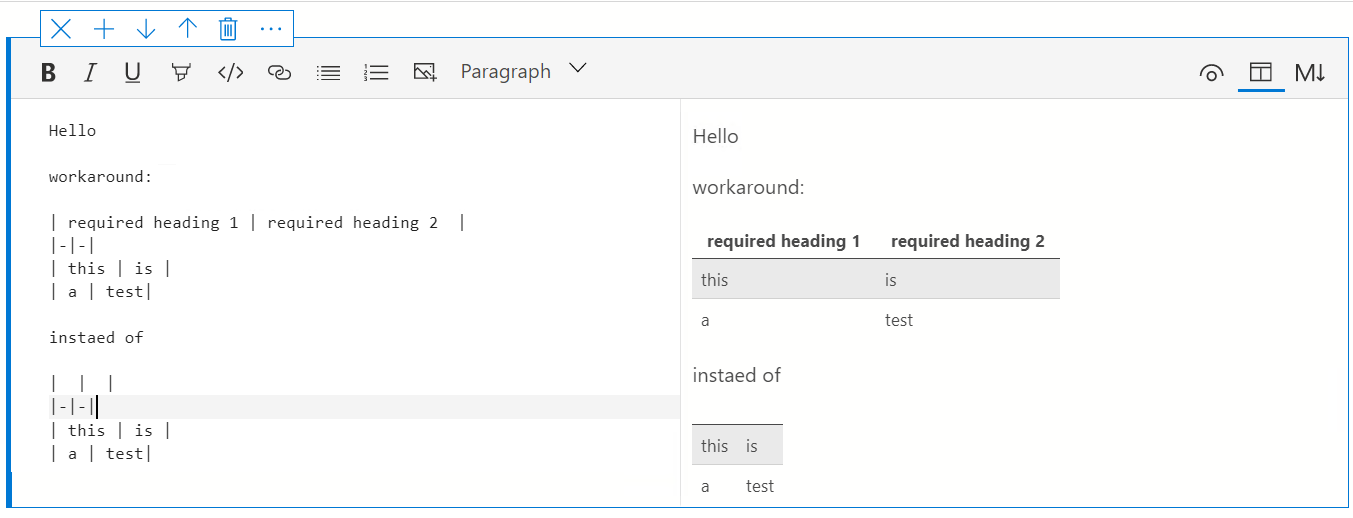
- This affects tables that don't have headings. Tables with headings work as expected.
- This is not a regression
 chlafreniere
on 6 Nov 2020
chlafreniere
on 6 Nov 2020
@chlafreniere - can you please confirm that this is the workaround?
 MsSQLGirl
on 9 Nov 2020
MsSQLGirl
on 9 Nov 2020
👍1
@chlafreniere - can you please confirm that this is the workaround?
@MsSQLGirl - that's correct 😄 Tables with a header do not get corrupted.
 barbaravaldez
on 9 Nov 2020
barbaravaldez
on 9 Nov 2020
👍1
This has been checked into main. Closing as it will make the next release after November.
chlafreniere
on 9 Nov 2020
Was this page helpful?
0 / 5 - 0 ratings
Related issues
 samirbehara
·
34Comments
samirbehara
·
34Comments
 borgdylan
·
30Comments
borgdylan
·
30Comments
 SvenAelterman
·
52Comments
SvenAelterman
·
52Comments
 orofino
·
58Comments
orofino
·
58Comments
 marcwied
·
24Comments
marcwied
·
24Comments