Azuredatastudio: Database projects build failure - dacfx dependency
- Azure Data Studio Version:
Version: 1.22.0-insider (user setup)
Commit: e16d3ed827161e6f071750370e9eea8837e3ac9b
Date: 2020-09-14T05:43:50.093Z
VS Code: 1.48.0
Electron: 9.2.1
Chrome: 83.0.4103.122
Node.js: 12.14.1
V8: 8.3.110.13-electron.0
OS: Windows_NT x64 10.0.19041
Steps to Reproduce:
- Import database (AdventureWorksLT will suffice) to project
- Build project command
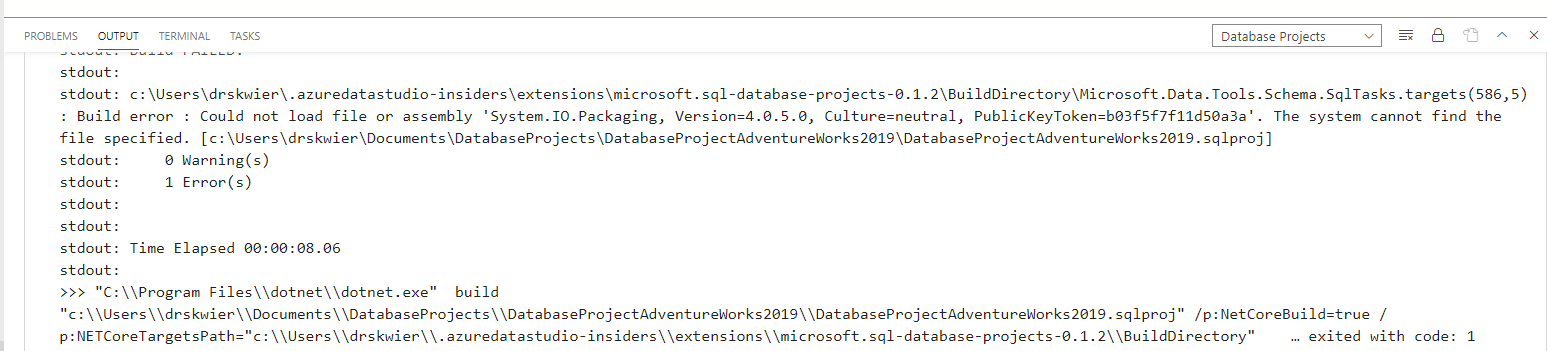
- Build fails with error message
>stdout:
stdout: c:\Users\drskwier.azuredatastudio-insiders\extensions\microsoft.sql-database-projects-0.1.2\BuildDirectory\Microsoft.Data.Tools.Schema.SqlTasks.targets(586,5): Build error : Could not load file or assembly 'System.IO.Packaging, Version=4.0.5.0, Culture=neutral, PublicKeyToken=b03f5f7f11d50a3a'. The system cannot find the file specified. [c:\Users\drskwier\Documents\DatabaseProjects\DatabaseProjectAdventureWorks2019\DatabaseProjectAdventureWorks2019.sqlproj]
 dzsquared
All 6 comments
fixed by #12336
 kisantia
on 19 Sep 2020
kisantia
on 19 Sep 2020
The latest version of the Insiders Build still has this problem. Meaning I can't get a successful build of the DB project, thus I can't do a schema comparison. However...since the SQL Database Projects extension is now released in the Sept 2020 release of Azure Data Studio, we no longer need the Insiders Build for this particular purpose.
 sqlchick
on 23 Sep 2020
sqlchick
on 23 Sep 2020
@sqlchick Can I confirm the version of the insiders build that you are on and seeing the build problem? We certainly want it to be working in both!
Is it:
Version: 1.23.0-insider (user setup)
Commit: c26963e848a135de3d44868435ddbec156da13d0
Date: 2020-09-23T05:41:16.160Z
dzsquared
on 23 Sep 2020
Version: 1.23.0-insider (user setup)
Commit: c26963e848a135de3d44868435ddbec156da13d0
Date: 2020-09-23T05:41:16.160Z
VS Code: 1.48.0
Electron: 9.2.1
Chrome: 83.0.4103.122
Node.js: 12.14.1
V8: 8.3.110.13-electron.0
OS: Windows_NT x64 10.0.19041
sqlchick
on 23 Sep 2020
thanks for catching this! The fix is in the stable release, but we forgot to update the insiders extensions gallery with the newer vsix too.
kisantia
on 23 Sep 2020
The insiders gallery is updated and should be fixed in insiders
kisantia
on 23 Sep 2020
Related issues
 ottadvantage
·
3Comments
ottadvantage
·
3Comments
 RobLW
·
3Comments
RobLW
·
3Comments
 Ungerfall
·
3Comments
Ungerfall
·
3Comments
 kburtram
·
3Comments
kburtram
·
3Comments
 jsmith8858
·
3Comments
jsmith8858
·
3Comments
Most helpful comment
thanks for catching this! The fix is in the stable release, but we forgot to update the insiders extensions gallery with the newer vsix too.